Lottie-web: Random out of memory and crashes loading a particular animation
Tell us about your environment
- Browser and Browser Version:
Chrome Version 75.0.3770.100 (Official Build) (64-bit)
lottie-web 5.5.3 - After Effects Version:
Unknown but lottie version seems to be 5.5.2.
What did you do? Please explain the steps you took before you encountered the problem.
I use lottie inside a react component and use props to control which animation json to load and play. For the 7 clips that I play in a sequence, 1 of them frequently causes OOM and freezes the browser.
What did you expect to happen?
All clips should play normally without causing memory issues.
What actually happened? Please include as much _relevant_ detail as possible.
I have a AnimationController component that loads the next animationData to Animation component based on complete event of the previous one. Code below
AnimationController = () => {
  const [currentAnimation, setAnimation] = useState(0);
  const {
    loop,
    data,
    segments,
    speed,
  } = animations[currentAnimation];

  const options = {
    loop,
    animationData: data,
    segments,
  };

  const listeners = [
    {
      eventName: 'complete',
      callback: () => {
        if (currentAnimation < animations.length - 1) {
          setAnimation(currentAnimation + 1);
        }
      },
    },
  ];

  return (
    <Animation
      speed={speed}
      options={options}
      eventListeners={listeners}
    />
  );
})

const Animation = ({
  options: { loop = true, autoplay = false, segments, animationData },
  eventListeners,
  speed,
  ...props
}: Props) => {
  const container = useRef(null);

  useEffect(() => {
    const options = {
      container: container.current,
      renderer: 'svg',
      loop,
      autoplay,
      animationData,
    };

    const anim = lottie.loadAnimation(options);
    anim.setSpeed(speed);
    registerEvents(anim, eventListeners);

    const play = () => {
      if (segments) {
        anim.playSegments(segments, true);
      } else {
        anim.play();
      }
    };
    anim.addEventListener('DOMLoaded', play);

    return () => {
      deregisterEvents(anim, eventListeners);
      anim.removeEventListener('DOMLoaded', play);
      anim.destroy();
    };
  }, [animationData]);

  return <div {...props} ref={container} />;
};
When the spiral animation (link below) is loaded and starts playing, there is a chance the browser freezes and I can observe memory usage skyrocketing and fan working like crazy. Eventually, if I have dev console open, Chrome will pause at the line that causes out of memory.
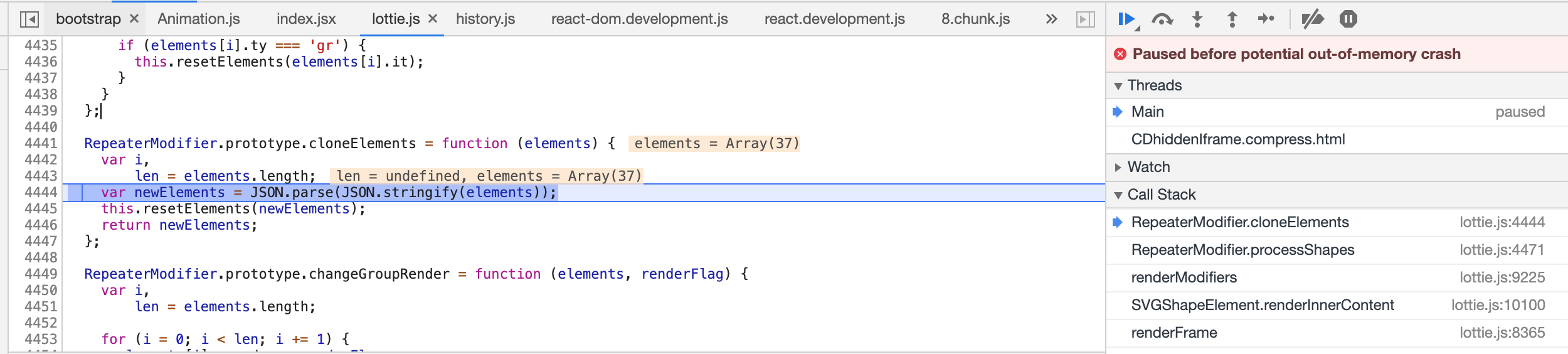
However, this doesn't happen every time and doesn't happen when I loop it after the initial load. Only when it is loaded for the first time after another animation does this happen.
This also doesn't happen to any of my other clips, which lead me to believe that something special about this clip was able to trigger some recursive memory allocation that doesn't end properly.
Please provide a download link to the After Effects file that demonstrates the problem.
spiral.json.zip
 wuhao1117
All 8 comments
Hi it's probably related to using repeaters.
There might be two reasons:
- you have nested repeaters in your animation
- you are loading the same animation object twice and this also causes nested repeaters. If this is the case, you should provide a new instance of the animation every time you load it.
 bodymovin
on 4 Jul 2019
bodymovin
on 4 Jul 2019
Thanks for the fast response! I'll relay the first point to the animation author and see if that's the reason.
For the second reason, could you elaborate on "loading the same animation object twice"? As far as I understand, as long as I remove all even listeners from the old animation object and destroy it, I should be able to load another animation, regardless of if this animation has been loaded before (because it would have been unloaded at this point).
wuhao1117
on 4 Jul 2019
The second reason is probably the one that's breaking after re checking the code you shared.
I guess animationData is being imported somewhere and passed down to this component every time you load an animation.
If you pass the same animationData several times, you are passing the same object, and Lottie uses and modifies that object every time it loads a new animation.
Repeatears, because of the way they work, create this type of nested elements and spike on memory.
You probably should pass the animation data down by doing JSON.parse(JSON.stringify(animationData )) and it will work fine.
bodymovin
on 4 Jul 2019
I guess animationData is being imported somewhere and passed down to this component every time you load an animation.
That's exactly what I'm doing. I thought the animationData passed into loadAnimation is treated as an immutable object and having it modified is unexpected for sure.
This explains the memory spike I saw when loading it multiple times but I sometimes do see the same issue when loading this animation for the first time. Do you think this is also due to the second reason? Or do both reasons apply in my case?
wuhao1117
on 4 Jul 2019
My guess is that if it only happens after loading it multiple times, it's just because of this and not the nested repeaters
bodymovin
on 4 Jul 2019
I used the JSON.parse(JSON.stringify(animationData)) trick and it hasn't crashed once so far. Thanks a lot for that!
I'm still curious though. Is there any reason lottie will modify the original animationData when loading it? It's a confusing and unexpected behavior that leads to user error like I did.
Could the source data be cloned inside the library before being used or could the mutation of the object be avoided altogether? It might slow down the initial load if the animationData is big enough whether it's done by user or the library. I myself use a json that's over 1MB in the same project.
wuhao1117
on 4 Jul 2019
Because of performance reasons, I'd rather not clone the data every time since the most common case is using animations only once and not multiple times.
Not mutating the object would mean maintaining data structures separate from the original animation data and it would be more difficult to reason about where the data comes from.
I agree this is far from ideal, and what happens in general is that the animation data is mutated only once in the original object even after using it multiple times.
But repeaters are a special case and I still need to figure out how to support them for multiple uses.
bodymovin
on 4 Jul 2019
Gotcha. Thanks for the detail explanation. I think cloning animationData on my end is sufficient for my use case for now.
wuhao1117
on 4 Jul 2019
Related issues
 deborabm
·
3Comments
deborabm
·
3Comments
 Sandok-voc
·
4Comments
Sandok-voc
·
4Comments
 dulllud
·
3Comments
dulllud
·
3Comments
 leantide
·
3Comments
leantide
·
3Comments
 RenanSgorlom
·
3Comments
RenanSgorlom
·
3Comments
Most helpful comment
I used the
JSON.parse(JSON.stringify(animationData))trick and it hasn't crashed once so far. Thanks a lot for that!I'm still curious though. Is there any reason lottie will modify the original
animationDatawhen loading it? It's a confusing and unexpected behavior that leads to user error like I did.Could the source data be cloned inside the library before being used or could the mutation of the object be avoided altogether? It might slow down the initial load if the
animationDatais big enough whether it's done by user or the library. I myself use a json that's over 1MB in the same project.