Lottie-web: Issues on Windows 7 / IE 11
Hi there,
Tell us about your environment
Animation works as intended on Chrome, Firefox, even later versions of IE, but on Windows 7 / IE 11 something goes haywire and shrinks the animation.
- Browser and Browser Version: Internet Explorer 11 / Windows 7
- After Effects Version: AE CC 2018 v15.0.0
What did you do? Please explain the steps you took before you encountered the problem.
I've created some dynamic banners within Google Web Designer, and implemented the lottie animation code within these banners. They display correctly on Chrome, Firefox and even some later/newer versions of Internet Explorer. But when displayed on WIndows 7 IE 11, the animation shrinks and doesn't work as intended.
What did you expect to happen?
The animation should look and be positioned as in 'Screenshot1' (see attachments). It's just a stroke, trim paths, animation that was created in AE, with the circle dot actually being animated within GWD.

What actually happened? Please include as much _relevant_ detail as possible.
The stroke animation shrinks/scales down in size considerably and is then positioned incorrectly and doesn't display correctly, as in 'Screenshot2' (see attachment)

Any help would be appreciated! Thanks!
 Natecairns
All 11 comments
Hi, can you share the .aep?
 bodymovin
on 15 May 2018
bodymovin
on 15 May 2018
Hi, AE animation file below.
To give some background info of the file setup, the banner runs twice, with each loop lasting 13 seconds, followed by a 4 second endframe after the second loop.
The stroke animation runs for approx. 4 seconds each loop of the banner, so i've created one single animation that runs 26 seconds to fit the stroke animation into the two 13 second loops.
Natecairns
on 15 May 2018
I don't have Windows 7, but I just tried it in IE 11 on Windows 10 and it seems to work fine.
Is this issue only related to that specific configuration?
bodymovin
on 16 May 2018
Yeah, ive tried it on a few different variations of Windows to IE versions, but unfortunately Windows 7 + IE 11 is what most computers/people at my work use... so getting approvals is tough by just saying "it works on other machines etc." as there is obviuosly an issue with W7/IE11.
I've tried to look through the code and searched the web for any fixes in relation to IE, but to no avail.
Natecairns
on 16 May 2018
Can you identify inspecting the DOM, what is exactly breaking?
bodymovin
on 16 May 2018
Im using Browserstack to inspect the different variations. It won't actually let me select the DOM element, as it would if I was in the native environment for it. But i've compared the code to say the banner in Chrome, and it doesn't look any different.
This is Windows 7 IE 11

This is Chrome
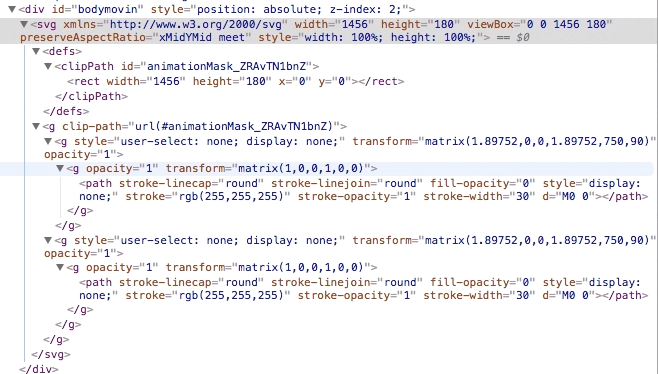
Natecairns
on 16 May 2018
I thought that it might show me a different container setting in the W7IE11 version, which would make sense as to why it was coming out small and out of place, but it hasn't, so now i'm even more confused
Natecairns
on 16 May 2018
can you share a link so I can check it in browser stack?
bodymovin
on 17 May 2018
I've uploaded the project files from GWD (which includes the html) for you to have a look, check it out in Browserstack.
One thing i have noticed with Bodymovin, is that the animation will sometimes start before the creative has even loaded, which then puts the timing of the animation completely out of sync with the creative. Is there anyway to control this? or make sure the animation only starts when the creative has loaded?
Also just as an FYI, i've tried to bypass bodymovin altogether and do the animation as an animated SVG through Animate CC. Now while this worked well, it still didn't work with IE 11, and rather than distorting the dimensions of the SVG, IE 11 simply just didnt display the animated SVG altogether. So it's definitley a browser issue, but i jsut haven't found a solution to get around this.
Natecairns
on 17 May 2018
We are also encountering this issue using Lottie 5.4.2. Animations are being loaded in responsive containers using flexbox.
lottie.loadAnimation({
    container: element[0],
    renderer: 'svg',
    loop: true,
    autoplay: true,
    path: animationPath
});
On IE11 specifically, the animation does not scale as expected to fit the container (it appears smaller).
 Dan-Wuensch
on 7 Mar 2019
Dan-Wuensch
on 7 Mar 2019
For all of those suffering for that issue. In general, Internet Explorer 11 has serious issues with scaling SVG, even most simple ones.
Solution for this is usually setting fixed width / heights with valid ratio so the SVGs aren't downscaled or upscaled.
Of course, in real life this usually isn't an option, especially in terms of scaling and so on - that's why I've drafted small helper function, that takes care of adjusting missing size attributes on the fly so you don't have to worry about it.
https://gist.github.com/adriandmitroca/15de2e2ed3a5816a1cd5eb800a68b83b
 adriandmitroca
on 17 Jul 2019
adriandmitroca
on 17 Jul 2019
Related issues
 leantide
·
3Comments
leantide
·
3Comments
 RenanSgorlom
·
3Comments
RenanSgorlom
·
3Comments
 ochanje210
·
3Comments
ochanje210
·
3Comments
 hardy613
·
4Comments
hardy613
·
4Comments
 casillasluisn12
·
4Comments
casillasluisn12
·
4Comments
Most helpful comment
For all of those suffering for that issue. In general, Internet Explorer 11 has serious issues with scaling SVG, even most simple ones.
Solution for this is usually setting fixed width / heights with valid ratio so the SVGs aren't downscaled or upscaled.
Of course, in real life this usually isn't an option, especially in terms of scaling and so on - that's why I've drafted small helper function, that takes care of adjusting missing size attributes on the fly so you don't have to worry about it.
https://gist.github.com/adriandmitroca/15de2e2ed3a5816a1cd5eb800a68b83b