Lottie-web: Animation in Basic HTML Page not Working
I am ultimately trying to get my animation working on Webflow, but thought I would test it out with a basic HTML page like in the YouTube demo.
For some reason, I am getting the error:
Uncaught TypeError: Cannot read property 'appendChild' of undefined
at SVGRenderer.configAnimation (bodymovin.js:6)
at AnimationItem.configAnimation (bodymovin.js:7)
at XMLHttpRequest.s.onreadystatechange (bodymovin.js:7)
SVGRenderer.configAnimation @ bodymovin.js:6
AnimationItem.configAnimation @ bodymovin.js:7
s.onreadystatechange @ bodymovin.js:7
Can you offer any support?
 tarlyo
All 11 comments
can you share a link?
it seems that the container element doesn't exist
 bodymovin
on 18 Nov 2017
bodymovin
on 18 Nov 2017
I'm not sure what was wrong, but I just tried exporting the demo HTML file from After Effects and that is working very nicely.
I was wondering if you might be able to help me add my animation to my Webflow site? I am not a JavaScript expert, nor am I very familiar with Webflow, so any help would be much appreciated!
tarlyo
on 18 Nov 2017
I have been playing around with custom code in my Webflow designer as well as trying to add embed code. Nothing seems to work. Here is the code in my embed code:
<div id="bm" style="width: 100%; height: 100%; background: red;"></div>
<script type="text/javascript" src="http://yourjavascript.com/15615187193/data.js"></script>
<script>
    var animation = bodymovin.loadAnimation({
    container: document.getElementById('bm'),
    renderer: 'svg',
    loop: true,
    autoplay: true
    })
</script>
Nothing displays at all with this code. Any ideas?
tarlyo
on 19 Nov 2017
Okay, now I've realized that the animation doesn't display because it has been flagged as "unsecure" because of where I am hosting my Javascript files. However, when I agree to show unsecure scripts, my animation appears like this:

tarlyo
on 19 Nov 2017
there seems to be missing files. Did you upload the images folder?
bodymovin
on 19 Nov 2017
Thank you for your speedy responses! I seem to have finally figured it out but have one last question- how might I move my animation to the bottom of the screen?
Right now it sits directly in the vertical middle, and I can't seem to move it. You can see what I'm talking about here: https://www.yaelhubert.com/ (please don't mind the unfinished site)
tarlyo
on 19 Nov 2017
Nevermind, I got it! Sorry to bother you!
tarlyo
on 19 Nov 2017
@tarlyo
Hi there.
I have been trying to get my bodymovin animation to work on webflow, and I'm running into a bit of a block. Looking at your website, its looking so good! Hoping that you can shed some light on the webflow integration.
The two things i'm having trouble with are:
- how did you make the animation responsive to the browser? (my ratio stays the same as I resize and create white strips bottom and top)
- my animation isn't looping for some reason.
Thanks in advance,
Thomas
 smallpotatos
on 18 Mar 2018
smallpotatos
on 18 Mar 2018
Hi Thomas (@smallpotatos),
Thank you for the compliment! I am not sure about how to fix your issues specifically, as my animation just seemed to magically work, but I will share the steps I took to get it to work the way it does, and hopefully that will help you!
I put this line in the custom code section labelled "inside head tag":
<script src='https://cdnjs.cloudflare.com/ajax/libs/bodymovin/4.10.2/bodymovin.js'></script>I uploaded my bodymovin data.json file as a secret gist on github, copied, and changed the first part of the URL to "https://cdn.rawgit.com"
I created a div block with class "bodymovin" and gave it the following four "custom div attributes" (see steps 4-7):
Name:
data-animation-path, Value: [your secret gist URL, with the beginning changed to "https://cdn.rawgit.com"]Name:
data-bm-renderer, Value:svgName:
data-bm-loop, Value:trueName:
data-bm-autoplay, Value:trueI gave these settings to the div:
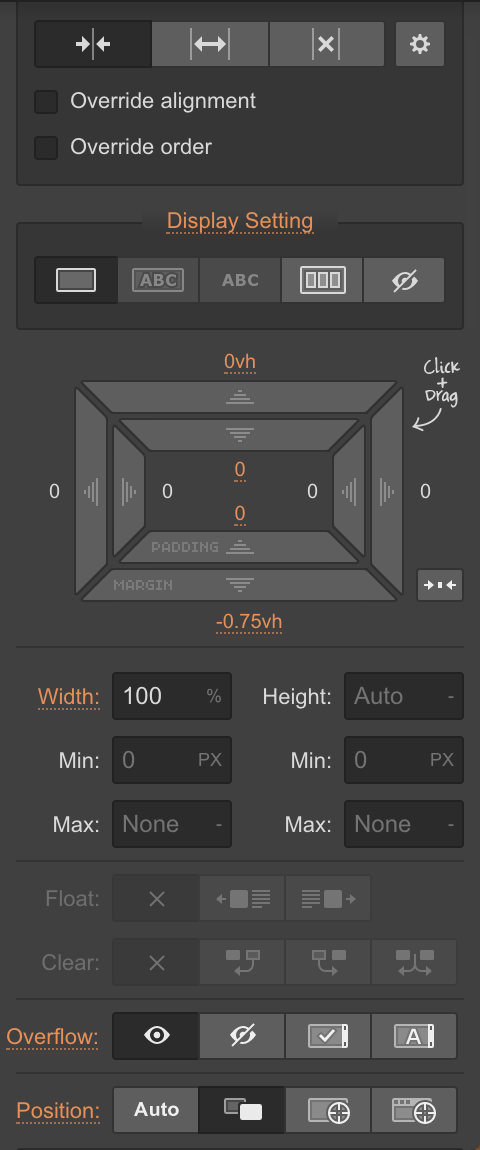
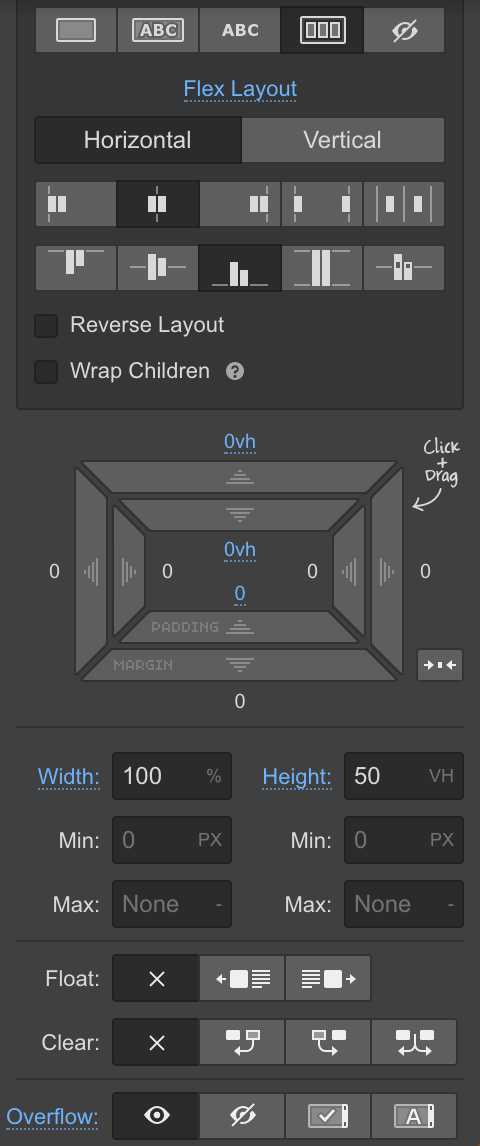
And gave these settings to the div in which my bodymovin div was nested (also, my position is set to relative, with a z-index of 600):
Hope this helps and best of luck! Not sure what else I can offer but please let me know if you have any more questions and I will do my best!
tarlyo
on 19 Mar 2018
Hi, I created an animation with after effect, I did the render and I obtained two files named lottie.js and data.json. I tried to make it starts in a new file html, following the instruction of the guide, but when I started in localhost the animation didn't appear. Someone could tell me the right steps that I have to follow to make it works?

 AndreaG91
on 27 Jan 2019
AndreaG91
on 27 Jan 2019
@AndreaG91 hi, it seems you're not using the correct path for lottie.
go to https://cdnjs.com/libraries/bodymovin and select one of the listed players you need.
try for example with https://cdnjs.cloudflare.com/ajax/libs/bodymovin/5.4.3/lottie.min.js
bodymovin
on 28 Jan 2019
Related issues
 ochanje210
·
3Comments
ochanje210
·
3Comments
 samiam2017
·
3Comments
samiam2017
·
3Comments
 ritsraghani
·
3Comments
ritsraghani
·
3Comments
 RenanSgorlom
·
3Comments
RenanSgorlom
·
3Comments
 processprocess
·
3Comments
processprocess
·
3Comments
Most helpful comment
Hi Thomas (@smallpotatos),
Thank you for the compliment! I am not sure about how to fix your issues specifically, as my animation just seemed to magically work, but I will share the steps I took to get it to work the way it does, and hopefully that will help you!
I put this line in the custom code section labelled "inside head tag":
<script src='https://cdnjs.cloudflare.com/ajax/libs/bodymovin/4.10.2/bodymovin.js'></script>I uploaded my bodymovin data.json file as a secret gist on github, copied, and changed the first part of the URL to "https://cdn.rawgit.com"
I created a div block with class "bodymovin" and gave it the following four "custom div attributes" (see steps 4-7):
Name:
data-animation-path, Value: [your secret gist URL, with the beginning changed to "https://cdn.rawgit.com"]Name:
data-bm-renderer, Value:svgName:
data-bm-loop, Value:trueName:
data-bm-autoplay, Value:trueI gave these settings to the div:

And gave these settings to the div in which my bodymovin div was nested (also, my position is set to relative, with a z-index of 600):

Hope this helps and best of luck! Not sure what else I can offer but please let me know if you have any more questions and I will do my best!