Lottie-android: Cropped lottie animation
Describe the bug
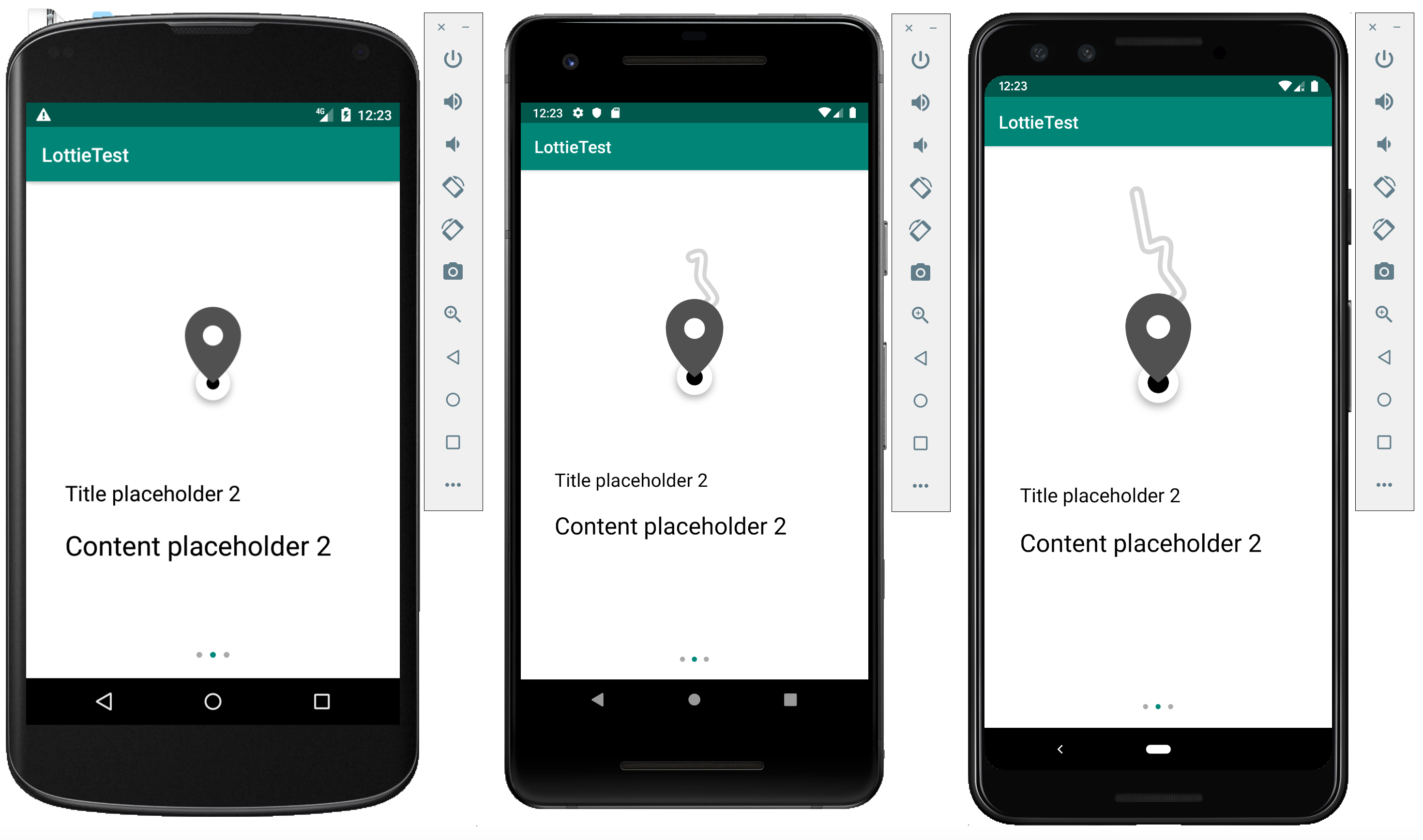
In the screenshot, you see an activity. The top half contains a LottieAnimationView which starts at the very top of the screen. The lottie animation seems to be cropped internally with different behavior on different devices (screen sizes). However, the size of the LottieAnimationView stays the same.
At the beginning of the animation, the line actually appears at the very top of the screen and disappears to the very top again when the animation ends. However, for some weird reason, the line in the animation gets shorter in the middle of the animation. The line should reach to the very top of the screen at all times.
Please see the attached files for a better understanding. The screencast video shows the weird behavior. There is also a video on how the animation should look like. Also, please see the project files for the full code.
NOTE: The same animation files are used on iOS and are displayed as expected. The problem seems to be on the Android side rather than the animations themselves.
We've tried all kinds of different configurations of the LottieAnimationView with width, height, scaleType, lottie_scale with no success.
What version of Lottie did you test this on?
3.0.7 (and about the last 10 releases before that, same results everywhere)
What version of Android did you test this on?
API 21, API 28, API Q (and others, same results everywhere)
Steps To Reproduce
Steps to reproduce the behavior:
- Launch the provided sample app.
- Click on the right or left side of the screen to show the next or previous lottie animation. You can also swipe the switch the screen (same behavior).
- Depending on your test device, the line on the second screen is cropped to a certain degree.
- Switching back and forth to the second screen will show, that the animation actually reaches to the very top of the screen.
- The third screen shows a weird glitch on the checkmark, which appears briefly before it should. Maybe this glitch has the same cause than the second animation.
Screenshots
Attachments
https://www.dropbox.com/s/7qjxgk0ydricvcr/lottie-test-files.zip?dl=0
- AEP file
- Screenshots
- Screencast
- Android Studio example project
 mmakmw
All 4 comments
@mmakmw Thanks for the detailed report! I can see the issue you're describing in 3.0.7 but upgrading to 3.1.0-SNAPSHOT seems to have fixed it. The final release is coming out soon but it is stable enough to use now if you need.
 gpeal
on 1 Sep 2019
gpeal
on 1 Sep 2019
@gpeal Thanks for the quick reply. The SNAPSHOT fixed it indeed, awesome! Looking forward to the official 3.1.0 release.
mmakmw
on 2 Sep 2019
@gpeal Are there any updates regarding the official 3.1.0 release? The latest release seems to be from June, 3.0.7.
mmakmw
on 7 Oct 2019
@mmakmw 3.1.0 is going to be released very soon
gpeal
on 13 Oct 2019
Related issues
 addyi
·
3Comments
addyi
·
3Comments
 lawloretienne
·
5Comments
lawloretienne
·
5Comments
 hkchakladar
·
3Comments
hkchakladar
·
3Comments
 nick1Jian
·
3Comments
nick1Jian
·
3Comments
 Anmolk22
·
3Comments
Anmolk22
·
3Comments
Most helpful comment
@gpeal Thanks for the quick reply. The SNAPSHOT fixed it indeed, awesome! Looking forward to the official 3.1.0 release.