Lottie-android: json export with bodymovin doesn't work on Android device
Im using AE to export an animation with the Bodymovin extension. The json file works perfectly fine on an iOS device, but crashes on Android. I reviewed the Lottie docs to see if I am using an unsupported feature in AE.
Im not applying any unsupported features. I've narrowed it down to a shape layer. Any keyframe animation I apply to the transform options is what causes it to fail in Android.
As a sanity check, I removed all animations from the shape layer, exported and it works fine. As soon as I add a keyframe tween on anything, ex. Opacity, Rotation, Position, and export, it crashes the app in Android only.
Is this a known problem and is there a workaround or something I need to do to prep the vectors?
 careyestes
All 13 comments
@careyestes please attach an AEP file (zipped up as a zip file) so I can take a look.
 gpeal
on 19 Jul 2019
gpeal
on 19 Jul 2019
github.export.aep.zip
Attached a zip of the aep file for review.
careyestes
on 19 Jul 2019
Faced a similar issue with a json file downloaded of the lottiefiles.com catalog.
Tested this for version 3.0.7, 3.0.6 and 3.0.0 on a Motorola Moto G5s Plus with Android 8.1.0.
 bitterbalpiraat
on 20 Jul 2019
bitterbalpiraat
on 20 Jul 2019
When I run the json out of the Lottie source param in my .tsx, it doesn't even run it. It crashes the emulator.
careyestes
on 20 Jul 2019
@bitterbalpiraat does your animation use expressions?
gpeal
on 20 Jul 2019
@bitterbalpiraat does your animation use expressions?
No, I just replicated the issue with a blank new activity and all I did was:
- Lottie dependency
implementation "com.airbnb.android:lottie:3.0.0"(also tested with 3.0.6 & 3.0.7) - Add json file to app/src/main/assets
- Insert autoloop Lottie
<com.airbnb.lottie.LottieAnimationView
        android:id="@+id/lottie_view"
        android:layout_width="150dp"
        android:layout_height="150dp"
        app:layout_constraintTop_toTopOf="parent"
        app:layout_constraintLeft_toLeftOf="parent"
        app:lottie_fileName="5847-forward-10-seconds.json"
        app:lottie_autoPlay="true"
        app:lottie_loop="true"/>
The result is what I linked to earlier.
bitterbalpiraat
on 20 Jul 2019
Ive scratched my entire comp and started anew. Created a shape, and without keyframing and it works. However, just putting a basic Opacity transform on it causes it to fail on Android. Seems like Bodymovin and Shape Layer anims do not work. Is there a setting to get this working? The Lottie docs claim these transforms work on Android.
careyestes
on 22 Jul 2019
I did a compare on the two simple shape files. test25 being without the animation and test26 having a simple opacity transform keyframe. This was the only change in the two.
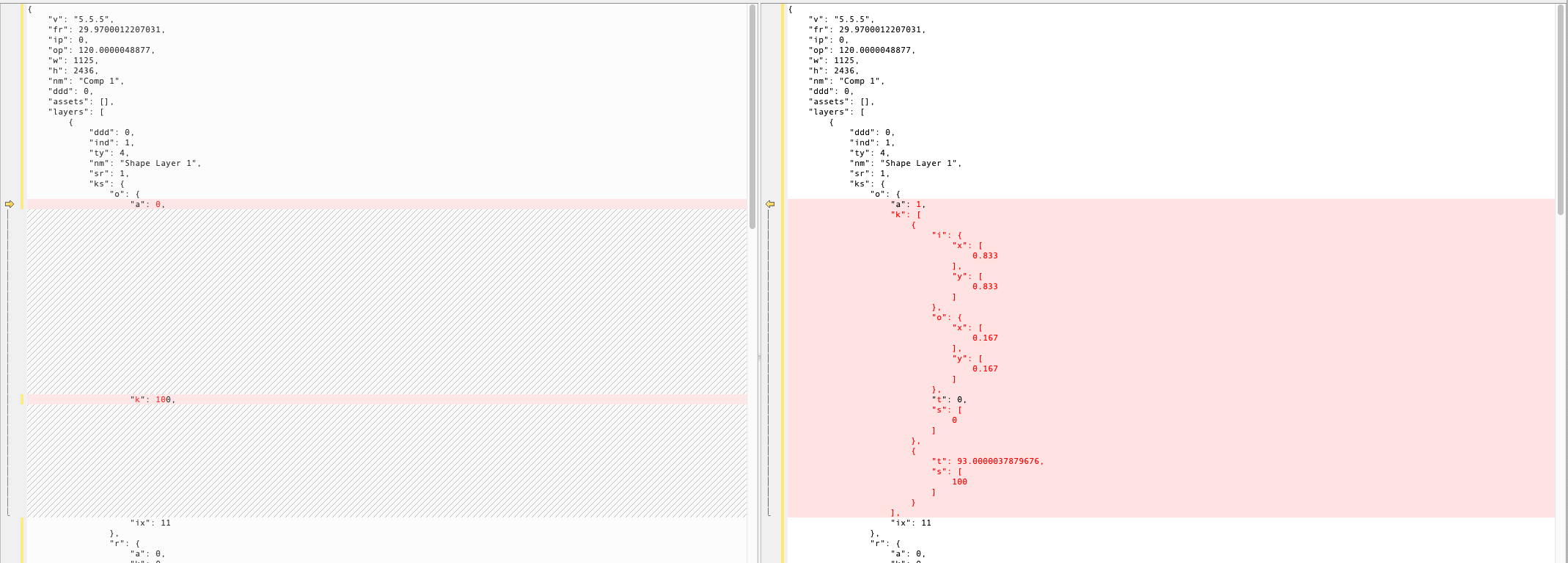
Left is without animation | Right is with animation
careyestes
on 23 Jul 2019
Lottie doesn't support the radial wipe effect.
gpeal
on 11 Aug 2019
@gpeal I don't think that answer resolves the issue. I have created a completely new .aep file with the default composition settings, added a shape and put an opacity keyframe on it. Exported out via Bodymovin and the json still crashes the app on Android. Ive attached the .aep file in a zip for review.
Like I said previously, it works fine as long as I don't add any keyframes on the shape.
careyestes
on 12 Aug 2019
@careyestes It's working for me. Have you searched through exiting issues for your stack trace?
gpeal
on 14 Aug 2019
https://snack.expo.io/@broabect/lottie-expo-error
Here's a snack of it not working. If I load this on my phone, it will say the the app crashes.
 brooksbecton
on 14 Aug 2019
brooksbecton
on 14 Aug 2019
@brooksbecton please report React Native issues on lottie-react-native
gpeal
on 17 Aug 2019
Related issues
 lawloretienne
·
5Comments
lawloretienne
·
5Comments
 mmakmw
·
4Comments
mmakmw
·
4Comments
 goldyonwar
·
4Comments
goldyonwar
·
4Comments
 mateusgrb
·
5Comments
mateusgrb
·
5Comments
 nightq
·
3Comments
nightq
·
3Comments