Loris: [Issue Tracker] Dropdown options display order is alpha, not array-defined
The Priority selection filter in the Issue Tracker presents dropdown options in alphabetical order, but should display them in the same order defined in the php array - the order of priority. See code snippet below
I suspect this is a known issue _in multiple modules_ with an easy fix.
Is there already a way we should be forcing the order of these dropdowns?
cc @johnsaigle @HenriRabalais
Occurs with Chrome, Firefox, Safari... on Demo and on test-dev-loris(23 branch), tested on mac.
Order defined in the php array:
        $priorities = array(
            'normal'    => 'Normal',
            'high'      => 'High',
            'urgent'    => 'Urgent',
            'immediate' => 'Immediate',
        );
Order as actually displayed :
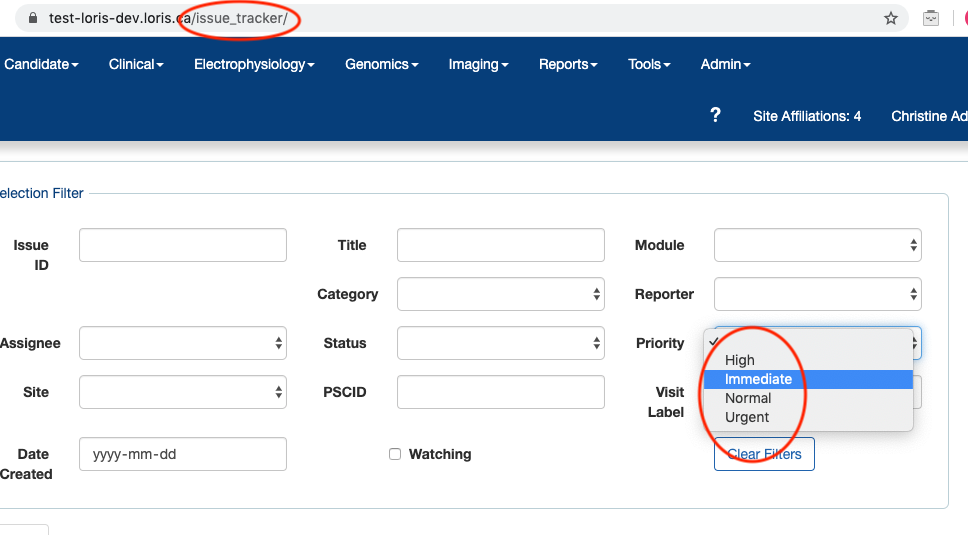
Related (sort of) to: #4602 - see @johnsaigle's comment recognizing this sort-order behaviour/implication in 2019
 christinerogers
All 9 comments
As you said this should probably be case-by-case. Maybe there is a generic way to specify sorting for dropdown elements within React? @HenriRabalais @maltheism @zaliqarosli maybe one of you would know?
 johnsaigle
on 7 Apr 2020
johnsaigle
on 7 Apr 2020
IIRC, @ridz1208 had made a PR to enforce alphabetical ordering. I'm not sure if there's a way to override this at the moment.
 HenriRabalais
on 7 Apr 2020
HenriRabalais
on 7 Apr 2020
Is there a way to extend/modify a component so that a sort ordering can be specified via a param?
johnsaigle
on 7 Apr 2020
@HenriRabalais yeah I had but I forgot how to use it. I do remember adding that though
 ridz1208
on 7 Apr 2020
ridz1208
on 7 Apr 2020
Looks like there might be - it's not commented in the code, but I think the props sortByValue determines if the drop down values are sorted alphabetically. The value defaults to true, so a value of false would have to be passed to the SelectElement for the prop sortByValue.
HenriRabalais
on 7 Apr 2020
OK so it sounds like we can make a PR to fix the issue tracker without much trouble in this case and that we have a lot of flexibility in general.
@christinerogers do you have any other examples of this?
johnsaigle
on 7 Apr 2020
@johnsaigle : sure, more examples --
- issue tracker: Status: New, Assigned, Closed
I also scanned a few modules and easily turned up: - [ all modules? ] Subproject -- probably better to group at least by project than list in alpha order.
- [imaging modules] Scan type (t1, t2, fMRI, DTI)
- [ Genomic browser subtabs ] “SNPs found”: current order is “Yes”, “No”
And more generically, dropdown option order would have changed upon Reactification for: - All "Yes", "No" dropdowns become "No", "Yes"
- any dropdown with "Other" or "NA" - typically we want these last position (e.g. in Genomic Browser)
christinerogers
on 7 Apr 2020
thanks!
johnsaigle
on 7 Apr 2020
Note: this is an effect of the default change from #3952 -- took effect in the August 2019 release 21
christinerogers
on 22 Apr 2020
Related issues
HenriRabalais
·
6Comments
johnsaigle
·
5Comments
johnsaigle
·
4Comments
 maltheism
·
5Comments
maltheism
·
5Comments
 3design
·
5Comments
3design
·
5Comments