Loris: [user_accounts] admin created account information not precise
Describe the bug
An administrator created an account, then user received an email saying that
"Account Changes - Example Study"
...
Your account details have changed:
password: IPsCkodaKT6z9z7ll7mcSSeXCyO4UEJcJDYeV59c2hycK9VRQbUsy4awil7ZxnQt
After login, the site has a Admin and a drop down half showing, strange to see, check the attached image.
To Reproduce
Steps to reproduce the behavior (attach screenshots if applicable):
- Go to 'User manager'
- Click on 'add', then choose "generate password",
- See emails got.
What did you expect to happen?
A clear and concise information, also the drop down should not show, if shown, should not be showing a little bit.
Browser Environment (please complete the following information):
- OS: [e.g. Plan9, HURD, Oberon, etc]
- Version [e.g. 22]
Server Environment (if known):
- LORIS Version: [e.g. 21.0.0] 22
- Linux distribution and Version: [e.g. Ubuntu 16.04, CentOS 7]
- MySQL/MariaDB Version: [e.g. MySQL 5.7, MariaDB 10.3]
Additional context
Add any other context about the problem here.
 lingma
All 14 comments
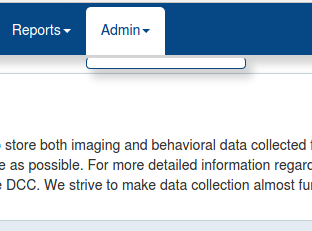
This user has not Admin permissions
lingma
on 23 Jan 2020
What permissions does the user have?
 johnsaigle
on 27 Jan 2020
johnsaigle
on 27 Jan 2020
No much permission, just data entry or a few, so there is no permission of Admin. In this case, I think the Admin drop down or Admin itself should not show up to confuse people.
lingma
on 27 Jan 2020
I think the Admin dropdown appears depending on the permissions the user has.
Can you take a screenshot of the permissions that user has assigned to them? It might help in figuring out the bug.
johnsaigle
on 27 Jan 2020
I also wanted to say that "Account Changes - Example Study" ...Your account details have changed:" whch is not true. This is a new account, and the password is way too long.
lingma
on 27 Jan 2020
Account Changes - Example Study" ...Your account details have changed:
You're right this is not precise and should be fixed.
the password is way too long
It's a one-time password so the idea is just to copy and paste it. If I remember correctly the user is forced to change their password when they login anyway.
johnsaigle
on 27 Jan 2020
permID | code | description | categoryID |
+--------+-----------------------------+------------------------------------------------------+------------+
| 3 | user_accounts_multisite | Across all sites create and edit users | 2 |
| 5 | bvl_feedback | Behavioural QC | 1 |
| 10 | access_all_profiles | Across all sites access candidate profiles | 2 |
| 11 | data_entry | Data entry | 1 |
| 12 | examiner_view | Add and certify examiners | 2 |
| 13 | examiner_multisite | Across all sites add and certify examiners | 2 |
| 25 | dicom_archive_view_allsites | Across all sites view Dicom Archive module and pages | 2
I don't know what happened, I could not access the user permission page right now, after the weekend, weird, but I get the data from DB as shown above,they were randomly chosen, I don't see "Admin" role
lingma
on 27 Jan 2020
| 3 | user_accounts_multisite | Across all sites create and edit users | 2 |
This is an admin permission (under Admin > User Accounts) so the dropdown should be there and should contain 'User Accounts'.
I'll try testing on my VM and figure out why User Accounts doesn't show up in that menu.
johnsaigle
on 27 Jan 2020
What branch is this on? (ie. is it on master with the modules taking care of the menus or a branch with the LorisMenus table?)
 driusan
on 27 Jan 2020
driusan
on 27 Jan 2020
22.0 master branch. Possibly my code is not up to date, so I could not use the permission page now, while last week it was OK.
lingma
on 27 Jan 2020
Can you test #5955? It seems to be because of the hack to make 'Admin' the last category not considering the possibility of it being empty..
driusan
on 27 Jan 2020
OK, later when I get time. By the way, just mention that the error message for my user accounts page not showing anything is
Undefined index: filter in /php/libraries/NDB_Menu_Filter.class.inc on line 598, referer: https:/user_accounts/
I have not checked yet.
lingma
on 27 Jan 2020
The Admin empty being hidden seems like a different bug. From the permissions posted above it looks like the correct behaviour here should be that the Admin menu does appear with User Accounts as the only option.
johnsaigle
on 27 Jan 2020
I've found a fix ⬆️ Issuing a PR in a second
johnsaigle
on 27 Jan 2020
Related issues
 laemtl
·
3Comments
laemtl
·
3Comments
 maltheism
·
5Comments
maltheism
·
4Comments
maltheism
·
5Comments
maltheism
·
4Comments
 3design
·
5Comments
johnsaigle
·
4Comments
3design
·
5Comments
johnsaigle
·
4Comments