Loris: [instrument builder] Add "Blank Line" does not work
Test plan Item 1
1.j Add Blank Line
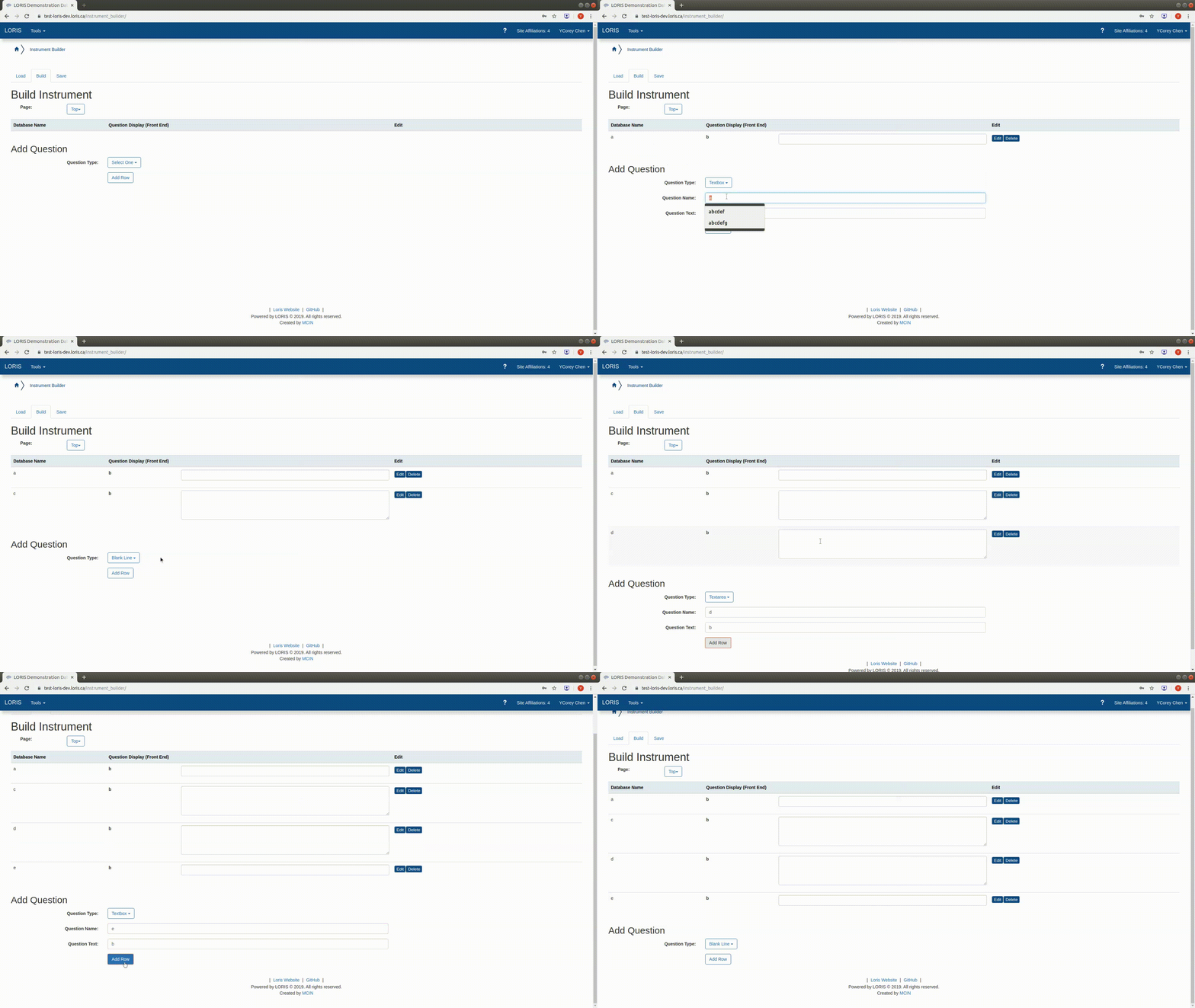
In instrument builder, nothing changes when you add a "Blank Line" field. Keeping adding field, there is no evidence showing the blank line.
If you download the linst file, there is no blank line in the file.
 ycAbout
All 22 comments
@christinerogers @coreyAbout can you guys work together in clarifying the test plan for that module please? Thanks!
 cmadjar
on 1 Nov 2019
cmadjar
on 1 Nov 2019
Weird... I just looked into this one and it looks like this is broken on test-loris-dev.loris.ca but not when I test the code on my different sandboxes...
@kongtiaowang @driusan any idea why?
cmadjar
on 6 Nov 2019
ok. It looks like sometimes the Blank Line is working, and sometime it isn't. No message in the JS console or the apache error log. Not ideal for debugging...
cmadjar
on 6 Nov 2019
IIRC someone brought it up in a LORIS meeting and it works the first time but not after that, or something along those lines.
 driusan
on 6 Nov 2019
driusan
on 6 Nov 2019
that would be consistent with my observations :)
cmadjar
on 6 Nov 2019
@driusan @cmadjar I'm not running into the "nothing changes" problem on 22.0-release. Basically the blank line is working for me.
 maltheism
on 12 Nov 2019
maltheism
on 12 Nov 2019
@maltheism If I understand you, you're having trouble reproducing the bug?
 christinerogers
on 12 Nov 2019
christinerogers
on 12 Nov 2019
Please check this out. It is still there! Click it to make it larger if you can see clearly. @maltheism
Chrome version: Version 78.0.3904.97 (Official Build) (64-bit)
Also used Firefox 70.0.1 tested, still there.
ycAbout
on 12 Nov 2019
@coreyAbout please test my PR to see if it solves the bug you encountered.
maltheism
on 12 Nov 2019
@maltheism i've change my assignment to you as you've issued a PR for this. let me know if i should revert this. thanks for looking into this issue!
 zaliqarosli
on 21 Nov 2019
zaliqarosli
on 21 Nov 2019
Duplicate of #4604
 johnsaigle
on 27 Nov 2019
johnsaigle
on 27 Nov 2019
This issue has been automatically marked as stale because it has not had recent activity. It will be closed if no further activity occurs. Thank you for your contributions.
![stale[bot] picture](https://avatars.githubusercontent.com/in/1724?v=4&s=40) stale[bot]
on 26 Jan 2020
stale[bot]
on 26 Jan 2020
The Stale label is being removed automatically because some activity has occurred or because the developers have decided that this pull request is important and should not continue to be overlooked.
stale[bot]
on 30 Jan 2020
@johnsaigle any reason you removed the PR sent tag? The PR is still open
zaliqarosli
on 3 Apr 2020
That tag doesn't exist anymore. When you delete a tag GitHub displays it the same as when you remove an existing tag.
johnsaigle
on 4 Apr 2020
What? Why doesn't the tag exist anymore? The tag should not have been deleted.
driusan
on 6 Apr 2020
We talked about it in the LORIS meeting on Feb 18th and I removed it after that. The idea is to use GitHub's Linked PRs feature instead.
johnsaigle
on 6 Apr 2020
I'm not sure what to do with this issue if the PR I made would alter the linst spec. Is there another way of going about it? I would be happy to try whatever would fix this issue but I cannot think of anything besides the existing PR that alters the linst spec.
maltheism
on 6 Apr 2020
@johnsaigle it was talked about, but there was never any decision/agreement to remove it that I recall.
@maltheism it works in the instrument builder the first time it's clicked as per the thread above. The bug is just that the frontend stops working after that.
driusan
on 6 Apr 2020
@driusan We remember it differently. Are you opposed to using Linked PRs instead? If so maybe it would be good to create an agenda item and discuss it tomorrow
johnsaigle
on 6 Apr 2020
@driusan last time I looked at the code the empty line wasn't doing anything. Whomever takes the linst file and attempts to load the instrument won't have an empty line between other elements. I'm wondering if there is any purpose of the empty line if it cannot be added to the linst file. I might be confused by your other comment but my impression is if I fix the frontend for still working after whatever is making it stop working.. well it won't have empty lines when the user loads the instrument from the linst file that was created by the frontend.
maltheism
on 6 Apr 2020
@driusan adding the blank line doesn't work at all when I tested, not even the first time. if there's no such blank line option in linst, could the solution to fix the bug be just to remove the blank line option?
zaliqarosli
on 6 Apr 2020
Related issues
driusan
·
3Comments
 3design
·
5Comments
3design
·
5Comments
 CamilleBeau
·
3Comments
maltheism
·
3Comments
CamilleBeau
·
3Comments
maltheism
·
3Comments
 h-karim
·
3Comments
h-karim
·
3Comments