Longhorn: [BUG] Longhorn installation fails sometimes with longhorn-manager pods stuck to come up healthy.
Describe the bug
The longhorn v1.0.1 installation sometimes fails on a cluster of 4 nodes(3 worker, 1etc/control plane)
To Reproduce
Steps to reproduce the behavior:
- Create a cluster of 3 workers and 1 etc/control plane.
- Install longhorn v1.0.1 from the catalog app.
- Try to install and uninstall multiple times
- Sometimes longhorn installation fails with longhorn-manager pods stuck in crashloop.
Engine image is marked asincompatible
Expected behavior
Installation should be always successful
Log
time="2020-08-04T17:41:17Z" level=info msg="Start overwriting built-in settings with customized values"
time="2020-08-04T17:41:17Z" level=info msg="cannot list the content of the src directory /var/lib/rancher/longhorn/engine-binaries for the copy, will do nothing: Failed to execute: nsenter [--mount=/host/proc/7970/ns/mnt --net=/host/proc/7970/ns/net bash -c ls /var/lib/rancher/longhorn/engine-binaries/*], output , stderr, ls: cannot access '/var/lib/rancher/longhorn/engine-binaries/*': No such file or directory\n, error exit status 2"
time="2020-08-04T17:41:17Z" level=info msg="New upgrade leader elected: khushboo-test-wk3"
time="2020-08-04T17:41:37Z" level=info msg="Start upgrading"
time="2020-08-04T17:41:37Z" level=info msg="No API version upgrade is needed"
time="2020-08-04T17:41:37Z" level=info msg="Finish upgrading"
E0804 17:41:37.844128       1 leaderelection.go:282] Failed to release lock: Lease.coordination.k8s.io "longhorn-manager-upgrade-lock" is invalid: spec.leaseDurationSeconds: Invalid value: 0: must be greater than 0
time="2020-08-04T17:41:37Z" level=info msg="Upgrade leader lost: khushboo-test-wk2"
E0804 17:41:37.854043       1 kubernetes_node_controller.go:256] Couldn't get nodes khushboo-test-wk2: node "khushboo-test-wk2" not found
time="2020-08-04T17:41:37Z" level=debug msg="Waiting for engine image longhornio/longhorn-engine:v1.0.1 to be ready"
time="2020-08-04T17:41:37Z" level=info msg="Start Longhorn node controller"
time="2020-08-04T17:41:37Z" level=info msg="Start Longhorn volume controller"
time="2020-08-04T17:41:37Z" level=info msg="Start Longhorn Engine Image controller"
time="2020-08-04T17:41:37Z" level=info msg="Start Longhorn websocket controller"
time="2020-08-04T17:41:37Z" level=info msg="Start Longhorn engine controller"
time="2020-08-04T17:41:37Z" level=info msg="Start Longhorn Setting controller"
time="2020-08-04T17:41:37Z" level=info msg="Starting Longhorn instance manager controller"
time="2020-08-04T17:41:37Z" level=info msg="Start kubernetes controller"
time="2020-08-04T17:41:37Z" level=info msg="Start Longhorn Kubernetes node controller"
time="2020-08-04T17:41:37Z" level=info msg="Start Longhorn replica controller"
time="2020-08-04T17:41:38Z" level=debug msg="Start monitoring instance manager instance-manager-r-037f05af"
time="2020-08-04T17:41:38Z" level=debug msg="Start monitoring instance manager instance-manager-e-eb769411"
time="2020-08-04T17:41:43Z" level=debug msg="Waiting for engine image longhornio/longhorn-engine:v1.0.1 to be ready"
time="2020-08-04T17:41:49Z" level=debug msg="Waiting for engine image longhornio/longhorn-engine:v1.0.1 to be ready"
time="2020-08-04T17:41:55Z" level=debug msg="Waiting for engine image longhornio/longhorn-engine:v1.0.1 to be ready"
time="2020-08-04T17:42:01Z" level=debug msg="Waiting for engine image longhornio/longhorn-engine:v1.0.1 to be ready"
time="2020-08-04T17:42:07Z" level=debug msg="Waiting for engine image longhornio/longhorn-engine:v1.0.1 to be ready"
Environment:
- Longhorn version: v1.0.1
- Kubernetes version: 18.6
- Node OS type and version: Ubuntu 18.04
Script to install and uninstall longhorn continuously
install.sh.zip
Requires longhorn.yaml in the same location to run the script.
longhorn.yaml.zip
 khushboo-rancher
All 17 comments
Log from first starting
time="2020-08-05T16:49:18Z" level=info msg="Start overwriting built-in settings with customized values"
time="2020-08-05T16:49:18Z" level=info msg="cannot list the content of the src directory /var/lib/rancher/longhorn/engine-binaries for the copy, will do nothing: Failed to execute: nsenter [--mount=/host/proc/3732/ns/mnt --net=/host/proc/3732/ns/net bash -c ls /var/lib/rancher/longhorn/engine-binaries/*], output , stderr, ls: cannot access '/var/lib/rancher/longhorn/engine-binaries/*': No such file or directory\n, error exit status 2"
time="2020-08-05T16:49:18Z" level=info msg="Start upgrading"
time="2020-08-05T16:49:18Z" level=warning msg="Cannot verify current CRD version, assume it's not v1alpha1: unable to verify if version matches v1alpha1: settings.longhorn.rancher.io \"default-engine-image\" is forbidden: User \"system:serviceaccount:longhorn-system:longhorn-service-account\" cannot get resource \"settings\" in API group \"longhorn.rancher.io\" in the namespace \"longhorn-system\""
time="2020-08-05T16:49:18Z" level=info msg="Initialized CRD API Version to longhorn.io/v1beta1"
time="2020-08-05T16:49:18Z" level=info msg="Finish upgrading"
E0805 16:49:18.647398 1 leaderelection.go:282] Failed to release lock: Lease.coordination.k8s.io "longhorn-manager-upgrade-lock" is invalid: spec.leaseDurationSeconds: Invalid value: 0: must be greater than 0
time="2020-08-05T16:49:18Z" level=info msg="Upgrade leader lost: yasker-longhorn-demo-1"
time="2020-08-05T16:49:18Z" level=info msg="Start Longhorn replica controller"
time="2020-08-05T16:49:18Z" level=info msg="Start Longhorn node controller"
time="2020-08-05T16:49:18Z" level=info msg="Start Longhorn engine controller"
time="2020-08-05T16:49:18Z" level=info msg="Start Longhorn volume controller"
time="2020-08-05T16:49:18Z" level=info msg="Start Longhorn Engine Image controller"
time="2020-08-05T16:49:18Z" level=info msg="Start Longhorn Setting controller"
time="2020-08-05T16:49:18Z" level=info msg="Start Longhorn Kubernetes node controller"
time="2020-08-05T16:49:18Z" level=info msg="Start Longhorn websocket controller"
time="2020-08-05T16:49:18Z" level=info msg="Start kubernetes controller"
time="2020-08-05T16:49:18Z" level=info msg="Starting Longhorn instance manager controller"
time="2020-08-05T16:49:20Z" level=info msg="Latest Longhorn version is v1.0.1"
time="2020-08-05T16:49:20Z" level=debug msg="Cannot update latest Longhorn version: settings.longhorn.io \"latest-longhorn-version\" is invalid: metadata.resourceVersion: Invalid value: 0x0: must be specified for an update"
time="2020-08-05T16:49:23Z" level=debug msg="Updated setting default-engine-image to longhornio/longhorn-engine:v1.0.1"
time="2020-08-05T16:49:23Z" level=debug msg="Updated setting default-instance-manager-image to longhornio/longhorn-instance-manager:v1_20200514"
time="2020-08-05T16:49:23Z" level=info msg="Event(v1.ObjectReference{Kind:\"Node\", Namespace:\"longhorn-system\", Name:\"yasker-longhorn-demo-1\", UID:\"2292c011-8f5e-44c4-9af5-d35123f13353\", APIVersion:\"longhorn.io/v1beta1\", ResourceVersion:\"23239990\", FieldPath:\"\"}): type: 'Warning' reason: 'Ready' Node yasker-longhorn-demo-1 is down: the manager pod longhorn-manager-qr8n9 is not running"
time="2020-08-05T16:49:23Z" level=info msg="Event(v1.ObjectReference{Kind:\"Node\", Namespace:\"longhorn-system\", Name:\"yasker-longhorn-demo-1\", UID:\"2292c011-8f5e-44c4-9af5-d35123f13353\", APIVersion:\"longhorn.io/v1beta1\", ResourceVersion:\"23239990\", FieldPath:\"\"}): type: 'Normal' reason: 'Schedulable' "
time="2020-08-05T16:49:23Z" level=debug msg="Prepare to create default instance manager instance-manager-e-af4df4b2, node: yasker-longhorn-demo-1, default instance manager image: longhornio/longhorn-instance-manager:v1_20200514, type: engine"
time="2020-08-05T16:49:23Z" level=info msg="Event(v1.ObjectReference{Kind:\"Node\", Namespace:\"longhorn-system\", Name:\"yasker-longhorn-demo-1\", UID:\"2292c011-8f5e-44c4-9af5-d35123f13353\", APIVersion:\"longhorn.io/v1beta1\", ResourceVersion:\"23239990\", FieldPath:\"\"}): type: 'Normal' reason: 'Ready' Disk default-disk-4b0d97e476dc21d3(/var/lib/longhorn/) on node yasker-longhorn-demo-1 is ready"
time="2020-08-05T16:49:23Z" level=info msg="Event(v1.ObjectReference{Kind:\"Node\", Namespace:\"longhorn-system\", Name:\"yasker-longhorn-demo-1\", UID:\"2292c011-8f5e-44c4-9af5-d35123f13353\", APIVersion:\"longhorn.io/v1beta1\", ResourceVersion:\"23239990\", FieldPath:\"\"}): type: 'Normal' reason: 'Schedulable' Disk default-disk-4b0d97e476dc21d3(/var/lib/longhorn/) on node yasker-longhorn-demo-1 is schedulable"
time="2020-08-05T16:49:23Z" level=debug msg="Created engine image ei-3bd16bdf (longhornio/longhorn-engine:v1.0.1)"
time="2020-08-05T16:49:23Z" level=debug msg="Waiting for engine image longhornio/longhorn-engine:v1.0.1 to be ready"
time="2020-08-05T16:49:23Z" level=debug msg="Prepare to create default instance manager instance-manager-r-14d475de, node: yasker-longhorn-demo-1, default instance manager image: longhornio/longhorn-instance-manager:v1_20200514, type: replica"
time="2020-08-05T16:49:24Z" level=debug msg="Engine Image Controller yasker-longhorn-demo-1 picked up ei-3bd16bdf (longhornio/longhorn-engine:v1.0.1)"
time="2020-08-05T16:49:24Z" level=info msg="Created daemon set engine-image-ei-3bd16bdf for engine image ei-3bd16bdf (longhornio/longhorn-engine:v1.0.1)"
time="2020-08-05T16:49:24Z" level=debug msg="Instance Manager Controller yasker-longhorn-demo-1 picked up instance-manager-e-af4df4b2"
time="2020-08-05T16:49:24Z" level=warning msg="Starts to clean up then recreates pod for instance manager instance-manager-e-af4df4b2 with state stopped"
time="2020-08-05T16:49:24Z" level=info msg="Created instance manager pod instance-manager-e-af4df4b2 for instance manager instance-manager-e-af4df4b2"
time="2020-08-05T16:49:25Z" level=debug msg="Instance Manager Controller yasker-longhorn-demo-1 picked up instance-manager-r-14d475de"
time="2020-08-05T16:49:25Z" level=warning msg="Starts to clean up then recreates pod for instance manager instance-manager-r-14d475de with state stopped"
time="2020-08-05T16:49:25Z" level=warning msg="cannot get engine version for ei-3bd16bdf (longhornio/longhorn-engine:v1.0.1): cannot get volume version: Failed to execute: /var/lib/longhorn/engine-binaries/longhornio-longhorn-engine-v1.0.1/longhorn [version --client-only], output , stderr, , error fork/exec /var/lib/longhorn/engine-binaries/longhornio-longhorn-engine-v1.0.1/longhorn: text file busy"
time="2020-08-05T16:49:25Z" level=info msg="Created instance manager pod instance-manager-r-14d475de for instance manager instance-manager-r-14d475de"
time="2020-08-05T16:49:27Z" level=debug msg="Start monitoring instance manager instance-manager-e-af4df4b2"
time="2020-08-05T16:49:27Z" level=debug msg="Start monitoring instance manager instance-manager-r-14d475de"
time="2020-08-05T16:49:29Z" level=debug msg="Waiting for engine image longhornio/longhorn-engine:v1.0.1 to b
It seems due to
time="2020-08-05T16:49:25Z" level=warning msg="cannot get engine version for ei-3bd16bdf (longhornio/longhorn-engine:v1.0.1): cannot get volume version: Failed to execute: /var/lib/longhorn/engine-binaries/longhornio-longhorn-engine-v1.0.1/longhorn [version --client-only], output , stderr, , error fork/exec /var/lib/longhorn/engine-binaries/longhornio-longhorn-engine-v1.0.1/longhorn: text file busy"
 yasker
on 5 Aug 2020
yasker
on 5 Aug 2020
@ttpcodes Tried multiple installations with the image quay.io/ttpcodes/longhorn-manager:engine-image-wait, Installation still fails sometimes.
time="2020-08-10T20:44:03Z" level=info msg="Start overwriting built-in settings with customized values"
time="2020-08-10T20:44:03Z" level=info msg="cannot list the content of the src directory /var/lib/rancher/longhorn/engine-binaries for the copy, will do nothing: Failed to execute: nsenter [--mount=/host/proc/9529/ns/mnt --net=/host/proc/9529/ns/net bash -c ls /var/lib/rancher/longhorn/engine-binaries/*], output , stderr, ls: cannot access '/var/lib/rancher/longhorn/engine-binaries/*': No such file or directory\n, error exit status 2"
time="2020-08-10T20:44:03Z" level=info msg="Start upgrading"
time="2020-08-10T20:44:03Z" level=info msg="No API version upgrade is needed"
time="2020-08-10T20:44:03Z" level=info msg="Finish upgrading"
time="2020-08-10T20:44:03Z" level=info msg="Upgrade leader lost: khush-test-lh-wk1"
E0810 20:44:03.236733       1 kubernetes_node_controller.go:256] Couldn't get nodes khush-test-lh-wk1: node "khush-test-lh-wk1" not found
E0810 20:44:03.237854       1 kubernetes_node_controller.go:244] Couldn't get nodes khush-test-lh-wk1: node "khush-test-lh-wk1" not found
time="2020-08-10T20:44:03Z" level=info msg="Start Longhorn Engine Image controller"
time="2020-08-10T20:44:03Z" level=info msg="Start Longhorn replica controller"
time="2020-08-10T20:44:03Z" level=info msg="Start Longhorn engine controller"
time="2020-08-10T20:44:03Z" level=info msg="Start Longhorn volume controller"
time="2020-08-10T20:44:03Z" level=info msg="Start Longhorn Setting controller"
time="2020-08-10T20:44:03Z" level=info msg="Start Longhorn node controller"
time="2020-08-10T20:44:03Z" level=info msg="Start Longhorn websocket controller"
time="2020-08-10T20:44:03Z" level=info msg="Starting Longhorn instance manager controller"
time="2020-08-10T20:44:03Z" level=info msg="Start kubernetes controller"
time="2020-08-10T20:44:03Z" level=info msg="Start Longhorn Kubernetes node controller"
time="2020-08-10T20:44:03Z" level=debug msg="Waiting for engine image longhornio/longhorn-engine:master to be ready"
time="2020-08-10T20:44:03Z" level=debug msg="Start monitoring instance manager instance-manager-r-7359ee3b"
time="2020-08-10T20:44:03Z" level=debug msg="Start monitoring instance manager instance-manager-e-070d93e5"
time="2020-08-10T20:44:09Z" level=debug msg="Waiting for engine image longhornio/longhorn-engine:master to be ready"
time="2020-08-10T20:44:15Z" level=debug msg="Waiting for engine image longhornio/longhorn-engine:master to be ready"
time="2020-08-10T20:44:21Z" level=debug msg="Waiting for engine image longhornio/longhorn-engine:master to be ready"
time="2020-08-10T20:44:27Z" level=debug msg="Waiting for engine image longhornio/longhorn-engine:master to be ready"
time="2020-08-10T20:44:33Z" level=debug msg="Waiting for engine image longhornio/longhorn-engine:master to be ready"
time="2020-08-10T20:44:39Z" level=debug msg="Waiting for engine image longhornio/longhorn-engine:master to be ready"
time="2020-08-10T20:44:45Z" level=debug msg="Waiting for engine image longhornio/longhorn-engine:master to be ready"
time="2020-08-10T20:44:51Z" level=debug msg="Waiting for engine image longhornio/longhorn-engine:master to be ready"
time="2020-08-10T20:44:57Z" level=debug msg="Waiting for engine image longhornio/longhorn-engine:master to be ready"
time="2020-08-10T20:45:03Z" level=debug msg="Waiting for engine image longhornio/longhorn-engine:master to be ready"
time="2020-08-10T20:45:09Z" level=debug msg="Waiting for engine image longhornio/longhorn-engine:master to be ready"
time="2020-08-10T20:45:15Z" level=debug msg="Waiting for engine image longhornio/longhorn-engine:master to be ready"
time="2020-08-10T20:45:21Z" level=debug msg="Waiting for engine image longhornio/longhorn-engine:master to be ready"
time="2020-08-10T20:45:27Z" level=debug msg="Waiting for engine image longhornio/longhorn-engine:master to be ready"
time="2020-08-10T20:45:33Z" level=debug msg="Waiting for engine image longhornio/longhorn-engine:master to be ready"
time="2020-08-10T20:45:39Z" level=debug msg="Waiting for engine image longhornio/longhorn-engine:master to be ready"
time="2020-08-10T20:45:45Z" level=debug msg="Waiting for engine image longhornio/longhorn-engine:master to be ready"
time="2020-08-10T20:45:51Z" level=debug msg="Waiting for engine image longhornio/longhorn-engine:master to be ready"
time="2020-08-10T20:45:57Z" level=debug msg="Waiting for engine image longhornio/longhorn-engine:master to be ready"
time="2020-08-10T20:46:03Z" level=fatal msg="Error starting manager: failed to wait for engine image longhornio/longhorn-engine:master: Wait for engine image longhornio/longhorn-engine:master timed out"
khushboo-rancher
on 10 Aug 2020
After this modification, the engine image can not become
readyanymore once it is (wrongly) marked asincompatible. That's why we will encounter this issue only in v1.0.1.In order to verify if the error is caused by the incompleteness of the binary, I tried to modify this line to
"if [ $? -ne 0 ]; then dd if=/usr/local/bin/longhorn of=/data/longhorn bs=1 count=1 && chmod +x /data/longhorn && echo installed; fi && "then generate the imageshuowu/longhorn-manager:incomplete-binary, the error log is
time="2020-08-11T10:54:54Z" level=warning msg="Dropping Longhorn engine image longhorn-system/ei-e6aacd98 out of the queue: fail to sync engine image for longhorn-system/ei-e6aacd98: cannot get engine version for ei-e6aacd98 (shuowu/longhorn-engine:ffa1472): cannot get volume version: Failed to execute: /var/lib/longhorn/engine-binaries/shuowu-longhorn-engine-ffa1472/longhorn [version --client-only], output , stderr, , error fork/exec /var/lib/longhorn/engine-binaries/shuowu-longhorn-engine-ffa1472/longhorn: exec format error"
I still don't know how we can exactly reproduce the error text file busy. There is no better way to reproduce the error for now.
 shuo-wu
on 11 Aug 2020
shuo-wu
on 11 Aug 2020
Pre-merged Checklist
[x] Does the PR include the explanation for the fix or the feature?
[x] Is the backend code merged (Manager, Engine, Instance Manager, BackupStore etc)?
The PR is at https://github.com/longhorn/longhorn-manager/pull/646[x] Is the reproduce steps/test steps documented?
[x] Which areas/issues this PR might have potential impacts on?
Area: installation, upgrade
Issues[x]
If the fix introduces the code for backward compatibility Has an separate issue been filed with the labelrelease/obsolete-compatibility?
The compatibility issue is filed at[x]
If labeled: area/ui Has the UI issue filed or ready to be merged?
The UI issue/PR is at[x]
if labeled: require/doc Has the necessary document PR submitted or merged?
The Doc issue/PR is at[x]
If labeled: require/automation-e2e Has the end-to-end test plan been merged? Have QAs agreed on the automation test case?
The automation skeleton PR is at
The automation test case PR is at[x]
if labeled: require/automation-engine Has the engine integration test been merged?
The engine automation PR is at[x] if labeled: require/manual-test-plan Has the manual test plan been documented?
The updated manual test plan is at https://github.com/longhorn/longhorn-tests/pull/391
 longhorn-io-github-bot
on 11 Aug 2020
longhorn-io-github-bot
on 11 Aug 2020
Verified on Master - 08-11-2020
Validation - Passed
Ran installations above 200 iterations, all installations passed successfully.
khushboo-rancher
on 13 Aug 2020
Is there any hotfix or workaround for Longhorn version 1.0.2
 uluzox
on 2 Nov 2020
uluzox
on 2 Nov 2020
@uluzox This should have been fixed in v1.0.2. You still have the same issue? Can you provide us the support bundle?
yasker
on 2 Nov 2020
Actually, no. Firstly, Longhorn fails to create the Support Bundle in my case. Secondly, after a night's sleep and another installation attempt, my error looks different than the here described error. I opened a new issue instead https://github.com/longhorn/longhorn/issues/1945
uluzox
on 3 Nov 2020
@uluzox Can you try the following workaround?
- Run kubectl -n longhorn-system get engineimages.longhorn.io to get the CR name for the engine image
- Directly delete the CR kubectl -n longhorn-system delete engineimages.longhorn.io
- Manually Re-deploy the image in Longhorn UI page
Notice that the volumes operations will be temporarily invalid during the workaround
shuo-wu
on 10 Nov 2020
1.0.2 same issue
kubernetes version 1.19.3
I tested the method provided by @shuo-wu , but unfortunately my UI keeps showing 502 errors.
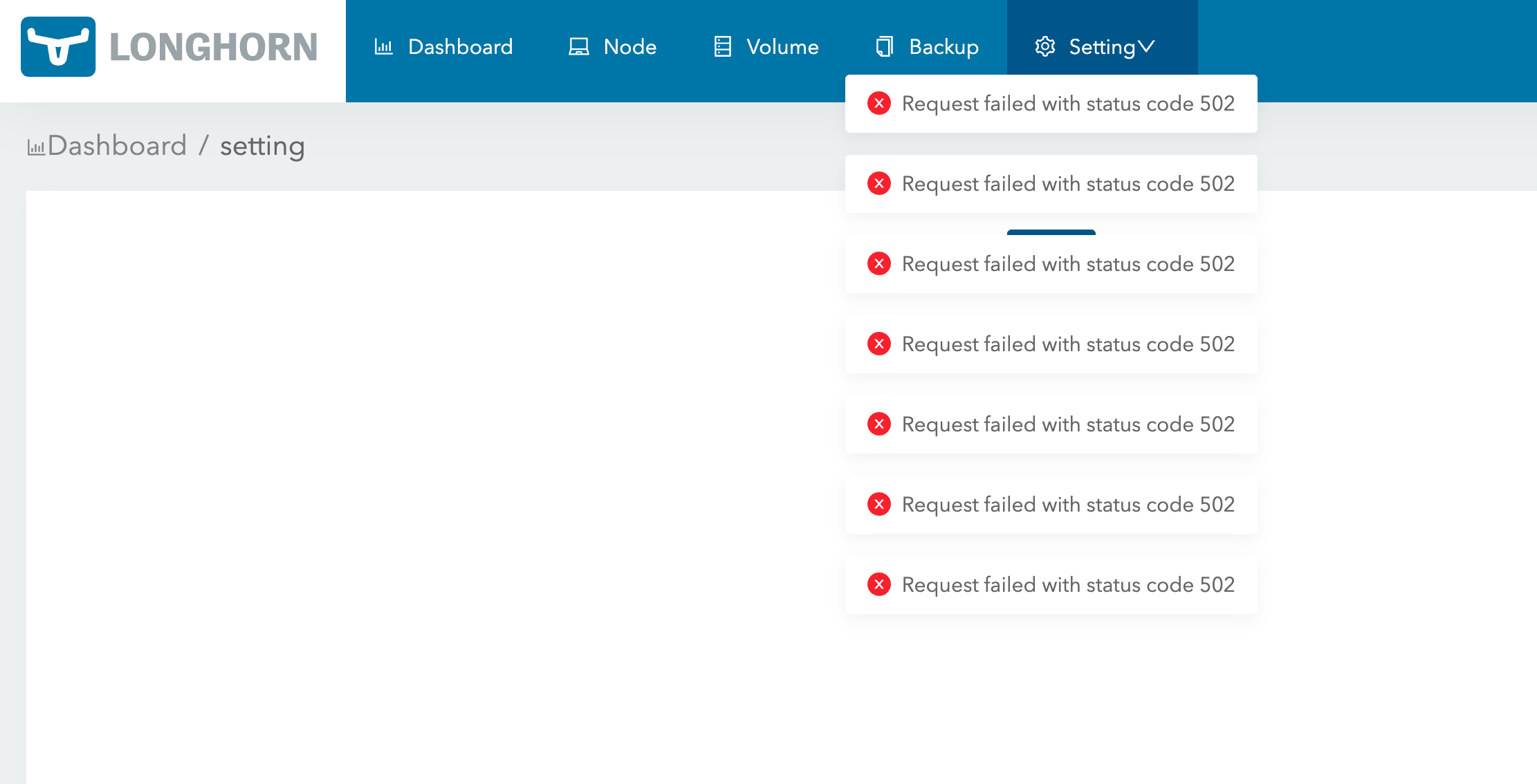
I am a newbie to longhorn and I cannot install longhorn through kubectl.....
 mritd
on 15 Nov 2020
mritd
on 15 Nov 2020
1.0.2 same issue
kubernetes version 1.19.3I tested the method provided by @shuo-wu , but unfortunately my UI keeps showing 502 errors.
I am a newbie to longhorn and I cannot install longhorn through kubectl.....
It seems that the UI part somehow doesn't work. The workaround won't cause this 502 error.
As for the installation, you don't need to install Longhorn via kubectl. The workaround steps is also feasible in the Longhorn installed via Rancher/Helm.
shuo-wu
on 16 Nov 2020
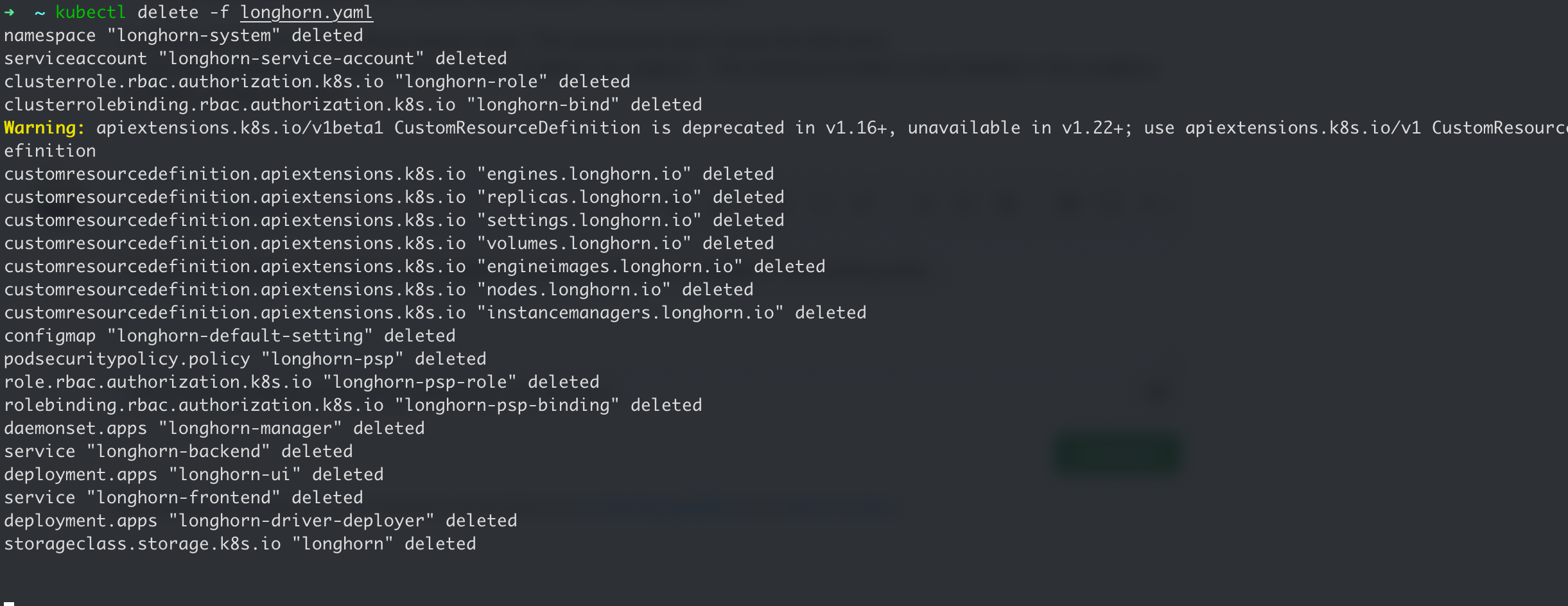
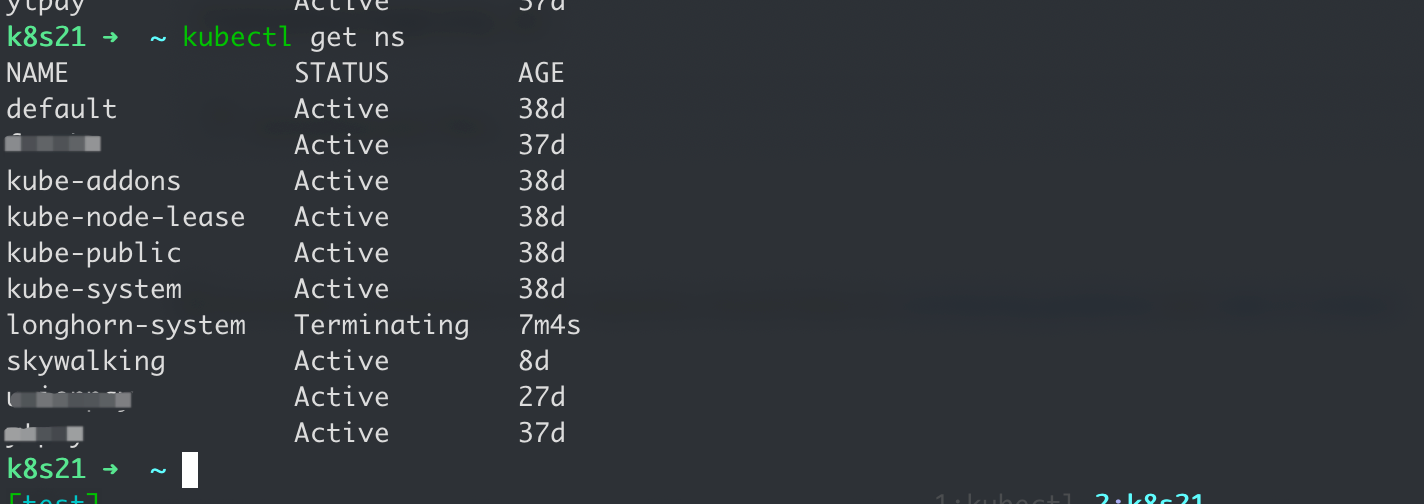
When I try to delete with kubectl, the longhorn-system namespace is always in Terminating state...
mritd
on 27 Nov 2020
I just tried kubectl apply -f https://raw.githubusercontent.com/longhorn/longhorn/master/deploy/longhorn.yaml according to the documentation, and then I used kubectl delete -f https://raw ....; This is too scary, the namespace created by longhorn cannot be deleted, it seems to have a permanent impact on my cluster.
mritd
on 27 Nov 2020
You need to follow the uninstall instructions here https://longhorn.io/docs/1.0.2/deploy/uninstall/ . Use Longhorn uninstaller, or Helm instead of yaml for installation.
yasker
on 27 Nov 2020
It's already working, so exciting! But I’m curious why I can’t install using kubectl?
mritd
on 28 Nov 2020
@mritd Of course, you can. But you need to follow the instruction to uninstall (rather than just do kubectl delete). There are things we need to clean up during uninstallation that cannot be done by kubectl delete.
yasker
on 30 Nov 2020
@yasker Thanks, I check the helm repo code 😀.
mritd
on 1 Dec 2020
Related issues
 shubb30
·
22Comments
yasker
·
17Comments
shubb30
·
22Comments
yasker
·
17Comments
 dstuart
·
18Comments
dstuart
·
18Comments
 excieve
·
28Comments
excieve
·
28Comments
 zshi456
·
16Comments
zshi456
·
16Comments