Longhorn: [BUG] Improve Kubernetes node drain support
Describe the bug
After rolling k8s nodes with StatefulSet workloads in AWS auto-scaling group — first creating new nodes, then cordoning and draining old nodes, then one by one terminating the EC2 instance. Some (out of many) volumes ended up "attached" to a non-existing node. This caused a StatefulSet pod to get stuck after being scheduled to a new node. The "Down" node couldn't be deleted from the pool either before manually detaching the volume.
To Reproduce
Not sure if this reproduces reliably, but I've seen this twice now.
- Deploy a number of
StatefulSets with PVCs on a k8s node group deployed as an AWS auto-scaling group - Update the ASG launch template
- Roll the group with https://github.com/hellofresh/eks-rolling-update
- Observe some pods unable to be scheduled due to failure in volume attachment
Expected behavior
Volumes should get detached automatically from nodes that are being drained, and especially the ones that don't exist at all.
Log
Failing pod event:
AttachVolume.Attach failed for volume "pvc-d937c093-5ba2-4ee7-9abe-563cb94d215c" : rpc error: code = FailedPrecondition desc = The volume pvc-d937c093-5ba2-4ee7-9abe-563cb94d215c cannot be attached to the node ip-10-0-197-215.eu-west-2.compute.internal since it is already attached to the node ip-10-0-110-63.eu-west-2.compute.internal
Longhorn volume event:
Error stopping pvc-d937c093-5ba2-4ee7-9abe-563cb94d215c-r-13878a7f: Operation cannot be fulfilled on instancemanagers.longhorn.io "instance-manager-r-9672e5cb": the object has been modified; please apply your changes to the latest version and try again
Many errors like this in one of the longhorn-manager logs:
1129:2020-07-22T21:02:48.974414429Z E0722 21:02:48.974300 1 engine_controller.go:668] fail to update status for engine pvc-d937c093-5ba2-4ee7-9abe-563cb94d215c-e-50a061ed: failed to list replicas from controller 'pvc-d937c093-5ba2-4ee7-9abe-563cb94d215c': Failed to execute: /var/lib/longhorn/engine-binaries/longhornio-longhorn-engine-v1.0.0/longhorn [--url 10.0.88.237:10001 ls], output , stderr, time="2020-07-22T21:02:48Z" level=fatal msg="Error running ls command: failed to list replicas for volume 10.0.88.237:10001: rpc error: code = Unavailable desc = all SubConns are in TransientFailure, latest connection error: connection error: desc = \"transport: Error while dialing dial tcp 10.0.88.237:10001: connect: no route to host\""
Environment:
- Longhorn version: 1.0.0
- Kubernetes version: EKS 1.17.6
- Node OS type and version: EKS-optimised Amazon Linux 2
Additional context
This happened when workload nodes are hosting some volumes and when there's a separate group for Longhorn volumes.
 excieve
All 28 comments
@khushboo-rancher Can you help to reproduce the issue? Not sure if autoscaling group is needed. Probably give it a try without autoscaling group first.
@excieve Can you generate a support bundle and send it to [email protected]? Just in case if we cannot reproduce the issue.
 yasker
on 23 Jul 2020
yasker
on 23 Jul 2020
Without the autoscaling group, I was not able to repro the issue. After draining of node, the pod moves to another node and volume automatically first get detached and then get attached to the new node.
I'll try to repro this with autoscaling and update.
 khushboo-rancher
on 24 Jul 2020
khushboo-rancher
on 24 Jul 2020
@yasker With the autoscaling group also, I couldn't reproduce the reported issue. I followed the below steps to reproduce the issue.
Steps:
- Create a cluster (1 master, 3 workers) with EKS auto-scaling group.
- Deploy multiple numbers of
StatefulSetwith volume attached. - Update the ASG launch template with a new template.
- Roll the group with https://github.com/hellofresh/eks-rolling-update
I observed the nodes going to cordon state first, then started to drain and getting terminated one by one. At this point in time pods got evicted from the node and moved to another. The respective volume got detached and attached to a new node smoothly.
Validated the data written in the volume also.
Logs :
longhorn-support-bundle_5ba7c270-5299-48e4-a53f-214e49a9c998_2020-07-24T01-01-55Z.zip
@excieve Let me know if there is any other step/configuration you might be having in your set up which I'm missing here.
khushboo-rancher
on 24 Jul 2020
@khushboo-rancher The setup we have looks like this:
- EKS cluster 1.17
- 4 custom worker groups each with its own ASG +
cluster-autoscaleroperating on (ii) and (iii):
- Workloads with EBS-backed storage
- Workloads with no storage
- Workloads with Longhorn-backed storage
- Longhorn storage
The issue happens for us when rolling (iii) as described in the ticket. The workloads are created and managed by the Redis cluster operator. When this happened last time there were 18 StatefulSets generated by it, each with two pods (36 total). Only 4 volumes within different sets ended up in this weird attachment to a terminated node. Perhaps the operator intervenes as well to heal the cluster, which causes some additional re-attachments.
I'll try to replicate this once more and generate a support bundle. Thanks for your time!
excieve
on 24 Jul 2020
When trying to reproduce it I ended up with two stuck volumes, but this time in a different way:
MountVolume.SetUp failed for volume "pvc-0ead94bb-59b6-4a88-8f0f-e0e479a3cb37" : kubernetes.io/csi: mounter.SetupAt failed: rpc error: code = InvalidArgument desc = There is no block device frontend for volume pvc-0ead94bb-59b6-4a88-8f0f-e0e479a3cb37
The volume in question was in a "Detached" state, despite a rescheduled pod waiting for it. Attaching it manually to the pod's node using Longhorn UI resolved this.
Another volume had a similar issue, but deleting the pod made it being able to attach automatically on a recreated pod (this didn't help with the previous volume).
Then I rolled the same group again and had two issues with stuck volumes. One of them new — the volumes were hanging in the "attaching" state until manually detaching it (after which it was able to successfully re-attach). I haven't seen this happen before.
AttachVolume.Attach failed for volume "pvc-35b87577-6ca6-4bcd-81d2-8bb2d2b45881" : rpc error: code = Aborted desc = The volume pvc-35b87577-6ca6-4bcd-81d2-8bb2d2b45881 is attaching
And finally the actual issue from the description again. This time I observed more closely what was happening and noticed that these volumes (pvc-3d6fe7af-7536-4367-8a33-249d8c2550d7 and pvc-d937c093-5ba2-4ee7-9abe-563cb94d215c) were first unmounted when draining their workload nodes and then for some reason re-mounted on the _same_ nodes despite them being cordoned and draining. I can't find this in the logs anymore probably because the corresponding managers are now terminated along with the nodes.
At the same time the corresponding VolumeAttachment resources have status with attached = false, e.g.:
apiVersion: storage.k8s.io/v1
kind: VolumeAttachment
metadata:
annotations:
csi.alpha.kubernetes.io/node-id: ip-10-0-235-9.eu-west-2.compute.internal
creationTimestamp: "2020-07-24T15:17:14Z"
finalizers:
- external-attacher/driver-longhorn-io
name: csi-ebe8a47464c6ad16bde499e3a48d64b01a45192956a9491d77d69e4922df49c9
resourceVersion: "11486636"
selfLink: /apis/storage.k8s.io/v1/volumeattachments/csi-ebe8a47464c6ad16bde499e3a48d64b01a45192956a9491d77d69e4922df49c9
uid: b90daa53-d269-4d28-a647-ee25ad42816e
spec:
attacher: driver.longhorn.io
nodeName: ip-10-0-235-9.eu-west-2.compute.internal
source:
persistentVolumeName: pvc-3d6fe7af-7536-4367-8a33-249d8c2550d7
status:
attachError:
message: 'rpc error: code = FailedPrecondition desc = The volume pvc-3d6fe7af-7536-4367-8a33-249d8c2550d7
cannot be attached to the node ip-10-0-235-9.eu-west-2.compute.internal since
it is already attached to the node ip-10-0-123-229.eu-west-2.compute.internal'
time: "2020-07-24T17:20:46Z"
attached: false
But this same volume is displaying as "Attached" in Longhorn UI:
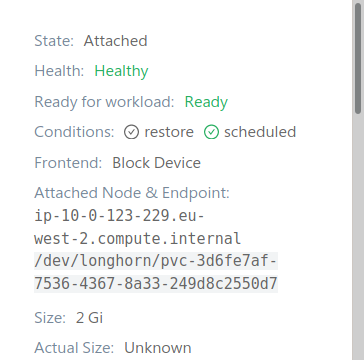
A wild guess: I wonder if this could be happening due to PodDisruptionBudgets for these StatefulSets not letting the pod to be rescheduled for some time, but Longhorn treating this draining as a call to detach unconditionally, then remounts when the pod doesn't migrate and finally get stuck despite the node being finally gone.
I'll send the support bundle too, it's taken at the point of two mentioned volumes being in this state.
excieve
on 24 Jul 2020
Right, I've experimented some more and it indeed looks like the original issue is related to PDBs. My StatefulSets have 2 pods each and PDBs for them allow a maximum of 1 pod to be disrupted at a time. This means that when draining, k8s will keep some pods and their nodes alive until one of two pods in each set is successfully running on new nodes to prevent service outage. With this workload it usually takes a couple of minutes for a pod to get the volume reattached, init and pass the readiness probe.
It seems like Longhorn might not like this sometimes and have a strange state on nodes that PDBs keep alive for some time. I wonder if this happens because the instance manager pods get evicted while workload pods with volumes are not. Should they have a toleration for draining?
When I modify the PDBs such that they allow both pods in a set to be disrupted, I no longer see this issue (tried rolling two times).
At the same time I'm still seeing the infinitely "attaching" volumes sometimes, which seem to be caused by this:
time="2020-07-24T21:01:10Z" level=warning msg="Dropping Longhorn engine longhorn-system/pvc-0b00746d-0a91-4d75-b548-cc6e8d7037b9-e-6f65f2fa out of the queue: fail to sync engine for longhorn-system/pvc-0b00746d-0a91-4d75-b548-cc6e8d7037b9-e-6f65f2fa: invalid Instance Manager instance-manager-e-28f49254, state: unknown, IP: 10.0.239.105"
time="2020-07-24T21:01:10Z" level=warning msg="Error syncing Longhorn engine longhorn-system/pvc-0b00746d-0a91-4d75-b548-cc6e8d7037b9-e-6f65f2fa: fail to sync engine for longhorn-system/pvc-0b00746d-0a91-4d75-b548-cc6e8d7037b9-e-6f65f2fa: invalid Instance Manager instance-manager-e-28f49254, state: unknown, IP: 10.0.239.105"
time="2020-07-24T21:01:10Z" level=warning msg="Error syncing Longhorn engine longhorn-system/pvc-0b00746d-0a91-4d75-b548-cc6e8d7037b9-e-6f65f2fa: fail to sync engine for longhorn-system/pvc-0b00746d-0a91-4d75-b548-cc6e8d7037b9-e-6f65f2fa: invalid Instance Manager instance-manager-e-28f49254, state: unknown, IP: 10.0.239.105"
E0724 21:01:10.786772 1 engine_controller.go:210] fail to sync engine for longhorn-system/pvc-0b00746d-0a91-4d75-b548-cc6e8d7037b9-e-6f65f2fa: invalid Instance Manager instance-manager-e-28f49254, state: unknown, IP: 10.0.239.105
Which also seems to be related to an instance manager that doesn't exist anymore (but an InstanceManager CRD still exists — they don't seem to be removed when nodes are terminated).
excieve
on 25 Jul 2020
Here may be the root cause. Since some logs are missed in the support bundle, I cannot guarantee the analysis is accurate:
- During the node draining, the related engine manager pod is evicted hence the volume on the node gets crashed unexpectedly. Then Longhorn will automatically detach and reattach the volume as the auto-recovery mechanism. (Cannot find any log here.)
- During the auto detachment, the workload becomes terminating and Kubernetes will send the detach request to Longhorn CSI plugin.
- The CSI plugin finds the volume is already detaching/detached hence it will blindly report success. But actually this detachment is not controlled/issued by Kubernetes. And there will be an auto reattachment operation after the detachment. The detachment is a transient state for the volume.
2020-07-24T15:16:05.012899952Z time="2020-07-24T15:16:05Z" level=info msg="GRPC request: {\"node_id\":\"ip-10-0-123-229.eu-west-2.compute.internal\",\"volume_id\":\"pvc-3d6fe7af-7536-4367-8a33-249d8c2550d7\"}"
2020-07-24T15:16:05.012960414Z time="2020-07-24T15:16:05Z" level=info msg="ControllerServer ControllerUnpublishVolume req: volume_id:\"pvc-3d6fe7af-7536-4367-8a33-249d8c2550d7\" node_id:\"ip-10-0-123-229.eu-west-2.compute.internal\" "
2020-07-24T15:16:05.015096193Z time="2020-07-24T15:16:05Z" level=error msg="GRPC error: rpc error: code = Aborted desc = The volume pvc-3d6fe7af-7536-4367-8a33-249d8c2550d7 is detaching"
......
2020-07-24T15:17:08.079802047Z time="2020-07-24T15:17:08Z" level=info msg="GRPC call: /csi.v1.Controller/ControllerUnpublishVolume"
2020-07-24T15:17:08.080826605Z time="2020-07-24T15:17:08Z" level=info msg="GRPC request: {\"node_id\":\"ip-10-0-123-229.eu-west-2.compute.internal\",\"volume_id\":\"pvc-3d6fe7af-7536-4367-8a33-249d8c2550d7\"}"
2020-07-24T15:17:08.082716697Z time="2020-07-24T15:17:08Z" level=info msg="ControllerServer ControllerUnpublishVolume req: volume_id:\"pvc-3d6fe7af-7536-4367-8a33-249d8c2550d7\" node_id:\"ip-10-0-123-229.eu-west-2.compute.internal\" "
2020-07-24T15:17:08.084673822Z time="2020-07-24T15:17:08Z" level=info msg="don't need to detach Volume pvc-3d6fe7af-7536-4367-8a33-249d8c2550d7 since we are already detached from node ip-10-0-123-229.eu-west-2.compute.internal"
- Kubernetes is informed that the volume is detached then it will launch a new workload with the volume. But the volume has been automatically reattached to the draining node (before the node is gone). ((Cannot find any logs for this reattachment) Then the workload sticks there.
2020-07-24T15:17:14.212174175Z time="2020-07-24T15:17:14Z" level=info msg="ControllerServer ControllerPublishVolume req: volume_id:\"pvc-3d6fe7af-7536-4367-8a33-249d8c2550d7\" node_id:\"ip-10-0-235-9.eu-west-2.compute.internal\" volume_capability:<mount:<fs_type:\"ext4\" > access_mode:<mode:SINGLE_NODE_WRITER > > volume_context:<key:\"baseImage\" value:\"\" > volume_context:<key:\"fromBackup\" value:\"\" > volume_context:<key:\"numberOfReplicas\" value:\"3\" > volume_context:<key:\"staleReplicaTimeout\" value:\"30\" > volume_context:<key:\"storage.kubernetes.io/csiProvisionerIdentity\" value:\"1595117863611-8081-driver.longhorn.io\" > "
2020-07-24T15:17:14.216267097Z time="2020-07-24T15:17:14Z" level=error msg="GRPC error: rpc error: code = Aborted desc = The volume pvc-d937c093-5ba2-4ee7-9abe-563cb94d215c is attaching"
......
2020-07-24T15:17:29.983502391Z time="2020-07-24T15:17:29Z" level=info msg="ControllerServer ControllerPublishVolume req: volume_id:\"pvc-3d6fe7af-7536-4367-8a33-249d8c2550d7\" node_id:\"ip-10-0-235-9.eu-west-2.compute.internal\" volume_capability:<mount:<fs_type:\"ext4\" > access_mode:<mode:SINGLE_NODE_WRITER > > volume_context:<key:\"baseImage\" value:\"\" > volume_context:<key:\"fromBackup\" value:\"\" > volume_context:<key:\"numberOfReplicas\" value:\"3\" > volume_context:<key:\"staleReplicaTimeout\" value:\"30\" > volume_context:<key:\"storage.kubernetes.io/csiProvisionerIdentity\" value:\"1595117863611-8081-driver.longhorn.io\" > "
2020-07-24T15:17:29.987886364Z time="2020-07-24T15:17:29Z" level=error msg="GRPC error: rpc error: code = FailedPrecondition desc = The volume pvc-3d6fe7af-7536-4367-8a33-249d8c2550d7 cannot be attached to the node ip-10-0-235-9.eu-west-2.compute.internal since it is already attached to the node ip-10-0-123-229.eu-west-2.compute.internal"
- The node is gone then the volume and the related engine manager pod is considered as
Unknown.
- typemeta:
kind: ""
apiversion: ""
objectmeta:
name: instance-manager-e-4aef6e75
generatename: ""
namespace: longhorn-system
selflink: /apis/longhorn.io/v1beta1/namespaces/longhorn-system/instancemanagers/instance-manager-e-4aef6e75
uid: b66e5a91-c2d6-499f-808f-57447d910973
resourceversion: "11444629"
generation: 1
creationtimestamp: "2020-07-24T13:05:53Z"
deletiontimestamp: null
deletiongraceperiodseconds: null
labels:
longhorn.io/component: instance-manager
longhorn.io/instance-manager-image: longhornio-longhorn-instance-manager-v1_20200514
longhorn.io/instance-manager-type: engine
longhorn.io/node: ip-10-0-123-229.eu-west-2.compute.internal
annotations: {}
ownerreferences:
- apiversion: longhorn.io/v1beta1
kind: Node
name: ip-10-0-123-229.eu-west-2.compute.internal
uid: fa0df2e5-c451-4d1d-bdaf-877a8f47ba0f
controller: null
blockownerdeletion: true
initializers: null
finalizers:
- longhorn.io
clustername: ""
managedfields: []
spec:
image: longhornio/longhorn-instance-manager:v1_20200514
nodeid: ip-10-0-123-229.eu-west-2.compute.internal
type: engine
engineimage: ""
status:
ownerid: ip-10-0-218-139.eu-west-2.compute.internal
currentstate: unknown
instances:
pvc-3d6fe7af-7536-4367-8a33-249d8c2550d7-e-bfe75919:
spec:
name: pvc-3d6fe7af-7536-4367-8a33-249d8c2550d7-e-bfe75919
status:
endpoint: ""
errormsg: ""
listen: ""
portend: 10009
portstart: 10009
state: running
type: ""
resourceversion: 0
pvc-d937c093-5ba2-4ee7-9abe-563cb94d215c-e-50a061ed:
spec:
name: pvc-d937c093-5ba2-4ee7-9abe-563cb94d215c-e-50a061ed
status:
endpoint: ""
errormsg: ""
listen: ""
portend: 10008
portstart: 10008
state: running
type: ""
resourceversion: 0
ip: 10.0.114.231
apiminversion: 1
apiversion: 1
The simplest workaround is manually detaching the volume.
@yasker To solve this issue, we may need to distinguish auto detach&reattach from regular detach and attach.
BTW, according to the above analysis, this issue is caused by the race condition. I am not sure why it is not triggered without setting PDBs.
 shuo-wu
on 28 Jul 2020
shuo-wu
on 28 Jul 2020
@shuo-wu Nice find! Can we detach the volume regardless of if the volume is detaching or not? We can check if it's detaching or not later, but I am not sure if it's really needed if the detach becomes idempotent.
yasker
on 29 Jul 2020
detach the volume regardless of if the volume is detaching or not?
Do you mean returning nil for the detach request if the volume is already detaching? I don't think that is the key point. Maybe we can cancel the following reattachment in this case if Longhorn receives detach requests from users/Kubernetes.
shuo-wu
on 29 Jul 2020
As another datapoint: by now this happens every time we rolling-upgrade nodes no matter how many volumes and volume-consuming pods there are. It gets pretty difficult to manage once there are hundreds as each stuck volume needs to be identified, then manually detached and then it takes some minutes until it finally attaches and mounts, slowing everything down.
excieve
on 19 Aug 2020
I am getting all the same type errors after kured ran across my nodes today...
k3s 1.18.8
longhorn 1.0.2
longhorn-support-bundle_8e0655a7-95cd-4269-840f-89a99f866561_2020-09-03T17-41-55Z.zip
 onedr0p
on 3 Sep 2020
onedr0p
on 3 Sep 2020
We get the same problem occasionally when we drain our nodes. As a workaround, we deploy a helper program on every node by DaemonSet. The helper program blocks deletion of Longhorn Instance Manager pods until all pods which mount Longhorn volumes finish to detach during kubectl drain. It works fine for our situation, so we would like to share something we've learned.
Environment
- Kubernetes v1.18.6
- Longhorn v1.0.2 with fix for node.session.scan (custom build)
- Ubuntu 18.04
- Set
node.session.scan = manualin iscsid.conf - Our clusters are recreated everyday for testing purposes in dev environment.
- Recreate clusters by creating and deleting nodes one by one.
- Every node is drained by
kubectl drainbefore deletion.
Problem
We had the following problems when we recreated clusters by draining nodes:
- The volume remains stuck occasionally bound after draining (same as this issue)
- Instance Manager (Engine and Replica) pods are not managed by DaemonSet, so when a node is drained, both Instance Manager pods and application pods which mount Longhorn volumes are deleted simultaneously. Therefore application pods cannot detach properly during
kubectl drain. - DaemonSet managed pods are not deleted by
kubectl drain. We use--ignore-daemonsetsoption to ignore them.
- Instance Manager (Engine and Replica) pods are not managed by DaemonSet, so when a node is drained, both Instance Manager pods and application pods which mount Longhorn volumes are deleted simultaneously. Therefore application pods cannot detach properly during
- All replicas of volumes are lost if draining nodes happens too fast.
- We need to check if the new replicas sync is done.
- https://github.com/longhorn/longhorn/issues/298 may fix it.
- Frequent deleting of replicas generates many old snapshots.
- Create a recurring backup job solved this problem.
- https://github.com/longhorn/longhorn/issues/685 may fix it.
Workaround
As a workaround, we deploy the following helper program on every node by DaemonSet (We call it longhorn-evictor). With this helper, we do not see the problems above.
Source code: https://gist.github.com/tksm/667c0562009df7c57a8cc1126d68fc52#file-main-go (not for production use)
Basically it works as follows on every node.
- Create PodDisruptionBudeget for Longhorn Instance Manager on the node to block deletion during
kubectl drain. - Wait for the node to become
Unschedulable.
- Consider it as
kubectl drainstart.
- Consider it as
- Wait for all longhorn volumes on the node to be detached.
- Ensure there are no longhorn volumes whose
currentNodeIDorownerIDis assigned this node.
- Ensure there are no longhorn volumes whose
- Evict Longhorn replicas on the node by deleting
replicas.longhorn.ioobjects. - Delete PodDisruptionBudeget for Longhorn Instance Manager on the node.
- Longhorn Instance Manager pods will be safely deleted.
PodDisruptionBudeget for Longhorn Instance Manager (Engine) looks like this. maxUnavailable: 0 blocks deletion of pods.
apiVersion: policy/v1beta1
kind: PodDisruptionBudget
metadata:
  labels:
    stateful.zlab.co.jp/app: longhorn-evictor
  name: longhorn-engine-demo-tkusumi118-worker-default-9d5e2007-9k8hb
  namespace: longhorn-system
spec:
  maxUnavailable: 0
  selector:
    matchLabels:
      longhorn.io/component: instance-manager
      longhorn.io/instance-manager-type: engine
      longhorn.io/node: demo-tkusumi118-worker-default-9d5e2007-9k8hb
 tksm
on 4 Sep 2020
tksm
on 4 Sep 2020
@tksm Using PodDisruptionBudget is a genius idea! We will see if we can use your idea to fix #1286 and this issue in v1.1.0.
yasker
on 5 Sep 2020
@yasker Just wanted to mention that we tried out this PDB when draining nodes and it worked flawlessly! Every workload that uses volumes migrated in a matter of seconds with nothing getting stuck, improving general service stability a lot during maintenance. Thanks for this @tksm!
excieve
on 20 Sep 2020
Pre-merged Checklist
[x] Does the PR include the explanation for the fix or the feature?
[x] Is the backend code merged (Manager, Engine, Instance Manager, BackupStore etc)?
The PR is at https://github.com/longhorn/longhorn-manager/pull/707, https://github.com/longhorn/longhorn-manager/pull/713, https://github.com/longhorn/longhorn-manager/pull/716[x] Is the reproduce steps/test steps documented?
[x] Which areas/issues this PR might have potential impacts on?
Area Upgrade
Issues[x] If the fix introduces the code for backward compatibility Has an separate issue been filed with the label
release/obsolete-compatibility?
The compatibility issue is filed at https://github.com/longhorn/longhorn/issues/1883[x]
If labeled: area/ui Has the UI issue filed or ready to be merged?
The UI issue/PR is at[x]
if labeled: require/doc Has the necessary document PR submitted or merged?
The Doc issue/PR is at[x]
If labeled: require/automation-e2e Has the end-to-end test plan been merged? Have QAs agreed on the automation test case?
The automation skeleton PR is at
The automation test case PR is at[x]
if labeled: require/automation-engine Has the engine integration test been merged?
The engine automation PR is at[x] if labeled: require/manual-test-plan Has the manual test plan been documented?
The updated manual test plan is at https://github.com/longhorn/longhorn/issues/1631#issuecomment-708842694
 longhorn-io-github-bot
on 15 Oct 2020
longhorn-io-github-bot
on 15 Oct 2020
reproduce steps:
- Create a cluster of 3 nodes. Install Longhorn.
- Create a volume with 2 replicas. Create PVC,PV from the volume
- Create a statefulset of size 1 which uses the PVC.
- Wait until the workload pod becomes running. Find the node on which the workload pod is located. Let's say it is
node-1 - cordon, then force drain
node-1. Assume that the k8s scheduler choosesnode-2for the workload pod
Observe that there are 2 scenarios:
- The volume detaches from
node-1, reattaches tonode-1(because of the auto attachment), detaches fromnode-1, and finally attaches tonode-2. Workload pod is able to start. The whole process takes about 2-3 minutes. Runningkubectl get volumes -n longhorn-system -w, we will see:
testvol1 attached healthy True 2147483648 phan-cluster-v24-node-group2-1 22h testvol1 detaching unknown True 2147483648 22h testvol1 detaching unknown True 2147483648 22h testvol1 detached unknown True 2147483648 phan-cluster-v24-node-group2-1 22h testvol1 attaching unknown True 2147483648 phan-cluster-v24-node-group2-1 22h testvol1 attached unknown True 2147483648 phan-cluster-v24-node-group2-1 22h testvol1 attached unknown True 2147483648 phan-cluster-v24-node-group2-1 22h testvol1 detaching unknown True 2147483648 22h testvol1 detached unknown True 2147483648 22h testvol1 detached unknown True 2147483648 22h testvol1 detached unknown True 2147483648 22h testvol1 attaching unknown True 2147483648 phan-cluster-v24-node-group2-2 22h testvol1 attached unknown True 2147483648 phan-cluster-v24-node-group2-2 22h testvol1 attached healthy True 2147483648 phan-cluster-v24-node-group2-2 22h - The volume detaches from
node-1, reattaches tonode-1(because of the auto attachment), and never detaches fromnode-1. Workload stuck incontainer creatingstate forever.
Most of the time, scenario#1 will happen. Sometimes scenario#2 happens. This is because of a race problem between CSI plugin calls and VolumeController's auto attachment feature as explained by @shuo-wu at https://github.com/longhorn/longhorn/issues/1631#issuecomment-664768769
 PhanLe1010
on 15 Oct 2020
PhanLe1010
on 15 Oct 2020
manual test steps:
- Create a cluster of 3 nodes. Install Longhorn.
- Create a volume with 2 replicas. Create PVC,PV from the volume
- Create a statefulset of size 1 which uses the PVC.
- Wait until the workload pod becomes running. Find the node on which the workload pod is located. Let's say it is
node-1 - cordon, then force drain
node-1. Assume that the k8s scheduler choosesnode-2for the workload pod - If
node-1contains the last healthy replica of a volume and the settingAllow Draining The node With The Last Healthy Replicaisfalse, the drain action is blocked. - Otherwise, observe that there is always 1 scenario: The volume detaches from
node-1, attaches tonode-2. The workload pod is able to start. The whole process takes ~ 15s. Runningkubectl get volumes -n longhorn-system -w, we will see:
testvol1   attached   healthy      True        2147483648   phan-cluster-v24-node-group2-1   22h
testvol1   detaching   unknown      True        2147483648                                    22h
testvol1   detached    unknown      True        2147483648                                    22h
testvol1   detached    unknown      True        2147483648                                    22h
testvol1   detached    unknown      True        2147483648                                    22h
testvol1   detached    unknown      True        2147483648                                    22h
testvol1   attaching   unknown      True        2147483648   phan-cluster-v24-node-group2-2   22h
testvol1   attached    unknown      True        2147483648   phan-cluster-v24-node-group2-2   22h
testvol1   attached    healthy      True        2147483648   phan-cluster-v24-node-group2-2   22h
We also need to test the above steps with a bigger scale (e.g. 10 statefulsets, each with 3 pods, each with 1 Longhorn volume )
PhanLe1010
on 15 Oct 2020
There's also a need to protect replica instances, so they don't end up all getting killed during rolling cluster upgrade. Even if you have multiple replicas, you can end up with failed volumes if rolling upgrade is fast enough and takes them all out one-by-one.
But that should probably be a separate issue/pr.
 tvanderka
on 15 Oct 2020
tvanderka
on 15 Oct 2020
@tvanderka
We have a separate feature to deal with replica eviction: https://github.com/longhorn/longhorn/issues/298
In v1.1.0, users can use the following steps to drain/shutdown nodes during maintaining:
(Let's say that user wants to do maintaining on node-x)
- Cordon the
node-x. - Evict all replicas from the
node-x(by feature https://github.com/longhorn/longhorn/issues/298) - Drain the node:
kubectl drain. It doesn't have to be force drain. (by this feature and https://github.com/longhorn/longhorn/issues/1286) - Do maintaining work
- Terminate the node and bring up a new one or uncordon the current node
Please let me know if this process work for you.
PhanLe1010
on 15 Oct 2020
@PhanLe1010 I understand #298 is for manual eviction, that will not help in OKD/Openshift and other solutions with automated rolling upgrades. Openshift cluster upgrade is completely automated, and drains/upgrades/reboots nodes one at a time (or specified % of nodes).
Protecting replicas with PDB would be nice, you should be unable to "drain --force" the node if there's no other ready/synced replica somewhere else.
tvanderka
on 16 Oct 2020
you should be unable to "drain --force" the node if there's no other ready/synced replica somewhere else.
I agree with this idea.
cc @yasker
Waiting for all replicas in the draining node to move to other nodes might take a long time and might cause the kubectl drain command to timeout. Therefore, we don't want to block users from draining the node if there are other healthy replicas on other nodes. This allows automation tools to drain the node quickly while ensuring that Longhorn volumes are safe.
However, if the draining node contains the only healthy replica, blocking is a must. In this case, users must take a manual intervention to evict the replicas from the draining node. I was thinking that Longhorn can trigger an auto eviction in this case but I can't think of a way to know on which condition Longhorn should do auto eviction. All Longhorn knows is that the node is unschedulable, which could mean the user is draining the node to prepare for upgrading or simply means that the user temporarily condors the node.
PhanLe1010
on 16 Oct 2020
If we want to fully automate the process, we need to agree on one convention: unschedulable node is the node that is being drained. Every replica must move out of the unschedulable node
Maybe we can have a global setting for this agreement.
PhanLe1010
on 16 Oct 2020
I don't think there is an easy solution for the automatic rolling upgrade case. The biggest reason is moving a replica from one node to another is a long process. It can take hours or even days. That's why I don't think automatic eviction is the answer here. And it's possible that no eviction is required. since volume might recover to full healthy by finish rebuilding on existing replicas.
In that sense, it's likely we need to block the drain operation if the only healthy replica of any attached volume is on that node.
However, there is one case that we might don't want to block the drain for the last healthy replica: for an application can do replication by itself and only need a single replica from Longhorn. Normally it's OK to lose the replica (and the workload pod) in that case since the replication is done at the application level. In that case, we need to add a global setting to allow draining the node with the last healthy replicas. By default, the drain will be blocked for the last healthy replicas.
Still, I don't have a good answer to what should we do about that last healthy replica. I feel we need some mechanism established between Longhorn and the system performing the automatic rolling upgrade, to make sure it's not going to drain all the healthy replicas of one volume at the same time. Something similar to the PodDisruptionBudget that can communicate and affect the system's decision on which nodes to drain.
yasker
on 16 Oct 2020
Thanks @yasker
The argument about auto eviction of last healthy replica makes doesn't make sense.
We should have a setting for whether we want to block if there is a replica which is the last healthy replica of a volume on the draining node that.
@tvanderka We will add the feature to this issue since it is a pretty quick modification.
PhanLe1010
on 16 Oct 2020
Simply blocking drain on last replica should be sufficient. Other scenarios mentioned would require manual intervention, you could evict the replica manually or detach the volume.
When I drain a node, new replacement replica is created. If it does not sync before last remainng replica gets drained/evicted, the volume goes down. It gets "salvaged" later and seems fine in longhorn, except pods using it keep returning i/o errors.
I worked around this by creating a PDB blocking eviction of any instance-manager-r pods and manually updating it to allow 1 go down only after resync was complete and 2 replicas were ready. Works but ...
I think rolling cluster upgrade requires "partial sync" functionality to work reasonably well, to not throw away all existing data when node/replica comes up again. Assuming rolling upgrade does not actually "replace" the whole node and wipe your data with it (which is a case with cluster autoscaler I guess).
tvanderka
on 16 Oct 2020
@PhanLe1010 auto-eviction would not help, could even make things worse as the upgrade would just kill things in the middle of eviction process.
tvanderka
on 16 Oct 2020
@tvanderka Thanks for the suggestion.
Yeah. I agree. We will not do auto eviction.
As @yasker mentioned, we will have a global setting for user to choose whether Longhorn should block kubectl drain if the is replica on the draining node which is the last replica of a volume.
How do you think?
PhanLe1010
on 16 Oct 2020
Verified on longhorn-master - 10/20/2020
Validation - Pass
Reproduced scenario 1 from https://github.com/longhorn/longhorn/issues/1631#issuecomment-708840175 multiple times. However, I couldn't reproduce scenario 2. With the fix, the volume detaches and attaches to another node.
kubectl get volumes -n longhorn-system -w
NAME            STATE      ROBUSTNESS   SCHEDULED   SIZE         NODE            AGE
volume-test   attached   healthy      True        5368709120   <node-1>   10m
volume-test   attached   healthy      True        5368709120   <node-1>   11m
volume-test   detaching   unknown      True        5368709120                   11m
volume-test   detached    unknown      True        5368709120                   11m
volume-test   detached    unknown      True        5368709120                   11m
volume-test   attaching   unknown      True        5368709120   <node-2>   11m
- Drain with 'Allow Node Drain with the Last Healthy Replica' disabled and more than one replica.
Volume move to another node successfully, the instance managers get evicted at the end.
node/<node-1> cordoned
evicting pod "wk-1-689bdd644-pqq2d"
evicting pod "instance-manager-e-44cfa350"
evicting pod "instance-manager-r-689ac220"
error when evicting pod "instance-manager-r-689ac220" (will retry after 5s): Cannot evict pod as it would violate the pod's disruption budget.
error when evicting pod "instance-manager-e-44cfa350" (will retry after 5s): Cannot evict pod as it would violate the pod's disruption budget.
pod/wk-1-689bdd644-pqq2d evicted
evicting pod "instance-manager-r-689ac220"
evicting pod "instance-manager-e-44cfa350"
error when evicting pod "instance-manager-r-689ac220" (will retry after 5s): Cannot evict pod as it would violate the pod's disruption budget.
error when evicting pod "instance-manager-e-44cfa350" (will retry after 5s): Cannot evict pod as it would violate the pod's disruption budget.
evicting pod "instance-manager-r-689ac220"
evicting pod "instance-manager-e-44cfa350"
error when evicting pod "instance-manager-r-689ac220" (will retry after 5s): Cannot evict pod as it would violate the pod's disruption budget.
error when evicting pod "instance-manager-e-44cfa350" (will retry after 5s): Cannot evict pod as it would violate the pod's disruption budget.
evicting pod "instance-manager-r-689ac220"
evicting pod "instance-manager-e-44cfa350"
pod/instance-manager-e-44cfa350 evicted
pod/instance-manager-r-689ac220 evicted
node/<node-1> evicted
- Drain with 'Allow Node Drain with the Last Healthy Replica' disabled and one replica.
Volume move to another node successfully, the replica doesn't move.
node/khush-test-lh-wk1 cordoned
evicting pod "csi-snapshotter-54b5b6487b-6fj78"
evicting pod "csi-attacher-7466697f7b-c6fhh"
evicting pod "csi-provisioner-5d6ff768f7-jz4s9"
evicting pod "longhorn-driver-deployer-695b98db65-f7q4c"
evicting pod "csi-resizer-64c4db9977-7nc62"
evicting pod "coredns-849545576b-x7s4r"
evicting pod "instance-manager-e-44cfa350"
evicting pod "csi-attacher-7466697f7b-gsxm2"
evicting pod "csi-snapshotter-54b5b6487b-hs54f"
evicting pod "csi-provisioner-5d6ff768f7-sj5wd"
evicting pod "wk-1-694486fcb4-ts8ck"
evicting pod "instance-manager-r-689ac220"
evicting pod "default-http-backend-598b7d7dbd-26ns7"
error when evicting pod "instance-manager-e-44cfa350" (will retry after 5s): Cannot evict pod as it would violate the pod's disruption budget.
error when evicting pod "instance-manager-r-689ac220" (will retry after 5s): Cannot evict pod as it would violate the pod's disruption budget.
pod/csi-provisioner-5d6ff768f7-sj5wd evicted
pod/csi-attacher-7466697f7b-gsxm2 evicted
pod/csi-snapshotter-54b5b6487b-6fj78 evicted
pod/longhorn-driver-deployer-695b98db65-f7q4c evicted
evicting pod "instance-manager-e-44cfa350"
evicting pod "instance-manager-r-689ac220"
error when evicting pod "instance-manager-e-44cfa350" (will retry after 5s): Cannot evict pod as it would violate the pod's disruption budget.
error when evicting pod "instance-manager-r-689ac220" (will retry after 5s): Cannot evict pod as it would violate the pod's disruption budget.
pod/csi-snapshotter-54b5b6487b-hs54f evicted
pod/default-http-backend-598b7d7dbd-26ns7 evicted
pod/wk-1-694486fcb4-ts8ck evicted
pod/csi-attacher-7466697f7b-c6fhh evicted
pod/csi-resizer-64c4db9977-7nc62 evicted
pod/csi-provisioner-5d6ff768f7-jz4s9 evicted
pod/coredns-849545576b-x7s4r evicted
evicting pod "instance-manager-e-44cfa350"
evicting pod "instance-manager-r-689ac220"
error when evicting pod "instance-manager-e-44cfa350" (will retry after 5s): Cannot evict pod as it would violate the pod's disruption budget.
evicting pod "instance-manager-e-44cfa350"
evicting pod "instance-manager-r-689ac220"
error when evicting pod "instance-manager-r-689ac220" (will retry after 5s): Cannot evict pod as it would violate the pod's disruption budget.
evicting pod "instance-manager-r-689ac220"
There are pending pods in node "<node-1>" when an error occurred: error when evicting pod "instance-manager-r-689ac220": global timeout reached: 2m0s
pod/default-http-backend-598b7d7dbd-rm29b
pod/instance-manager-e-44cfa350
pod/instance-manager-r-689ac220
error: unable to drain node "<node-1>", aborting command...

There are pending nodes to be drained:
<node-1>
error: error when evicting pod "instance-manager-r-689ac220": global timeout reached: 2m0s
- Drain with 'Allow Node Drain with the Last Healthy Replica' enabled and one replica.
Volume move to another node successfully, the replica becomes faulted.
There is one drain failure observed when a cluster has 1 node which is configured as etcd, control plane and worker and is drained.
There are pending pods in node "<node-1>" when an error occurred: [error when evicting pod "csi-provisioner-5d6ff768f7-s265v": an error on the server ("<html>\r\n<head><title>502 Bad Gateway</title></head>\r\n<body>\r\n<center><h1>502 Bad Gateway</h1></center>\r\n<hr><center>nginx/1.19.2</center>\r\n</body>\r\n</html>") has prevented the request from succeeding (post pods.policy csi-provisioner-5d6ff768f7-s265v), error when evicting pod "csi-snapshotter-54b5b6487b-9lnv4": an error on the server ("<html>\r\n<head><title>502 Bad Gateway</title></head>\r\n<body>\r\n<center><h1>502 Bad Gateway</h1></center>\r\n<hr><center>nginx/1.19.2</center>\r\n</body>\r\n</html>") has prevented the request from succeeding (post pods.policy csi-snapshotter-54b5b6487b-9lnv4)]
Related issues
 lyred193
·
7Comments
yasker
·
7Comments
yasker
·
3Comments
lyred193
·
7Comments
yasker
·
7Comments
yasker
·
3Comments
 anouarchattouna
·
4Comments
anouarchattouna
·
4Comments
 ainiml
·
6Comments
ainiml
·
6Comments
Most helpful comment
We get the same problem occasionally when we drain our nodes. As a workaround, we deploy a helper program on every node by DaemonSet. The helper program blocks deletion of Longhorn Instance Manager pods until all pods which mount Longhorn volumes finish to detach during
kubectl drain. It works fine for our situation, so we would like to share something we've learned.Environment
node.session.scan = manualin iscsid.confkubectl drainbefore deletion.Problem
We had the following problems when we recreated clusters by draining nodes:
kubectl drain.kubectl drain. We use--ignore-daemonsetsoption to ignore them.Workaround
As a workaround, we deploy the following helper program on every node by DaemonSet (We call it
longhorn-evictor). With this helper, we do not see the problems above.Source code: https://gist.github.com/tksm/667c0562009df7c57a8cc1126d68fc52#file-main-go (not for production use)
Basically it works as follows on every node.
kubectl drain.Unschedulable.kubectl drainstart.currentNodeIDorownerIDis assigned this node.replicas.longhorn.ioobjects.PodDisruptionBudeget for Longhorn Instance Manager (Engine) looks like this.
maxUnavailable: 0blocks deletion of pods.