Longhorn: Deleted server in cluster still listed in longhorn node list as marked "down"
I've increased my cluster worker number by one and deleted it after some time. However Longhorn thinks it's not deleted, but it's being down.
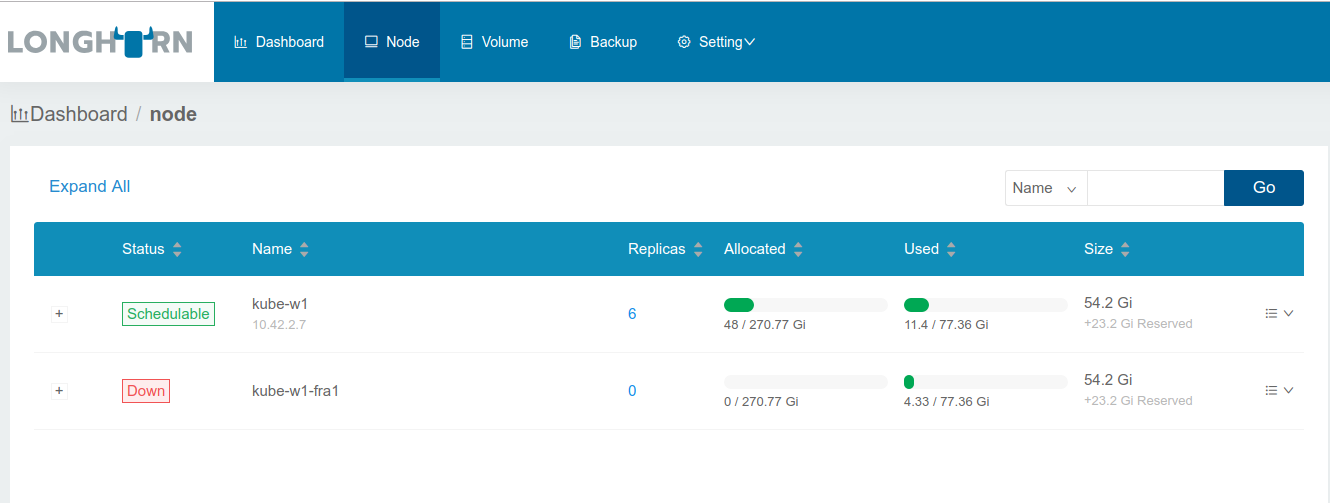
Second node was deleted already.
 shinebayar-g
All 18 comments
Should be covered by https://github.com/rancher/longhorn/issues/223 .
Can you try to disable the scheduling for the node then see if UI allows you to remove the node?
Let me know if it doesn't work.
 yasker
on 3 Oct 2018
yasker
on 3 Oct 2018

You mean by clicking this button of deleted node? If yes, this button does nothing on deleted node, but works on green node.
shinebayar-g
on 3 Oct 2018
OK, that's a bug.
yasker
on 3 Oct 2018
Hi, same situation.
Created kube with 3 nodes setup at digital ocean.
Created volumes - ok, attaching to differ nodes - ok.
But then i resize cluster from 3 nodes to one.
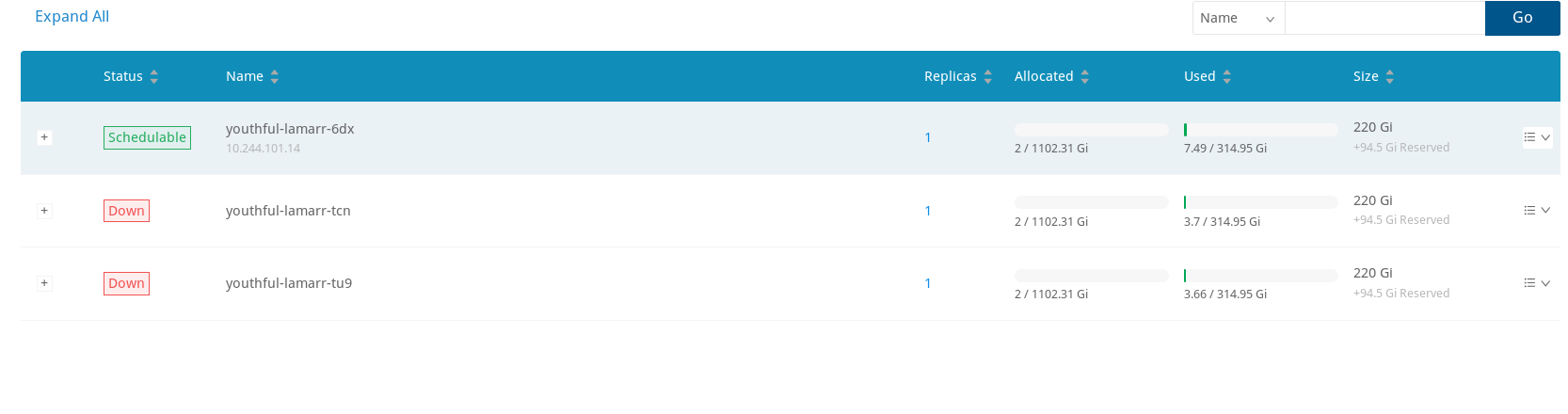
And now i can not delete nodes, that does not exist in cluster anymore.
I was checking scenario when more than half of nodes goes down.
Can i somehow manualy remove nodes?

 kukara4
on 21 Oct 2018
kukara4
on 21 Oct 2018
In the interim, is there a manual, or recommended, way to remove disabled/removed nodes without the UI?
 carloslozano
on 5 Nov 2018
carloslozano
on 5 Nov 2018
@carloslozano We don't want to introduce the additional complexity now. But the good news is the new release (v0.3.2) contains the fix is coming out this week.
yasker
on 5 Nov 2018
Done
yasker
on 8 Nov 2018
Hi, I've created a cluster in Rancher v2.1.1 using Longhorn (installed by the Catalog Apps) on version v0.3.2 and added a cluster with 60 machines then deleted them. The problem still persists with the deleted nodes still being listed in Longhorn node list with the Down status (unable to remove by the UI). Do someone have the same problem still? Any tips regarding it?
Longhorn creation parameters:
- Longhorn Kubernetes Driver: csi
- Expose app using Layer 7 Load Balancer: true
 lucasm0ta
on 29 Nov 2018
lucasm0ta
on 29 Nov 2018
@lucasm0ta Are they any replicas remains on the node? You would need to delete the replicas first before delete the node. The UI should give some prompt on why it's not deletable (if the button is greyed out).
yasker
on 29 Nov 2018
There were no replicas on the node. The UI allows to click on "Remove Node" on the Down nodes, the page loads but nothing happens. Which longhorn service I can find relevant logs about it ?
lucasm0ta
on 30 Nov 2018
@lucasm0ta Can you check all the longhorn-manager's log?
@LLParse can you take a look at this issue?
yasker
on 30 Nov 2018
@lucasm0ta Are there any volumes attached to the Down nodes? These need to be detached before node can be removed.
The UI should be telling user about this...so I suspect some bug... the logs would be very helpful.
 LLParse
on 30 Nov 2018
LLParse
on 30 Nov 2018
I have the same issue in v.1.0.0.
node was drained and deleted, but it still listed in longhorn and on delete i get an error
unable to delete node: Could not delete node xxxx-node-001 with node ready condition is False, reason is KubernetesNodeGone, node schedulable false, and 0 replica, 1 engine running on it
log from longhorn-manager :
[30/Jun/2020:18:16:52 +0000] "DELETE /v1/nodes/xxxx-node-001 HTTP/1.1" 500 360 "https://XXXX.XXXX.XXX/k8s/clusters/c-gd9xl/api/v1/namespaces/longhorn-system/services/http:longhorn-frontend:80/proxy/node" "Mozilla/5.0 (Macintosh; Intel Mac OS X 10_15_5) AppleWebKit/605.1.15 (KHTML, like Gecko) Version/13.1.1 Safari/605.1.15"
30.6.2020 20:27:54 time="2020-06-30T18:27:54Z" level=warning msg="HTTP handling error unable to delete node: Could not delete node xxxx-node-001 with node ready condition is False, reason is KubernetesNodeGone, node schedulable false, and 0 replica, 1 engine running on it"
30.6.2020 20:27:54 time="2020-06-30T18:27:54Z" level=error msg="Error in request: unable to delete node: Could not delete node xxxx-node-001 with node ready condition is False, reason is KubernetesNodeGone, node schedulable false, and 0 replica, 1 engine running on it"
is it possible to delete it manualy?
thanks!
 fa-at-pulsit
on 30 Jun 2020
fa-at-pulsit
on 30 Jun 2020
@fa-at-pulsit we're tracking the new effort of automatically scaling down Kubernetes in https://github.com/longhorn/longhorn/issues/1151
In your case, you somehow have one volume still show as attached to the node? You can detach that volume first, then you should be able to remove the node.
yasker
on 30 Jun 2020
yes!
thanks - all good!
fa-at-pulsit
on 30 Jun 2020
Just had the same issue as @fa-at-pulsit after rolling k8s nodes in AWS auto-scaling group (one by one, first creating a new node, then cordoning and draining old node, then terminating the EC2 instance). A single volume (out of 24) ended up "attached" to a non-existing node. This caused a StatefulSet pod to get stuck. Manually detaching helped, but it looks like a bug to me.
 excieve
on 19 Jul 2020
excieve
on 19 Jul 2020
@excieve Can you file another issue? Have the workload moved to a new node? If you can show us the longhorn-manager log regarding the volume, it would help us to find out what happened. A support bundle would be even more helpful.
yasker
on 20 Jul 2020
@yasker Yes, the workload has been moved to a new node. Opened a new bug here: https://github.com/longhorn/longhorn/issues/1631
excieve
on 23 Jul 2020
Related issues
 liyimeng
·
27Comments
liyimeng
·
27Comments
 shubb30
·
22Comments
shubb30
·
22Comments
 bradwood
·
26Comments
bradwood
·
26Comments
 zshi456
·
16Comments
zshi456
·
16Comments
 aleksey005
·
33Comments
aleksey005
·
33Comments
Most helpful comment
OK, that's a bug.