After upgrade from version 10 to version 11 we have problem logging in with username/password method on Cordova environment. In a regular browser login works.
Logging in Cordova with username/password ends up with "WE'RE SORRY, SOMETHING WENT WRONG" message.
Our configuration is:
new Auth0Lock(clientId, domain, {
                    autoclose: true,
                    auth: {
                        sso: false,
                        redirect: true, // Automatically FALSE in Cordova
                        redirectUrl: "http://192.168.0.12:9090/api/v1/auth/oauth/auth0",
                        responseType: 'code'
                    }});
What I've figured out so far:
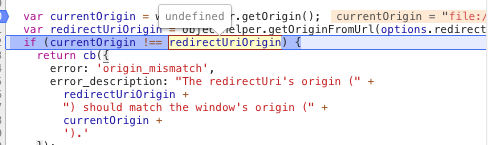
1) origin validation added in latest 11.1.0 fails on Cordova. On desktop it's ok because in redirect mode there is no such check. While in cordova it falls to popup mode (which is ok) but then origin check fails. currentOrigin is "file://" but redirectUriOrigin is undefined. options object doesn't contain redirectUri prop.
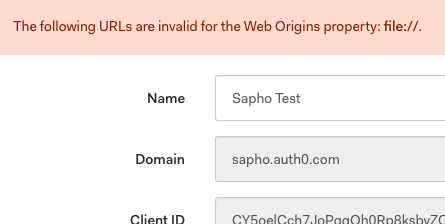
2) When we downgraded to 11.0.1 to fix first mentioned issue, it doesn't work because of cross-origin check. Our page is on file:// protocol, such as file:///data/content/tmp/e8f41568 but it try to load invisible iframe with auth0.com domain. So we have to add our domain to "Allowed Web Origins" I presume but I can't because file:// is not valid origin in Auth0 Dashboard form. It does not have
Any thoughts?
 lexaurin
All 16 comments
I'm fixing the origin check right now: https://github.com/auth0/auth0.js/pull/635
should be released today. Do you think that will fix though?
 luisrudge
on 24 Jan 2018
luisrudge
on 24 Jan 2018
Hi Luis,
thanks for the fix, just tried it out on Cordova but sadly it doesn't fix issue 1. nor issue 2.
As for the 1. - currentOrigin is now file:// but redirectUriOrigin is for example http://login.company.com/api/v1/auth/oauth/auth0 so the check makes no sense at all on Cordova. Origin (file://) will be always different from redirectUri.
As for the 2. - I made a little research and the thing with posMessage communication is that we can't use origin check in cross domain communication between file:// origin and iframe on some domain because file:// is not a domain exclusively allocated for Cordova thus browser can't guarantee that communication is with the right origin, our Cordova'sfile://. Origin could be any other malicious page just sitting on file:// protocol..
See SO with the same problem https://stackoverflow.com/questions/5466376/on-javascript-postmessage-to-parent-html-iframe-that-is-on-local-disk
Actually origin of cordova's page should be null by the spec https://html.spec.whatwg.org/multipage/origin.html#concept-origin-opaque but Chrome has a bug and thus returns file:// for the origin now https://bugs.chromium.org/p/chromium/issues/detail?id=406076
So now the question is if we can't use origin check in postMessage communication, could we use some fall back to cross-domain ajax for Cordova? It could be activated on window.location.protocol === 'file:'
lexaurin
on 26 Jan 2018
Ok, I can easily add a check to only validate origin if currentOrigin doesn't start with file://. This will fix the first issue. Does that work for you?
Let's talk about issue 2. What do you mean by cross-domain ajax? It's not clear to me what the real issue is, so I can't visualize the solution 😁
luisrudge
on 26 Jan 2018
As for 1. yes, please add a check similar to if (['file://', null].contains(window.location.origin)) to support HTML specs null too.
As for. 2. "Lock v10" on user/pass login sends XHR POST to https://company.auth0.com/oauth/ro with {connection: "Username-Password-Authentication", grant_type: "password"} and the response is Access Token, which works fine with the exception that we're asking for responseType: 'code' in Lock configuration but got valid accessToken.
new Auth0Lock(clientId, domain, {
                    auth: {
                        responseType: 'code'
                        ...
                    }});
Ideally it should make XHR request to Auth0 and response with just code (Authorization Grant), then we can exchange it on backend to Access Token.
lexaurin
on 26 Jan 2018
Can I help somehow with it? I can prepare PR for 1. and/or help with 2. if you help me to find out which auth0.com endpoint should it use for Username-Password-Authentication in Cordova.
lexaurin
on 6 Feb 2018
Hi @lexaurin. Thanks for getting in touch again. We have someone working on the new auth0-cordova and it should be ready in the next couple of weeks. I'll keep you posted.
luisrudge
on 6 Feb 2018
Hi @luisrudge, thank you for feedback. Bad news are auth0-cordova doesn't help us as we are shipping embedded version of Auth0 to our customers while auth0-cordova is based on Hosted Login Page. So we are now forced to upgrade embedded version to v11 by April 1 but actually we can't because upgrade breaks login flow in Cordova. Also it takes some time to distribute and upgrade it on our customer sites so there is not much time left so that I'm trying to find out what can we do to resolve it in embedded version..
To summarise problem with cordova and file protocol:
- Either
file://should be allowed as origin for iframe cross site postMessage communication - Or it should fall back to cross-site xhr request as v10 does it.
- Or is there some other solution?
lexaurin
on 7 Feb 2018
@lexaurin you're correct.
We'll have to go with option 1 but I'll have to check with the security team if that's ok with them. I'll get back to you.
luisrudge
on 7 Feb 2018
One thing that we just pushed in the latest patch version is that if the redirectUri is empty, we don't check the origins at all. Do you think that helps you in any way?
luisrudge
on 7 Feb 2018
We have the same problem and still not working with the latest version (v11.2.3) and file:// is not allowed as the web origin. Any news for this @luisrudge? Did you find any workaround for this @lexaurin? We have a little bit hurry with this because previous versions are deprecating by April 1 so our app will stop working(?)...
 sampsasaarela
on 22 Feb 2018
sampsasaarela
on 22 Feb 2018
I am in the exact same boat as @lexaurin - my app requires more flexibility than the Hosted Login Page provides, so I have to use Lock in my Cordova (Phonegap) app. April 1 is coming up fast 😰
 codyrushing
on 22 Feb 2018
codyrushing
on 22 Feb 2018
Hi there,
Lock v11.3.1 and auth0.js v9.3.1 are still affected by this bug.
As for @luisrudge mentioned last patch - it doesn't help because redirectUrl in Cordova environment is not emptied but redirect flag is set to FALSE automatically and thus popup mode is used and in our usecase redirectUrl is set to our backend server while currentOrigin is file:// so they don't match.
Nevertheless at this point I see there two options:
1) Make Auth0 backward compatible by using the same API endpoint in Cordova env as in version 10 and fix this bug properly (by postMessage maybe) in version 12. Pull request here https://github.com/auth0/lock/pull/1283. Good thing about it that it is fast, no need to change anything in Auth0 console and this issue can be finally resolved in current version. Auth0 must support /oauth/ro endpoint in this case.
2) Fix the origin check, use actual window origin in postMessage verification and make Auth0 /authorize endpoint use it. Pull request on auth0.js side is here https://github.com/auth0/auth0.js/pull/696. But there should be also fix on Auth0 backend - /authorize MUST listen to origin parameter (instead of redirectUrl) and MUST send targetOrigin = '*' in response IF params.origin === 'file://' || params.origin === 'null'. See the spec https://html.spec.whatwg.org/multipage/web-messaging.html#dom-window-postmessage. The reason is that redirectUrl may be different from current window origin and you actually need to check by the current origin - you need to verify that origin was not changed since request roundtrip.
lexaurin
on 5 Mar 2018
I'm also worried about April 1st and the aforementioned issue.
My issue manifests with the following console message:
Uncaught TypeError: Cannot read property 'protocol' of null.
I believe it is the same issue, because this happens due to .getOriginFromUrl receiving redirectUri="file:///android_asset/www/index.html", as it apparently cannot parse file:// urls.
This is happening in Lock v11.3.1 in redirect mode.
 GabrielArakaki
on 5 Mar 2018
GabrielArakaki
on 5 Mar 2018
@GabrielArakaki don't know what is your scenario and why you need to redirect something in Cordova but in some cases I saw this TypeError too, so I've submitted a fix for this in Auth0.js PR so now it accepts urls other than http(s).
lexaurin
on 6 Mar 2018
@luisrudge
Any news on this issue. April 1st is right around the corner and it would be helpful if Lock was usable in our Cordova App
 carnevalle
on 20 Mar 2018
carnevalle
on 20 Mar 2018
Hi @carnevalle @GabrielArakaki @lexaurin @codyrushing @sampsasaarela
Lock v11 is not going to work in Cordova apps, so you will need to migrate to the Hosted Login Page.
There are two main reasons:
The right way, from a security/standards perspective, to do authentication in Native apps is using the [Code Grant with PKCE] (https://auth0.com/docs/api-auth/tutorials/authorization-code-grant-pkce). Lock is designed to use the Implicit Grant, which is the right solution for SPA applications. As part of our move to more secure and standards-based solutions, we are not going to support Lock in Cordova moving forward.
We support the Cordova platform with 'auth0-cordova', which uses the Hosted Login page. Using the Hosted Login page is the most secure way to manage authentication, and will let our customers get the benefits of our continuous improvements to the authentication pipeline. You will not need to change or update your applications to take advantage of upcoming features like improved MFA support, password expiration, new device detection, etc. The login page is highly customizable today.
We understand this requires effort in your side, please feel free to reach out to support if you need help in implementing this solution.
Regards
Andres
Product Manager @ Auth0
 aaguiarz
on 20 Mar 2018
aaguiarz
on 20 Mar 2018
Related issues
 juhaelee
·
3Comments
juhaelee
·
3Comments
 fernandomunizz89
·
3Comments
fernandomunizz89
·
3Comments
 adamtay
·
8Comments
adamtay
·
8Comments
 dszmaj
·
3Comments
dszmaj
·
3Comments
 DavidWells
·
5Comments
DavidWells
·
5Comments