Lock: Service not found: http://localhost:8080 Error
I got a Service not found: http://localhost:8080 error when trying to login using lock:

Related code:
const lock = new Auth0Lock(
  'rl8Kjiy21AZOd62jNXGuNgIU********',
  '*******.auth0.com',
  {
    allowedConnections: ['Username-Password-Authentication'],
    rememberLastLogin: true,
    languageDictionary: { title: 'FindEarth' },
    language: 'en',
    closable: false,
    theme: {
      primaryColor:'#3A99D8',
      logo: 'https://avatars2.githubusercontent.com/u/19509447?v=3&s=200'
    },
    auth: {
      redirect     : false,
      responseType: 'token',
      sso: true
    }
  }
);

lock.on('authenticated', (err, authResult) => {
  console.log('err', err);
  console.log('authenticated', authResult);
});

lock.on('authorization_error', (error) => {
  console.log('authorization_error', error);
});

lock.show(); // to display the lock view
Note that the console.log's are from the authenticated event, Im not sure if that is ok or the error should come from authorization_error event.
I followed the tutorials and even downloaded the sample project and I got the same error, I already add my localhost url to Allowed Callback URLs. I assume Im missing something in the configuration.
Im using Google Chrome Version 55.0.2883.95 (64-bit), in a macOS Sierra. The lock version that im using is 10.10.2.
 ndelvalle
All 8 comments
Do you have any active rule in your account or maybe a custom db?
 glena
on 30 Jan 2017
glena
on 30 Jan 2017
Yes I have a rule configured, but I disabled it and the error keep happening. No I don't have a custom db.
More Info:
When I click the try all rules with button, and select Username-Password-Authentication (the one Im using) it redirects me to this page, even If I disable my rule:

ndelvalle
on 2 Feb 2017
Can you share your account name?
glena
on 2 Feb 2017
keepers-co
ndelvalle
on 2 Feb 2017
seems that you set that as your default audience but you dont have an API with that identifier

Clear that setting and it should work fine
glena
on 2 Feb 2017
It worked! thank you very much @glena!
ndelvalle
on 2 Feb 2017
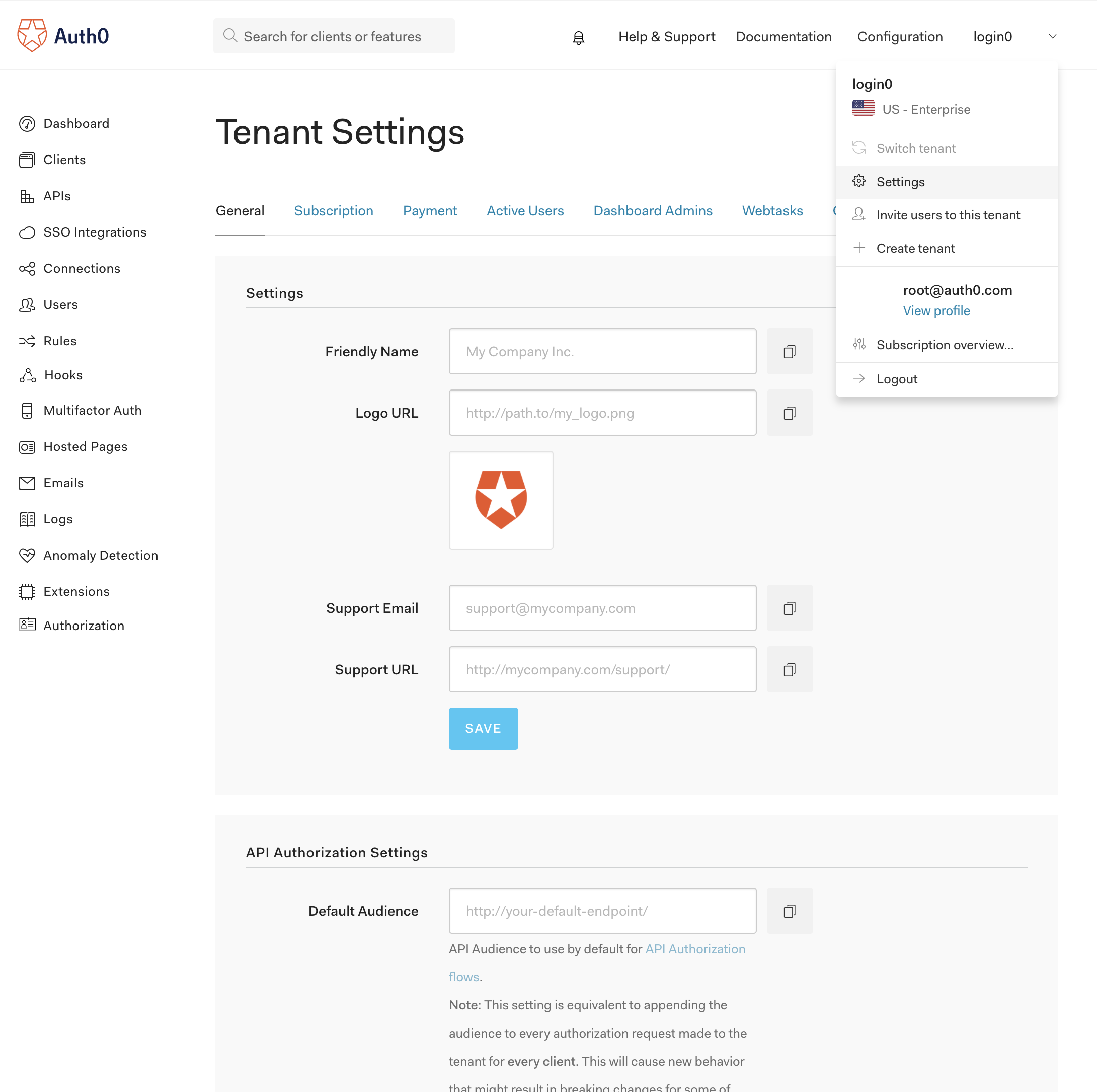
@glena where's the "Default Audience" section located?
 snolangps
on 17 Jan 2018
snolangps
on 17 Jan 2018
go to https://manage.auth0.com, click on the right top corner and it will unfold a menu.
Click on settings, and you should see it in the second section of the first tab
glena
on 18 Jan 2018
Related issues
 sandrinodimattia
·
6Comments
sandrinodimattia
·
6Comments
 cgcote
·
3Comments
cgcote
·
3Comments
 dharness
·
6Comments
dharness
·
6Comments
 maxlapides
·
5Comments
maxlapides
·
5Comments
 fernandomunizz89
·
3Comments
fernandomunizz89
·
3Comments
Most helpful comment
It worked! thank you very much @glena!