Lnpopupcontroller: Labels overlapping buttons when UIBarButtonItem has custom view in it
Description
If you use a UIBarButton with customview inside, the position of the labels are wrong and so they overlap (goes behind actually) the buttons.
From the following screenshot, the left button is the "custom" one, while the right one is a UIBarButtonItem with an image.
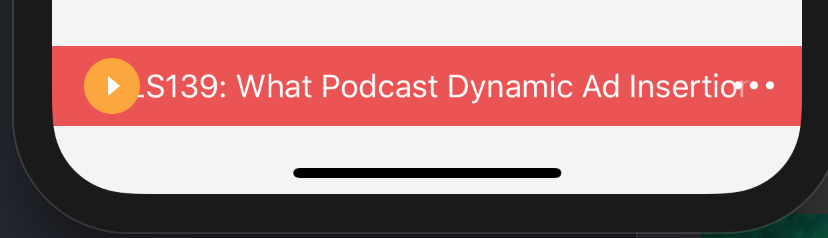
It does not matter if you provide (via constraints) an fixed size to the custom view inside, the problem still happens.
Steps to Reproduce
Add 2 buttons, one with custom view (fixed size will do) and another with an image.
Device, OS and Xcode Versions
I just tested on iOS11 but I've the feeling is not just in this version.
 dral3x
All 11 comments
This was fixed—supposedly—a while ago. Could you please create a demo project with the assets you are using and the constraints you are setting on the items?
 LeoNatan
on 27 Apr 2018
LeoNatan
on 27 Apr 2018
I modified the example project from this repo. You can download the source code here
https://www.dropbox.com/s/sj8qi1ud1gt7rts/LNPopupController-issue-260.zip?dl=0
Thanks
dral3x
on 27 Apr 2018
Thanks, I will soon.
LeoNatan
on 27 Apr 2018
@dral3x ,
First of all, your constraints are not active:
Fix it:
    [fixedButton.widthAnchor constraintEqualToConstant:40].active = YES;
    [fixedButton.heightAnchor constraintEqualToConstant:40].active = YES;
After that, the labels do not overlap the custom button but there is no margin. We should make a leading constraint but we don't have access to the label properties.
 iDevelopper
on 28 Apr 2018
iDevelopper
on 28 Apr 2018
That should be handled by the framework.
Can you post a screenshot with the constraints fixed?
LeoNatan
on 28 Apr 2018
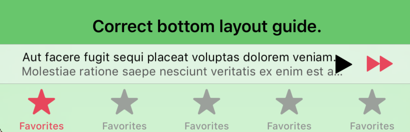
Before:
After activate the constraints:
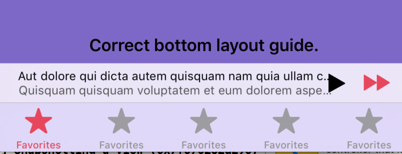
It remains a small overlap but less important.
iDevelopper
on 28 Apr 2018
Doesn’t look good.
LeoNatan
on 28 Apr 2018
FYI I did some debugging and it seems that the framework is not able to detect the margin the buttons's container (a UIStackView on iOS11) has with its superview.
I was checking inside this method https://github.com/LeoNatan/LNPopupController/blob/master/LNPopupController/LNPopupController/Private/LNPopupBar.m#L626
dral3x
on 28 Apr 2018
@LeoNatan have you any update on this?
Thanks
dral3x
on 8 May 2018
Sorry, I have been very busy lately. I will look soon. Please don't delete your demo project.
LeoNatan
on 8 May 2018
Fixed
LeoNatan
on 18 May 2018
Related issues
 johnswifttt
·
5Comments
johnswifttt
·
5Comments
 funkenstrahlen
·
3Comments
funkenstrahlen
·
3Comments
 RajChanchal
·
3Comments
RajChanchal
·
3Comments
 chauhan130
·
8Comments
chauhan130
·
8Comments
 PrakashMaharjan
·
6Comments
PrakashMaharjan
·
6Comments