Lnpopupcontroller: RTL support
Hi,
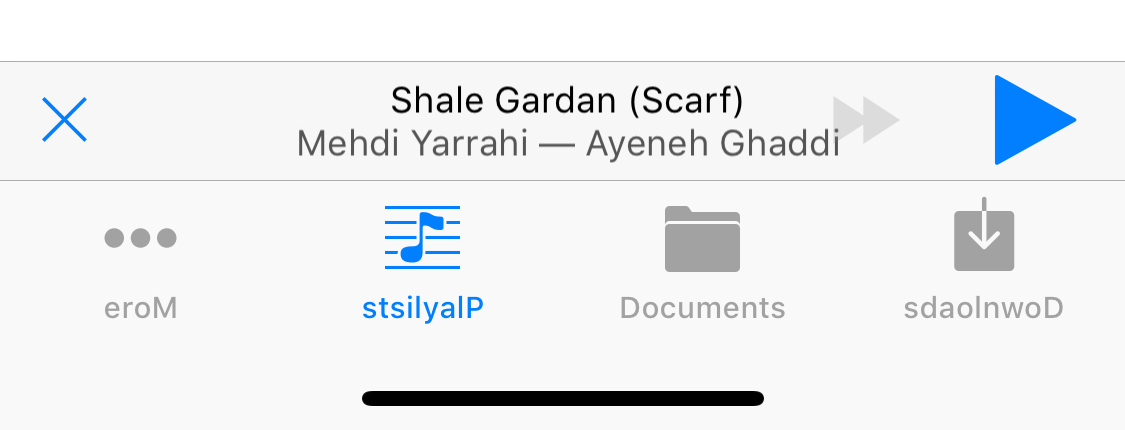
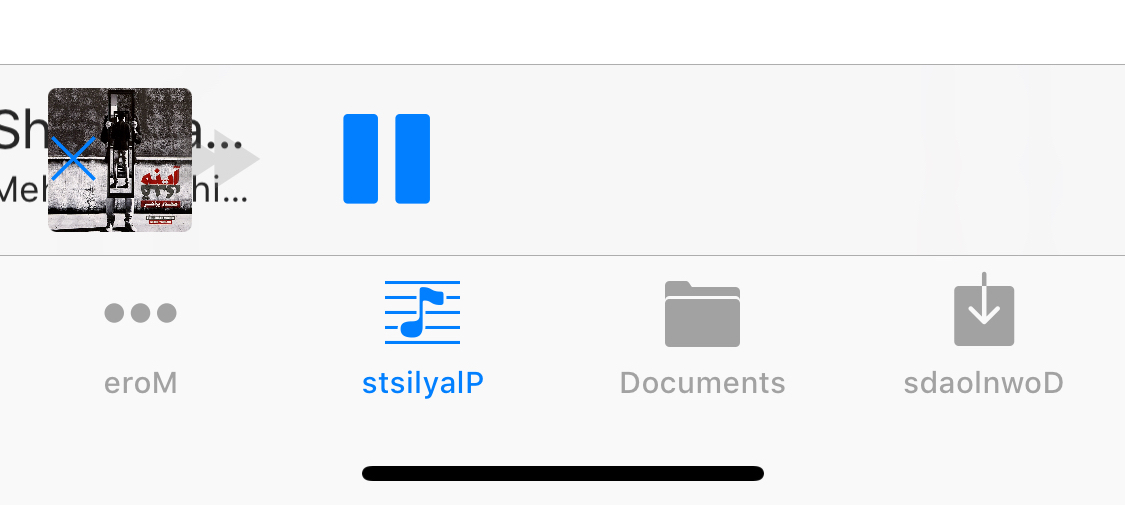
I think LNPopupController can't handle right to left layout, This is the result of my test with pseudolanguage mode in XCode
 amosavian
All 21 comments
Thanks for reporting!
I will look at this soon.
 LeoNatan
on 14 Feb 2018
LeoNatan
on 14 Feb 2018
I've added this line to my source to disable RTL and it worked, until there is a real fix. It works on iOS 9+:
UIView.appearance(whenContainedInInstancesOf: [LNPopupBar.self]).semanticContentAttribute = .forceLeftToRight
[[UIView appearanceWhenContainedInInstancesOfClasses:@[[LNPopupBar class]]] setSemanticContentAttribute:UISemanticContentAttributeForceLeftToRight];
Looking at Apple’s implementation, I see an interesting result:
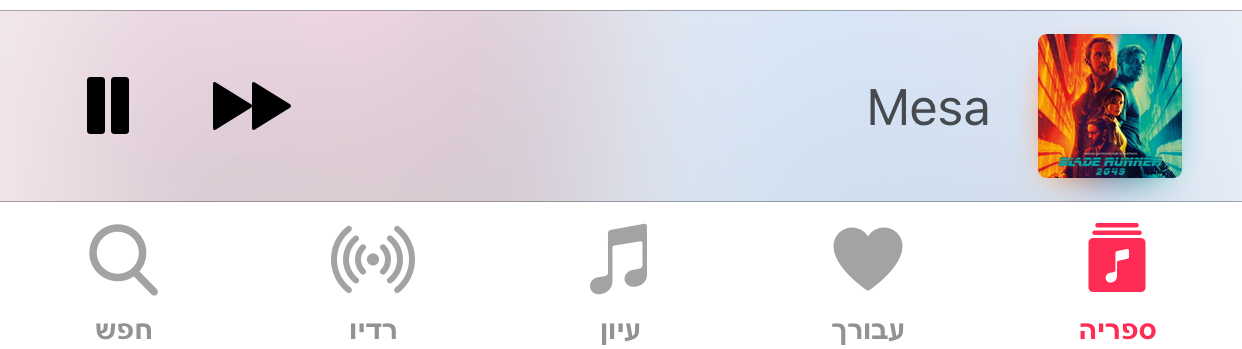
The bar is flipped but the buttons are in the same order. So I need to expose granularity for both and layout accordingly. What should be the defaults?
LeoNatan
on 15 Feb 2018
I believe we should do it based on semanticContentAttribute. if it's set to .playback, then apple's layout should be considered. If it's .forceLeftToRight the result must be same as .playback. .forceRightToLeft must change the order and .unspecified must respect UIView's direction.
We can define a separate property for UIBarButton, like barSemanticContentAttribute, or simply respects LNPopupBar.view's semantic
.playback will change image and labels direction while don't touch bar items. .forceLeftToRight and .forceRightToLeft will force left direction for both. .unspecified will respect UIView's direction.
amosavian
on 15 Feb 2018
I've implemented this and will release a new version soon.
LeoNatan
on 16 Feb 2018
Hm, so doing final checks and I found a bug in iOS 11. Setting the semanticContentAttribute of a toolbar seems to not affect how it layouts its items. So, if the app is in LTR UI and I use UISemanticContentAttributeForceRightToLeft, it breaks the layout.
LeoNatan
on 16 Feb 2018
You don't use autolayout as I checked the code.
About toolbar, it uses autolayout on iOS 11 and this can be a bug
amosavian
on 16 Feb 2018
I don't use AutoLayout. I enhanced my layout code to support RTL. Now, the result is funny, all the manual stuff is layout correctly for RTL or LTR according to semanticContentAttribute except for the toolbar I use internally. iOS 11 is such a shit release.
Reproduced independently in a demo project and opened a radar.
LeoNatan
on 16 Feb 2018
I am trying to reverse engineer the toolbar implementation on iOS 11 to make it work correctly.
LeoNatan
on 16 Feb 2018
I think I found something. Internally, UIToolbar now uses a custom UIStackView subclass to layout the items. That stack view is not forwarded the toolbar's semanticContentAttribute. If I set it manually to UISemanticContentAttributeForceRightToLeft, the items are flipped as expected, but the layout is broken.
LeoNatan
on 17 Feb 2018
Apple's internal implementations are dirty. I've added a dozen of workarounds to address different iOS bugs.
I suggest you to subclass toolbar and use [[UIView appearanceWhenContainedInInstancesOfClasses:@[[LNPopupBarToolbar class]]] setSemanticContentAttribute:semantic]
amosavian
on 17 Feb 2018
Yes! I think I made it work!
LeoNatan
on 17 Feb 2018
I basically forced Apple's hand and enforced the attribute myself. It now works properly on iOS 10 and 11.
LeoNatan
on 17 Feb 2018
semanticContentAttribute is not marked as UI_APPEARANCE_SELECTOR so it should not be used using the appearance API.
LeoNatan
on 17 Feb 2018
It works with UIAppearance in my tests pretty good
amosavian
on 17 Feb 2018
Still, you shouldn't. It works coincidentally due to how the appearance API is implemented, but there is no guarantee it won't break under certain conditions or in a future release.
LeoNatan
on 17 Feb 2018
I'll push this soon as a minor version to the 2.5.x train. I have not found much time to continue working on the other stuff for 3.0.
LeoNatan
on 17 Feb 2018
Thanks a lot.
amosavian
on 17 Feb 2018
Out: https://github.com/LeoNatan/LNPopupController/releases/tag/v2.5.9
Please test and open more issues if you see any RTL problems.
LeoNatan
on 18 Feb 2018
I am using RTL, the UIBarButtonItem is positioned correctly however the Title and Subtitle is not, it's just next to the UIBarButtonItem on the right side of it while I want it to be pushed to right side corner of the tab UIBar. How can I solve this?
 RazeeHJ
on 6 Nov 2018
RazeeHJ
on 6 Nov 2018
Please do not bump closed old issues. Open a new issue with your question. Thank you
LeoNatan
on 6 Nov 2018
Related issues
 johnswifttt
·
5Comments
johnswifttt
·
5Comments
 Kastet
·
6Comments
Kastet
·
6Comments
 RajChanchal
·
5Comments
RajChanchal
·
5Comments
 dancarasco
·
6Comments
dancarasco
·
6Comments
 funkenstrahlen
·
3Comments
funkenstrahlen
·
3Comments