Lnd: Install fails at step go install . ./cmd/...
I tried many different sytems, osx, aws ubuntu instance, and always get this, following
https://github.com/lightningnetwork/lnd/blob/master/docs/INSTALL.md
at step:
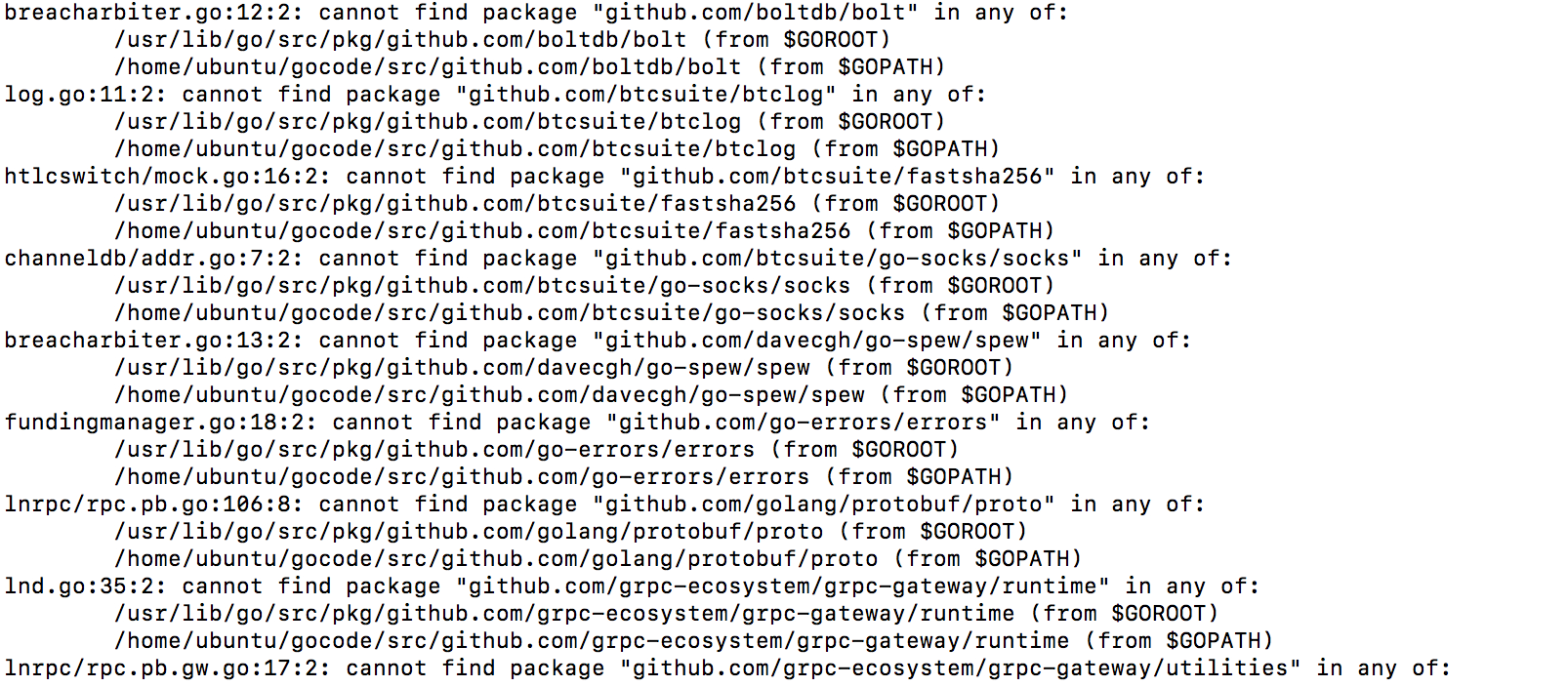
go install . ./cmd/...
output :
 xorq
xorq
All 26 comments
I'm getting the same error on my machines too.
 davidapple
on 12 Feb 2018
davidapple
on 12 Feb 2018
- What are your
GOROOTandGOPATHset to? - Did you run
glide installwhile in the lnd folder?
 dabura667
on 12 Feb 2018
dabura667
on 12 Feb 2018
also, what does go version say?
dabura667
on 12 Feb 2018
GOROOT isn't set, not surprising since there is nothing in the installation instruction that sets GOROOT to anything, right ?
I strictly followed the instructions so I did as in the user manual :
cd $GOPATH/src/github.com/lightningnetwork/lnd
glide install
so yea it is ran from the lnd folder ...
go version says :
go1.9.4 darwin/amd64
xorq
on 12 Feb 2018
Also, what does
git rev-parse HEAD
say when performed in the lnd directory?
dabura667
on 12 Feb 2018
65d6d77ef409741c7ad8562cb9781dd5894a5117
xorq
on 12 Feb 2018
When you strictly follow the steps in https://github.com/lightningnetwork/lnd/blob/master/docs/INSTALL.md
can't you reproduce this error ? I get it on every single machine including brand new installs and I simply follow line by line everything in the install.md file
xorq
on 12 Feb 2018
Looks like you either don't have your GOPATH set up properly, or didn't do glide install. I'd also check that your GOPATH and GOROOT aren't over lapping.
 Roasbeef
on 12 Feb 2018
Roasbeef
on 12 Feb 2018
Hi, I did :
export GOPATH=~/gocode
export PATH=$PATH:$GOPATH/bin
as instructed...
of course I did glide install everytime, I followed the instructions numerous times, I believe there is a problem with the INSTALL.md document.
GOROOT isn't set up to anything since there is no instruction about setting up GOROOT.
How to set GOPATH and GOROOT properly ?
by the way now glide install has an issue :

Thanks
xorq
on 13 Feb 2018
@xorq I have got the same issue. Just like you I followed the instruction steps to the letter. No mention of GOROOT there.
 satoshi-ninja
on 13 Feb 2018
satoshi-ninja
on 13 Feb 2018
If there are any LN geniuses that have managed to get this working. Can you please improve the INSTALL.md file to bring down the barriers to entry. Otherwise most people are simply not going to be able to get this working and not bother asking for help.
davidapple
on 13 Feb 2018
I literally followed the guide in a fresh VM with Ubuntu stock and everything is working fine with the commit posted, as well as current master.
I would try MacOS in a VM, but Tim Cook hates me.
dabura667
on 13 Feb 2018
@dabura667 which Ubuntu version have you used for your VM? I'm on 16.04.3 LTS (without success).
satoshi-ninja
on 13 Feb 2018
What version of glide are y'all using?
Roasbeef
on 13 Feb 2018
It seems only a very narrow set of users have this issue, and it's typically related to a dated version of glide.
Roasbeef
on 13 Feb 2018
Tried to reproduce this o a fresh machine as well, but it works w/o issue.
Roasbeef
on 13 Feb 2018
Fine for me on ubuntu16.04 (not a VM), tried a few days ago. (glide 0.13.2-dev).
By the way my go path is ~/go not ~/gocode
I created a .go_profile file with this in
GOPATH="$(go env GOPATH)"
PATH=$PATH:$GOPATH/bin
so instead of typing out export ... each time i open a new bash window i do source .go_profile
 cavapoo2
on 14 Feb 2018
cavapoo2
on 14 Feb 2018
YES !
Guys ! following step by step never works but I just tried leaving the go path to ~/go and it works on ubuntu...
So maybe update the INSTALL.md file without the line changing the go path to ~/gocode ?
Could everyone who made it work confirm that they didn't set ~/gocode as go path ?
Also to make it work I installed glide from https://glide.sh/ (v0.13.1)
(not from go get -u github.com/Masterminds/glide which installs a dev version)
(on OSX I always get the message I sent above ... ([WARN] Download failed.))
Looks like glide is blocked from accessing internet to check for updates (?)
xorq
on 14 Feb 2018
@xorq In my experience, this usually means there's an issue with your git setup, as glide/go get uses git internally. Could you try to do go get manually on the failing repos, and also git clone?
 halseth
on 15 Feb 2018
halseth
on 15 Feb 2018
I put together instructions on how to setup LND from scratch and tested them step-by-step on multiple systems (Ununtu, Debina, and Trisquel).
Go path is covered with more precision then the official LND instructions:
https://github.com/alevchuk/pstm/tree/master/lnd-e2e-testing#build-go
 alevchuk
on 24 Feb 2018
alevchuk
on 24 Feb 2018
Seems like this is solved just by following the official golang installation instructions (which we link to in INSTALL.md).
Roasbeef
on 9 Mar 2018
Hopefully this is a related question: Can we expect to build in Eclipse (with Goclipse plugin)? Can build per instruction outside of Eclipse but struggling building after creating a new Go project and specifying location of existing code. If Eclipse is not the recommended IDE, is there an IDE that is?
 jrmillerwork
on 6 Jun 2018
jrmillerwork
on 6 Jun 2018
@jrmillerwork Not sure about that. Would recommend trying VSCode together with the golang package if you need an IDE :)
halseth
on 6 Jun 2018
@halseth, thanks. What I am wondering is how people are set up and in particular how code is debugged or any other tips.
EDIT: I would add, is there any reason to believe the code as structured and built will be hard to run in any IDE?
jrmillerwork
on 6 Jun 2018
@jrmillerwork I would believe it is not very different from other go projects, so I would just look at what is a recommended setup for go. Personally I don't use an IDE, just execute what I need from the commandline. :)
halseth
on 7 Jun 2018
I was having this issue and my error was executing "sudo make" instead of just "make". Presumably, by using 'sudo', I was using root's $PATH instead of the current user's $PATH, which did not include the /usr/local/go/bin directory. Hope that helps someone!
 basnappl
on 28 Feb 2019
basnappl
on 28 Feb 2019
Related issues
 ealymbaev
·
3Comments
Roasbeef
·
3Comments
ealymbaev
·
3Comments
Roasbeef
·
3Comments
 joaodealmeida
·
3Comments
joaodealmeida
·
3Comments
 whizz
·
3Comments
Roasbeef
·
3Comments
whizz
·
3Comments
Roasbeef
·
3Comments