Lmms: [Feature Request] LMMS could really use a Tracker view for Piano Roll
Every now and then for the past 10 years I'm looking for a (modern) tracker. I just can't get used to the horizontal visual style of composing melodies. In my experience, it's easier to be creative in a tracker.
LMMS has a beautiful sound engine and awesome instruments/synths. Every other thing is well designed. The biggest leap forward right now would be a Tracker mode for Piano Roll.
I have made some attempts in the past, but C++ just isn't my forte, although it is what makes LMMS so strong.
_SchismTracker, an Impulse Tracker clone_

There are some limitations of course in the structure of a Tracker view compared to Piano Roll.
The most obvious problem is that note based technology doesn't lend itself for all the sample-based functionality like sample cutoff and offsets, at least not in a way that could realistically fit in the LMMS data structure without reimplementing things. The (ancient) _Impulse Tracker_ midi-only clone _zTracker_ solved this by simply removing all sample-based features, and implementing note-off rather than cut-off.
The second problem is that trackers store the position of a note inside a pattern on a specific channel, and LMMS has no concept of channels in the same way, as the entire pattern could be one channel. The piano roll is a "bag of notes" with no concept of on what channel the note was stored. A solution would be to allow one instrument per pattern, like the piano roll. Although this would only fix the problem of mixed instruments that would make the pattern incompatible with a piano roll, the spatial placement of notes over channels is still incompatible.
For that reason, it could make sense to have a Tracker View that is _backward compatible_ with (can be converted to) a Piano Roll, but not the other way around. This would also solve the problem that Piano Roll has tick based precision, while a Tracker view has only row-based precision (depending on speed/tempo), for things like volume corrections. This is similar to the Bassline Editor compared to the Piano Roll.
I.e. a non-Piano-Roll-bassline from the Bassline Editor can be converted to a Tracker View. A Tracker View pattern can be converted to a Piano Roll. Both steps increase the precision, so there is no converting back.
Bassline Editor < Tracker View < Piano Roll
Note that this is not a complete Tracker, just a Tracker-like alternative to the Piano Roll. I'm sure a lot of creative folks from a certain era would love this.
 Redsandro
All 23 comments
I'd really like to see a Free/Libre (F/LS) Software tracker DAW... that can also output to MOD, XM, S3M, IT, etc...
 dchmelik
on 18 Jan 2020
dchmelik
on 18 Jan 2020
try OpenMPT
 CaBachhav
on 19 Jan 2020
CaBachhav
on 19 Jan 2020
I've thought about this before, so I would love to see this feature added to LMMS. The only tracker type program I'm familiar with is Jeskola Buzz and it was so easy to be creative with that program.
As far as multiple notes on the same time position, additional note channels could be automatically or manually added. I imagine a tracker editor, like the other editors (song, piano, automation, bbe) which has two modes "song" and "track". "Song mode" could have columns that represent the tracks (like shown above), and displays general track data, maybe notes, and/or other important data, and you can chose the track you want to view in "track mode," which would display one track at a time, for more detail with columns representing note key, note length, velocity, etc in each column (which could eventually include data for effects plugin knob positions in additional columns).
As far as note spacing, the rows could have a default spacing, but if the spacing of the notes is too close for the tracker editor, you could design the tracker to adapt to the quantization so that it wouldn't ever be less detailed than the note quantization. If the spacing of the notes is too wide, the notes would simply be placed on the appropriate rows. Then, there could be an option to change the tracker quantization manually, as long as the row timing isn't too wide for the note spacing, and have an option to quantize the notes to specific spacings.
It would also be nice to be able to edit automation tracks in the tracker editor.
I imagine it could all be compatible, just different ways of displaying the same data.
 tecknixia
on 20 Feb 2020
tecknixia
on 20 Feb 2020
Was tracker software not just a 'prequel' to looper-software like sony-Asid, but both are inferior to DAW-software?
Enlighten me.. what can a tracker do, that a DAW (specifically LMMS) cant?
I do not remember hearing about living-room artists, that makes world-hits on tracker software, but both Aviici and i believe Prydz did make their hits on FLs DAW
(incidently -LMMS can be used as looper
https://www.youtube.com/watch?v=cCTaCs_8j2M
 musikBear
on 21 Feb 2020
musikBear
on 21 Feb 2020
@musikBear commented:
Was tracker software not just a 'prequel' to looper-software
Yes but it's not that Amiga program anymore. It's being developed just like everything else that has an audience. Renoise is a high quality highly popular commercial software music tracker. Check some of the artists that use it.
what can a tracker do, that a DAW (specifically LMMS) cant?
Create a full song keyboard only in half the time without getting a repetitive strain injury.
I do not remember hearing about living-room artists, that makes world-hits on tracker software
Trackers are or have been used by Aphex Twin, Venetian Snares, Calvin Harris, Infected Mushroom and Deadmau5 to name a few.
But that is irrelevant. Why are you against something that makes the creative process easier and more accessible? We're not talking about taking away your favorite tools. We're talking about adding one that will give a boost to both LMMS and people's creativity.
Redsandro
on 21 Feb 2020
Why are you against something that makes the creative process easier and more accessible?
Im not 'against something' i inquire good sound reason for assigning a lot of development for a component no other DAW has implemented (afaik)
musikBear
on 23 Feb 2020
@musikBear commented:
a component no other DAW has implemented (afaik)
- Renoise is a full DAW with full audio recording, midi support, VST instrument support and all the expected audio processors. Used by artists like She and B-Complex.
- ReViSiT is a tracker plugin for CuBase DAW, but has fallen out of favor when Redux was released.
- Redux, a tracker plugin for Ableton Live DAW.
Jeroen Tel is a big fan of Renoise. He created many songs for Commodore 64 games in the 80s, and uses Renoise to bring them into the 21st century. Here he throws in the Commandos C64 theme song during a Renoise set. 🤘
@musikBear commented:
i inquire good sound reason for assigning a _lot_ of development
Well developers are mostly enthusiasts and volunteers, right? It's not like we get to decide what developers spend their time on, or that this affects you somehow. If this is not relevant to your interests, then I'm not sure what motivates the scrutiny, but allow me to address your concern.
Over the years developers have shown interest in creating free and open source tracker type programs.
- OpenMPT @manxorist @sagamusix
- MilkyTracker @Deltafire @dwhinham
- SchismTracker :heart: @Storlek @jangler
- Psycle Arguru and JosepMa
- ztracker @cmicali
- PlayerPro @MaddTheSane @rossetantoine
I'm hoping to enthuse developers to whom there is relevance with their interests, by emphasizing how much value there is in the LMMS sound engine and DAW capabilities; how much work has already been done in that regard. With a tracker view, LMMS could rival commercial products like the ones mentioned above.
We're not talking about a complete tracker or replacement. Just a new editor view to use in conjunction, like the Piano Roll or the Bassline Editor, but different. Like ReViSiT. Redux. Perhaps even a module importer/converter that converts samples to AudioFileProcessor Plugins to wow people in their late 30s and up.
_Edit by SecondFlight: Correct credits for Psycle as requested by @johan-boule_
_Edit by Redsandro: Correct credits for zTracker by request._
Redsandro
on 23 Feb 2020
Technically every sort of MOD/S3M/XM/IT etc. tracker since Amiga PC ones in the 1980s, to now, is a digital audio workstation (DAW)... they're digital, do audio, and you work with them. A false claim is that a DAW has to do specific newer types of digital audio and not necessarily others. Even before the term was coined (when everything was referred to as MOD or MIDI) at some time, 10% of electronic/techno music was made with trackers. So when you think about it, there are good reasons to add one. Of course, it would take a lot of work and is entirely up to the programmers themselves...
dchmelik
on 24 Feb 2020
Can you please correct the main authors of Psycle? These are Arguru and JosepMa. I only contributed to it.
 johan-boule
on 15 Jul 2020
johan-boule
on 15 Jul 2020
Fixed :)
 SecondFlight
on 10 Aug 2020
SecondFlight
on 10 Aug 2020
@SecondFlight please could you remove me from being in any way related to zTracker. I used it, and I tried to find some people who might be interested in porting it to macOS, but they didn't really get going with it. I tried to actually get a couple people to become interested in the project, but didn't work. So what I have on my github re: zTracker_for_Mac or something, doesn't work at all and requires a lot of plumbery.
 esaruoho
on 15 Sep 2020
esaruoho
on 15 Sep 2020
@esaruoho are you receiving unwanted communications from my comment above? I have removed your tag from the comment. Apologies.
Redsandro
on 15 Sep 2020
@Redsandro no problem. i wish ztracker existed for macOS. as it is, I'm holding onto an old PCMCIA soundcard-capable PC laptop so I can use zTracker on windows XP. it's just in a closet, waiting to be used. Ouch.
Anyway, yeah, @cmicali developed zTracker, I just rescued some random files from it, and updated some readme md stuff, so only contributions, not "the good stuff", as it were :)
esaruoho
on 15 Sep 2020
@esaruoho I have something similar with an Impulse Tracker machine in the attic for nostalgia reasons. I've actually used it a couple of times. It plays the general midi samples from an old AWE32 card in tracks where SchismTracker does not.
I wish a ztracker-like pattern editor existed for LMMS. I'm afraid the creative freedom we felt with vertical pattern editors just isn't a thing anymore. Renoise is the only option that's seen some serious development in the last 10 years. There is no FOSS option. As far as I know.
Redsandro
on 16 Sep 2020
@Redsandro can you help me understand how the tracker works? I'd be willing to put some time into the piano roll to see if I can get a tracker view working (I've already put a lot of time into reworking the piano roll to be faster to draw 😄).
Does each row correspond to a single division of time? So like 1/192 = 1 row? Or is it more customizable? What does each column after the note mean?
 Veratil
on 16 Sep 2020
Veratil
on 16 Sep 2020
@Veratil hi. depending on the BPM, each row can be anything like 1/16 = 1 row to 1/4 or even 1/1 per row. Or more. I prefer slower tempo, so a row would equate to a metronome tick, if that helps in any way. You can also modify it per step, by either using the column after the note to set a new BPM, or a time division (the default was "Speed 6, BPM 125" - people would create a shuffle by alternating between Speed 8 and Speed 4 (row 1 = Speed 8, row 2 = Speed 4, and repeat) - this would create an automatic shuffle with the notes, while maintaining the regular "Speed 6".
The columns after the notes are for effects, such as pitch slide down, pitch slide up, volume slide down, volume slide up, gliding between current and previous note, retriggering a note (instead of a TCHK you'd hear a TRRRR depending on the retriggering speed) and many other things such as Sample Offset (good if you were triggering a drumloop, you could set a specific portion of the drumloop to play with the Sample Offset).. And many other things, such as arpeggios, vibrato, tremolo, panning, sample delay (some would use this for humanizing the beats or melodies, or to create shuffle, if they preferred not to use A08-A04 alternation per row).
Hope that helps somehow.
esaruoho
on 16 Sep 2020
@Redsandro i've actually got a DOS PC in my room, I turn it on every once in a while just to use ImpulseTracker2 and ScreamTracker3. Unfortunately, the device was off for about 7 months and now the main powersource fan is very noisy, not a fan of hums and noises, so gotta take it apart and try to maybe air-spray it clean and hope that fixes it. The workflow of a DOS based tracker is second to none.
esaruoho
on 16 Sep 2020
@Veratil that's great, I appreciate the effort, or at least the attempt to give it a shot!
A pattern is based on 'bars' and I believe the default (configurable) used to be 64 bars, divided in 4x4x4 (default but configurable). That means you get a line mark (different color) every 16 bars, with different marks (colors) every 4 bars.
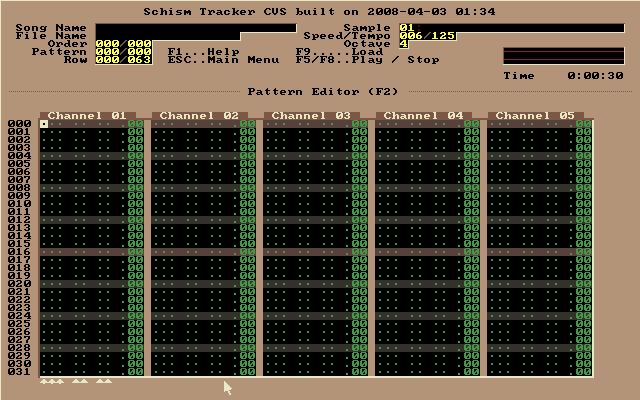
(scrolls down to 63 and then starts at the beginning or next pattern)
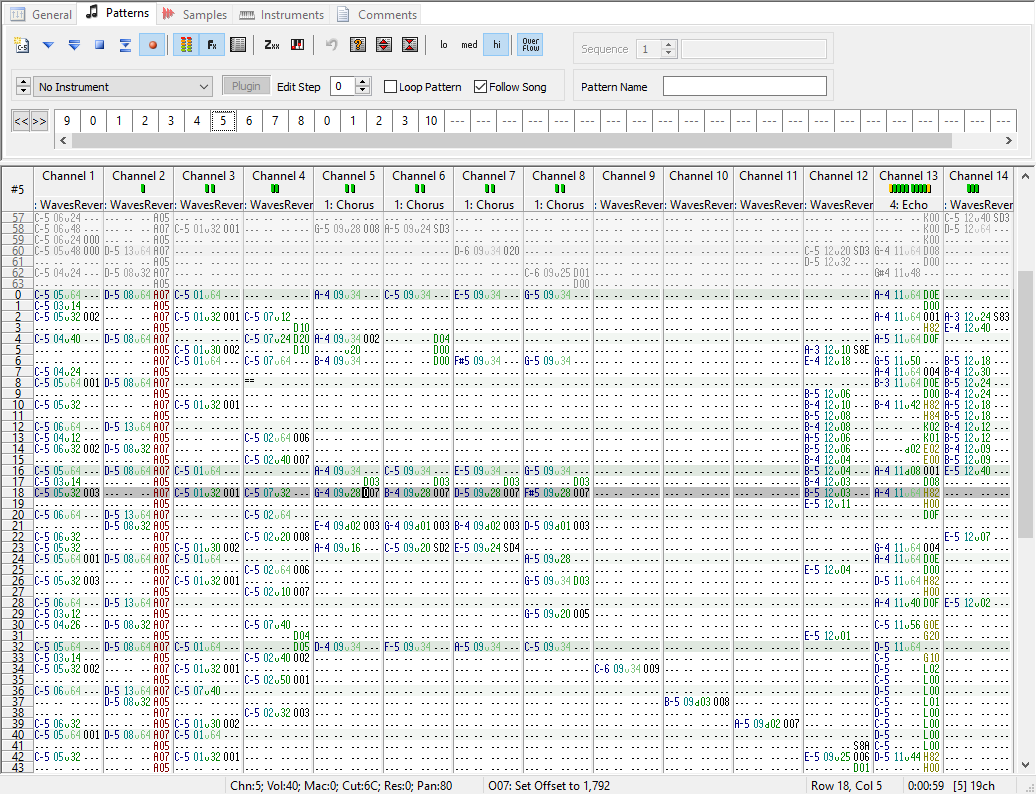
In comparison the default "Bassline Editor" has 1x4x4:

The bassline editor is synchronized with the "time sig":
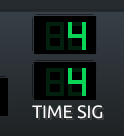
It might make sense to synchronize the pattern editor with the time signature as well. Although I feel like there is a bug in the Bassline Editor where e.g. a 4x5 sig doesn't highlight 5 beats in the bassline editor, it just keeps highlighting 4. But maybe I've been understanding it wrong for LMMS. Or the pattern editor should have a (partially) separate configuration, because some people prefer a higher bars-rate so their composition can be more detailed. Either way, the bars should always be a multiple of 2 from a "beat" in the Bassline Editor. E.g.: 1/1, 2/1, 4/1 or 8/1, the latter being 8 notes in one beat (and I don't think anyone goes beyond that but I'm not sure).
This would be my initial interpretation of what I think makes sense, but this can be worked out in different ways. You can also, for simplicity sake, make 1 beat in the bassline editor equal to 4 bars in the pattern editor. Then the 4x4x4 default pattern size automatically equals the 1x4x4 default bassline editor default. Although this makes the default intended speed locked in a more subjective state.
The columns can be configured in multiple ways, but can keep it simple in this attempt. The first 3 characters are the note and the octave.
E-5 ·· ··
F-5 ·· ··
F#5 ·· ··
··· ·· ··
The next two numbers show the instrument number, convenient when writing drums in one column.
E-5 01 ··
F-5 01 ··
F#5 01 ··
··· ·· ··
This adds the first complexity and subjective choice: If we want the simplest solution and piano-roll drop-in, a pattern can only host one instrument (similar to the piano roll). That's probably best for an initial attempt. But the power of a pattern editor is being able to write little compositions of multiple instruments in one go with the keyboard alone, so the technical implementation (or choice not to) is something to think about. I'll just continue explaining the default SchismTracker pattern view.
The next two numbers are the volume from 0 to 64. When there are no numbers, the default volume is used.
C-3 02 ··
··· ·· ··
··· ·· ··
··· ·· ··
C-3 02 ··
··· ·· ··
··· ·· ··
··· ·· ··
C-3 02 ··
C-3 02 48
C-3 02 32
C-3 02 16
C-3 02 ··
··· ·· ··
··· ·· ··
··· ·· ··
The last three are effects, but those are tracker native, and would require a lot more work, so I'll skip them. I'm happy if we have the basics.
The length of the note is as long as a note-off command is encountered (or a new note is encountered). The note-off command is ===.
C-3 02 ··
··· ·· ··
=== ·· ··
··· ·· ··
C-3 02 ··
··· ·· ··
=== ·· ··
··· ·· ··
C-3 02 ··
C-3 02 48
C-3 02 32
C-3 02 16
C-3 02 ··
··· ·· ··
=== ·· ··
··· ·· ··
You assemble patterns using a "pattern sequencer", which in our case would be similar to the "song editor".
I guess by default default, using LMMS defaults and SchismTracker defaults, one pattern in the song editor would be as long as four blocks.
Technically, in the most basic form using 1 instrument, a pattern is like a limited quantized version of the piano roll. The piano roll has freedom, but the pattern has a set grid. So technically, the pattern can be converted to a piano roll, but not vice-versa, unless the accuracy can be 'rounded' up to the nearest grid line.
Is this the answer you seek?
Redsandro
on 16 Sep 2020
@esaruoho commented:
(..) the main powersource fan is very noisy, not a fan of hums and noises, so gotta take it apart and try to maybe air-spray it clean and hope that fixes it. The workflow of a DOS based tracker is second to none.
If you use IT and S3M, and haven't used general midi instruments but only samples or sample-based instruments (chances are high because no one does that), I would highly recommend a modern lightweight silent mini-sized computer using Ubuntu and SchismTracker. If you're already have the workflow in the fingers, SchismTracker is exactly the same.
Redsandro
on 16 Sep 2020
Note: What you call bars are in fact rows, and one bar is typically 16 rows (4 beats consisting of 4 rows each, so one row equals a 16th note in the default configuration). By default a row consists of 6 ticks (during which parameters such as volume and pitch can 'slide'), which means that with these settings, one beat equals 24 ticks (which coincides with the definition of a MIDI clock tick, which makes MIDI sync wonderfully simple in this specific case).
Since there is no legacy that FL Studio has to emulate (like OpenMPT and Schism Tracker have to), many of these details (in particular the concept of ticks) should probably be a completely ignored in a modern approach to a tracker interface. Renoise might be a better example to stick to because they managed to throw away many old tracker conventions or modernized them significantly, allowing for a more user-friendly, streamlined and higher-quality approach while retaining the same paradigm.
Also, note that ReViSiT works with any VST host, not just Cubase (it works in OpenMPT, so you can have a tracker in a tracker!). Similarly, Redux should work with any VST host as well but it's not a tracker - it took the sampler from Renoise and stripped away the main pattern editor, not vice versa. Still it might appeal to tracker users in DAWs due to its phrase mode, which allows you to use tracker patterns in a more restricted way. So both of these should be valid options for LMMS users.
 sagamusix
on 16 Sep 2020
sagamusix
on 16 Sep 2020
To try and get an idea I downloaded SchismTracker, but for some reason it just doesn't want to output any sound. @Redsandro are you in the lmms discord server?
EDIT: I can't talk now, but it'd be easier to discuss without flooding this issue. 😄
Veratil
on 16 Sep 2020
@Veratil you need to load a sample into schism, then you can play it on the pc keyboard.
esaruoho
on 17 Sep 2020
As I've been thinking about this, I feel like a Tracker view for the piano roll is "underkill" so to speak. What would really work better would be an alternative to the Song Editor instead.
The best thing I can think of for a Tracker view would be a window similar to how the FX Mixer currently works by adding new mixer channels as you go. Each channel would be a track, the same as if adding a track to the song editor. Initially if empty project you'd have no channels, but you can drag an instrument plugin to the Tracker view to add a channel. This sort of removes the need for the instrument number (2nd) column unfortunately. The best I can think of is having it as a pan value. Automation I'm still not sure how to account for yet in this view, but this is what I've come up with currently.
The reason I'm thinking this way is because a tracker view for the piano roll would end up only having a single channel list. We can't add new "channels" because it's all contained internally as a single pattern. I'd rather not modify the pattern object just to account for a tracker view channel.
Veratil
on 22 Sep 2020
Related issues
 demmm
·
3Comments
demmm
·
3Comments
 Wallacoloo
·
3Comments
Wallacoloo
·
3Comments
 mnini
·
3Comments
mnini
·
3Comments
 Gabrielxd195
·
3Comments
Gabrielxd195
·
3Comments
 Sawuare
·
3Comments
Sawuare
·
3Comments