Version 1.2.0-rc5 (Linux/i386, Qt 4.8.6, GCC 4.8.4)
Linux Mint 17.3
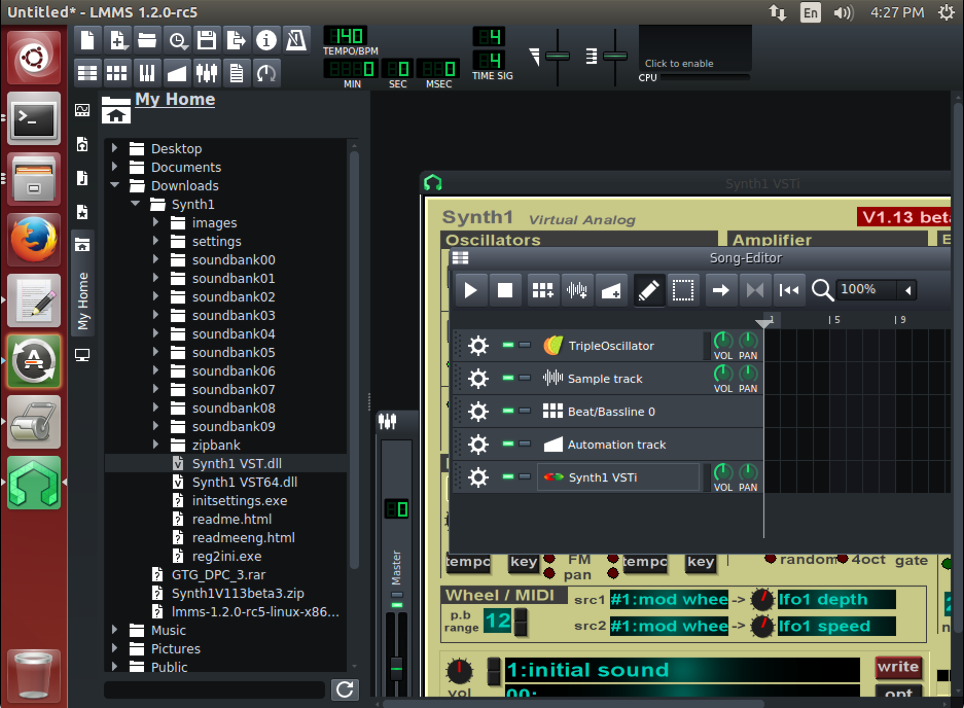
This happens with any VST-plugin. As you can see, the contents of the plugin window overlaps all other windows. But the header of the plugin window behaves normally.

 ghost
ghost
All 10 comments
What do your settings say about the VST embedding method? Can you try the AppImage from https://lmms.io/download/#linux
 Umcaruje
on 9 Jan 2018
Umcaruje
on 9 Jan 2018
The embedding method is "Embed using XEmbed protocol". The issue is that such a behavior was not being appeared on my system in the previous releases (i.e. 1.1.3 and newer).
Unfortunatelly, I currently using a 32bit distribution, so I can't try the AppImage.
ghost
on 9 Jan 2018
Cannot reproduce with Synth1/Qt 5.9/Ubuntu 14.04 x64.
- What window manager are you using?
- What Qt version?
- Is
winecfg,Graphics,Allow Window Manager to control the windowsselected?
 tresf
on 9 Jan 2018
tresf
on 9 Jan 2018
- DE is MATE 1.12.0 (window manager is Caja).
- Qt version is 4.8.6.
- The "Allow Window Manager to control the windows" option is set.
Should I try to rebuild the program with Qt5?
ghost
on 9 Jan 2018
Should I try to rebuild the program with Qt5?
@iamvd Yes, please. VST embedding has been rewritten for Qt5 and it's unlikely that we'll put a lot of work into fixing Qt4-only embedding bugs. Going forward with 1.3.0, Qt4 support will be dropped entirely.
It's strange that you report it used to work with 1.1.3 though. Not much has changed since then in the Qt4-specific code.
It'll be interesting to see whether switchiing to Qt5 fixes this for you. To build with Qt5, pass -DWANT_QT5=ON to CMake.
 lukas-w
on 9 Jan 2018
lukas-w
on 9 Jan 2018
Finally I've done with the building process, which required me to resolve lots of Qt5-related dependencies. And now I can say that the VST GUI works just fine.
Nevertheless, the mouse is going crazy, when I dragging the windows :)

ghost
on 9 Jan 2018
@iamvd which Qt5 version?
tresf
on 9 Jan 2018
@tresf, 5.2.1
Just ran the program. There are no mouse lags for now.
ghost
on 10 Jan 2018
@iamvd are you OK if we close this issue? It sounds like your problems have been resolved by switching to Qt5. Note, we ship our AppImages with Qt 5.9 so any Qt-specific issues you encounter with 5.2.1 should be tested against the AppImage before filing a new bug.
tresf
on 10 Jan 2018
@tresf, no problem.
Many thanks to you, guys, for your support.
Best regards!
ghost
on 10 Jan 2018
Related issues
 SecondFlight
·
3Comments
SecondFlight
·
3Comments
 Firepal
·
3Comments
Firepal
·
3Comments
 FigyTuna
·
3Comments
FigyTuna
·
3Comments
 fentras
·
3Comments
fentras
·
3Comments
 DeRobyJ
·
3Comments
DeRobyJ
·
3Comments
Most helpful comment
@tresf, no problem.
Many thanks to you, guys, for your support.
Best regards!