Lizmap-web-client: Problem with diacritics in labels
Hello, I have problems with Romanian diacritics in labels. In popup there are no problems.
Also in the qgs map document when is loaded in QGIS.
To be more precise, there are problems with the letters "ă" and "ţ".
I have tryied with Romanian Standard and Romanian Legacy keyboard.
Tks!
 catalinmiraute
All 16 comments
Please provide a screenshot.
 nboisteault
on 14 May 2020
nboisteault
on 14 May 2020
Please provide a screenshot.

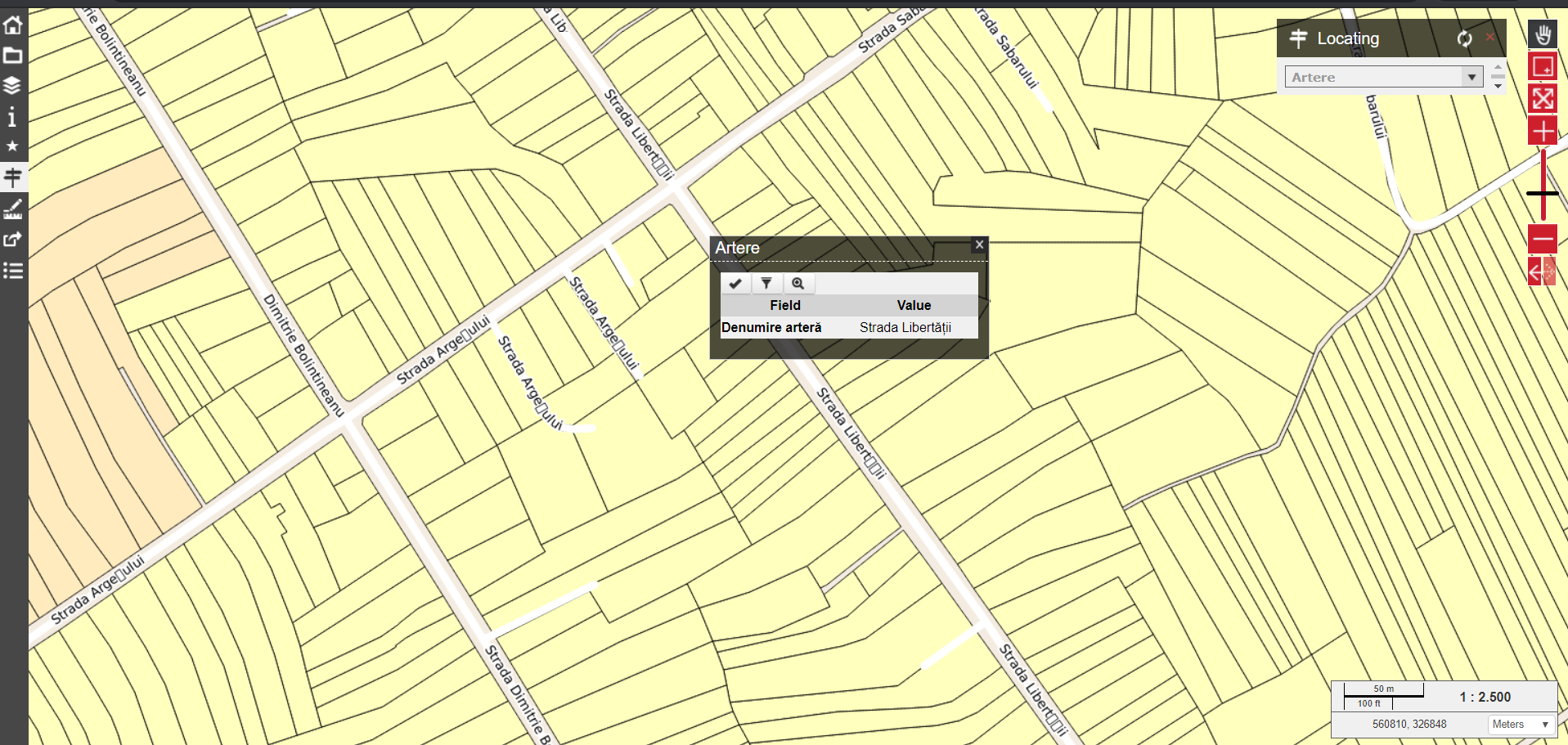
catalinmiraute
on 14 May 2020
Hello, I have problems with Romanian diacritics in labels.
If it's in labels, then the issue is coming from QGIS Server, no?
Please follow the ticket template provided, so we could know which QGIS Desktop/Server version you are using too.
 Gustry
on 14 May 2020
Gustry
on 14 May 2020
According to your screenshots, the rendering is the same between QGIS Desktop and Lizmap, right?
Do you mean you have an encoding problem in QGIS Desktop? Is the issue with the field name or with its value?
Gustry
on 14 May 2020
I am using QGIS Desktop 3.12.2.
The problem apears only in LWC, on labels, with letters "ă" and "ţ".
The data are stored in MS SQl DB.
catalinmiraute
on 14 May 2020
It's not an issue with LWC. You would have the same issue if you load the WMS in QGIS Desktop.
Your popup is fine. The issue is with QGIS Server, providing the tiles.
Did you look your font on the server?
Gustry
on 14 May 2020
@catalinmiraute it's an encoding issue. Change the font of the labels in QGIS Desktop
 ygorigor
on 14 May 2020
ygorigor
on 14 May 2020
@catalinmiraute it's an encoding issue. Change the font of the labels in QGIS Desktop
I used Arial, than Calibri and nothing happened.
Can you give precise info what to change/check?
catalinmiraute
on 14 May 2020
It's not an issue with LWC. You would have the same issue if you load the WMS in QGIS Desktop.
Your popup is fine. The issue is with QGIS Server, providing the tiles.Did you look your font on the server?
I am new in using QGIS Server and I have no idee where to look.
Can you help me ?
catalinmiraute
on 14 May 2020
@catalinmiraute first provide the info on which OS is running your applications.
ygorigor
on 14 May 2020
@catalinmiraute first provide the info on which OS is running your applications.
Windows Server 2019 Standard
catalinmiraute
on 14 May 2020
all of them?
ygorigor
on 14 May 2020
all of them?
Yes, I am testing and I put QGIS Desktop, Server and DB here
catalinmiraute
on 14 May 2020
I had some similar issues. My QGIS Deskop is on Windows, LWC and QGIS Server are on linux. After font change all was OK. In your case I'm not sure then.
ygorigor
on 14 May 2020
I solved the problem like this:
in the file php73.conf from location
..\Apache24\conf\extra
I insert the following line that points to Windows Fonts:
DefaultInitEnv QT_QPA_FONTDIR "C:\Windows\Fonts"
catalinmiraute
on 15 May 2020
Thank you for your feedback.
nboisteault
on 15 May 2020
Related issues
 FPaulsen
·
13Comments
nboisteault
·
9Comments
FPaulsen
·
13Comments
nboisteault
·
9Comments
 tethysgeco
·
8Comments
tethysgeco
·
8Comments
 robibrazze
·
5Comments
robibrazze
·
5Comments
 josemvm
·
13Comments
josemvm
·
13Comments
Most helpful comment
I solved the problem like this:
in the file php73.conf from location
..\Apache24\conf\extra
I insert the following line that points to Windows Fonts:
DefaultInitEnv QT_QPA_FONTDIR "C:\Windows\Fonts"