Lizmap-web-client: Form filtering working on more layer at the same time?
Is your feature request related to a problem? Please describe
Describe the solution you'd like
Hi, currently form filter can work only on one layer at a time and it’s been a great improvement.
Do you think it's feasible to add the option of filtering two or more layers at the same time? Would it be easy or it's a high time-consuming activity?
Describe alternatives you've considered
Additional context
We are also testing a change in the user interface. We have modified the UI as shown in the image below; if you are interested, we could share the js code with you. We think it’s better for users to see the TOC and filter at the same time.
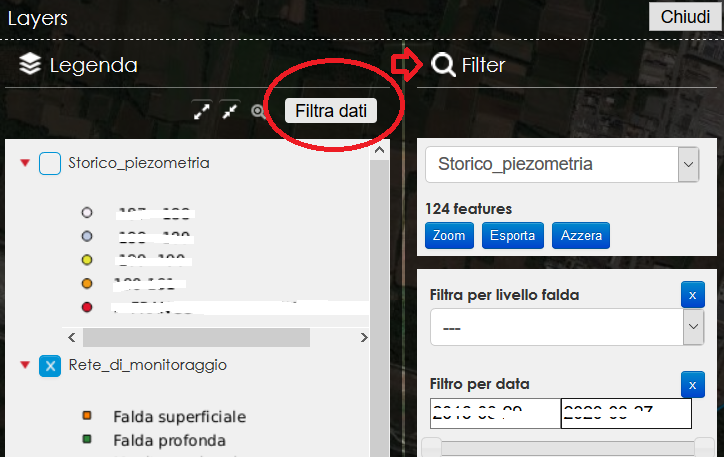
 tethysgeco
All 8 comments
Hi @tethysgeco . Can you share the js code here with your modifications?
 ygorigor
on 8 Apr 2020
ygorigor
on 8 Apr 2020
hi @ygorigor, we're trying adding these lines in media/js:
// add some custom style
var style = ""
$( style ).appendTo( "head" )
lizMap.events.on({
'uicreated': function(e) {
setTimeout(() => {
// add filter panel title
$("#filter #filter-container").before('<h3 style="margin-bottom: 40px; border-bottom: 1px solid rgba(255,255,255,0.5);"><span class="title"><span class="icon" style="background-image: url(/css/filter-icon-white.png); background-position: center; width: 20px; background-size: contain; height: width: 20px; height: 20px; display: inline-block;"></span> <span class="text">Filter</span></span></h3>')
// add filter button on layers panel
$('#switcher-layers-actions').append('<button class="btn-custom" id="custom-filter-switcher" style="outline: none;background: rgba(255,255,255,0.9); border-radius: 3px;color: black; margin: 8px; margin-right: 0px;">Filtra dati</button>');
// open filter panel on click
$("#custom-filter-switcher").click(function(e) {
e.preventDefault();
setTimeout( function() {
$("#filter").toggleClass("active");
}, 200);
})
}, 800);
}
});
it definitely can be improved..
tethysgeco
on 10 Apr 2020
Thank you
ygorigor
on 10 Apr 2020
You can add your javascript here https://github.com/3liz/lizmap-javascript-scripts
 rmarzocchi84
on 5 May 2020
rmarzocchi84
on 5 May 2020
As one filter is reset when choosing another layer (in the filter GUI) I would say that this is a bug rather than a feature request. Opinions? @rldhont
 gioman
on 3 Jun 2020
gioman
on 3 Jun 2020
@mdouchin is it a bug or a feature request ?
 nboisteault
on 7 Aug 2020
nboisteault
on 7 Aug 2020
This line can be commented out to get desired behavior but I've not tested for undesirable side effects.
nboisteault
on 7 Aug 2020
It requires a big refactoring of the code responsible for applying filtering. At the time present, it is not possible to apply a filter on more than one layer.
Keep in mind that triggering a filter applies also the filter to the child layers by following QGIS relations defined in the project, so it is not an easy stuff to change, and changing only the UI won't be enough
 mdouchin
on 7 Aug 2020
mdouchin
on 7 Aug 2020
Related issues
 t0xycus
·
7Comments
t0xycus
·
7Comments
 saeri-ims
·
12Comments
saeri-ims
·
12Comments
 FPaulsen
·
13Comments
FPaulsen
·
13Comments
 Nokram
·
5Comments
Nokram
·
5Comments
 robibrazze
·
5Comments
robibrazze
·
5Comments
Most helpful comment
hi @ygorigor, we're trying adding these lines in media/js:
// add some custom style
var style = ""
$( style ).appendTo( "head" )
lizMap.events.on({
'uicreated': function(e) {
setTimeout(() => {
});
it definitely can be improved..