Live-share: Missing Intellisense/Trigger Suggestion in LiveShare Session
In a new LiveShare session, none of the participants are able to see intellisense or trigger suggestion for code blocks. The host is able to trigger suggestions just fine (although participants can't see them when following host).
We tested in both TypeScript and C# code bases. Type checking seems to work fine. If a participant misspells an attribute or method for example, it will be properly underlined as an error with hover capabilities but again, no intellisense/autocomplete at all.
What was your system configuration?
Product and Version [VS/VSCode]: VsCode 1.42.1
OS Version[macOS/Windows]: Linux and Mac
Live Share Extension Version: 1.0.1653
Target Platform or Language [e.g. Node.js]: C# and Typescript (React)
Steps to Reproduce / Scenario:
- Start new LiveShare session using shareable link and Invite participant
- Observe that participant is unable to trigger intellisense or suggestions
Please attach logs to this issue:
You can access them via the Live Share: Export Logs command from the command palette (ctrl + shift + p) and attach them to this issue
HOST LOGS:
20200228_141518_15828993188680_VSCode.log
20200228_141521_Agent.log
20200228_141525_15828993253960_VSLSAudio.log
20200228_142333_15828998136770_VSCode.log
20200228_142336_15828998168900_VSLSAudio.log
PARTICIPANT LOGS:
20200227_150853_15828161330880_VSCode.log
20200227_150854_Launcher.log
20200227_150856_Agent.log
20200227_154220_15828181408750_VSCode.log
20200227_154221_Launcher.log
20200227_162355_15828206359710_VSCode.log
20200227_162356_Launcher.log
20200227_185325_15828296058910_VSCode.log
20200227_185326_Launcher.log
20200227_190834_15828305140580_VSCode.log
20200227_190834_Launcher.log
20200228_002010_15828492106140_VSCode.log
20200228_002010_Launcher.log
20200228_002012_Agent.log
20200228_142020_15828996202220_VSCode.log
20200228_142021_Launcher.log
20200228_142024_Agent.log
20200228_151355_15829028357560_VSCode.log
20200228_151356_Launcher.log
Screenshots
If applicable, add screenshots to help explain your problem.
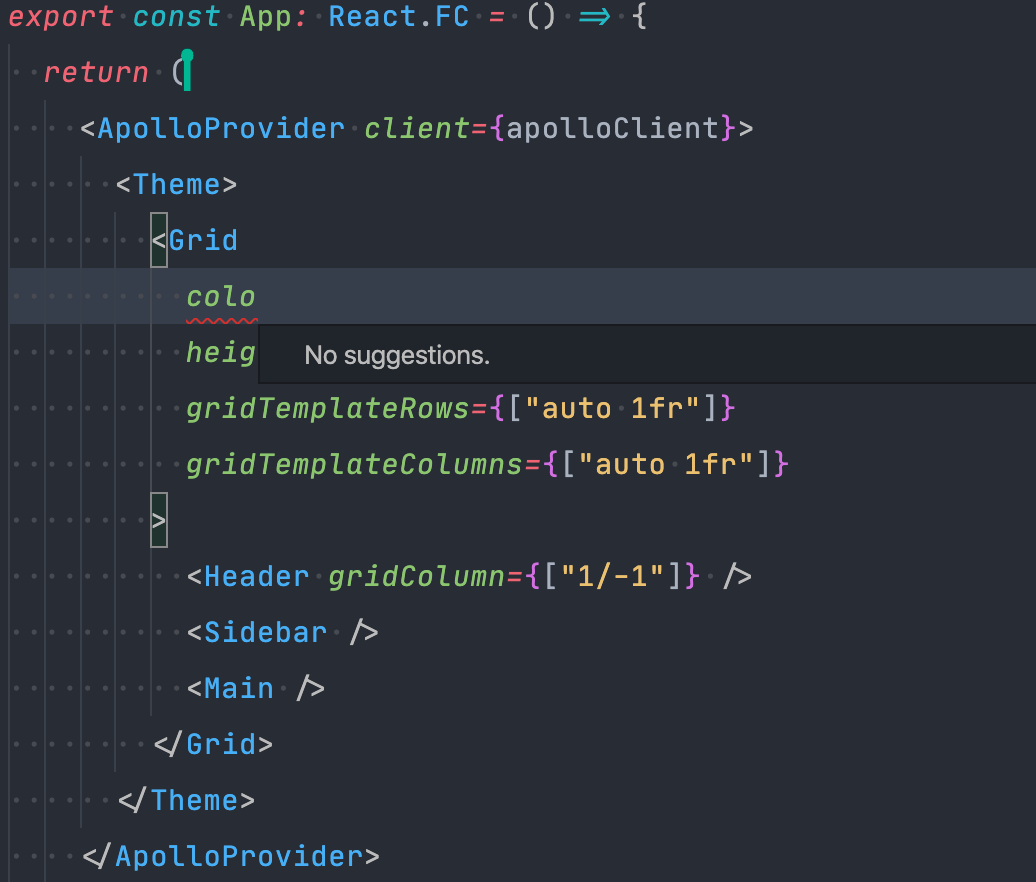
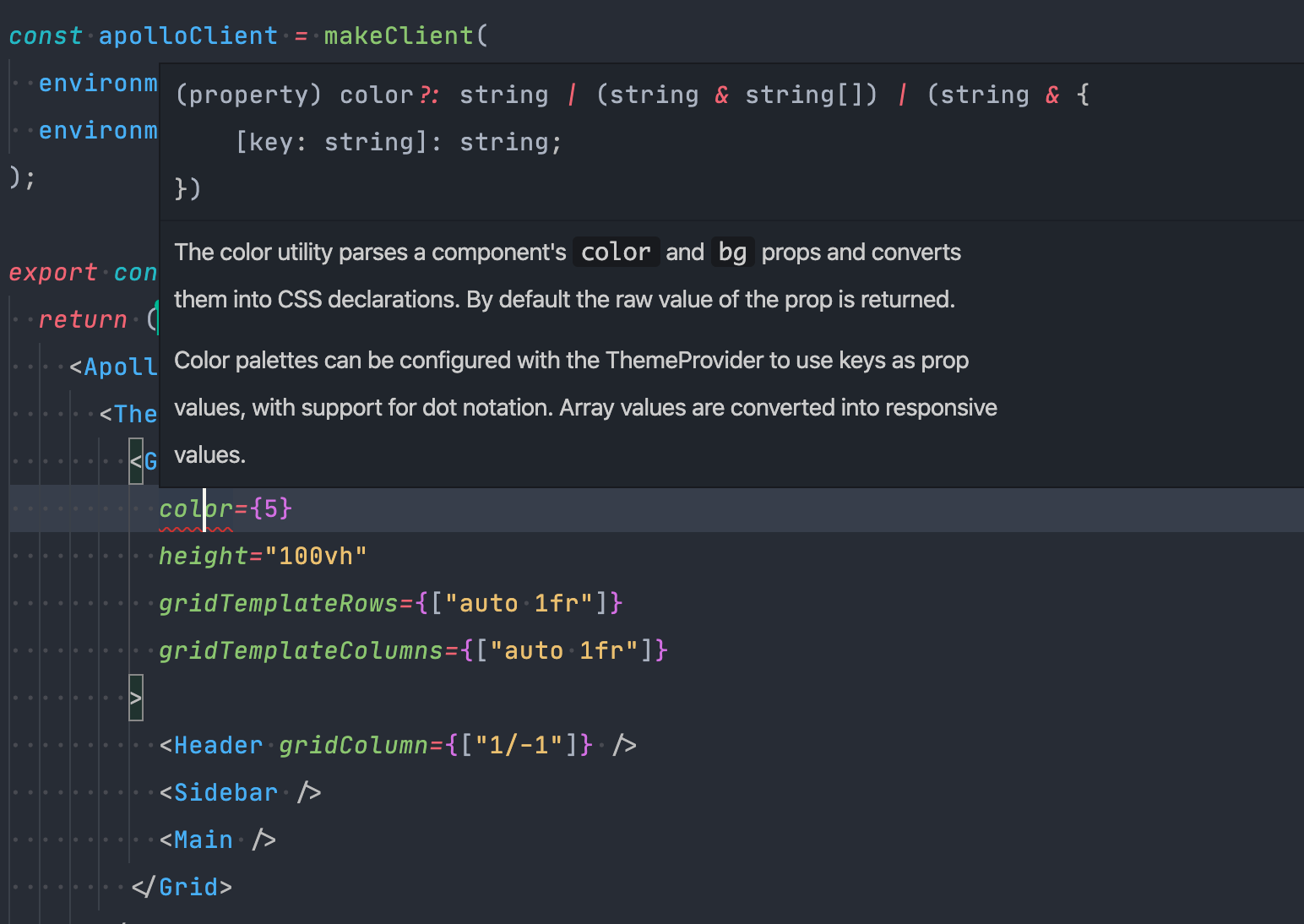
 WonderPanda
All 12 comments
Hello @WonderPanda, thanks for reaching out.
are the host and the guest using VSCode right?
 aletsdelarosa
on 2 Mar 2020
aletsdelarosa
on 2 Mar 2020
Yes both host and guest are using VsCode
WonderPanda
on 3 Mar 2020
Is there any news about this? I'm having the same problem (VSCode 1.43 on macOS).
 micheleberetta98
on 13 Mar 2020
micheleberetta98
on 13 Mar 2020
Yes, we should be releasing a fix early next week!
Note: it's by design that if the host triggers completion it's not visible to the guest. However, if the guest triggers completion, they should get the same results that the host would.
 daytonellwanger
on 13 Mar 2020
daytonellwanger
on 13 Mar 2020
@daytonellwanger has that new version been released? I am up to date with all the latest extensions but am still experiencing this issue with my team.
Product and Version [VS/VSCode]: VsCode 1.43
OS Version[macOS/Windows]: Mac
Live Share Extension Version: 1.0.1847
Target Platform or Language [e.g. Node.js]: Typescript (React)
 jleider
on 26 Mar 2020
jleider
on 26 Mar 2020
@jleider , yes the fix should be in 1.0.1847. I wonder if you're hitting a separate issue than the one I fixed.. Same repro? Guest triggers completion and doesn't see anything?
daytonellwanger
on 26 Mar 2020
@daytonellwanger Yes, usually intellisense (hover/completion) works as expected but sometimes it just doesn't work from the beginning or if it is working initially it will stop working at some point during the shared session.
jleider
on 26 Mar 2020
The later ones are host logs, the earlier ones are guest logs. IntelliSense was mostly working during host sessions but was not working for the initial guest session.
20200326_205150_15852559102070_VSLSAudio.log
20200326_205147_Agent.log
20200326_205144_Launcher.log
20200326_205144_15852559041470_VSCode.log
20200326_162314_15852397940240_VSLSAudio.log
20200326_162308_Launcher.log
20200326_162307_15852397879240_VSCode.log
20200326_162253_Agent.log
20200326_162249_Launcher.log
20200326_162249_15852397693460_VSCode.log
20200326_161917_15852395572990_VSLSAudio.log
20200326_161915_Launcher.log
20200326_161915_15852395551020_VSCode.log
20200326_160744_15852388645450_VSLSAudio.log
20200326_160740_Agent.log
20200326_160740_15852388604070_VSCode.log
20200326_160735_Launcher.log
I'll have my coworker upload his logs as well.
jleider
on 26 Mar 2020
Ok, thanks! In that case, if it's not happening 100% of the time from the very beginning of the session, this is a separate issue than the one I solved. I'll see if I can find anything in your logs that indicates the issue..
Any suggestions on how I could try to repro? How often do you find language services stop working? Does it happen when multiple people are typing simultaneously? On poor network connections? On large projects? (All just example questions btw.)
daytonellwanger
on 26 Mar 2020
Thank you @daytonellwanger, here are my logs as well.
20200325_213639_Agent.log
20200326_214855_15852593352650_VSCode.log
20200326_214855_Launcher.log
20200326_214856_15852593369790_VSLSAudio.log
20200326_154256_15852373767460_VSCode.log
20200326_185103_15852486638220_VSCode.log
20200326_193159_15852511193870_VSLSAudio.log
20200326_193158_15852511186830_VSCode.log
20200326_193154_Launcher.log
20200326_162342_15852398225730_VSLSAudio.log
20200326_162341_15852398218580_VSCode.log
20200326_185111_15852486719120_VSLSAudio.log
20200326_185104_Launcher.log
20200326_162338_Launcher.log
20200325_213647_15851722071310_VSLSAudio.log
20200325_213645_15851722056070_VSCode.log
20200326_154256_Launcher.log
20200326_154258_15852373785170_VSLSAudio.log
20200325_214356_15851726365800_VSLSAudio.log
20200325_214355_15851726351160_VSCode.log
 johndatserakis
on 26 Mar 2020
johndatserakis
on 26 Mar 2020
@daytonellwanger We have a fairly large project but that doesn't seem to be the issue as sometimes it works flawlessly. Then again, when its not working with one host it seems to not work regardless of how many times you reconnect. When its working at first it can start failing after 5-10 minutes or so. Unfortunately, I haven't noticed a pattern of when it happens or not.
jleider
on 26 Mar 2020
Thanks! That's already very useful info.
daytonellwanger
on 27 Mar 2020
Related issues
 YardGnomeNinja
·
3Comments
YardGnomeNinja
·
3Comments
 evasgit
·
3Comments
evasgit
·
3Comments
 PranavGPR
·
3Comments
PranavGPR
·
3Comments
 Chuxel
·
3Comments
Chuxel
·
3Comments
 csharpfritz
·
4Comments
csharpfritz
·
4Comments
Most helpful comment
Yes, we should be releasing a fix early next week!
Note: it's by design that if the host triggers completion it's not visible to the guest. However, if the guest triggers completion, they should get the same results that the host would.