Describe what happened:
I'm a guest in a live share session. We're working together on a C# (.Net Framework 4.8) solution. The session is not read-only: I'm able to edit files and trigger builds.
I'm unable to go to any definitions whatsoever. Ctrl-clicking on a type name does nothing. Choosing "Go To Definition" from the context menu brings up the "Cannot navigate to the symbol under the caret" window.
Also, "Find All References" from the context menu finds nothing.
"View Call Hierarchy" from the context menu causes the IDE to throw an AggregateException and offers me a log file. It's attached.
This is the first time I've used Live Share so I don't really know how it's supposed to work, but it's not a seamless or nice experience for Visual Studio to be reduced to Notepad's functionality.
What was your system configuration?
Product and Version VS 2019
OS Version Windows 10 1909 (18363.628)
Live Share Extension Version 1.0.1586.0
Target Platform or Language C# .Net Framework 4.8
I have these extensions installed:
| Extension | Version |
|--|--|
| Live Share | 1.0.1586.0 |
| Developer Analytics Tools | 16.4.460.23317 |
| Cloud Explorer for VS 2019 Preview | 1.2.1910.102 |
| Visual Studio IntelliCode | 2.2.389.48252 |
| Microsoft Library Manager | 2.0.87.20923 |
Steps to Reproduce / Scenario:
- Have a friend start a live share session
- Have said friend send you a link inviting you to it
- I opened the link in a browser
- I observed the aforementioned behavior
Sorry I know that's not a very helpful repro, but that's what we did. Hopefully the logs show something.
Please attach logs to this issue:
You can access them via the Live Share: Export Logs command from the command palette (ctrl + shift + p) and attach them to this issue <-- those instructions look like they're for VS Code. No love for Visual Studio? Lucky for you guys when it threw the exception I described earlier it offered the attached log file (which GitHub wouldn't let me attach unless I tossed it in a zip file). If you need something different then please update these instructions telling me how.
ActivityLog.zip
Screenshots
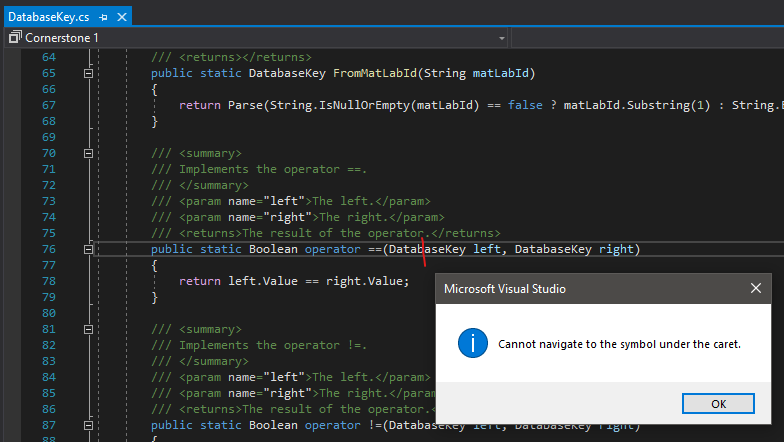
^^ I added a red line where my caret was. It won't be hard for you to guess what class I was in when I did this.
 matthew-a-thomas
All 11 comments
I used the "Report a Problem" thing in Visual Studio. (The HTML comment in the instructions said something about doing that). The title of that issue is the URL of this one. I included a screen recording just showing the stuff I described above. Hopefully that issue report landed in a bucket you'll be able to see because all the reporting tool said after that was "thanks"
matthew-a-thomas
on 12 Feb 2020
@matthew-a-thomas: thanks for reporting this issue! The ActivityLog you included does show that there was an issue loading language service components which explains the degraded experience. Adding @daytonellwanger and @aletsdelarosa to investigate further. They might have some follow up questions for you.
 jramsay
on 13 Feb 2020
jramsay
on 13 Feb 2020
They might have some follow up questions for you.
Fire away, @daytonellwanger and @aletsdelarosa !
matthew-a-thomas
on 13 Feb 2020
Hello @matthew-a-thomas could you tell us the VS version of the host?
Thanks!
 aletsdelarosa
on 13 Feb 2020
aletsdelarosa
on 13 Feb 2020
Hey @matthew-a-thomas , thanks for the very detailed bug report!
Language services should be working in a Live Share session.
From your logs, it looks like the issue is that Live Share is trying to load the wrong version of one of our dependencies. I'm not sure why that'd be the case, and can't repro the issue.
A few things you could try:
- Clear the MEF cache (go to
%LOCALAPPDATA%\Microsoft\VisualStudio\YourBuildOfVSand delete theComponentModelCachefolder and any.cachefiles inExtensions). - Uninstall and reinstall Live Share
- Uninstall and reinstall VS
Sorry I don't have a better suggestion, but it looks like it's a machine-specific problem.
 daytonellwanger
on 14 Feb 2020
daytonellwanger
on 14 Feb 2020
Hello @matthew-a-thomas could you tell us the VS version of the host?
Thanks!
@aletsdelarosa The host is running 16.4.5 like me
matthew-a-thomas
on 14 Feb 2020
thanks for the very detailed bug report!
@daytonellwanger Happy to help.
So both I and the host performed the first and second steps (cleared MEF cache, reinstalled Live Share) with no change. Then we both installed VS 2019 Preview (16.5.0 Preview 2.0) configured with the .Net load and the Live Share extension. We tried all permutations of VS normal vs preview as host vs client and the only combination that works is when both of us are running VS preview.
I hope that helps. We might try reinstalling VS normal 2019 next week. Let me know if you have any questions.
matthew-a-thomas
on 14 Feb 2020
Thanks for jumping through all the hoops @matthew-a-thomas ! I'm able to repro and am working on a fix. Hopefully we can get it out to you this week or next. I'll keep you posted.
daytonellwanger
on 19 Feb 2020
(But yes, upgrading to VS 2019 Preview would be a temporary work-around)
daytonellwanger
on 19 Feb 2020
@matthew-a-thomas this should be fixed as of yesterday's release. Let me know if you find otherwise.
daytonellwanger
on 23 Feb 2020
@daytonellwanger Yep, it works now. Thanks!
matthew-a-thomas
on 24 Feb 2020
Related issues
 arc95
·
3Comments
arc95
·
3Comments
 Chuxel
·
3Comments
Chuxel
·
3Comments
 jpopadak
·
3Comments
jpopadak
·
3Comments
 PranavGPR
·
3Comments
PranavGPR
·
3Comments
 csharpfritz
·
4Comments
csharpfritz
·
4Comments