Live-share: Loss of Intellisense and syntax highlighting in VS for guest
Product and Version [VS/VSCode]:
OS Version [macOS/Windows]:
Live Share Extension Version:
Target Platform or Language [e.g. Node.js]:
Steps to Reproduce / Scenario:
- Go to '...'
- Click on '....'
- Scroll down to '....'
- See error
Screenshots
If applicable, add screenshots to help explain your problem.
 fubaduba
All 9 comments
Also, your logs may provide us with helpful information. You can access them via the Live Share: Export Logs command from the command palette (ctrl + shift + p) and attach them to this issue.
fubaduba
on 28 Jan 2020
Product and Version: Visual Studio Enterprise 2019, version 16.4.3
OS Version: Windows 10 version 1909 build 18363.592
Live Share Extension Version: 1.0.1510.0
Target Platform or Language: C#, asp.net core 3.1
The guest intellisense, auto-complete, quick actions and syntax highlighting are completely not working.
 Riff451
on 29 Jan 2020
Riff451
on 29 Jan 2020
Do you know what IDE/Version the host is on?
 daytonellwanger
on 29 Jan 2020
daytonellwanger
on 29 Jan 2020
And are you able to repro with a vanilla C# ASP.NET app?
daytonellwanger
on 29 Jan 2020
Hi,
the host is:
IDE: Visual Studio Enterprise 2019 version 16.4.3
Live share extension: 1.0.1510.0
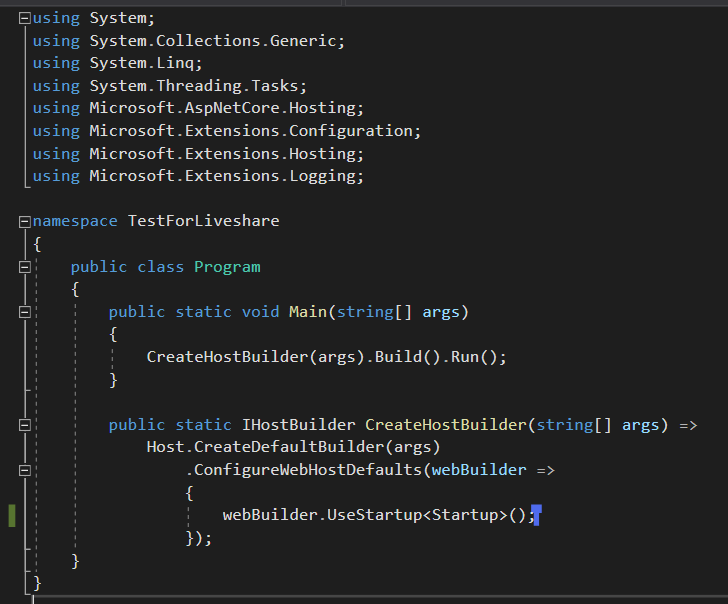
We've just tried with an empty vanilla ASP.NET core 3.1 and we've got the same result, you can see no highlighting and if I type no auto-completion, suggestions, go-to-definition, etc.
And we tried to swap between host and guest as well. Thank you.
Riff451
on 30 Jan 2020
Hi there, I've suffered with this issue myself. I'm watching a Microsoft stream on Twitch hosted by @csharpfritz. We've seen this fail on a couple of guest sessions where the guest is unable to get intellisense.
Here's a screenshot of the stream

 FacePalmDev
on 30 Jan 2020
FacePalmDev
on 30 Jan 2020
Ok, I'm able to repro, so should be pretty quick to clear up. We should have this resolved shortly! I'll keep you updated.
daytonellwanger
on 30 Jan 2020
any update?
 VALLIS-NERIA
on 9 Jun 2020
VALLIS-NERIA
on 9 Jun 2020
@VALLIS-NERIA , I believe this is fixed on newer versions of VS. Are you still seeing it repro? If so, what's your setup?
daytonellwanger
on 11 Jun 2020
Related issues
 dec0dOS
·
4Comments
dec0dOS
·
4Comments
 PranavGPR
·
3Comments
PranavGPR
·
3Comments
 roblourens
·
4Comments
roblourens
·
4Comments
 Chuxel
·
3Comments
Chuxel
·
3Comments
 Luchiwis
·
3Comments
Luchiwis
·
3Comments
Most helpful comment
Ok, I'm able to repro, so should be pretty quick to clear up. We should have this resolved shortly! I'll keep you updated.