Live-share: LiveShare Audio not updating
Product and Version [VS/VSCode]: Version 1.36.0 (1.36.0)
OS Version [macOS/Windows]: macOS
Live Share Extension Version: 0.1.56
Target Platform or Language [e.g. Node.js]: JavaScript
liveshare.zip
Steps to Reproduce / Scenario:
- Start VS Code or Insiders - My problem existed on both platforms
- Update Process Begins and ends in
Failure to install VS Live Share Audio Dependencies due to network issues
Expected Behavior:
Installation completes without failure
Debug Process that fixed the problem:
- Make sure that it's not a network issue by checking if you are behind some sort of proxy. I used, Proxy Check. If you are behind a proxy follow the steps here - Network Debugging
- Export the Live Share logs
- Remove extensions from VS Code: Live Share Extension Pack, Live Share Audio and Live Share
- Open Zip file and locate log file ending with
VSLSAudio.log. Find the last log entry. - In my instance, the error message was
[2019-07-09 14:40:12.942 LiveShareAudio E] Failed at stage: installPackages - Dependency download failed. Error: ENOTEMPTY: directory not empty, rmdir '/Users/dhallan/.vscode-insiders/extensions/ms-vsliveshare.vsliveshare-audio-0.1.56/node_modules/temp/Electron.app/Contents/Resources' - Because of the error messages I
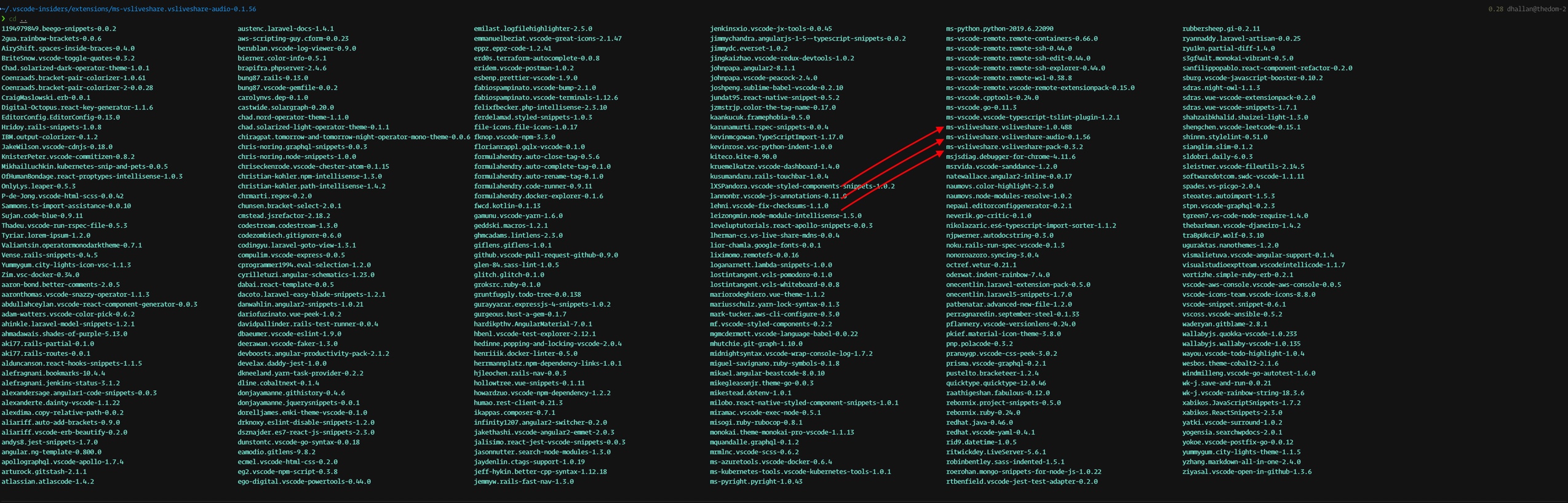
rm -f'd the following directories,ms-vsliveshare.vsliveshare-1.0.488,ms-vsliveshare.vsliveshare-audio-0.1.56,ms-vsliveshare.vsliveshare-pack-0.3.2 - Restart VS Code
- Reinstall Live Share and Live Share Audio
9. Successful install with no errors
I think there were a couple of problems. The first being after the deletion of the plugin the node_modules and directories remained. So short of going in yourself and deleting them they persist after removal of the plugin. The second thing that I think is happening is that when Live Share Audio attempted to update it wants to create a dir that is already created and it rmdir command is not actually removing the directories it needs to install into if they are already created. The directory /Users/dhallan/.vscode-insiders/extensions/ms-vsliveshare.vsliveshare-audio-0.1.56/node_modules/temp/Electron.app/Contents/Resources' was there even after failed attempts at updating.
TLDR:
Error happened because of the directory LS Audio needed to install into already existed. Delete all Live share plugins and make sure that all the directories at .vscode-extensions/{all the Live share things} are removed. Reinstall JUST Live share, Live Share Audio without using the plugin that installs all these in a group and my problem was solved.
Screenshots
If applicable, add screenshots to help explain your problem.
removed directories at: /Users/dhallan/.vscode-insiders/extensions/ms-vsliveshare.vsliveshare-audio-0.1.56 ⬇
 polyglotdev
All 2 comments
@CodefulDom: this is great! Thanks so much for the investigation! From the above I can repro an issue where if the install fails our removal of temp .asar files was failing. Thus, the Live Share Audio extension wasn't able to reinstall the required assets until the audio extension was manually deleted & reinstalled. The fix for this will be included in our next release.
 jramsay
on 23 Jul 2019
jramsay
on 23 Jul 2019
@jramsay thanks for taking a look at it!!!!
polyglotdev
on 24 Jul 2019
Related issues
 avanderhoorn
·
148Comments
avanderhoorn
·
148Comments
 aeperez94
·
33Comments
aeperez94
·
33Comments
 theAndrewCline
·
31Comments
theAndrewCline
·
31Comments
 david50407
·
95Comments
david50407
·
95Comments
 joeynguyen
·
26Comments
joeynguyen
·
26Comments
Most helpful comment
@CodefulDom: this is great! Thanks so much for the investigation! From the above I can repro an issue where if the install fails our removal of temp .asar files was failing. Thus, the Live Share Audio extension wasn't able to reinstall the required assets until the audio extension was manually deleted & reinstalled. The fix for this will be included in our next release.