Live-share: Cannot commit from VS Code if this extension is enabled
Product and Version [VS/VSCode]: VSCode 1.23.1
OS Version [macOS/Windows]: Windows 10 Pro
Live Share Extension Version: 0.3.264
Target Platform or Language [e.g. Node.js]: ?
Steps to Reproduce / Scenario:
When I install and enable this extension, trying to commit using VS Code's Source Control sidebar causes an error pop-up "Git: failed to execute git" and in the Git Output logs I can see an "error" *** Please tell me who you are., indicating that git could not figure out my username and email to create the commit. But if I run git config --get user.name (or user.email) from the terminal, the correct values come up. Furthermore, doing git commit -m "<some message>" from the terminal also works as expected.
Unrelated to the commit issue but apparently also caused by this extension (and probably due to the same root cause) I noticed that in Python projects that use pipenv, when the project is loading the following error occurs: Workspace contains pipfile but attempt to run 'pipenv --venv' failed ....
It seems to me like commands that should be running from the project folder are not running there (thus git fails to find my global configuration, and pipenv cannot figure out the path to the virtual environment because it's not running in the folder where the virtual environment was created).
I couldn't find anything that seemed relevant in this extension's logs, nor VS Code's logs. But as soon as I disable this extension, everything works as expected.
Steps to reproduce:
(Assumes a working git installation with global configuration that includes user.name and user.email)
- Install this extension.
- Create a new, empty project, go to VS Code's Source Control sidebar, and initialize the repository.
- Add an empty file to the project, stage it, and try to commit it using VS Code's Source Control sidebar.
 alexvy86
All 16 comments
Here you go, I split it on ;
PATH=
.bin
C:\Program Files (x86)Calibre2\
C:\Program Files (x86)\Embarcadero\Studio\19.0\bin
C:\Program Files (x86)\Embarcadero\Studio\19.0\bin64
C:\Program Files (x86)\Gpg4win..\GnuPG\bin
C:\Program Files (x86)\Intel\Intel(R) Management Engine Components\DAL
C:\Program Files (x86)\Intel\Intel(R) Management Engine Components\IPT
C:\Program Files (x86)\Intel\Intel(R) Management Engine Components\iCLS\
C:\Program Files (x86)\Microsoft SDKs\AzureCLI2\wbin
C:\Program Files (x86)\Microsoft SQL Server\140\DTS\Binn\
C:\Program Files (x86)\Microsoft SQL Server\140\Tools\Binn\
C:\Program Files (x86)\Microsoft SQL Server\140\Tools\Binn\ManagementStudio\
C:\Program Files (x86)\Microsoft SQL ServerClient SDK\ODBC\130\Tools\Binn\
C:\Program Files (x86)\NVIDIA Corporation\PhysXCommon
C:\Program Files (x86)\Windows Kits\10\Windows Performance Toolkit\
C:\Program FilesCalibre2\
C:\Program FilesCommon Files\Intel\WirelessCommon\
C:\Program Files\Docker\Docker\Resources\bin
C:\Program Files\Gitcmd
C:\Program Files\Intel\Intel(R) Management Engine Components\DAL
C:\Program Files\Intel\Intel(R) Management Engine Components\IPT
C:\Program Files\Intel\Intel(R) Management Engine Components\iCLS\
C:\Program Files\Intel\WiFi\bin\
C:\Program Files\Microsoft SDKs\Azure\Visual Studio Connected Environment CLI\
C:\Program Files\Microsoft SQL Server\130\Tools\Binn\
C:\Program Files\Microsoft VS Code\bin
C:\Program Files\Microsoft\Web Platform Installer\
C:\Program Files\OpenVPN\bin
C:\Program Files\PuTTY\
C:\Program Filesdotnet\
C:\Program Files\nodejs\
C:\ProgramData\chocolatey\bin
C:\Python36\
C:\Python36\Scripts\
C:\Users\Public\Documents\Embarcadero\Studio\19.0\Bpl
C:\Users\Public\Documents\Embarcadero\Studio\19.0\Bpl\Win64
C:\Users\alexv.dotnet\tools
C:\Users\alexv\AppData\Local\Keybase\
C:\Users\alexv\AppData\Local\Microsoft\WindowsApps
C:\Users\alexv\AppData\Local\Microsoft\WindowsApps
C:\Users\alexv\AppData\Local\Programs\Fiddler
C:\Users\alexv\AppData\Roaming\npm
C:\WINDOWS
C:\WINDOWS\System32\OpenSSH\
C:\WINDOWS\System32\Wbem
C:\WINDOWS\System32\WindowsPowerShell\v1.0\
C:\WINDOWS\system32
C:\windows
C:\windows\System32\Wbem
C:\windows\System32\WindowsPowerShell\v1.0\
C:\windows\system32
D:\Users\alexv\Tools
alexvy86
on 6 Jun 2018
Hi @alexvy86, this is an interesting bug, really baffling. I'm unable to reproduce it and we haven't had anyone else report anything like it.
I looked at the source code for the Git extension for VS Code. It explicitly specifies the repository root as the CWD when invoking git commands. It doesn't rely on the extension process CWD or PATH. So I'm having trouble imagining how the Live Share extension could have possibly affected it.
Does this problem still occur for you if you re-enable Live Share? Could it have actually been the reload of VS Code (after disabling the extension) that fixed the problem?
Thanks for your help!
 jasongin
on 9 Jun 2018
jasongin
on 9 Jun 2018
It still happens when I re-enable Live Share :(. I tried disabling some other extensions to see if a particular combination caused the issue, but I always run into it, even with all extensions disabled (except Live Share).
I also tried launching VS Code in "a new profile" with the --user-data-dir argument; same behavior.
This are 2 examples of slightly different things that I've seen in the Git Output panel. I didn't copy the whole log (up until I commit) for the first example, but you can at least see that git complains it's not in a repository when 3 commands above it very clearly said that it is. Not sure why the sequence of commands is different in the second example, and I haven't been able to reproduce the first one.
Looking for git in: C:\Program Files\Git\cmd\git.exe
Using git 2.17.1.windows.2 from C:\Program Files\Git\cmd\git.exe
> git rev-parse --show-toplevel
> git config --get commit.template
Open repository: f:\Sandbox\bug-demo
> git status -z -u
> git rev-parse --show-toplevel
> git symbolic-ref --short HEAD
fatal: not a git repository (or any of the parent directories): .git
Looking for git in: C:\Program Files\Git\cmd\git.exe
Using git 2.17.1.windows.2 from C:\Program Files\Git\cmd\git.exe
> git rev-parse --show-toplevel
> git config --get commit.template
Open repository: f:\Sandbox\bug-demo
> git status -z -u
> git symbolic-ref --short HEAD
> git rev-parse master
> git rev-parse --symbolic-full-name master@{u}
fatal: no upstream configured for branch 'master'
> git for-each-ref --format %(refname) %(objectname) --sort -committerdate
> git remote --verbose
> git show :one.py
> git check-ignore -z --stdin
> git commit --quiet --allow-empty-message --file -

*** Please tell me who you are.
Here are the logs printed to the console when I launch VS Code from a command prompt with code --verbose --log trace (with all other extension disabled, just enabling/disabling VS Live Share). They include me trying to commit, thus in the log with Live Share enabled you can see a line [main 12:54:41 PM] windowsService#showMessageBox 1, which I assume is the error pop-up I get saying Git: failed to execute git.
liveshare-disabled.txt
liveshare-enabled.txt
Since no one else has ran into this it seems I really hit an edge case, so I understand if it's not the highest priority, but I'm happy to help troubleshooting as much as I can with my setup.
alexvy86
on 9 Jun 2018
Update: I just tried installing VS Live Share in another machine with a similar (not quite identical) setup, and it didn't cause any issues there... I'll see if I can find any particular differences. Worst case I'll try reinstalling Live Share in the environment that's having issues and see what that does.
alexvy86
on 9 Jun 2018
@alexvy86 Thanks so much for helping look into this! This is definitely a high priority bug, and we’re still trying to repro it so we can identity what might be going on here. This is definitely a strange bug 🤔
 lostintangent
on 9 Jun 2018
lostintangent
on 9 Jun 2018
No problem :)
Another update: I uninstalled and reinstalled the Live Share extension but I'm still getting the same error. Will keep researching.
alexvy86
on 9 Jun 2018
Possibly related to #404 and #419.
jasongin
on 11 Jun 2018
After reading through those two issues, just for completeness let me say that I did try to share my VS Code session with the extension (once, didn't quite work) before noticing this problem. Not sure if it'll end up mattering since those other two issues occur even without trying to do it, but just in case. I haven't tried sharing again after I uninstalled and reinstalled the extension.
alexvy86
on 11 Jun 2018
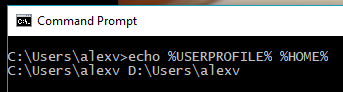
I've had this issue, and it appears to be that live share modifies the HOME environment variable within process.env. It appears to set it to the value of USERPROFILE, which is not a problem if you haven't modified HOME. This means that git cannot find your config, and also prevents some other programs (pipenv, gpg, etc.) from working properly, as they require a correct HOME.
It doesn't seem to affect the process.env of the Developer Tools window, but it does affect other extensions, including git.
 comp500
on 14 Jun 2018
comp500
on 14 Jun 2018
@comp500 Aha! @jasongin and I were just talking about the fact that we believed this issue was caused due to the HOME env var getting mutated. So thanks for chasing that down 😄
It appears like one of our transitive NPM dependencies does this, so we should look into replacing it with something else.
lostintangent
on 15 Jun 2018
Awesome! :) I can confirm that in my setup, USERPROFILE and HOME are different:
alexvy86
on 15 Jun 2018
@comp500 @lostintangent Great finds! Now that the problem is understood, I'm sure we can fix this fairly soon.
jasongin
on 15 Jun 2018
@alexvy86 @comp500 The latest VS Live Share extension (0.3.317) that is now available in the Marketplace should address your issue. If you can confirm that the issue you reported is resolved it would be greatly appreciated. thanks!
 Chuxel
on 20 Jun 2018
Chuxel
on 20 Jun 2018
Seems like everything's working now on my end. I was able to commit from VS Code, and I didn't get the Workspace contains pipfile but attempt to run 'pipenv --venv' failed error anymore. Thanks guys!
alexvy86
on 20 Jun 2018
@alexvy86 Yay! It feels good to get this issue resolved 😃Thanks again for all your help tracking this down.
I'll go ahead and close this then, but please re-open it if you notice any other problems occur. Thanks!
lostintangent
on 20 Jun 2018
Works for me as well, thanks!
comp500
on 20 Jun 2018
Related issues
 david50407
·
95Comments
jasongin
·
86Comments
david50407
·
95Comments
jasongin
·
86Comments
 avanderhoorn
·
148Comments
avanderhoorn
·
148Comments
 joeynguyen
·
26Comments
joeynguyen
·
26Comments
 aracpyon
·
28Comments
aracpyon
·
28Comments
Most helpful comment
I've had this issue, and it appears to be that live share modifies the HOME environment variable within process.env. It appears to set it to the value of USERPROFILE, which is not a problem if you haven't modified HOME. This means that git cannot find your config, and also prevents some other programs (pipenv, gpg, etc.) from working properly, as they require a correct HOME.
It doesn't seem to affect the process.env of the Developer Tools window, but it does affect other extensions, including git.