Lit-html: shady-render @apply is broken in 0.10.1+
CSS mixins are not applied to Polymer elements:
https://jsfiddle.net/bw03sng5/1
Works in 0.10.0:
https://jsfiddle.net/bw03sng5/2
This affects lit-element 0.6.x
lit-element 0.6.1:
https://jsfiddle.net/mgoqz923/1
Works in lit-element 0.5.2:
https://jsfiddle.net/mgoqz923/2
 mkorenko
All 22 comments
Check out the Changelog. Several fixes have been done around this topic since then.
 emilio-martinez
on 24 Sep 2018
emilio-martinez
on 24 Sep 2018
@emilio-martinez these fixes don't fix the case above. Check the reproduction, it is based on the latest v0.11.4.
mkorenko
on 24 Sep 2018
I did some debugging and diff checking between 0.10.0 and 0.11.4 and here is what I discovered:
shady-render was using prepareTemplate() in shadyTemplateFactory instead of prepareTemplateDom() before, which also called ShadyCSS's prepareTemplateStyles()
If you replace prepareTemplateDom() with prepareTemplate() call - @apply case above works.
But that change was made intentionally, together with it all style processing was moved next to the litRender() call.
And that is the reason why css mixin is not applied:
paper-button, that has "@apply --paper-button;" inside, is rendered by litRender() before the css mixin is processed, so the "@apply --paper-button;" gets ignored and does not transform to "background: var(--paper-button_-_background, transparent);"
Though css mixin gets processed correctly, it happens after paper-button is rendered, so the mixin has no effect on paper-button as the button doesn't get the appropriate transpiled css variable.
mkorenko
on 26 Sep 2018
Actually, I found that changing
window.ShadyCSS.styleElement(container.host);
to
window.ShadyCSS.styleSubtree(container.host);
in shady-render fixes the issue.
Also there was a problem in my repro that compatibleShadyCSSVersion was false as ShadyCSS was not in window at first load.
Here is the working example with styleSubtree() call in firstUpdated() hook:
https://jsfiddle.net/mgoqz923/10/
mkorenko
on 26 Sep 2018
@mkorenko I have the same problem, need to do some customisation on stock elements but @apply isn't working :(
Added /scoping-shim.min.js to the document, and tried your patch,
<style>
app-drawer {
    --app-drawer-content-container: {
         background-color: #f00;
      }
 }
</style>

...

firstUpdated(changedProperties) {
    super.firstUpdated(changedProperties);
    // todo: fix @apply https://github.com/Polymer/lit-html/issues/518
    window.ShadyCSS.styleSubtree(this);

    installRouter((location) => this._updateLocation(location));
  }
But the mixin isn't applied :(
 vedtam
on 7 Oct 2018
vedtam
on 7 Oct 2018
@apply has been deprecated for awhile now, and we should really be getting away from it. I know it's still supported by Polymer, and not sure what the best alternative is for these use cases. Maybe leads can provide that answer.
 logicalphase
on 8 Oct 2018
logicalphase
on 8 Oct 2018
Sorry, didn't have time this week to post here...
First of all, I can confirm that the issue is reproduced on the latest v0.12.0.
Also, I found another issue with <slot> and slotted elements:
https://jsfiddle.net/qebLh981/
And I made a dirty workaround to fix this:
https://jsfiddle.net/qebLh981/1/
@vedtam you can try to check it for your case, app-drawer uses slots as well.
I closed my PR as I think we need some general approach to fix this.
@TimvdLippe I think I could add some failing tests for these cases, but I didn't managed to run the existing tests.
I tried npm run quicktest to run tests on chrome, but everything I got was "undefined" on a blank screen. I also didn't find anything in docs, could you please give me a hint?
@hyperpress There was a discussion on removing @apply: #370.
In two words we still need @apply support, as ::part and ::theme are not yet here, and also for backward compatibility. Please see this @justinfagnani's comment.
mkorenko
on 8 Oct 2018
@mkorenko You need to run npm run test: https://github.com/Polymer/lit-html/blob/ddfd13a4487f2d42056e5a2aa2ab6a629ed07bda/package.json#L26
 TimvdLippe
on 8 Oct 2018
TimvdLippe
on 8 Oct 2018
@TimvdLippe sorry, I had the dev server + browser-sync running on ports 8080+8081 and got this:

I stopped them and tests are running well now.
mkorenko
on 8 Oct 2018
So, I added tests and the workaround as a separate PR, as I don't know whether it is OK or there is a better solution...
mkorenko
on 11 Oct 2018
Probably this should be an opt-in, if it should be supported at all by lit-html since it is non-standard.
 LarsDenBakker
on 11 Oct 2018
LarsDenBakker
on 11 Oct 2018
@LarsDenBakker If I got it right, shady-render itself is an opt-in to support @apply mixins (but it is used as default renderer in lit-element). But currently it does not work for all the cases.
mkorenko
on 12 Oct 2018
shady-render is opt in to use shady dom, which polyfills shadow dom.
LarsDenBakker
on 12 Oct 2018
@LarsDenBakker yeah, I mean for native shadow dom shady-render is only used for non-standard @apply support.
mkorenko
on 12 Oct 2018
There was a discussion about removing @apply support previously, and at that time it was decided that it was desirable to keep in support, for backwards compatibility reasons. I don't think anything changed since then.
 ruphin
on 12 Oct 2018
ruphin
on 12 Oct 2018
Right, so what would be the official way to move forward with standards friendly solution to styling sub-elements? It seems that CSS Variables seem the proper way to go for now.
 ergo
on 30 Oct 2018
ergo
on 30 Oct 2018
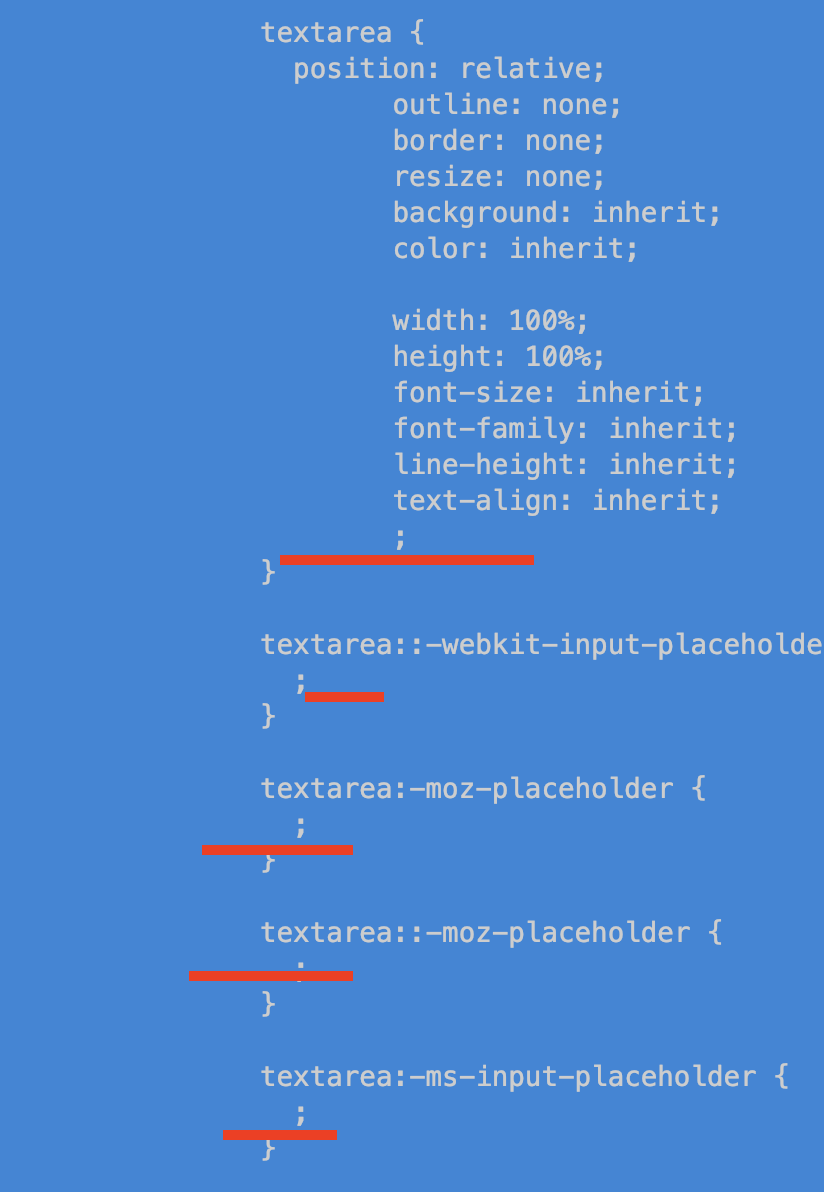
In lit-html 0.12.0 the @apply rules are completely stripped from the <style>s of the element that declares them.
E.g. This is what happens with the @polymer/iron-autogrow-textarea element:
 doplumi
on 31 Oct 2018
doplumi
on 31 Oct 2018
@sorvell or @azakus could you take a look?
 justinfagnani
on 2 Nov 2018
justinfagnani
on 2 Nov 2018
Given that currently old mixins are the only way to customize elements, this issue seem like of high priority. The bug forces to downgrade components to polymer v2/3 and renders LitElement kind of useless.
To be honest it's weird that a lot of features are prioritized over severe bugs like this one: https://github.com/Polymer/lit-html/issues/565
 dcbrwn
on 21 Nov 2018
dcbrwn
on 21 Nov 2018
This is definitely a bug and we're working on a fix.
It's important that ShadyCSS has a chance to manipulate element styles before any sub-elements attempt to render. The older version of shady-render ensured this was the case, but the change made a few months ago to consolidate the rendering code broke this. It does not cause problems if any sub-elements render asynchronously, and since LitElement does this, the breakage was not immediately obvious.
The fix here is to handle the first scope render by (1) rendering to a fragment, (2) scoping element styles, (3) moving the fragment to the render container.
We'll obviously also need to add some additional tests.
 sorvell
on 29 Nov 2018
sorvell
on 29 Nov 2018
Just to be clear, https://jsfiddle.net/bw03sng5/1 needs to use a custom-style like this.
The issue we're working on fixing is with https://jsfiddle.net/mgoqz923/1 and involves using shady-render with elements using Polymer that use @apply (e.g. paper-button).
sorvell
on 29 Nov 2018
@sorvell
https://jsfiddle.net/mgoqz923/21/
I've updated the example and it seems ok, however it only works when webcomponents-bundle is loaded. Is this intentional?
 janlat
on 7 Dec 2018
janlat
on 7 Dec 2018
Related issues
 fopsdev
·
5Comments
fopsdev
·
5Comments
 RyanAfrish7
·
4Comments
RyanAfrish7
·
4Comments
 pietmichal
·
4Comments
justinfagnani
·
4Comments
pietmichal
·
4Comments
justinfagnani
·
4Comments
 dakom
·
4Comments
dakom
·
4Comments
Most helpful comment
Given that currently old mixins are the only way to customize elements, this issue seem like of high priority. The bug forces to downgrade components to polymer v2/3 and renders LitElement kind of useless.
To be honest it's weird that a lot of features are prioritized over severe bugs like this one: https://github.com/Polymer/lit-html/issues/565