Linuxgsm: Minecraft Bedrock Perpetually Updates
User Story
As a system administrator, I want to update a server when an update is available.
Basic info
- Distro: [Ubuntu 18.04]
- Game: [Minecraft Bedrock]
- Command: [Update]
- LinuxGSM version: [v20.3.3]
Further Information
When updating the game, every other update command issued results in an update which isn't actually needed. When an update is thought to be available, it states the local build is 1.16.1.2 and the remote build is 1.16.1.02, which shouldn't result in a update, but it does.
To Reproduce
Steps to reproduce the behaviour:
- Install an mcbserver and start the server at least once
- Issue
./mcbserver update4 times - Notice there were 2 updates attempted
Expected behaviour
An update should only occur if there is an update available.
 thelegendofbrian
All 6 comments
Issue-Label Bot is automatically applying the label type: bug to this issue, with a confidence of 0.55. Please mark this comment with :thumbsup: or :thumbsdown: to give our bot feedback!
Links: app homepage, dashboard and code for this bot.
![issue-label-bot[bot] picture](https://avatars2.githubusercontent.com/in/27079?v=4&s=40) issue-label-bot[bot]
on 30 Jun 2020
issue-label-bot[bot]
on 30 Jun 2020
How odd. the update logic is as simple as if local and remote version number do not match then update. So my guess is that its getting the wrong local version
 dgibbs64
on 30 Jun 2020
dgibbs64
on 30 Jun 2020
My Minecraft is setup to check for updates every 60 minutes.
It is constantly trying to update from 1.16.1.2 to 1.16.1.02
 mspencerl87
on 1 Jul 2020
mspencerl87
on 1 Jul 2020
How odd. the update logic is as simple as if local and remote version number do not match then update. So my guess is that its getting the wrong local version
Any idea which file to change in the mcbserver directories to rectify the issue?
Could one simply "rename file" ?
mspencerl87
on 1 Jul 2020
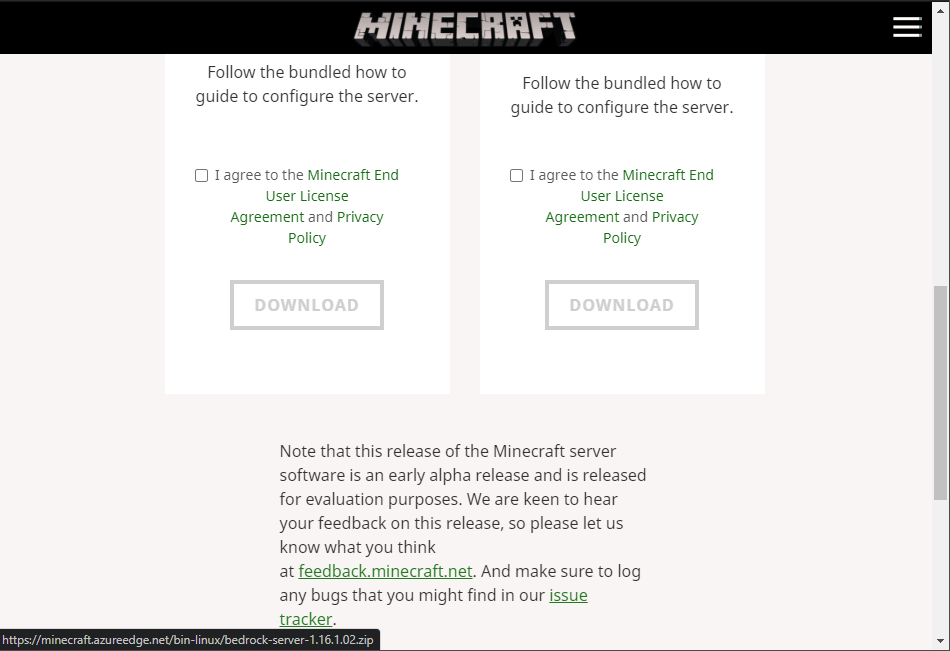
Yeah looks like the minecraft devs have got the remote release number wrong which is causing the error. The logs give 2 and the remote location (zipfile name) gives 02
Update available
* Local build: 1.16.1.2
* Remote build: 1.16.1.02
There is nothing I can do to fix this. It will need to be raised with Mojang.
dgibbs64
on 3 Jul 2020
If anyone wants to contact Mojang feel free to reference this issue. I will, however, close this as there is nothing more I can do until they fix filename
dgibbs64
on 3 Jul 2020
Related issues
 pavelhoral
·
3Comments
pavelhoral
·
3Comments
 borzaka
·
3Comments
borzaka
·
3Comments
 Audrik
·
3Comments
Audrik
·
3Comments
 DavidRayner
·
3Comments
DavidRayner
·
3Comments
 metalowcom
·
3Comments
metalowcom
·
3Comments
Most helpful comment
Issue-Label Bot is automatically applying the label
type: bugto this issue, with a confidence of 0.55. Please mark this comment with :thumbsup: or :thumbsdown: to give our bot feedback!Links: app homepage, dashboard and code for this bot.