Linkerd2: When downstream deployment is updated, upstream pods don't connect to new downstream pods
Given: deploy_a -> deploy_b (a is a client/connects to b)
Sometimes, not always, when a rolling update of deploy_b is performed (new pods are created), each request made by deploy_a start failing, as if the proxies in the deploy_a pods were not aware that the destination pods for deploy_b had changed. Killing all deploy_a pods (i.e. letting them respawn) fixes the problem.
Unfortunately, I don't have much more than this to say about this, as I did not yet have time to dive deeper into the issue and try to better understand what is going on.
Also, I apologize if this has already been filed, I did not search existing issues.
I just wanted to put it out there because I've been bitten by this since early Conduit versions and have been waiting to have details before filing it...
 bourquep
All 74 comments
@bourquep any specific replication steps? Does it happen sometimes, all the time, based on the phase of the moon?
 grampelberg
on 6 Sep 2018
grampelberg
on 6 Sep 2018
On our development cluster, where we deploy updates many times a day, it was happening about 50% of the time. Enough to make us remove Linkerd2 from that cluster because it was a big pain point (teammates saying "uh guys, service X stopped working" only to realize that it was because service Y had been updated and X wasn't seeing it anymore)
On our prod cluster, it seems to happen when it's been "a while" (few days) since our last deploy. So now whenever we deploy an updated service to prod, I restart all upstream pods to make sure they see the new downstream pods.
Back in the Conduit days, I thought it might be caused by the control plane restarting (there was a time when Conduit control pod was restarting quite often) and the existing client proxies, having lost connection to the initial control plane pod, were not reconnecting to the control plane and made aware of downstream changes.
But now I see the problem even when the control pod had 0 restarts.
Other than that, I am sorry to say I don't have much more to provide. ☹️
bourquep
on 6 Sep 2018
Hi @bourquep, thanks for all of the additional details. It seems like one of two things are happening:
- Either the destination service is falling out of sync with the Kubernetes API; or
- The proxies are falling out of sync with the destination service.
If you see this happen again, it would be great if you could grab the destination service's log file, with:
kubectl logs -n linkerd -l linkerd.io/proxy-deployment=controller -c destination
In the meantime I've kicked off a test locally to see if I can reproduce it. Here's the Kubernetes config file that I'm using:
And I'm running with:
linkerd install --controller-log-level=debug --proxy-log-level=warn,linkerd2_proxy=debug | kubectl apply -f -
linkerd inject --proxy-log-level=warn,linkerd2_proxy=debug redeploy.txt | kubectl apply -f -
 klingerf
on 7 Sep 2018
klingerf
on 7 Sep 2018
@klingerf Thanks, I'll make sure to grab the logs next time. Your repro config seems reasonable, hopefully it'll yield interesting results.
Meanwhile, something different but probably related happened yesterday evening:
I had some clients telemetry start to report that some API calls were intermittently returning http 504 (gateway timeout). Those calls go through the nginx-ingress -> [l8d2 proxy -> esp -> my_container] path.
Eager to fix the problem, I restarted the API service pods before capturing any logs (those pods have the l8d2, esp and my_container containers) and the 504 went away.
So now I still don't know for sure if it was l8d2 or esp that was returning 504, but I figured it might be worth reporting here since it may be related.
bourquep
on 7 Sep 2018
Hmm, the more I think of it the less I think it is related, because the 504 problem happens within a pod, not inter-pod.
bourquep
on 7 Sep 2018
I seem to come across this issue a lot on a dev environment more than our live environment.
It happens quite frequently for us, and I'm happy to get as much info as I can.
The destination pod doesn't seem so helpful though. There's no error, just this:
time="2018-09-10T08:21:04Z" level=info msg="Establishing watch on endpoint packs.ms:8443"
time="2018-09-10T08:39:28Z" level=info msg="Establishing watch on endpoint tg.ms:8443"
time="2018-09-10T08:47:49Z" level=info msg="Establishing watch on endpoint training.ms:8443"
time="2018-09-10T08:49:03Z" level=info msg="Establishing watch on endpoint inventory.ms:8443"
packs.ms is the service that it dropped. And then what happens is I just get Received http2 header with status: 500 from the pod after a timeout of 10s.
The linkerd-proxy pod from the linkerd namespace shows this, although without the timestamp it's hard to tell if it's related.
ERR! proxy={server=out listen=127.0.0.1:4140 remote=100.97.148.7:44198} linkerd2_proxy::transparency::tcp tcp duplex error: Transport endpoint is not connected (os error 107)
ERR! proxy={server=out listen=127.0.0.1:4140 remote=100.97.148.7:44202} linkerd2_proxy::transparency::tcp tcp duplex error: Broken pipe (os error 32)
ERR! proxy={server=out listen=127.0.0.1:4140 remote=100.97.148.7:44190} linkerd2_proxy::transparency::tcp tcp duplex error: Broken pipe (os error 32)
ERR! proxy={server=out listen=127.0.0.1:4140 remote=100.97.148.7:44210} linkerd2_proxy::transparency::tcp tcp duplex error: Transport endpoint is not connected (os error 107)
ERR! proxy={server=out listen=127.0.0.1:4140 remote=100.97.148.7:44206} linkerd2_proxy::transparency::tcp tcp duplex error: Broken pipe (os error 32)
ERR! proxy={server=out listen=127.0.0.1:4140 remote=100.97.148.7:44214} linkerd2_proxy::transparency::tcp tcp duplex error: Transport endpoint is not connected (os error 107)
ERR! proxy={server=out listen=127.0.0.1:4140 remote=100.97.148.7:44218} linkerd2_proxy::transparency::tcp tcp duplex error: Connection reset by peer (os error 104)
ERR! proxy={server=out listen=127.0.0.1:4140 remote=100.97.148.7:44222} linkerd2_proxy::transparency::tcp tcp duplex error: Broken pipe (os error 32)
ERR! proxy={server=out listen=127.0.0.1:4140 remote=100.97.148.7:44230} linkerd2_proxy::transparency::tcp tcp duplex error: Transport endpoint is not connected (os error 107)
ERR! proxy={server=out listen=127.0.0.1:4140 remote=100.97.148.7:44246} linkerd2_proxy::transparency::tcp tcp duplex error: Broken pipe (os error 32)
ERR! proxy={server=out listen=127.0.0.1:4140 remote=100.97.148.7:44242} linkerd2_proxy::transparency::tcp tcp duplex error: Broken pipe (os error 32)
ERR! proxy={server=out listen=127.0.0.1:4140 remote=100.97.148.7:44234} linkerd2_proxy::transparency::tcp tcp duplex error: Broken pipe (os error 32)
ERR! proxy={server=out listen=127.0.0.1:4140 remote=100.97.148.7:44238} linkerd2_proxy::transparency::tcp tcp duplex error: Transport endpoint is not connected (os error 107)
Is there anything else I can do to get some more helpful logs?
 benjdlambert
on 10 Sep 2018
benjdlambert
on 10 Sep 2018
On further inspection it looks like the destination pod doesn't revalidate after the downstream containers are re-deployed. Checking when the packs containers were updated again I see that they were launched at Mon, 10 Sep 2018 11:14:27 +0200. Which is after the watch is established, but it looks like it's routing to the old IP's?
benjdlambert
on 10 Sep 2018
@benjdlambert Thanks for the additional info.
To get timestamps in the proxy logs, use the --timestamps flag when running kubectl logs.
I agree that the destination service's logs are lacking. If you're able to re-install the control plane with linkerd install --controller-log-level=debug, that should provide some additional insight. Note that the debug logs will be not entirely useful, however, until we fix #1606.
klingerf
on 10 Sep 2018
Aha - I thought there would be a way to get that. Just never needed it before!
Ok will reinstall on our dev, and see what logs I can get.
benjdlambert
on 11 Sep 2018
I noticed that when injected pods are killed (either manually or via a rolling deployment upgrade), they stay in the Terminating state quite a long time. Could this be related to this issue?
bourquep
on 13 Sep 2018
@bourquep I have that too, but I put that down to our PDB making sure theres enough in service to deal with the request, so it brings the other pods up first. But if you don't have one then I'm not sure.
benjdlambert
on 13 Sep 2018
Interesting, while attempting to reproduce this issue in a test cluster, I came into a situation where a simple grpc client can't connect at all to a simple grpc service once the proxy has been injected in both client and server.
Repro:
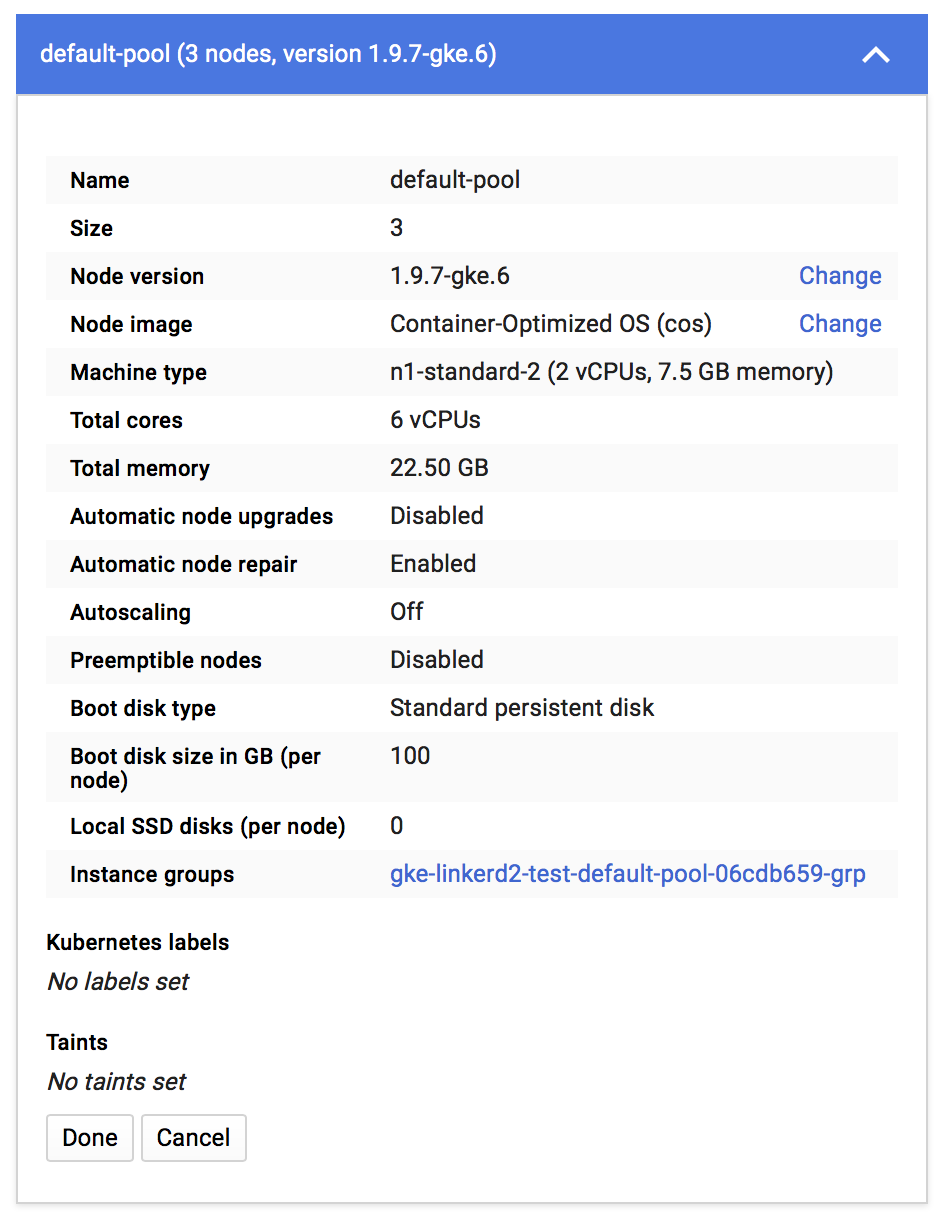
- Create a GKE cluster with the following characteristics (see images 1 and 2 below)
- Install Linkerd2 v18.9.1 ~v18.8.2 onto the cluster (this is not the latest version, but is the one deployed in my prod cluster so I'm trying to repro with it)~
- Apply the non-injected k8s files to the default namespace (files below)
- Tail the logs of the client pod: observe that it successfully displays _Greeting: Hello world_ every second
- Apply the injected j8s files
- Tail the logs of the client pod: observe this error
grpc: addrConn.resetTransport failed to create client transport: connection error: desc = "transport: dial tcp 10.47.246.31:5000: getsockopt: connection refused"; Reconnecting to {greeter-server.default:5000 <nil>}
Note that this does not really correspond to the current issue, but I'm posting it here first in case it might bring light to something that I am not understanding well in this whole k8s/l8d world, and that this bad understanding leads to what is triggering the problem relevant to this issue.
Image 1
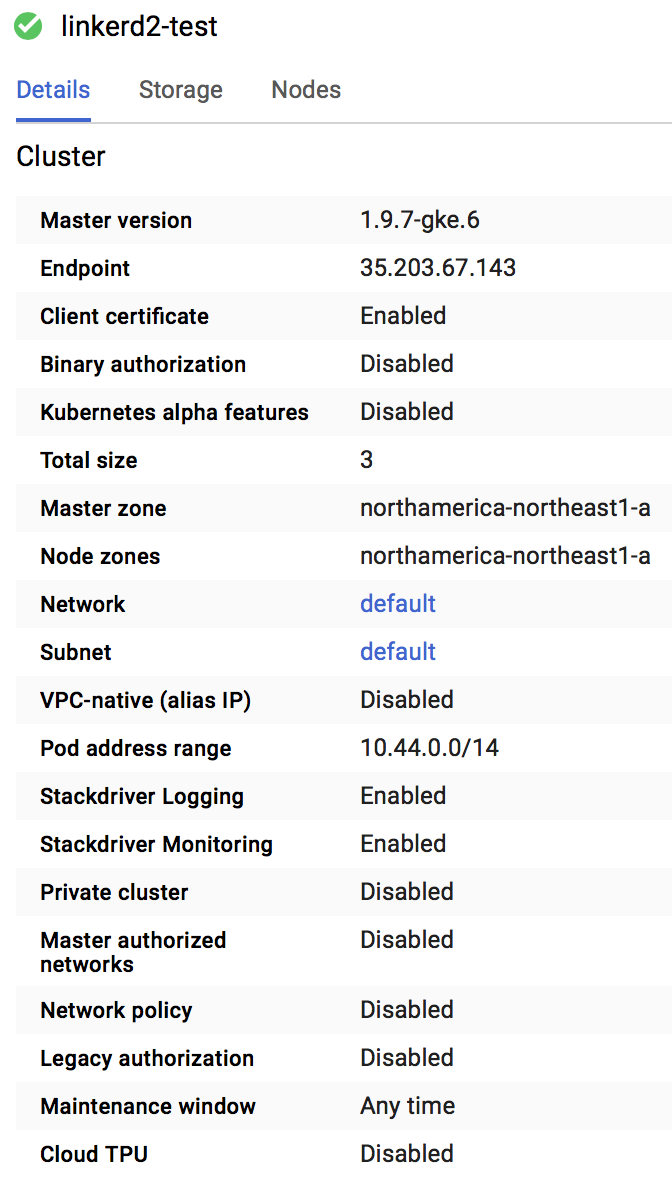
Image 2
k8s config files
bourquep
on 13 Sep 2018
Here's the linkerd-proxy logs when deploy_a in my initial bug report stops being able to call deploy_b after deploy_b has been restarted:
WARN proxy={client=out dst=calendars-connector.studyo:5000 proto=Http2} linkerd2_proxy::bind connect error to Endpoint { address: V4(10.36.2.196:5000), metadata: Metadata { labels: {"control_plane_ns": "linkerd", "deployment": "calendars-connector", "namespace": "studyo", "pod": "calendars-connector-6468d64959-2xz74", "pod_template_hash": "2024820515", "service": "calendars-connector"}, protocol_hint: Http2, tls_identity: None(NotProvidedByServiceDiscovery) } }: Error attempting to establish underlying session layer: No route to host (os error 113)
WARN proxy={client=out dst=calendars-connector.studyo:5000 proto=Http2} linkerd2_proxy::bind connect error to Endpoint { address: V4(10.36.0.182:5000), metadata: Metadata { labels: {"control_plane_ns": "linkerd", "deployment": "calendars-connector", "namespace": "studyo", "pod": "calendars-connector-6468d64959-ngfnp", "pod_template_hash": "2024820515", "service": "calendars-connector"}, protocol_hint: Http2, tls_identity: None(NotProvidedByServiceDiscovery) } }: Error attempting to establish underlying session layer: No route to host (os error 113)
WARN proxy={client=out dst=calendars-connector.studyo:5000 proto=Http2} linkerd2_proxy::bind connect error to Endpoint { address: V4(10.36.1.187:5000), metadata: Metadata { labels: {"control_plane_ns": "linkerd", "deployment": "calendars-connector", "namespace": "studyo", "pod": "calendars-connector-6468d64959-hd5kg", "pod_template_hash": "2024820515", "service": "calendars-connector"}, protocol_hint: Http2, tls_identity: None(NotProvidedByServiceDiscovery) } }: Error attempting to establish underlying session layer: No route to host (os error 113)
ERR! proxy={server=out listen=127.0.0.1:4140} linkerd2_proxy turning operation timed out after 10s into 500
And from then on, whenever deploy_a tries to make a grpc call to deploy_b, the proxy simply keeps logging:
ERR! proxy={server=out listen=127.0.0.1:4140} linkerd2_proxy turning operation timed out after 10s into 500
@benjdlambert I don't have a PDB
bourquep
on 13 Sep 2018
Install Linkerd2 v18.8.2
I just noticed after trying for a while to tweak the tests to get something failing. A recent refactor did change slightly the code that handles connection errors, it's possible previously there were cases where the task would get lost. Would it be possible to try this repro with v18.9.1?
 seanmonstar
on 15 Sep 2018
seanmonstar
on 15 Sep 2018
@seanmonstar I am able to repro with v18.9.1
bourquep
on 16 Sep 2018
Are the addresses shown in the logs correct? Like, 10.36.2.196:5000, etc? Seeing an errno 113 suggests the OS is not able to lookup that IP...
seanmonstar
on 17 Sep 2018
Yes, the addresses are correct.
FYI, I have deployed Linkerd2 v18.9.1 on my both my dev and prod clusters this weekend. So far, this issue has not manifested itself. I'll be monitoring how the dev cluster behaves after a few deployments over the coming days.
bourquep
on 17 Sep 2018
But the "other" bug (which may or may not be the same thing, probably not), described in this comment above, still occurs with 18.9.1. I should probably file it in a separate issue.
bourquep
on 17 Sep 2018
If original issue was showing the same error code (os error 113), then they could be related. If it wasn't, it might be something different (possibly related to the GKE config?).
seanmonstar
on 17 Sep 2018
Ok, it just happened again on my prod cluster with v18.9.1.
I did a rolling update of deploy_b (see original description at top of this issue), and deploy_a stopped being able to communicate with it.
The linkerd-proxy for deploy_a show a bunch of:
"WARN proxy={client=out dst=generator.studyo:5000 proto=Http2} linkerd2_proxy::svc::reconnect connect error to Client { proxy: Outbound, remote: V4(10.36.1.245:5000), metadata: Metadata { labels: {"control_plane_ns": "linkerd", "deployment": "generator", "namespace": "studyo", "pod": "generator-f8d6c4957-5dcvl", "pod_template_hash": "948270513", "service": "generator"}, protocol_hint: Http2, tls_identity: None(NotProvidedByServiceDiscovery) }, tls_status: None(NoIdentity(NotProvidedByServiceDiscovery)) }: Error attempting to establish underlying session layer: No route to host (os error 113)
"
And 10.36.1.245:5000 is one of the now-gone deploy_b endpoints.
bourquep
on 17 Sep 2018
It looks like the proxy does emit TRACE logs about when it is told about IP address changes. This would show them: --proxy-log-level=warn,linkerd2_proxy=info,linkerd2_proxy::control::destination::background::destination_set=trace. When kubernetes tears down the old pods, and controller should notice and send each proxy an update. The logs would include remove V4(10.36.1.245:5000) for DnsName... and then add V4([some new addr]).
If they aren't there, that would suggest to me that the controller for some reason isn't telling the proxies...
seanmonstar
on 17 Sep 2018
Ok, I'll enable this trace into 1 or 2 of my deployments. Should I enable trace in server or client deployments? (a or b according to the initial bug report)
bourquep
on 17 Sep 2018
That'd be for the client, those logs would be letting us peak at what IP addresses it will use to connect to generator.studyo:5000.
seanmonstar
on 17 Sep 2018
Ok. And where would those trace logs end up? In the control plane pod or my client pod?
bourquep
on 17 Sep 2018
Those are part of the client pod (the same place you're seeing WARN proxy={..} [...] Error attempting to establish underlying session layer: No route to host (os error 113)).
seanmonstar
on 17 Sep 2018
I am facing the same issue pretty frequently on our staging env. Please let me know if I can provide logs that might help.
 aleerizw-zz
on 25 Sep 2018
aleerizw-zz
on 25 Sep 2018
@aleerizw if you can enable logs in the proxy like mentioned in this comment, it could help us understand if the proxy is ever being notified of the address changes.
seanmonstar
on 25 Sep 2018
@seanmonstar Shouldn't it be linkerd2_proxy::control::destination::background::destination_set ?
aleerizw-zz
on 26 Sep 2018
@aleerizw yes, woops 🤦♂️
seanmonstar
on 26 Sep 2018
I think I have this same problem, unfortunately I don't have the logs anymore. We are currently trying linkerd2 on our dev cluster, to then move it to our production one.
At the time this was happening, looking at the logs of the linkerd proxy of the affected pod, I could see that all new requests to that pod were returning a timeout error.
 JCMais
on 1 Nov 2018
JCMais
on 1 Nov 2018
Hey @bourquep, just as a heads up, we just released Linkerd2 edge-18.11.1 recently and there were some proxy changes that might reveal useful information when this issue comes up again. I recommend that you try it out and see if you can get any logs that may help us debug this.
 dadjeibaah
on 2 Nov 2018
dadjeibaah
on 2 Nov 2018
@dadjeibaah I'll give it a shot, thanks for the heads-up.
bourquep
on 2 Nov 2018
just happened again.
The logs of the linkerd-proxy only show timeouts:
ERR! proxy={server=out listen=127.0.0.1:4140 remote=10.16.1.106:51860} linkerd2_proxy::proxy::tcp tcp duplex error: Connection reset by peer (os error 104)
ERR! proxy={server=out listen=127.0.0.1:4140 remote=10.16.1.106:42090} linkerd2_proxy::proxy::http::router service error: operation timed out after 10s
WARN proxy={client=out dst=authorization:80 proto=Http1 { host: Authority(authorization), is_h1_upgrade: false, was_absolute_form: false }} linkerd2_proxy::svc::reconnect connect error to Client { proxy: Outbound, remote: V4(10.16.0.50:3000), metadata: Metadata { labels: {"control_plane_ns": "linkerd", "deployment": "authorization", "namespace": "default", "pod": "authorization-5d75ddcc64-6t9lt", "pod_template_hash": "1831887720", "service": "authorization"}, protocol_hint: Http2, tls_identity: None(NotProvidedByServiceDiscovery) }, tls_status: None(NoIdentity(NotProvidedByServiceDiscovery)) }: Error attempting to establish underlying session layer: No route to host (os error 113)
ERR! proxy={server=out listen=127.0.0.1:4140 remote=10.16.1.106:42364} linkerd2_proxy::proxy::http::router service error: operation timed out after 10s
ERR! proxy={server=out listen=127.0.0.1:4140 remote=10.16.1.106:42638} linkerd2_proxy::proxy::http::router service error: operation timed out after 10s
ERR! proxy={server=out listen=127.0.0.1:4140 remote=10.16.1.106:42928} linkerd2_proxy::proxy::http::router service error: operation timed out after 10s
ERR! proxy={server=out listen=127.0.0.1:4140 remote=10.16.1.106:42950} linkerd2_proxy::proxy::http::router service error: operation timed out after 10s
ERR! proxy={server=out listen=127.0.0.1:4140 remote=10.16.1.106:43192} linkerd2_proxy::proxy::http::router service error: operation timed out after 10s
ERR! proxy={server=out listen=127.0.0.1:4140 remote=10.16.1.106:43470} linkerd2_proxy::proxy::http::router service error: operation timed out after 10s
ERR! proxy={server=out listen=127.0.0.1:4140 remote=10.16.1.106:43758} linkerd2_proxy::proxy::http::router service error: operation timed out after 10s
ERR! proxy={server=out listen=127.0.0.1:4140 remote=10.16.1.106:43990} linkerd2_proxy::proxy::http::router service error: operation timed out after 10s
ERR! proxy={server=out listen=127.0.0.1:4140 remote=10.16.1.106:44262} linkerd2_proxy::proxy::http::router service error: operation timed out after 10s
ERR! proxy={server=out listen=127.0.0.1:4140 remote=10.16.1.106:20413} linkerd2_proxy::proxy::http::router service error: operation timed out after 10s
ERR! proxy={server=out listen=127.0.0.1:4140 remote=10.16.1.106:44800} linkerd2_proxy::proxy::http::router service error: operation timed out after 10s
ERR! proxy={server=out listen=127.0.0.1:4140 remote=10.16.1.106:45792} linkerd2_proxy::proxy::http::router service error: operation timed out after 10s
ERR! proxy={server=out listen=127.0.0.1:4140 remote=10.16.1.106:46074} linkerd2_proxy::proxy::http::router service error: operation timed out after 10s
ERR! proxy={server=out listen=127.0.0.1:4140 remote=10.16.1.106:46344} linkerd2_proxy::proxy::http::router service error: operation timed out after 10s
ERR! proxy={server=out listen=127.0.0.1:4140 remote=10.16.1.106:46438} linkerd2_proxy::proxy::http::router service error: operation timed out after 10s
ERR! proxy={server=out listen=127.0.0.1:4140 remote=10.16.1.106:46622} linkerd2_proxy::proxy::http::router service error: operation timed out after 10s
ERR! proxy={server=out listen=127.0.0.1:4140 remote=10.16.1.106:46718} linkerd2_proxy::proxy::http::router service error: operation timed out after 10s
ERR! proxy={server=out listen=127.0.0.1:4140 remote=10.16.1.106:20418} linkerd2_proxy::proxy::http::router service error: operation timed out after 10s
ERR! proxy={server=out listen=127.0.0.1:4140 remote=10.16.1.106:20419} linkerd2_proxy::proxy::http::router service error: operation timed out after 10s
This happened after the authorization-5d75ddcc64-6t9lt pod mentioned in the logs was removed by a new deployment.
I will try to install the edge version to help debug that.
JCMais
on 2 Nov 2018
I'm running stable-2.0.0 on GKE 1.9.7-gke.6 and encountered similar issue twice this week.
In my case, its between services via gRPC calls.
recycling the pods seems to clear up. But I did see in the linkerd proxy logs of the caller, its referencing a pod that no longer exists (i.e. after a redeploy)
protocol_hint: Http2, tls_identity: None(NotProvidedByServiceDiscovery) }, tls_status: None(NoIdentity(NotProvidedByServiceDiscovery)) }: Error attempting to establish underlying session layer: No route to host (os error 113)
ERR! proxy=
Anything I can do to help debug or help reproducing,
Cheers
 markstgodard
on 7 Nov 2018
markstgodard
on 7 Nov 2018
Occurred again, this time I was using the latest edge as recommended, so here are the logs:
WARN authorization:80 linkerd2_proxy::proxy::reconnect connect error to Endpoint { dst: Destination { name_or_addr: Name(DnsNameAndPort { host: DnsName(DNSName("authorization")), port: 80 }), settings: Http2, _p: () }, connect: Target { addr: V4(10.16.1.143:3000), tls: None(NoIdentity(NotProvidedByServiceDiscovery)), _p: () }, metadata: Metadata { labels: {"control_plane_ns": "linkerd", "deployment": "authorization", "namespace": "default", "pod": "authorization-6f95d747f7-ks9qh", "pod_template_hash": "2951830393", "service": "authorization"}, protocol_hint: Http2, tls_identity: None(NotProvidedByServiceDiscovery) }, _p: () }: Error attempting to establish underlying session layer: operation timed out after 300ms
ERR! proxy={server=out listen=127.0.0.1:4140 remote=10.16.0.115:34906} linkerd2_proxy::proxy::http::router service error: operation timed out after 10s
INFO proxy={server=in listen=0.0.0.0:4143 remote=10.16.0.1:33644} linkerd2_proxy::app::inbound::orig_proto_downgrade downgrading requests; source=Source { remote: V4(10.16.0.1:33644), local: V4(10.16.0.115:4143), orig_dst: Some(V4(10.16.0.115:3000)), tls_status: None(Disabled), _p: () }
ERR! proxy={server=out listen=127.0.0.1:4140 remote=10.16.0.115:35062} linkerd2_proxy::proxy::http::router service error: operation timed out after 10s
ERR! proxy={server=out listen=127.0.0.1:4140 remote=10.16.0.115:35284} linkerd2_proxy::proxy::http::router service error: operation timed out after 10s
ERR! proxy={server=out listen=127.0.0.1:4140 remote=10.16.0.115:35466} linkerd2_proxy::proxy::http::router service error: operation timed out after 10s
INFO proxy={server=in listen=0.0.0.0:4143 remote=10.16.0.1:34180} linkerd2_proxy::app::inbound::orig_proto_downgrade downgrading requests; source=Source { remote: V4(10.16.0.1:34180), local: V4(10.16.0.115:4143), orig_dst: Some(V4(10.16.0.115:3000)), tls_status: None(Disabled), _p: () }
INFO proxy={server=in listen=0.0.0.0:4143 remote=10.16.0.1:34688} linkerd2_proxy::app::inbound::orig_proto_downgrade downgrading requests; source=Source { remote: V4(10.16.0.1:34688), local: V4(10.16.0.115:4143), orig_dst: Some(V4(10.16.0.115:3000)), tls_status: None(Disabled), _p: () }
INFO proxy={server=in listen=0.0.0.0:4143 remote=10.16.0.1:35146} linkerd2_proxy::app::inbound::orig_proto_downgrade downgrading requests; source=Source { remote: V4(10.16.0.1:35146), local: V4(10.16.0.115:4143), orig_dst: Some(V4(10.16.0.115:3000)), tls_status: None(Disabled), _p: () }
ERR! proxy={server=out listen=127.0.0.1:4140 remote=10.16.0.115:36932} linkerd2_proxy::proxy::http::router service error: operation timed out after 10s
INFO proxy={server=in listen=0.0.0.0:4143 remote=10.16.0.1:35602} linkerd2_proxy::app::inbound::orig_proto_downgrade downgrading requests; source=Source { remote: V4(10.16.0.1:35602), local: V4(10.16.0.115:4143), orig_dst: Some(V4(10.16.0.115:3000)), tls_status: None(Disabled), _p: () }
ERR! proxy={server=out listen=127.0.0.1:4140 remote=10.16.0.115:37144} linkerd2_proxy::proxy::http::router service error: operation timed out after 10s
ERR! proxy={server=out listen=127.0.0.1:4140 remote=10.16.0.115:37328} linkerd2_proxy::proxy::http::router service error: operation timed out after 10s
INFO proxy={server=in listen=0.0.0.0:4143 remote=10.16.0.113:60822} linkerd2_proxy::app::inbound::orig_proto_downgrade downgrading requests; source=Source { remote:
V4(10.16.0.113:60822), local: V4(10.16.0.115:4143), orig_dst: Some(V4(10.16.0.115:3000)), tls_status: None(Disabled), _p: () }
ERR! proxy={server=out listen=127.0.0.1:4140 remote=10.16.0.115:37492} linkerd2_proxy::proxy::http::router service error: operation timed out after 10s
INFO proxy={server=in listen=0.0.0.0:4143 remote=10.16.0.1:36156} linkerd2_proxy::app::inbound::orig_proto_downgrade downgrading requests; source=Source { remote: V4(10.16.0.1:36156), local: V4(10.16.0.115:4143), orig_dst: Some(V4(10.16.0.115:3000)), tls_status: None(Disabled), _p: () }
ERR! proxy={server=out listen=127.0.0.1:4140 remote=10.16.0.115:37690} linkerd2_proxy::proxy::http::router service error: operation timed out after 10s
INFO proxy={server=in listen=0.0.0.0:4143 remote=10.16.0.113:32922} linkerd2_proxy::app::inbound::orig_proto_downgrade downgrading requests; source=Source { remote:
V4(10.16.0.113:32922), local: V4(10.16.0.115:4143), orig_dst: Some(V4(10.16.0.115:3000)), tls_status: None(Disabled), _p: () }
ERR! proxy={server=out listen=127.0.0.1:4140 remote=10.16.0.115:37868} linkerd2_proxy::proxy::http::router service error: operation timed out after 10s
ERR! proxy={server=out listen=127.0.0.1:4140 remote=10.16.0.115:38022} linkerd2_proxy::proxy::http::router service error: operation timed out after 10s
ERR! proxy={server=out listen=127.0.0.1:4140 remote=10.16.0.115:38046} linkerd2_proxy::proxy::http::router service error: operation timed out after 10s
INFO proxy={server=in listen=0.0.0.0:4143 remote=10.16.0.1:36670} linkerd2_proxy::app::inbound::orig_proto_downgrade downgrading requests; source=Source { remote: V4(10.16.0.1:36670), local: V4(10.16.0.115:4143), orig_dst: Some(V4(10.16.0.115:3000)), tls_status: None(Disabled), _p: () }
ERR! proxy={server=out listen=127.0.0.1:4140 remote=10.16.0.115:38178} linkerd2_proxy::proxy::http::router service error: operation timed out after 10s
ERR! proxy={server=out listen=127.0.0.1:4140 remote=10.16.0.115:38204} linkerd2_proxy::proxy::http::router service error: operation timed out after 10s
ERR! proxy={server=out listen=127.0.0.1:4140 remote=10.16.0.115:38348} linkerd2_proxy::proxy::http::router service error: operation timed out after 10s
ERR! proxy={server=out listen=127.0.0.1:4140 remote=10.16.0.115:38594} linkerd2_proxy::proxy::http::router service error: operation timed out after 10s
INFO proxy={server=in listen=0.0.0.0:4143 remote=10.16.0.1:37382} linkerd2_proxy::app::inbound::orig_proto_downgrade downgrading requests; source=Source { remote: V4(10.16.0.1:37382), local: V4(10.16.0.115:4143), orig_dst: Some(V4(10.16.0.115:3000)), tls_status: None(Disabled), _p: () }
First WARN is when it started happening, and it was exactly the same time the authorization service was redeployed.
JCMais
on 7 Nov 2018
@JCMais thank you! Are you able to tell if that IP address was still correct, or if the recycling meant it should have been different? "addr: V4(10.16.1.143:3000)"
seanmonstar
on 7 Nov 2018
@seanmonstar it was not correct, the new one was 10.16.1.210:3000
JCMais
on 8 Nov 2018
@JCMais did you happen to catch the logs for the proxy-api container in the controller pod when this happened?
dadjeibaah
on 8 Nov 2018
@dadjeibaah here they are, nothing abnormal
E  time="2018-11-07T15:35:10Z" level=info msg="Establishing watch on endpoint authorization.default:80"

E  time="2018-11-07T15:38:23Z" level=info msg="Stopping watch on endpoint authorization.default:80"

E  time="2018-11-07T15:38:53Z" level=info msg="Establishing watch on endpoint authorization.default:80"

E  time="2018-11-07T15:39:31Z" level=info msg="Establishing watch on endpoint authorization.default:80"

E  time="2018-11-08T14:07:33Z" level=info msg="Stopping watch on endpoint authorization.default:80"

E  time="2018-11-08T14:08:17Z" level=info msg="Establishing watch on endpoint authorization.default:80"
Latest update: we haven't been able to repro this on our side. However, we're going to add some further logging to the destination service which may elucidate the issue further.
In the meantime we're still going to work on repro-ing. @JCMais @markstgodard @bourquep @aleerizw are any of you seeing this issue on edge-18.11.1? If so, can you tell us what cloud provider, K8s version, # of services, and any other pertinent details about where and when it occurs?
Thanks for your patience, everyone. This is high priority for us.
 wmorgan
on 15 Nov 2018
wmorgan
on 15 Nov 2018
Hi @wmorgan , the above logs are from edge-18.11.1.
Some information:
Cloud provider: GKE
k8s: 1.10.6-gke.11
There are almost 120 services, but only 4 have linkerd enabled.
It generally happens when a new deployment of a pod is created (change on the deployment spec for example, like the container image tag).
Will try to grab more info tomorrow
JCMais
on 16 Nov 2018
I haven't yet upgraded to edge, sorry...
bourquep
on 16 Nov 2018
Latest update: we haven't been able to repro this on our side. However, we're going to add some further logging to the destination service which may elucidate the issue further.
In the meantime we're still going to work on repro-ing. @JCMais @markstgodard @bourquep @aleerizw are any of you seeing this issue on edge-18.11.1? If so, can you tell us what cloud provider, K8s version, # of services, and any other pertinent details about where and when it occurs?
Thanks for your patience, everyone. This is high priority for us.
Appreciate looking into.
I've found a way to reproduce consistently. At least if I redeploy a specific service (C), then calls from (B) will fail after that deployment. In this case (B) seems to have out of date information and tries to communicate via the old pod.
                                grpc
                 http   +-----+      +------+
                +-----> |     +----> |      |
                |       | B   |      | C    |
             +--+--+    +-----+      +------+
             |     |
+----------> | A   |
             +-----+
Note: again I don't know if this matters... SERVICE A is a simple app that is a reverse proxy and talks to a number of services (B and ALSO C)... but in one flow B makes an RPC call to C.. which is the one failing. Also if I k exec on to SERVICE A and "curl" SERVICE C... I do get the same error. So in this case, SERVICE A and SERVICE B have stale info about SERVICE C.
When I redeployed (C), I looked at the logs in linkerd.io/proxy-deployment=controller
and I see this, which I am not sure if this indicative of an issue:
(note: redacting my service names)
time="2018-11-17T00:00:02Z" level=info msg="Establishing watch on endpoint REDACTING-SERVICE-NAME
time="2018-11-17T00:00:02Z" level=info msg="Establishing watch on endpoint REDACTING-SERVICE-NAME
time="2018-11-17T00:00:02Z" level=info msg="Establishing watch on endpoint REDACTING-SERVICE-NAME
time="2018-11-17T00:00:02Z" level=info msg="Establishing watch on endpoint REDACTING-SERVICE-NAME

// RIGHT AFTER I REDEPLOY

time="2018-11-18T15:32:20Z" level=info msg="Stopping watch on endpoint REDACTING-SERVICE-NAME
time="2018-11-18T15:32:20Z" level=info msg="Stopping watch on endpoint REDACTING-SERVICE-NAME
time="2018-11-18T15:32:20Z" level=info msg="Stopping watch on endpoint REDACTING-SERVICE-NAME
time="2018-11-18T15:32:20Z" level=info msg="Stopping watch on endpoint REDACTING-SERVICE-NAME
time="2018-11-18T15:32:20Z" level=info msg="Stopping watch on endpoint REDACTING-SERVICE-NAME
time="2018-11-18T15:32:20Z" level=info msg="Stopping watch on endpoint REDACTING-SERVICE-NAME
time="2018-11-18T15:32:20Z" level=info msg="Stopping watch on endpoint REDACTING-SERVICE-NAME
time="2018-11-18T15:32:20Z" level=info msg="Stopping watch on endpoint REDACTING-SERVICE-NAME
time="2018-11-18T15:32:20Z" level=info msg="Stopping watch on endpoint REDACTING-SERVICE-NAME
time="2018-11-18T15:32:20Z" level=info msg="Stopping watch on endpoint REDACTING-SERVICE-NAME
time="2018-11-18T15:32:20Z" level=info msg="Stopping watch on endpoint REDACTING-SERVICE-NAME
time="2018-11-18T15:32:20Z" level=info msg="Stopping watch on endpoint REDACTING-SERVICE-NAME
time="2018-11-18T15:32:20Z" level=info msg="Stopping watch on endpoint REDACTING-SERVICE-NAME
And then in SERVICE B's linkerd proxy logs when the problem occurs:
And the SERVICE-C's pod is the one that was terminated.
ERR! proxy={server=out listen=127.0.0.1:4140 remote=10.20.0.48:58278} linkerd2_proxy::proxy::tcp tcp duplex error: Connection reset by peer (os error 104)
ERR! proxy={server=out listen=127.0.0.1:4140 remote=10.20.0.48:46492} linkerd2_proxy::proxy::tcp tcp duplex error: Transport endpoint is not connected (os error 107)
WARN proxy={client=out dst=THIS-IS-SERVICE-C.staging:9002 proto=Http1 { host: Authority(THIS-IS-SERVICE-C.staging:9002), is_h1_upgrade: false, was_absolute_form: false }} linkerd2_proxy::svc::reconnect connect error to Client { proxy: Outbound, remote: V4(10.20.0.58:9002), metadata: Metadata { labels: {"control_plane_ns": "linkerd", "deployment": "THIS-IS-SERVICE-C", "namespace": "staging", "pod": "THIS-IS-SERVICE-C-844c9748f8-sjvw5", "pod_template_hash": "4007530494", "service": "THIS-IS-SERVICE-C"}, protocol_hint: Http2, tls_identity: None(NotProvidedByServiceDiscovery) }, tls_status: None(NoIdentity(NotProvidedByServiceDiscovery)) }: Error attempting to establish underlying session layer: No route to host (os error 113)
WARN proxy={client=out dst=THIS-IS-SERVICE-C.staging:9002 proto=Http1 { host: Authority(THIS-IS-SERVICE-C.staging:9002), is_h1_upgrade: false, was_absolute_form: false }} linkerd2_proxy::svc::reconnect connect error to Client { proxy: Outbound, remote: V4(10.20.0.49:9002), metadata: Metadata { labels: {"control_plane_ns": "linkerd", "deployment": "THIS-IS-SERVICE-C", "namespace": "staging", "pod": "THIS-IS-SERVICE-C-844c9748f8-2754k", "pod_template_hash": "4007530494", "service": "THIS-IS-SERVICE-C"}, protocol_hint: Http2, tls_identity: None(NotProvidedByServiceDiscovery) }, tls_status: None(NoIdentity(NotProvidedByServiceDiscovery)) }: Error attempting to establish underlying session layer: No route to host (os error 113)
ERR! proxy={server=out listen=127.0.0.1:4140 remote=10.20.0.48:55636} linkerd2_proxy::proxy::http::router service error: operation timed out after 10s
So, again i'm on the same version of linkerd (not edge) and same k8s cluster info from before.. just an update that I can reproduce on demand and a bit more about the services and some of the output.
Sorry for the "works on my machine" / "fails on my cluster" :) Unfortunately the above are not open source or things I could get you to spin up. They are all basically go 1.10 services.. with also gRPC between some services.
Cheers
markstgodard
on 18 Nov 2018
@markstgodard incredibly helpful, thanks! We're digging into this more this week. Stay tuned.
wmorgan
on 18 Nov 2018
@wmorgan any updates? Or anything else we can do to help?
JCMais
on 27 Nov 2018
@JCMais unfortunately we didn't get to spend time on this last week after all, but we'll be digging into this this week.
wmorgan
on 27 Nov 2018
@markstgodard thanks for the repro! I saw that you included proxy logs. Where you able to increase the log level for SERVICE B's sidecar proxy with the log level described in this comment? I am curious to see what the destination client for that proxy sees whenever a pod is redeployed?
Seeing the message Stopping watch on endpoint... leads me to believe that the proxy is closing HTTP/2 connections to the destination API for that particular service address and is unable to reestablish a watch connection for that service address after redeployment. It would be good to bump up the logs to see if that is what the proxy's destination client is seeing.
When you inject Service's B deployment, setting the log level would look like this:
bin/linkerd inject --proxy-log-level=linkerd2_proxy::control::destination::background::destination_set=trace,linkerd2_proxy::control::destination::background=trace <Service B deployment.yml> | kubectl apply -f -`
To help repro this a little bit more, there will be some extra logging added.
grampelberg
on 3 Dec 2018
Latest logs from when this happened:
2018-12-04 16:00:21.000 BRST
TRCE admin={bg=resolver} linkerd2_proxy::control::destination::background::destination_set no endpoints for DnsNameAndPort { host: DnsName(DNSName("authorization")), port: 80 } that is known to exist
2018-12-04 16:00:21.000 BRST
TRCE admin={bg=resolver} linkerd2_proxy::control::destination::background::destination_set remove V4(10.16.0.15:3000) for DnsNameAndPort { host: DnsName(DNSName("authorization")), port: 80 }
2018-12-04 16:00:21.000 BRST
TRCE admin={bg=resolver} linkerd2_proxy::control::destination::background::destination_set checking DNS for DnsNameAndPort { host: DnsName(DNSName("authorization")), port: 80 }
2018-12-04 16:00:23.000 BRST
TRCE admin={bg=resolver} linkerd2_proxy::control::destination::background Discover tx is dropped, shutdown
2018-12-04 16:00:25.000 BRST
2018/12/04 18:00:25 Tracing this script execution as [1543946425]
2018-12-04 16:00:25.000 BRST
2018/12/04 18:00:25 State of iptables rules before run:
2018-12-04 16:00:25.000 BRST
2018/12/04 18:00:25 > iptables -t nat -vnL
2018-12-04 16:00:25.000 BRST
2018/12/04 18:00:25 < Chain PREROUTING (policy ACCEPT 0 packets, 0 bytes)
2018-12-04 16:00:25.000 BRST
pkts bytes target prot opt in out source destination
2018-12-04 16:00:25.000 BRST
2018-12-04 16:00:25.000 BRST
Chain INPUT (policy ACCEPT 0 packets, 0 bytes)
2018-12-04 16:00:25.000 BRST
pkts bytes target prot opt in out source destination
2018-12-04 16:00:25.000 BRST
2018-12-04 16:00:25.000 BRST
Chain OUTPUT (policy ACCEPT 0 packets, 0 bytes)
2018-12-04 16:00:25.000 BRST
pkts bytes target prot opt in out source destination
2018-12-04 16:00:25.000 BRST
2018-12-04 16:00:25.000 BRST
Chain POSTROUTING (policy ACCEPT 0 packets, 0 bytes)
2018-12-04 16:00:25.000 BRST
pkts bytes target prot opt in out source destination
2018-12-04 16:00:25.000 BRST
2018-12-04 16:00:25.000 BRST
2018/12/04 18:00:25 > iptables -t nat -F PROXY_INIT_REDIRECT
2018-12-04 16:00:25.000 BRST
2018/12/04 18:00:25 < iptables: No chain/target/match by that name.
2018-12-04 16:00:25.000 BRST
2018-12-04 16:00:25.000 BRST
2018/12/04 18:00:25 > iptables -t nat -X PROXY_INIT_REDIRECT
2018-12-04 16:00:25.000 BRST
2018/12/04 18:00:25 < iptables: No chain/target/match by that name.
2018-12-04 16:00:25.000 BRST
2018-12-04 16:00:25.000 BRST
2018/12/04 18:00:25 Will ignore port 4190 on chain PROXY_INIT_REDIRECT
2018-12-04 16:00:25.000 BRST
2018/12/04 18:00:25 Will ignore port 4191 on chain PROXY_INIT_REDIRECT
2018-12-04 16:00:25.000 BRST
2018/12/04 18:00:25 Will redirect all INPUT ports to proxy
2018-12-04 16:00:25.000 BRST
2018/12/04 18:00:25 > iptables -t nat -F PROXY_INIT_OUTPUT
2018-12-04 16:00:25.000 BRST
2018/12/04 18:00:25 < iptables: No chain/target/match by that name.
2018-12-04 16:00:25.000 BRST
2018-12-04 16:00:25.000 BRST
2018/12/04 18:00:25 > iptables -t nat -X PROXY_INIT_OUTPUT
2018-12-04 16:00:25.000 BRST
2018/12/04 18:00:25 < iptables: No chain/target/match by that name.
2018-12-04 16:00:25.000 BRST
2018-12-04 16:00:25.000 BRST
2018/12/04 18:00:25 Ignoring uid 2102
2018-12-04 16:00:25.000 BRST
2018/12/04 18:00:25 Redirecting all OUTPUT to 4140
2018-12-04 16:00:25.000 BRST
2018/12/04 18:00:25 Executing commands:
2018-12-04 16:00:25.000 BRST
2018/12/04 18:00:25 > iptables -t nat -N PROXY_INIT_REDIRECT -m comment --comment proxy-init/redirect-common-chain/1543946425
2018-12-04 16:00:25.000 BRST
2018/12/04 18:00:25 <
2018-12-04 16:00:25.000 BRST
2018/12/04 18:00:25 > iptables -t nat -A PROXY_INIT_REDIRECT -p tcp --destination-port 4190 -j RETURN -m comment --comment proxy-init/ignore-port-4190/1543946425
2018-12-04 16:00:25.000 BRST
2018/12/04 18:00:25 <
2018-12-04 16:00:25.000 BRST
2018/12/04 18:00:25 > iptables -t nat -A PROXY_INIT_REDIRECT -p tcp --destination-port 4191 -j RETURN -m comment --comment proxy-init/ignore-port-4191/1543946425
2018-12-04 16:00:25.000 BRST
2018/12/04 18:00:25 <
2018-12-04 16:00:25.000 BRST
2018/12/04 18:00:25 > iptables -t nat -A PROXY_INIT_REDIRECT -p tcp -j REDIRECT --to-port 4143 -m comment --comment proxy-init/redirect-all-incoming-to-proxy-port/1543946425
2018-12-04 16:00:25.000 BRST
2018/12/04 18:00:25 <
2018-12-04 16:00:25.000 BRST
2018/12/04 18:00:25 > iptables -t nat -A PREROUTING -j PROXY_INIT_REDIRECT -m comment --comment proxy-init/install-proxy-init-prerouting/1543946425
2018-12-04 16:00:25.000 BRST
2018/12/04 18:00:25 <
2018-12-04 16:00:25.000 BRST
2018/12/04 18:00:25 > iptables -t nat -N PROXY_INIT_OUTPUT -m comment --comment proxy-init/redirect-common-chain/1543946425
2018-12-04 16:00:25.000 BRST
2018/12/04 18:00:25 <
2018-12-04 16:00:25.000 BRST
2018/12/04 18:00:25 > iptables -t nat -A PROXY_INIT_OUTPUT -m owner --uid-owner 2102 -j RETURN -m comment --comment proxy-init/ignore-proxy-user-id/1543946425
2018-12-04 16:00:25.000 BRST
2018/12/04 18:00:25 <
2018-12-04 16:00:25.000 BRST
2018/12/04 18:00:25 > iptables -t nat -A PROXY_INIT_OUTPUT -o lo -j RETURN -m comment --comment proxy-init/ignore-loopback/1543946425
2018-12-04 16:00:25.000 BRST
2018/12/04 18:00:25 <
2018-12-04 16:00:25.000 BRST
2018/12/04 18:00:25 > iptables -t nat -A PROXY_INIT_OUTPUT -p tcp -j REDIRECT --to-port 4140 -m comment --comment proxy-init/redirect-all-outgoing-to-proxy-port/1543946425
2018-12-04 16:00:25.000 BRST
2018/12/04 18:00:25 <
2018-12-04 16:00:25.000 BRST
2018/12/04 18:00:25 > iptables -t nat -A OUTPUT -j PROXY_INIT_OUTPUT -m comment --comment proxy-init/install-proxy-init-output/1543946425
2018-12-04 16:00:25.000 BRST
2018/12/04 18:00:25 <
2018-12-04 16:00:25.000 BRST
2018/12/04 18:00:25 > iptables -t nat -vnL
2018-12-04 16:00:25.000 BRST
2018/12/04 18:00:25 < Chain PREROUTING (policy ACCEPT 0 packets, 0 bytes)
2018-12-04 16:00:25.000 BRST
pkts bytes target prot opt in out source destination
2018-12-04 16:00:25.000 BRST
0 0 PROXY_INIT_REDIRECT all -- * * 0.0.0.0/0 0.0.0.0/0 /* proxy-init/install-proxy-init-prerouting/1543946425 */
2018-12-04 16:00:25.000 BRST
2018-12-04 16:00:25.000 BRST
Chain INPUT (policy ACCEPT 0 packets, 0 bytes)
2018-12-04 16:00:25.000 BRST
pkts bytes target prot opt in out source destination
2018-12-04 16:00:25.000 BRST
2018-12-04 16:00:25.000 BRST
Chain OUTPUT (policy ACCEPT 0 packets, 0 bytes)
2018-12-04 16:00:25.000 BRST
pkts bytes target prot opt in out source destination
2018-12-04 16:00:25.000 BRST
0 0 PROXY_INIT_OUTPUT all -- * * 0.0.0.0/0 0.0.0.0/0 /* proxy-init/install-proxy-init-output/1543946425 */
2018-12-04 16:00:25.000 BRST
2018-12-04 16:00:25.000 BRST
Chain POSTROUTING (policy ACCEPT 0 packets, 0 bytes)
2018-12-04 16:00:25.000 BRST
pkts bytes target prot opt in out source destination
2018-12-04 16:00:25.000 BRST
2018-12-04 16:00:25.000 BRST
Chain PROXY_INIT_OUTPUT (1 references)
2018-12-04 16:00:25.000 BRST
pkts bytes target prot opt in out source destination
2018-12-04 16:00:25.000 BRST
0 0 RETURN all -- * * 0.0.0.0/0 0.0.0.0/0 owner UID match 2102 /* proxy-init/ignore-proxy-user-id/1543946425 */
2018-12-04 16:00:25.000 BRST
0 0 RETURN all -- * lo 0.0.0.0/0 0.0.0.0/0 /* proxy-init/ignore-loopback/1543946425 */
2018-12-04 16:00:25.000 BRST
0 0 REDIRECT tcp -- * * 0.0.0.0/0 0.0.0.0/0 /* proxy-init/redirect-all-outgoing-to-proxy-port/1543946425 */ redir ports 4140
2018-12-04 16:00:25.000 BRST
2018-12-04 16:00:25.000 BRST
Chain PROXY_INIT_REDIRECT (1 references)
2018-12-04 16:00:25.000 BRST
pkts bytes target prot opt in out source destination
2018-12-04 16:00:25.000 BRST
0 0 RETURN tcp -- * * 0.0.0.0/0 0.0.0.0/0 tcp dpt:4190 /* proxy-init/ignore-port-4190/1543946425 */
2018-12-04 16:00:25.000 BRST
0 0 RETURN tcp -- * * 0.0.0.0/0 0.0.0.0/0 tcp dpt:4191 /* proxy-init/ignore-port-4191/1543946425 */
2018-12-04 16:00:25.000 BRST
0 0 REDIRECT tcp -- * * 0.0.0.0/0 0.0.0.0/0 /* proxy-init/redirect-all-incoming-to-proxy-port/1543946425 */ redir ports 4143
2018-12-04 16:00:25.000 BRST
2018-12-04 16:12:46.000 BRST
TRCE admin={bg=resolver} linkerd2_proxy::control::destination::background Discover tx is dropped, shutdown
2018-12-04 16:12:48.000 BRST
2018/12/04 18:12:48 Tracing this script execution as [1543947168]
2018-12-04 16:12:48.000 BRST
2018/12/04 18:12:48 State of iptables rules before run:
2018-12-04 16:12:48.000 BRST
2018/12/04 18:12:48 > iptables -t nat -vnL
2018-12-04 16:12:48.000 BRST
2018/12/04 18:12:48 < Chain PREROUTING (policy ACCEPT 0 packets, 0 bytes)
2018-12-04 16:12:48.000 BRST
pkts bytes target prot opt in out source destination
2018-12-04 16:12:48.000 BRST
2018-12-04 16:12:48.000 BRST
Chain INPUT (policy ACCEPT 0 packets, 0 bytes)
2018-12-04 16:12:48.000 BRST
pkts bytes target prot opt in out source destination
2018-12-04 16:12:48.000 BRST
2018-12-04 16:12:48.000 BRST
Chain OUTPUT (policy ACCEPT 0 packets, 0 bytes)
2018-12-04 16:12:48.000 BRST
pkts bytes target prot opt in out source destination
2018-12-04 16:12:48.000 BRST
2018-12-04 16:12:48.000 BRST
Chain POSTROUTING (policy ACCEPT 0 packets, 0 bytes)
2018-12-04 16:12:48.000 BRST
pkts bytes target prot opt in out source destination
2018-12-04 16:12:48.000 BRST
2018-12-04 16:12:48.000 BRST
2018/12/04 18:12:48 > iptables -t nat -F PROXY_INIT_REDIRECT
2018-12-04 16:12:48.000 BRST
2018/12/04 18:12:48 < iptables: No chain/target/match by that name.
2018-12-04 16:12:48.000 BRST
2018-12-04 16:12:48.000 BRST
2018/12/04 18:12:48 > iptables -t nat -X PROXY_INIT_REDIRECT
2018-12-04 16:12:48.000 BRST
2018/12/04 18:12:48 < iptables: No chain/target/match by that name.
2018-12-04 16:12:48.000 BRST
2018-12-04 16:12:48.000 BRST
2018/12/04 18:12:48 Will ignore port 4190 on chain PROXY_INIT_REDIRECT
2018-12-04 16:12:48.000 BRST
2018/12/04 18:12:48 Will ignore port 4191 on chain PROXY_INIT_REDIRECT
2018-12-04 16:12:48.000 BRST
2018/12/04 18:12:48 Will redirect all INPUT ports to proxy
2018-12-04 16:12:48.000 BRST
2018/12/04 18:12:48 > iptables -t nat -F PROXY_INIT_OUTPUT
2018-12-04 16:12:48.000 BRST
2018/12/04 18:12:48 < iptables: No chain/target/match by that name.
2018-12-04 16:12:48.000 BRST
2018-12-04 16:12:48.000 BRST
2018/12/04 18:12:48 > iptables -t nat -X PROXY_INIT_OUTPUT
2018-12-04 16:12:48.000 BRST
2018/12/04 18:12:48 < iptables: No chain/target/match by that name.
2018-12-04 16:12:48.000 BRST
2018-12-04 16:12:48.000 BRST
2018/12/04 18:12:48 Ignoring uid 2102
2018-12-04 16:12:48.000 BRST
2018/12/04 18:12:48 Redirecting all OUTPUT to 4140
2018-12-04 16:12:48.000 BRST
2018/12/04 18:12:48 Executing commands:
2018-12-04 16:12:48.000 BRST
2018/12/04 18:12:48 > iptables -t nat -N PROXY_INIT_REDIRECT -m comment --comment proxy-init/redirect-common-chain/1543947168
2018-12-04 16:12:48.000 BRST
2018/12/04 18:12:48 <
2018-12-04 16:12:48.000 BRST
2018/12/04 18:12:48 > iptables -t nat -A PROXY_INIT_REDIRECT -p tcp --destination-port 4190 -j RETURN -m comment --comment proxy-init/ignore-port-4190/1543947168
2018-12-04 16:12:48.000 BRST
2018/12/04 18:12:48 <
2018-12-04 16:12:48.000 BRST
2018/12/04 18:12:48 > iptables -t nat -A PROXY_INIT_REDIRECT -p tcp --destination-port 4191 -j RETURN -m comment --comment proxy-init/ignore-port-4191/1543947168
2018-12-04 16:12:48.000 BRST
2018/12/04 18:12:48 <
2018-12-04 16:12:48.000 BRST
2018/12/04 18:12:48 > iptables -t nat -A PROXY_INIT_REDIRECT -p tcp -j REDIRECT --to-port 4143 -m comment --comment proxy-init/redirect-all-incoming-to-proxy-port/1543947168
2018-12-04 16:12:48.000 BRST
2018/12/04 18:12:48 <
2018-12-04 16:12:48.000 BRST
2018/12/04 18:12:48 > iptables -t nat -A PREROUTING -j PROXY_INIT_REDIRECT -m comment --comment proxy-init/install-proxy-init-prerouting/1543947168
2018-12-04 16:12:48.000 BRST
2018/12/04 18:12:48 <
2018-12-04 16:12:48.000 BRST
2018/12/04 18:12:48 > iptables -t nat -N PROXY_INIT_OUTPUT -m comment --comment proxy-init/redirect-common-chain/1543947168
2018-12-04 16:12:48.000 BRST
2018/12/04 18:12:48 <
2018-12-04 16:12:48.000 BRST
2018/12/04 18:12:48 > iptables -t nat -A PROXY_INIT_OUTPUT -m owner --uid-owner 2102 -j RETURN -m comment --comment proxy-init/ignore-proxy-user-id/1543947168
2018-12-04 16:12:48.000 BRST
2018/12/04 18:12:48 <
2018-12-04 16:12:48.000 BRST
2018/12/04 18:12:48 > iptables -t nat -A PROXY_INIT_OUTPUT -o lo -j RETURN -m comment --comment proxy-init/ignore-loopback/1543947168
2018-12-04 16:12:48.000 BRST
2018/12/04 18:12:48 <
2018-12-04 16:12:48.000 BRST
2018/12/04 18:12:48 > iptables -t nat -A PROXY_INIT_OUTPUT -p tcp -j REDIRECT --to-port 4140 -m comment --comment proxy-init/redirect-all-outgoing-to-proxy-port/1543947168
2018-12-04 16:12:48.000 BRST
2018/12/04 18:12:48 <
2018-12-04 16:12:48.000 BRST
2018/12/04 18:12:48 > iptables -t nat -A OUTPUT -j PROXY_INIT_OUTPUT -m comment --comment proxy-init/install-proxy-init-output/1543947168
2018-12-04 16:12:48.000 BRST
2018/12/04 18:12:48 <
2018-12-04 16:12:48.000 BRST
2018/12/04 18:12:48 > iptables -t nat -vnL
2018-12-04 16:12:48.000 BRST
2018/12/04 18:12:48 < Chain PREROUTING (policy ACCEPT 0 packets, 0 bytes)
2018-12-04 16:12:48.000 BRST
pkts bytes target prot opt in out source destination
2018-12-04 16:12:48.000 BRST
0 0 PROXY_INIT_REDIRECT all -- * * 0.0.0.0/0 0.0.0.0/0 /* proxy-init/install-proxy-init-prerouting/1543947168 */
2018-12-04 16:12:48.000 BRST
2018-12-04 16:12:48.000 BRST
Chain INPUT (policy ACCEPT 0 packets, 0 bytes)
2018-12-04 16:12:48.000 BRST
pkts bytes target prot opt in out source destination
2018-12-04 16:12:48.000 BRST
2018-12-04 16:12:48.000 BRST
Chain OUTPUT (policy ACCEPT 0 packets, 0 bytes)
2018-12-04 16:12:48.000 BRST
pkts bytes target prot opt in out source destination
2018-12-04 16:12:48.000 BRST
0 0 PROXY_INIT_OUTPUT all -- * * 0.0.0.0/0 0.0.0.0/0 /* proxy-init/install-proxy-init-output/1543947168 */
2018-12-04 16:12:48.000 BRST
2018-12-04 16:12:48.000 BRST
Chain POSTROUTING (policy ACCEPT 0 packets, 0 bytes)
2018-12-04 16:12:48.000 BRST
pkts bytes target prot opt in out source destination
2018-12-04 16:12:48.000 BRST
2018-12-04 16:12:48.000 BRST
Chain PROXY_INIT_OUTPUT (1 references)
2018-12-04 16:12:48.000 BRST
pkts bytes target prot opt in out source destination
2018-12-04 16:12:48.000 BRST
0 0 RETURN all -- * * 0.0.0.0/0 0.0.0.0/0 owner UID match 2102 /* proxy-init/ignore-proxy-user-id/1543947168 */
2018-12-04 16:12:48.000 BRST
0 0 RETURN all -- * lo 0.0.0.0/0 0.0.0.0/0 /* proxy-init/ignore-loopback/1543947168 */
2018-12-04 16:12:48.000 BRST
0 0 REDIRECT tcp -- * * 0.0.0.0/0 0.0.0.0/0 /* proxy-init/redirect-all-outgoing-to-proxy-port/1543947168 */ redir ports 4140
2018-12-04 16:12:48.000 BRST
2018-12-04 16:12:48.000 BRST
Chain PROXY_INIT_REDIRECT (1 references)
2018-12-04 16:12:48.000 BRST
pkts bytes target prot opt in out source destination
2018-12-04 16:12:48.000 BRST
0 0 RETURN tcp -- * * 0.0.0.0/0 0.0.0.0/0 tcp dpt:4190 /* proxy-init/ignore-port-4190/1543947168 */
2018-12-04 16:12:48.000 BRST
0 0 RETURN tcp -- * * 0.0.0.0/0 0.0.0.0/0 tcp dpt:4191 /* proxy-init/ignore-port-4191/1543947168 */
2018-12-04 16:12:48.000 BRST
0 0 REDIRECT tcp -- * * 0.0.0.0/0 0.0.0.0/0 /* proxy-init/redirect-all-incoming-to-proxy-port/1543947168 */ redir ports 4143
2018-12-04 16:12:48.000 BRST
2018-12-04 16:14:26.000 BRST
TRCE admin={bg=resolver} linkerd2_proxy::control::destination::background Destination.Get DnsNameAndPort { host: DnsName(DNSName("authorization")), port: 80 }
2018-12-04 16:14:26.000 BRST
TRCE admin={bg=resolver} linkerd2_proxy::control::destination::background DestinationServiceQuery connect DnsNameAndPort { host: DnsName(DNSName("authorization")), port: 80 }
2018-12-04 16:14:26.000 BRST
TRCE admin={bg=resolver} linkerd2_proxy::control::destination::background::destination_set checking DNS for DnsNameAndPort { host: DnsName(DNSName("authorization")), port: 80 }
2018-12-04 16:14:26.000 BRST
TRCE admin={bg=resolver} linkerd2_proxy::control::destination::background::destination_set insert V4(10.16.0.18:3000) for DnsNameAndPort { host: DnsName(DNSName("authorization")), port: 80 }
2018-12-04 16:14:26.000 BRST
TRCE admin={bg=resolver} linkerd2_proxy::control::destination::background::destination_set checking DNS for DnsNameAndPort { host: DnsName(DNSName("authorization")), port: 80 }
JCMais
on 4 Dec 2018
Just a thought - this isn't something to do with just gRPC is it? Is it something to do with linkerd-proxy re-using the connection to the older service? Just seems to only affect our gRPC stuff. Total speculation, probably wrong.
benjdlambert
on 12 Dec 2018
@benjdlambert Sorry for the delay here -- that's a good thought regarding gRPC. I'll try to see if I can set up a gRPC env that replicates this bug.
For folks who are easily able to reproduce this bug in their environments, the latest linkerd release has additional logging that might help track this down. You can collect the logs as follows:
Install the edge-18.12.3 release:
curl https://run.linkerd.io/install-edge | shInstall linkerd with additional debug logging enabled:
linkerd install --controller-log-level debug --proxy-log-level warn,linkerd2_proxy=debug | kubectl apply -f -Inject your application with additional debug logging enabled (where
my-app.ymlcontains 1 or more deployments for your application):linkerd inject my-app.yml --proxy-log-level warn,linkerd2_proxy=debug | kubectl apply -f -When the problem arises, grab the logs (where
my-appis the name of your deployment andmy-app-nsis the namespace where your deployment is running):kubectl -n linkerd logs --timestamps deploy/linkerd-controller proxy-api > proxy-api.log kubectl -n linkerd logs --timestamps deploy/linkerd-controller linkerd-proxy > controller-proxy.log kubectl -n my-app-ns logs --timestamps deploy/my-app linkerd-proxy > my-app-proxy.logComment on this issue and upload those logs.
klingerf
on 17 Dec 2018
I spent some time trying to reproduce this and understand what's happening in our cluster to cause this to only happen with a few of our services.
One service that this happens to is a service that normally causes another node to be added to the cluster as it has quite large requests, and when we roll this it can normally take a long time to become ready.
I could reproduce this on 2.0.0-stable, but with the below test case couldn't get it to happen on 2.1.0-stable no matter what i tried. I'd be interested to see if this exactly the issue here, and what changed in 2.1.0 to fix it.
I thought that it could have been something like the watch stuff timing out waiting for the pod to apply the update in the destination service.
Here's the test case I was using:
deploy-1.yml
---
apiVersion: v1
kind: Namespace
metadata:
  name: blamtest
---
apiVersion: extensions/v1beta1
kind: Deployment
metadata:
  name: downstream
  namespace: blamtest
spec:
  replicas: 1
  template:
    metadata:
      labels:
        app: downstream
    spec:
      containers:
      - command:
        - node
        - server.js
        image: blam/grpc-test:v1.5.0
        name: downstream
        ports:
        - containerPort: 8443
        resources:
          requests:
            cpu: 10m
---
apiVersion: extensions/v1beta1
kind: Deployment
metadata:
  name: mellan
  namespace: blamtest
spec:
  replicas: 1
  template:
    metadata:
      labels:
        app: mellan
    spec:
      containers:
      - command:
        - node
        - mellan.js
        image: blam/grpc-test:v1.5.0
        resources:
          requests:
            memory: 2.1Gi
            cpu: 1.8
        name: mellan
        ports:
        - containerPort: 8443
        livenessProbe:
          tcpSocket:
            port: 8443
          failureThreshold: 30
          initialDelaySeconds: 200
          periodSeconds: 30
          successThreshold: 1
          timeoutSeconds: 1
        readinessProbe:
          tcpSocket:
            port: 8443
          failureThreshold: 30
          initialDelaySeconds: 200
          periodSeconds: 30
          successThreshold: 1
          timeoutSeconds: 1

---
apiVersion: v1
kind: Service
metadata:
  name: mellan
  namespace: blamtest
spec:
  selector:
    app: mellan
  type: NodePort
  ports:
  - port: 8443
    targetPort: 8443
---
apiVersion: v1
kind: Service
metadata:
  name: downstream
  namespace: blamtest
spec:
  selector:
    app: downstream
  type: NodePort
  ports:
  - port: 8443
    targetPort: 8443
---
apiVersion: extensions/v1beta1
kind: Deployment
metadata:
  name: client1
  namespace: blamtest
spec:
  replicas: 1
  template:
    metadata:
      labels:
        app: client1
    spec:
      containers:
      - command:
        - node
        - getter.js
        image: blam/grpc-test:v1.5.0
        name: client1
        resources:
          requests:
            cpu: 100m

---
apiVersion: extensions/v1beta1
kind: Deployment
metadata:
  name: client2
  namespace: blamtest
spec:
  replicas: 1
  template:
    metadata:
      labels:
        app: client2
    spec:
      containers:
      - command:
        - node
        - getter.js
        image: blam/grpc-test:v1.5.0
        name: client2
        resources:
          requests:
            cpu: 100m
deploy-2.yml
apiVersion: extensions/v1beta1
kind: Deployment
metadata:
  name: mellan
  namespace: blamtest
spec:
  replicas: 1
  template:
    metadata:
      labels:
        app: mellan
    spec:
      containers:
      - command:
        - node
        - mellan.js
        image: blam/grpc-test:v1.6.0
        resources:
          requests:
            memory: 2.1Gi
            cpu: 1.8
        name: mellan
        ports:
        - containerPort: 8443
        livenessProbe:
          tcpSocket:
            port: 8443
          failureThreshold: 30
          initialDelaySeconds: 200
          periodSeconds: 30
          successThreshold: 1
          timeoutSeconds: 1
        readinessProbe:
          tcpSocket:
            port: 8443
          failureThreshold: 30
          initialDelaySeconds: 200
          periodSeconds: 30
          successThreshold: 1
          timeoutSeconds: 1

---
apiVersion: v1
kind: Service
metadata:
  name: mellan
  namespace: blamtest
spec:
  selector:
    app: mellan
  type: NodePort
  ports:
  - port: 8443
    targetPort: 8443
linkerd inject ./deploy-1 | kubectl apply -f -
# wait to become ready
linkerd inject ./deploy2.yml | kubectl apply -f -
And observe that both client1 and client2 still route traffic to the old addresses.
I'm sorry I can't provide anything more than this, but I'll continue to do some more digging. just wondered if anyone else that has this issue is still seeing it after an upgrade to 2.1.0, and/or has noticed that spinning up new nodes and long waiting for service ready causes this?
The test code is here: https://github.com/benjdlambert/test-l5d2-bug if you want to build your own containers or see what is going on. It was a late night thing so please forgive the horrible hacks to get this running quickly.. 😂
/b
benjdlambert
on 21 Dec 2018
@benjdlambert This is _awesome_! Great work on getting this reproduced. I deployed your configs to a GKE 1.11.5 cluster with linkerd 2.0 and I think it reproduces the issue. After applying deploy-2.yml, traffic never returns to the "mellan" pod:
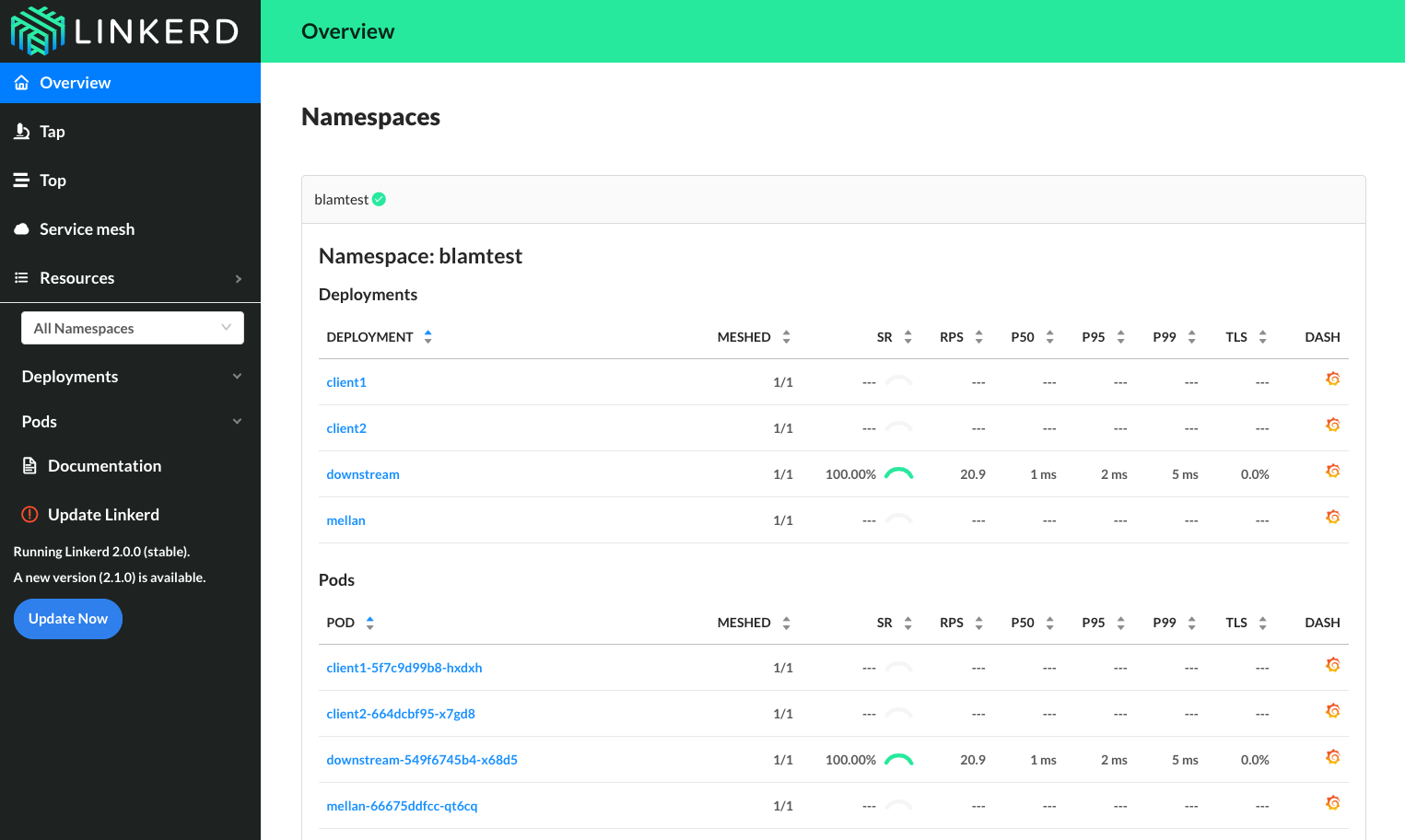
Whereas when I re-run the test with linkerd 2.1, traffic does return:
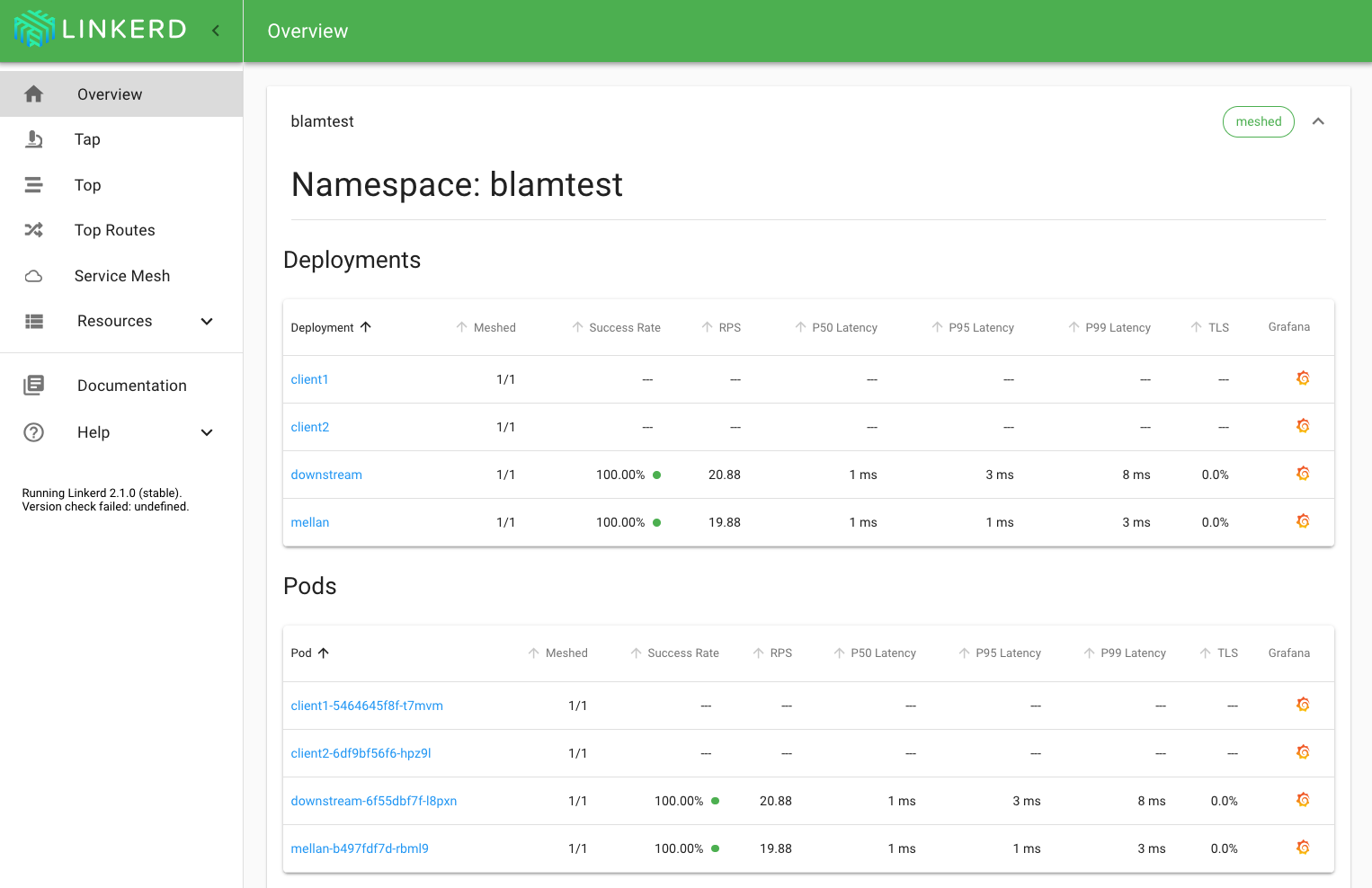
Does that match the results that you're seeing? I'm glad that this appears to be fixed as of the latest stable release.
klingerf
on 22 Dec 2018
The user case I was having is different from @benjdlambert one. There was no auto scaling involved. I will try to check latest version and try to reproduce this the following week.
JCMais
on 22 Dec 2018
FWIW, I did experience the bug on stable-2.1. However, did not have time to troubleshoot.
bourquep
on 22 Dec 2018
@klingerf yep that's exactly what I was seeing! Glad you managed to reproduce it! Unfortunately it might be possible that there's multiple ways to cause the same issue - and maybe only this one was fixed in 2.1.0-stable.
The more I keep thinking about it, the more I'm thinking that this is going to be one of those really horrible concurrency mutex problems hah.
@JCMais, I wasn't sure if it was scaling that was causing the issue, or the the fact that the new container might take a while to become ready, and when this happens in our stack the service does to to 0 healthy containers because we're using apiVersion: extensions/v1beta1, which may or might not have been an issue.
If anyone has any information about if it only effects certain services more often than others, and what happens when these deploy could be super helpful in working out where the problem lies.
benjdlambert
on 22 Dec 2018
the the fact that the new container might take a while to become ready, and when this happens in our stack the service does to to 0 healthy containers because we're using apiVersion: extensions/v1beta1, which may or might not have been an issue.
@benjdlambert hm, that does match our setup
JCMais
on 22 Dec 2018
I haven't seen any new reports of this issue in the past few weeks. It seems likely that we fixed one of the issues related to stale service discovery in 2.1, but it's possible based on reports from @bourquep and @JCMais that another still remains. I'll leave this issue open in case new details emerge, but we're not actively working on reproducing the issue in our test environments, given the lack of additional reports.
klingerf
on 16 Jan 2019
Would anyone mind if we close this issue and open some more specific ones? There's so much in here at this point it is tough to figure out what is actually going on.
grampelberg
on 16 Jan 2019
no problem from me, but please link any created issues here, so it's easier to follow.
JCMais
on 16 Jan 2019
I agree with @JCMais
bourquep
on 16 Jan 2019
Ok, thanks for the additional input. Will close this and link other reports back to here.
klingerf
on 22 Jan 2019
Thanks, i'll come back and check the reports as we're seeing similar issues when re-deploying in GKE.
 kiithwarrior
on 25 Jan 2019
kiithwarrior
on 25 Jan 2019
Upgraded from Linkerd 2.0.0 to 2.1.0 on GKE cluster which was experiencing the issue quite consistently. After upgrade and subsequent re-deploys, was not able to reproduce the issue after upgrading to 2.1.0. I'll keep my 👀s on it, but just wanted to provide my feedback.
cc @wmorgan
Cheers
markstgodard
on 28 Jan 2019
@markstgodard That's great!
wmorgan
on 28 Jan 2019
Ok so I apparently forgot to "knock on wood" and it seems like our end to end tests failed with the same issue (after a couple runs)
I am going to create a simplified version of this flow (see my ascii diagram above: A -> B -> C) and something I can toss up on GH as a test harness. Not saying to re-open but I'll provide something the team can use to reproduce, maybe then its a reason to re-open.
Cheers
markstgodard
on 28 Jan 2019
I'd love a new, separate issue with the replication steps @markstgodard.
grampelberg
on 28 Jan 2019
I've been hitting this on and off for a while but just managed to capture it as it happened (still not much to go on so I won't open a new ticket for now). edge-19.1.3
traffic flows as:
load balancer -> linkerd -> nginx ingress ->linkerd -> linkerd -> pod
we did a deploy of the app (new image, the deployment did a rolling update) and starting seeing 500s returned from the ingress controller with the following logged in it's linkerd-proxy
WARN 10.1.65.130:80 linkerd2_proxy::proxy::reconnect connect error to Config { target: Target { addr: V4(10.1.65.130:80), tls: Some(ConnectionConfig { server_identity: Identity(DnsName(DNSName("myapp.deployment.myappns.linkerd-managed.linkerd.svc.cluster.local"))), config: ClientConfig }), _p: () }, settings: Http2, _p: () }: operation timed out after 300ms
the IP 10.1.65.130 is no longer assigned in the cluster but according to logs, it was the pod that _would_ have received the traffic for this request before the rolling upgrade happened
 jon-walton
on 30 Jan 2019
jon-walton
on 30 Jan 2019
@jon-walton are you on AKS? I'm wondering if this is the AKS watch staleness bug.
grampelberg
on 30 Jan 2019
Yep this is on aks-engine
jon-walton
on 30 Jan 2019
We are using Linkerd stable 2.4.0 and facing similar issue when reloads downstream service , anyone got any permanent fix for same ? we are running EKS
 manoj3832
on 9 Jan 2020
manoj3832
on 9 Jan 2020
@manoj3832 Haven't seen this issue since upgrading to stable 2.6.1.
bourquep
on 9 Jan 2020
ok , will give a try with 2.6.1
manoj3832
on 11 Jan 2020
Related issues
 michalschott
·
32Comments
michalschott
·
32Comments
 jmirc
·
43Comments
jmirc
·
43Comments
 siggy
·
24Comments
siggy
·
24Comments
 kforsthoevel
·
35Comments
kforsthoevel
·
35Comments
 bjoernhaeuser
·
35Comments
bjoernhaeuser
·
35Comments
Most helpful comment
Would anyone mind if we close this issue and open some more specific ones? There's so much in here at this point it is tough to figure out what is actually going on.