Lila: Make board scrolling feature optional
When the mouse is over the board the scroll wheel scrolls through the game rather than scrolling the page up and down. This is not behavior I personally ever want. Whenever I use the scroll wheel it's because I want the default browser behavior.
The game board takes up a lot of screen real estate and so it's annoyingly difficult to get the behavior I want. Especially annoying is to start scrolling with the mouse above the board and then the screen scrolls down so the mouse is over the board then when I decide to scroll again now the game scrolls rather than the screen.
If this could be made and optional feature that I can turn off I would appreciate it.
 colwem
All 5 comments
It's also VERY ANNOYING if you have a magic mouse with touch screen and believe me if I say that I need to plug in another mouse because it's so sensitive that it scrolls through every time my fingers land on it..... MAKE THIS AN OPTIONAL FEATURE, IT IS VERY FRUSTRATING! You can't penalise someone because that person uses a sensitive mouse... I was going to fire a separate issue but I think that devs should really test their website on macOS with a magic mouse.
 Cristian-A
on 20 May 2019
Cristian-A
on 20 May 2019
@Christian-A The developers have no obligation to test anything they release. Lichess is a free service, and most developers I know don't have access to expensive hardware for testing. (Moreover, if they had such hardware, they probably wouldn't have the time to test all possible combinations.)
Maybe scrolling between moves could be bound to Shift + Mouse wheel or Alt + Mouse wheel?
 Calinou
on 20 May 2019
Calinou
on 20 May 2019
@Calinou It could be a user setting (default true) and if someone has issues because of the mouse wheel sensitivity they could just go in the settings and turn it off. Also shift + mouse wheel could be an option.
Cristian-A
on 20 May 2019
First of all, I'd like to thank everyone who's worked on this repository. Lichess has a great website and great apps too. I would like to share a similar experience regarding this issue.
I also have an Apple Magic Mouse and had the same issue that @Cristian-A described, as in: the game history would be triggered very easily while playing. It took me a while to figure out what was happening.
Now I understand that this particular mouse is more sensitive than "classic" ones, but I believe that scrolling the _game_ rather than the window (or container) is not the expected behaviour.
Like suggested, a user preference to control this behaviour would solve the issue (that's where I looked for first). Or adding a modifier key like Shift or Alt is also a good option.
In any case, I'd like to share my temporary solution, which is to simply remove the wheel event listener from the main-board div:
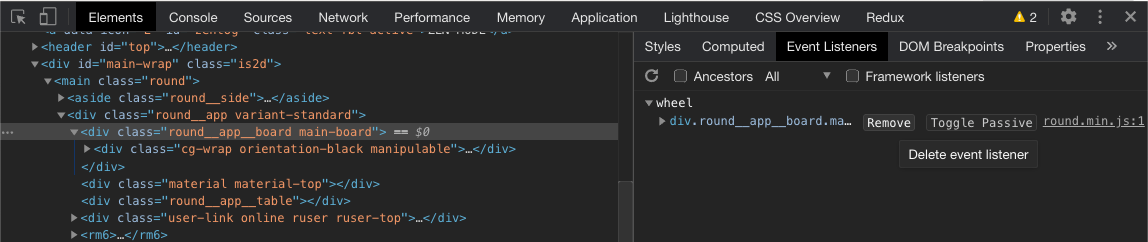
Again, this is a small issue, but can make the whole experience a bit confusing.
 jgthms
on 4 Nov 2020
jgthms
on 4 Nov 2020
If any mac user wants to do disable this behaviour with custom script injection here's the code I made based on @jgthms answer:
document.getElementsByClassName('cg-wrap')[0].addEventListener('wheel', (e) => { e.stopPropagation(); });
You can't remove an event if you don't know the pointer to the function of that event (I know, it's a bit lame) so what I did with this snippet is I added a new event listener to the child wrapper .cg-wrap element that prevents the propagation of the wheel event to its father .main-board.
Cristian-A
on 6 Nov 2020
Related issues
 serversideapps
·
3Comments
serversideapps
·
3Comments
 niklasf
·
4Comments
niklasf
·
4Comments
 Assios
·
3Comments
Assios
·
3Comments
 ShRyDeR
·
3Comments
ShRyDeR
·
3Comments
 nojoking
·
4Comments
nojoking
·
4Comments