Lf: Mojibake / weird nonprintable characters when I try to use -selection-path in something
I'm not sure if this is a problem with lf or just my poor Bash skills. Hoping someone can put me on the right track.
I'm trying to use the -selection-path option to use lf as a file picker as a part of other scripts, similar to how dmenu or rofi are used to choose from among linear lists. I couldn't find a way of getting it to just write straight to standard output (i.e. so that something like lf -selection-path - | some_other_program would work) but it seems according to #89 I have to write it to a file. I couldn't find any other documentation about how to actually use this option.
So I wrote a script called lfpick that makes a temporary file, invokes lf -selection-path, and then echoes the contents of that file:
#!/usr/bin/env bash

temp_file="$(mktemp --suffix .lf-browse)"
lf -selection-path $temp_file
picked_filename=$(<$temp_file)
rm $temp_file
echo $picked_filename
When I run lfpick just on its own, it launches lf and when I choose a file it seems to echo it properly:
[cameron@cameron-desktop test_dir]$ lfpick
/home/cameron/Documents/test_dir/something.txt
However when I then try to use this output as part of a larger command or pipeline, I can still pick a file with lf, but once it exits and the next program starts, I get this weird corrupted output full of cryptic Unicode codepoints:
[cameron@cameron-desktop Documents]$ xdg-open $(lfpick)
screenshot:

(this error window is so wide it doesn't fit on my 2560 pixel wide screen and the text for the "close" button isn't visible)
And yes I know it's pointless to use xdg-open here since lf can do it already, this is just a demonstration of the problem.
If I try assigning to a variable and echoing it in the terminal, like this:
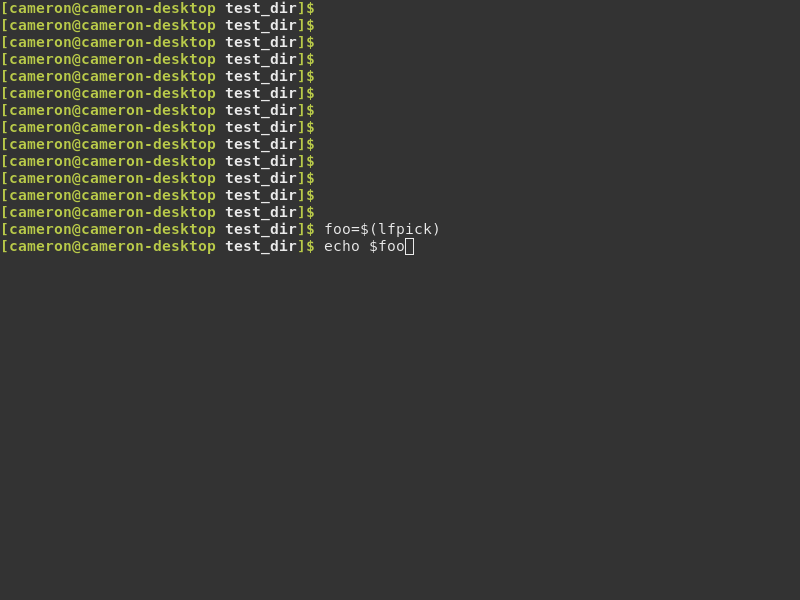
It prints the filename .. but way up at the top, overwriting one of the old history lines, and I have to hold enter to make the cursor come back down to the bottom again:
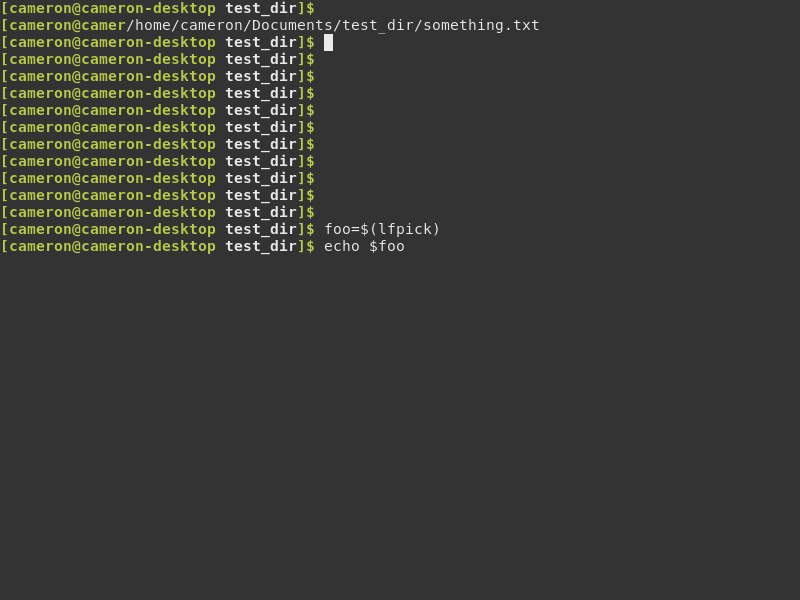
So what has gone wrong?
 ckp95
ckp95
All 6 comments
@ckp95 It seems like an interesting idea. I think the problem is related to using a tui program in a process substitution. I have tried this idea with vim using the following script:
#!/usr/bin/env bash
tmp="$(mktemp)"
vim $tmp
msg=$(<$tmp)
rm $tmp
echo $msg
This does not seem to work either. Maybe there are some solutions for this on the internet for vim which you can adapt to lf. Or someone with a better understanding can come up with a solution here.
 gokcehan
on 17 Jun 2020
gokcehan
on 17 Jun 2020
The TUI file browser nnn can do it. You specify file-picking mode with the -p option and send it to standard output with -. So you can do
[cameron@cameron-laptop ~]$ foo=$(nnn -p -)
# (TUI mode goes here)
[cameron@cameron-laptop ~]$ echo $foo
/home/cameron/something.txt
So it's certainly possible to use a TUI program in a process substitution, or use as part of a pipeline. People use fzf in this way a lot too.
I would use nnn, but it doesn't have Miller columns and the developer said it won't ever have them, and I really like Miller columns, so I wanted a way to do it in lf. I tried it in ranger as well but that had problems of its own.
ckp95
on 17 Jun 2020
@ckp95 I found the issue here. At some point we added some cursor movement code as part of #22. Since cursor movement is not part of termbox api, I have used ansi cursor movement escape codes to implement this (you may see moveCursor function in os.go). It was a hack and I don't think it is a good idea to add these manual escape codes anymore. I remember this had become a problem a few times before as well. Also, I'm not sure if lf is a useful tool to be used with screen readers and we haven't got much feedback after the implementation anyways. Maybe it is time we get rid of this implementation. Marking this issue as a bug for visibility in the meantime.
gokcehan
on 17 Jun 2020
As a workaround, redirecting the output of lf to /dev/null seems to work
#!/usr/bin/bash

temp_file="$(mktemp --suffix .lf-browse)"
lf -selection-path "$temp_file" > /dev/null
picked_filename=$(<"$temp_file")
rm "$temp_file"
echo "$picked_filename"
like this. Hope this helps fix the issue
 sillypill
on 25 Jun 2020
sillypill
on 25 Jun 2020
@sillypill I haven't thought of that, thanks for the workaround. /dev/null redirections also effects shell commands though, so we should fix this in the code in the long term.
gokcehan
on 27 Jun 2020
I have removed the mentioned code. Original example should now work as intended. Closing this issue.
gokcehan
on 4 Jul 2020
Related issues
 itmitica
·
6Comments
itmitica
·
6Comments
 pr4th4m
·
7Comments
pr4th4m
·
7Comments
 johnhk
·
8Comments
gokcehan
·
7Comments
johnhk
·
8Comments
gokcehan
·
7Comments
 uppercat
·
5Comments
uppercat
·
5Comments