downloaded version r15 and Im getting "Permission denied" on almost all folders.
Reverted bak to an older version I had in a backup folder (r10) and no more "Permission denied".
Any Ideas?
log file:
2020/08/14 11:36:03 hi!
2020/08/14 11:36:03 reading directory: readlink C:\Users\All Users: Access is denied.
2020/08/14 11:36:03 reading directory: readlink C:\Documents and Settings: Access is denied.
2020/08/14 11:36:03 reading directory: readlink C:\Users\
...
just checked the lf.exe's backwards in the release history. Looks like _my_ problem was introduced from r14-->r15
 johnhk
All 8 comments
@johnhk Looking at release notes, it seems that permission denied errors were introduced in r13. Before that these were simply shown as empty directories without an error. If you're sure this was introduced in r15, this might be related to something different.
Are you able to read those directories without using lf? If not, this might be considered expected behavior.
 gokcehan
on 16 Aug 2020
gokcehan
on 16 Aug 2020
Thx for quick reply.
I am able to navigate via cd and have access to the folders. And It if only version r15. r14 works fine.
But I might see a pattern and will investigate further. Might be some specific access or ownership rule.
btw. sorry I didnt even write any specifics about system or situation.
Windows 10 Business v. 2004
Windows terminal
PowerShell 5
run as admin
johnhk
on 17 Aug 2020
Havent quit figured it out yet.
I dont think its a basic access settings. None of the read-only/hidden/system set off the bug.
So its probably either some som of the basic/advance permission settings or a ownership problem.
Unfortunately windows has 14 some different permission settings. Combine that with ownership and the 3 attributes, the nummer of combinations get difficult to test.
And Im not realy sure what user og account is actually envoking the calls inside lf. (not a Golang programmer)
The first account created on my mashine was a admin user from internal IT department. My user is a domain user, but is member of the local Admin group.
It could also be some weird security or policy setting (might be, if im the only one expericings this problem)
So unless somebody else votes it up, it might not be worth investigating ;-)
johnhk
on 17 Aug 2020
I can reproduce the behavior. It seems to happen on most folders on C: but it doesn't happen on other hard drives I have on my machine. Any hint on how to debug this is appreciated.
r15
Windows 10 Pro
Powershell 7.0.3, both as Admin or not
C:\Users\myuser\AppData\Local\Temp>cat lf.myuser.1000.log
2020/08/17 21:29:00 hi!
2020/08/17 21:29:00 reading directory: readlink C:\Users\All Users: Access is denied.
2020/08/17 21:29:00 reading directory: readlink C:\Documents and Settings: Access is denied.
2020/08/17 21:29:00 loading files: []
2020/08/17 21:29:00 reading directory: readlink C:\Users\myuser\Application Data: Access is denied.
 pviotti
on 17 Aug 2020
pviotti
on 17 Aug 2020
I have now tried this on my windows machine and unfortunately I can't reproduce the behavior, that is File explorer, powershell and lf behaves identically. I have tried this with r13, r14, and r15. The difference is that hidden is now implemented on windows in r15. I can't think of any other recent changes related to this.
All three folders in your examples seem to be hidden protected folders. These do not show in File explorer without ticking "Hidden items" from the view menu and unticking "Hide protected operating system files" from the options. In powershell, these are only displayed using dir -force. On my machine, C:\Users\All Users works fine, but C:\Documents and Settings and C:\Users\myuser\Application Data give permission denied errors. In powershell, error is given when using dir inside these directories. Running it as a regular user or admin user did not change anything for me.
@johnhk Can you make sure you're running dir inside these directories. Also can you try to access these directories with File explorer?
@pviotti What exactly do you mean by reproducing the behavior? Did you try this with versions older than r15? Do you have a different behavior with powershell and File explorer?
gokcehan
on 18 Aug 2020
What exactly do you mean by reproducing the behavior? Did you try this with versions older than r15? Do you have a different behavior with powershell and File explorer?
I created a throwaway virtual machine with Windows 10. Then I downloaded the binaries of r13, r14 and r15.
r13 and r14 when opened in my user directory, show this:
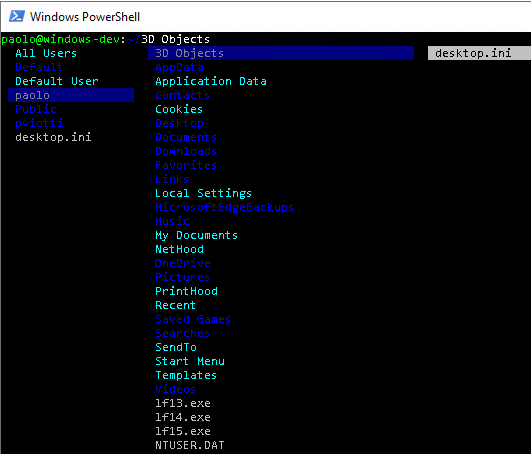
if I run lf r15 on my user directory (which I can browse with explorer and powershell) I get this:
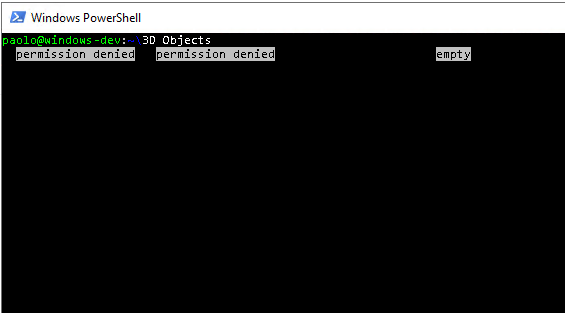
So it looks like there may be some regression for Windows between r14 and r15.
pviotti
on 18 Aug 2020
@pviotti Thank you for testing it throughly.
I tried to download r15 from releases page and I can now reproduce the issue myself. Marking this as a bug.
Before, I was testing it by checking out to an older release in the repository and then building it myself on my machine. My machine has go1.13 installed, whereas our automated build system still uses go1.11. I tried to install go1.11 on my machine and build it on my machine with this version and the issue exists with this version, so it is indeed a go version problem. I also tried go1.12 and it has the issue as well, so it is a problem with go1.13 -> go1.12.
It says in go1.13 release notes:
The Windows version specified by internally-linked Windows binaries is now Windows 7 rather than NT 4.0. This was already the minimum required version for Go, but can affect the behavior of system calls that have a backwards-compatibility mode. These will now behave as documented. Externally-linked binaries (any program using cgo) have always specified a more recent Windows version.
On lf side, the related change in r14 -> r15 is #374
I will change error handling in this change to fix the bug and also maybe bump the go version in our automated build system. Maybe it is a good idea to make a new release after this as well. If you have go installed (>=1.13), you should be able to build from the source as a workaround for now.
In retrospect, I should have found the related change in lf from the original issue report by looking at the errors in the log file, since we have only one Readlink call in our code which is introduced in #374 . I'm also guilty for suggesting a bad error handling strategy in this PR. Anyway, thank you both for helping with the issue @johnhk @pviotti
gokcehan
on 19 Aug 2020
I have now changed error handling to make it work with A new release r16 is now available with the fix. Closing this issue.
gokcehan
on 20 Aug 2020
Related issues
 itmitica
·
6Comments
itmitica
·
6Comments
 BachoSeven
·
9Comments
BachoSeven
·
9Comments
 niksfirefly
·
9Comments
niksfirefly
·
9Comments
 juacq97
·
6Comments
juacq97
·
6Comments
 ipstone
·
6Comments
ipstone
·
6Comments
Most helpful comment
@pviotti Thank you for testing it throughly.
I tried to download r15 from releases page and I can now reproduce the issue myself. Marking this as a bug.
Before, I was testing it by checking out to an older release in the repository and then building it myself on my machine. My machine has
go1.13installed, whereas our automated build system still usesgo1.11. I tried to installgo1.11on my machine and build it on my machine with this version and the issue exists with this version, so it is indeed a go version problem. I also triedgo1.12and it has the issue as well, so it is a problem withgo1.13 -> go1.12.It says in go1.13 release notes:
On
lfside, the related change inr14 -> r15is #374I will change error handling in this change to fix the bug and also maybe bump the go version in our automated build system. Maybe it is a good idea to make a new release after this as well. If you have go installed (>=1.13), you should be able to build from the source as a workaround for now.
In retrospect, I should have found the related change in
lffrom the original issue report by looking at the errors in the log file, since we have only oneReadlinkcall in our code which is introduced in #374 . I'm also guilty for suggesting a bad error handling strategy in this PR. Anyway, thank you both for helping with the issue @johnhk @pviotti