Lf: Executable icon overrides more specific icons
I'm loving the new icons support. Although one thing I'd like to be able to change is how the executable icon is applied - at the moment it seems that the executable icon overrides any file-specific icons even if the ex="" inside $LF_ICONS is an empty string.
Given that executable files already have a different text color (e.g. green) I would prefer to keep the file-specific icon even if the file is executable, and only use the executable icon if the file doesn't have any other icon.
This is pretty similar to how it works now, but the file-specific icon would take precedence over the executable icon instead of always overriding it.
Unless this is already achievable with the current implementation?
 nostdm
All 6 comments
@nostdm I have also realized that and as far as I'm aware this is currently not possible. There are also a few other things that could be improved in the current icon system. We should probably have a way to configure links to files and directories separately. Also currently we don't have a way to match the whole file name but only the extension. For example we should be able to match specific files or directories such as Makefile, LICENSE, or Dropbox. At first I was trying to stay compatible to $LS_COLORS configuration mechanism but maybe icon configuration should be different. Also setting up a multiline environmental variable manually in ~/.bashrc may not be the best approach and can be annoying for some users. So maybe we should add a simpler configuration file for icons in our configuration directory (i.e. ~/.config/lf/icons). I feel like this is the way forward.
 gokcehan
on 5 Jul 2019
gokcehan
on 5 Jul 2019
Sounds like a plan, I suppose it could allow you to set the icons in the config file like so:
set [regex] [icon]
E.g.
set /\.jpg/i \uF03E
I noticed that the current implementation is not case insensitive, i.e. setting the .png icon will not apply to a .PNG extension. This is solved in the example above with the /i regex option to make the lookup case insensitive.
You could also add a few special settings that understand file properties e.g. Directory, File, Executable, Symlink, Broken Symlink, No permissions etc.
set [property] [icon]
E.g
set link \uF481
I suppose these icon settings could also be ordered, where the subsequent settings override the previous ones if they both match. So that you could have the executable icon defined after the standard file icon but before the file-specific regex patterns, which would mean that the executable icon would be shown only if none of the regexes match.
set file \uF0F6
set executable \uF427
set /\.sh/i \uF489
These settings could live inside the standard $XDG_CONFIG_HOME/lf/lfrc or as you mentioned inside a separate file $XDG_CONFIG_HOME/lf/icons.
nostdm
on 6 Jul 2019
@gokcehan @nostdm What if we allowed the user to define a function which given a file path has to determine the icon? This would allow for great customization (and address this issue). It could also be somehow combined with the LF_ICONS (by outputting an empty string or some word)
(Im thinking, something similar like the way we define the preview stuff)
 JurisMajors
on 16 Jul 2019
JurisMajors
on 16 Jul 2019
@JurisMajors If you mean like a custom shell function, I think that would be too expensive. When I implemented coloring, I tried to make it work with a simple map lookup for each path. Icons use the same mechanism. Globbing makes things a little tricky but I think we can come up with a simple assumption to make it work.
gokcehan
on 17 Jul 2019
Incidentally, I'm not sure whether this is related to waht @gokcehan mentioned above about directories and files having icons configured seperately, but it seems to me like the same icon which works for a file doesn't work for a directory.
For example:
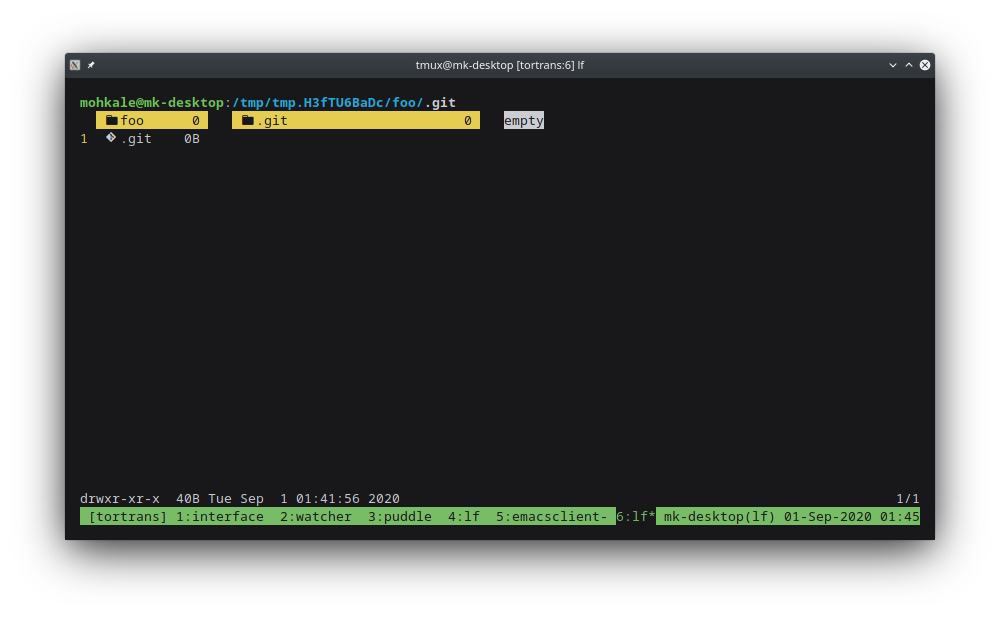
a .git file has the correct icon, but .git directory just uses the default directory icon :/
 mohkale
on 1 Sep 2020
mohkale
on 1 Sep 2020
Also currently we don't have a way to match the whole file name but only the extension.
@gokcehan I was looking to implement this but I'd like some clarification as to what behaviour we're after here. From where I'm standing here's how it's expected to work:
- The order of icons in LF_ICONS is relevent. If you have
*.txt=foo:*.txt=barall txt files should recieve the icon foo, never bar. This behaviour matches the PATH variable. - Patterns should take precedence over types.
fi=foo:*.txt=bar. txt files should recieve bar, even though the match fi occurs earlier in LF_ICONS.
The current implementation just seems to check each of the type matchers (tw, st, ex, etc.) and then does a check for the files extension with a * prefixed to it. So for foo.txt it checks for *.txt. This is why custom icons don't work for directories (they match against fo immeadiately) or none-extension based patterns such as *webpack*=.
I can think of a few ways to approach this, the easiest would be to store the type patterns (tw, st, etc.) in a map and then for each glob we check whether the files basename matches the glob or not and then return the appropriate pattern. I'm slightly worried about the performance implications of running multiple globs for each pattern in the entire LF_ICONS variable. We can probably detect and store simple extension based patterns seperately in a map to speed things up.
@gokcehan what're your thoughts.
So maybe we should add a simpler configuration file for icons in our configuration directory (i.e. ~/.config/lf/icons)
I've been maintaining a human readable icon config file at ~/.config/diricons and using this command to turn it into the format lf expects. If we're gonna go a dedicated config route I'd appreciate if lf gave us the option to specify where to find it:
LF_ICONS=$(sed ~/.config/diricons \
            -e '/^[ \t]*#/d'       \
            -e '/^[ \t]*$/d'       \
            -e 's/[ \t]\+/=/g'     \
            -e 's/$/ /')
LF_ICONS=${LF_ICONS//$'\n'/:}
export LF_ICONS
Related issues
 johnhk
·
8Comments
johnhk
·
8Comments
 pr4th4m
·
7Comments
gokcehan
·
7Comments
pr4th4m
·
7Comments
gokcehan
·
7Comments
 mvrozanti
·
6Comments
mvrozanti
·
6Comments
 muellerto
·
8Comments
muellerto
·
8Comments
Most helpful comment
@nostdm I have also realized that and as far as I'm aware this is currently not possible. There are also a few other things that could be improved in the current icon system. We should probably have a way to configure links to files and directories separately. Also currently we don't have a way to match the whole file name but only the extension. For example we should be able to match specific files or directories such as
Makefile,LICENSE, orDropbox. At first I was trying to stay compatible to$LS_COLORSconfiguration mechanism but maybe icon configuration should be different. Also setting up a multiline environmental variable manually in~/.bashrcmay not be the best approach and can be annoying for some users. So maybe we should add a simpler configuration file for icons in our configuration directory (i.e.~/.config/lf/icons). I feel like this is the way forward.