Lens: Unable to connect to Rancher clusters after upgrading to v3.6.0
Describe the bug
After I upgraded to v3.6.0 I am unable to connect to our clusters managed by Rancher (can still connect to our AKS clusters)
To Reproduce
Steps to reproduce the behavior:
- Added Rancher managed cluster to lens from kubeconfig through 'add cluster' menu
- Lens tries to connect and simply shows the overview dashboard but it is blank
Expected behavior
Cluster connects and I can interact normally with Lens. I am still able to interact with the cluster with kubectl outside of lens
Screenshots
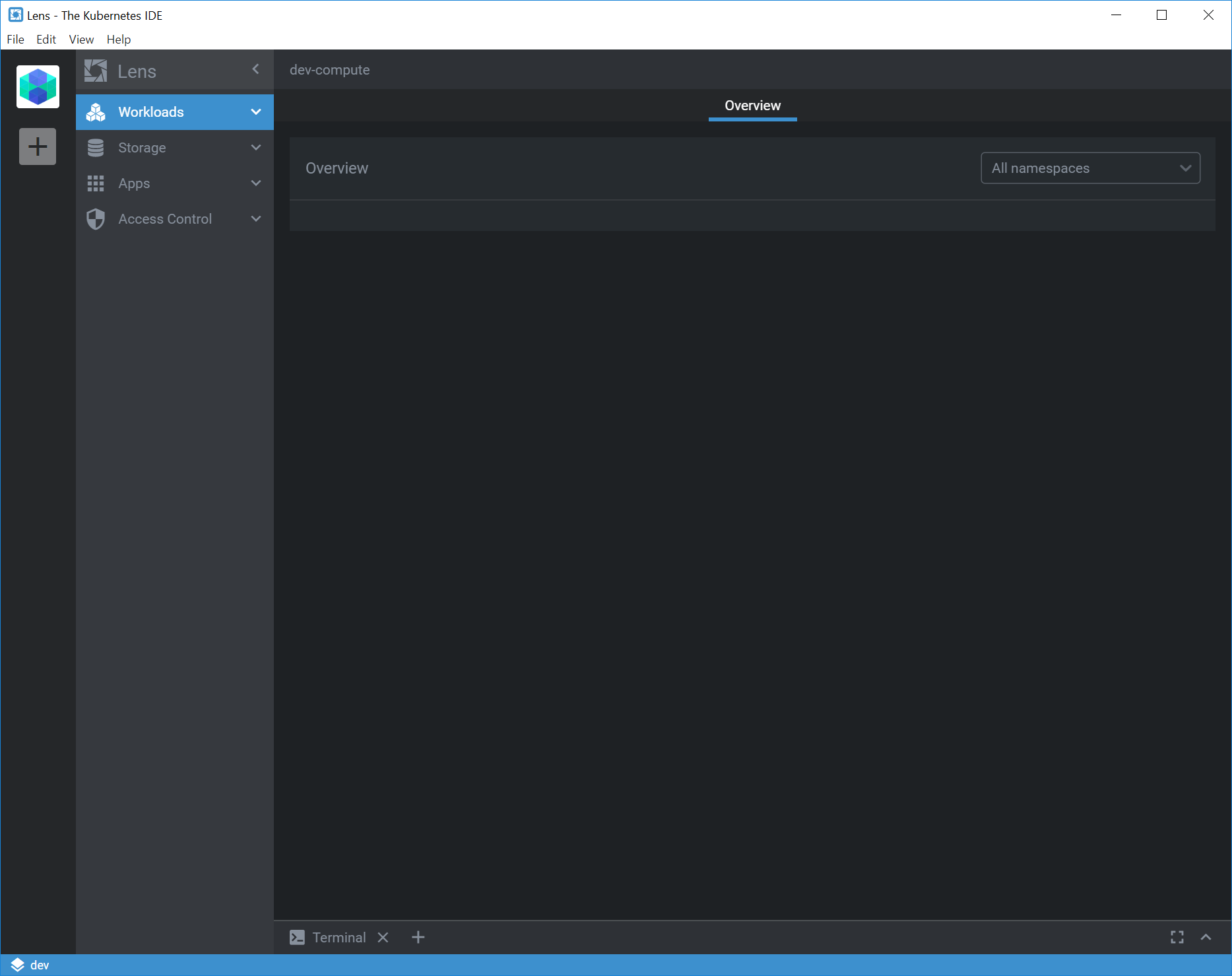
Environment (please complete the following information):
- Lens Version: v3.6.0
- OS: Windows
- Installation method (e.g. snap or AppImage in Linux): Install
Logs:
When you run the application executable from command line you will see some logging output. Please paste them here:
debug: Set kubectl version 1.17.11 for cluster version 1.17.11 using version map
info: [IPC]: setup channel "cluster:activate"
info: [IPC]: setup channel "cluster:disconnect"
info: [IPC]: setup channel "cluster:install-feature"
info: [IPC]: setup channel "cluster:uninstall-feature"
info: [IPC]: setup channel "cluster:upgrade-feature"
info: 🚀 Starting Lens from "C:\Users\laroberts\AppData\Roaming\Lens"
info: Checking for update
debug: Lookup new free port..
debug: New port found: 61037
info: [STORE]: LOADED from C:\Users\laroberts\AppData\Roaming\Lens\config.json
info: [STORE]: LOADED from C:\Users\laroberts\AppData\Roaming\Lens\lens-cluster-store.json
info: [STORE]: LOADED from C:\Users\laroberts\AppData\Roaming\Lens\lens-workspace-store.json
info: [CLUSTER-MANAGER]: init cluster {"id":"18e5f93c-f193-44b8-a78b-997120092a6c","name":"dev-compute","initialized":false}
debug: Lookup new free port..
info: [CLUSTER]: "dev-compute" init success {"id":"18e5f93c-f193-44b8-a78b-997120092a6c","context":"dev-compute","apiUrl":"https://dbkube201/k8s/clusters/c-b5hp5"}
info: LensProxy server has started at http://localhost:61037
debug: New port found: 61038
debug: Dumping KubeConfig: {"apiVersion":"v1","kind":"Config","preferences":{},"current-context":"dev-compute","clusters":[{"name":"dev-compute","cluster":{"server":"http://127.0.0.1:61038/k8s/clusters/c-b5hp5"}}],"contexts":[{"name":"dev-compute","context":{"cluster":"dev-compute","user":"proxy","namespace":"monitor"}}],"users":[{"name":"proxy","user":{}}]}
debug: Created temp kubeconfig "dev-compute" at "C:\Users\LAROBE~1\AppData\Local\Temp\kubeconfig-18e5f93c-f193-44b8-a78b-997120092a6c":
apiVersion: v1
kind: Config
preferences: {}
current-context: dev-compute
clusters:
  - name: dev-compute
    cluster:
      server: 'http://127.0.0.1:61038/k8s/clusters/c-b5hp5'
contexts:
  - name: dev-compute
    context:
      cluster: dev-compute
      user: proxy
      namespace: monitor
users:
  - name: proxy
    user: {}

info: Update for version 3.6.0 is not available (latest version: 3.6.0, downgrade is disallowed).
debug: checkForUpdatesAndNotify called, downloadPromise is null
info: [STORE]: SAVING lens-cluster-store.json
debug: Acquired a lock for 1.17.11
debug: Releasing lock for 1.17.11
debug: spawning kubectl proxy with args: proxy,-p,61038,--kubeconfig,C:\Users\laroberts\.kube\config,--context,dev-compute,--accept-hosts,.*,--reject-paths,^[^/]
info: [KUBE-AUTH]: out-channel "kube-auth:18e5f93c-f193-44b8-a78b-997120092a6c" {"data":"Authentication proxy started\n","meta":{"id":"18e5f93c-f193-44b8-a78b-997120092a6c","name":"dev-compute","initialized":true}}
info: [CLUSTER]: activate {"id":"18e5f93c-f193-44b8-a78b-997120092a6c","name":"dev-compute","initialized":true}
info: [CLUSTER]: bind events {"id":"18e5f93c-f193-44b8-a78b-997120092a6c","name":"dev-compute","initialized":true}
info: [CLUSTER]: refresh {"id":"18e5f93c-f193-44b8-a78b-997120092a6c","name":"dev-compute","initialized":true}
debug: Set kubectl version 1.16.14 for cluster version v1.16.9 using version map
debug: features for dev-compute
debug: feature metrics
debug: getting feature status...
debug: Acquired a lock for 1.16.14
error: failed to request selfSubjectAccessReview: HttpError: HTTP request failed
debug: feature user-mode
debug: getting feature status...
debug: getFeatures resolving with features: {"metrics":{"currentVersion":null,"installed":false,"latestVersion":"v2.17.2-lens1","canUpgrade":false},"user-mode":{"currentVersion":null,"installed":false,"latestVersion":"v2.0.0","canUpgrade":false}}
debug: Local kubectl is version 1.16.14
debug: Releasing lock for 1.16.14
error: failed to request selfSubjectAccessReview: HttpError: HTTP request failed
error: failed to request selfSubjectAccessReview: HttpError: HTTP request failed
error: failed to request selfSubjectAccessReview: HttpError: HTTP request failed
error: failed to request selfSubjectAccessReview: HttpError: HTTP request failed
error: failed to request selfSubjectAccessReview: HttpError: HTTP request failed
error: failed to request selfSubjectAccessReview: HttpError: HTTP request failed
error: failed to request selfSubjectAccessReview: HttpError: HTTP request failed
error: failed to request selfSubjectAccessReview: HttpError: HTTP request failed
error: failed to request selfSubjectAccessReview: HttpError: HTTP request failed
error: failed to request selfSubjectAccessReview: HttpError: HTTP request failed
error: failed to request selfSubjectAccessReview: HttpError: HTTP request failed
error: failed to request selfSubjectAccessReview: HttpError: HTTP request failed
error: failed to request selfSubjectAccessReview: HttpError: HTTP request failed
error: failed to request selfSubjectAccessReview: HttpError: HTTP request failed
error: failed to request selfSubjectAccessReview: HttpError: HTTP request failed
error: failed to request selfSubjectAccessReview: HttpError: HTTP request failed
error: failed to request selfSubjectAccessReview: HttpError: HTTP request failed
error: failed to request selfSubjectAccessReview: HttpError: HTTP request failed
error: failed to request selfSubjectAccessReview: HttpError: HTTP request failed
error: failed to request selfSubjectAccessReview: HttpError: HTTP request failed
error: failed to request selfSubjectAccessReview: HttpError: HTTP request failed
error: failed to request selfSubjectAccessReview: HttpError: HTTP request failed
debug: watch using kubeconfig:{
  "contexts": [
    {
      "cluster": "dev-compute",
      "name": "dev-compute",
      "user": "proxy",
      "namespace": "monitor"
    }
  ],
  "clusters": [
    {
      "name": "dev-compute",
      "server": "http://127.0.0.1:61038/k8s/clusters/c-b5hp5",
      "skipTLSVerify": false
    }
  ],
  "users": [
    {
      "name": "proxy"
    }
  ],
  "currentContext": "dev-compute"
}
warn: watch ended: Error: Not Found
(node:47260) [DEP0005] DeprecationWarning: Buffer() is deprecated due to security and usability issues. Please use the Buffer.alloc(), Buffer.allocUnsafe(), or Buffer.from() methods instead.
debug: Watch request closed
debug: Stopping watcher for api: /api/v1/namespaces?watch=1&resourceVersion=
debug: watch aborted
debug: watch using kubeconfig:{
  "contexts": [
    {
      "cluster": "dev-compute",
      "name": "dev-compute",
      "user": "proxy",
      "namespace": "monitor"
    }
  ],
  "clusters": [
    {
      "name": "dev-compute",
      "server": "http://127.0.0.1:61038/k8s/clusters/c-b5hp5",
      "skipTLSVerify": false
    }
  ],
  "users": [
    {
      "name": "proxy"
    }
  ],
  "currentContext": "dev-compute"
}
warn: watch ended: Error: Not Found
warn: watch ended: Error: Not Found
warn: watch ended: Error: Not Found
info: [STORE]: SAVING lens-cluster-store.json
info: [CLUSTER]: disconnect {"id":"18e5f93c-f193-44b8-a78b-997120092a6c","name":"dev-compute","initialized":true,"ready":true,"online":true,"accessible":true}
info: [CLUSTER]: unbind events {"id":"18e5f93c-f193-44b8-a78b-997120092a6c","name":"dev-compute","initialized":true,"ready":true,"online":true,"accessible":true}
debug: [KUBE-AUTH]: stopping local proxy {"id":"18e5f93c-f193-44b8-a78b-997120092a6c","name":"dev-compute","initialized":true,"ready":true,"online":true,"accessible":true}
info: Closing proxy server
info: [CLUSTER]: disconnect {"id":"18e5f93c-f193-44b8-a78b-997120092a6c","name":"dev-compute","initialized":true,"ready":false,"online":false,"accessible":false,"disconnected":true}
info: [CLUSTER]: unbind events {"id":"18e5f93c-f193-44b8-a78b-997120092a6c","name":"dev-compute","initialized":true,"ready":false,"online":false,"accessible":false,"disconnected":true}
 lukeroberts
All 11 comments
I appear to be having this issue as well. No upgrade. Fresh install of v3.6.0 on Mac. I can connect via an authorized endpoint and switching the context to a specific master but not via Rancher's API endpoint. I wasn't sure if this was expected behavior.
 sabur7
on 14 Sep 2020
sabur7
on 14 Sep 2020
I'm trying to reproduce this issue. How did you install Rancher?
 nevalla
on 14 Sep 2020
nevalla
on 14 Sep 2020
I'm trying to reproduce this issue. How did you install Rancher?
I discovered this when my 3.5.3 auto upgraded to 3.6.0 (windows) but I also reproduced this on a brand new machine (download v3.6.0 and install fresh)
lukeroberts
on 14 Sep 2020
I'm trying to reproduce this issue. How did you install Rancher?
I discovered this when my 3.5.3 auto upgraded to 3.6.0 (windows) but I also reproduced this on a brand new machine (download v3.6.0 and install fresh)
I meant how is the rancher server installed. Is it running in Kubernetes cluster or plain docker container?
nevalla
on 14 Sep 2020
I'm trying to reproduce this issue. How did you install Rancher?
I discovered this when my 3.5.3 auto upgraded to 3.6.0 (windows) but I also reproduced this on a brand new machine (download v3.6.0 and install fresh)
I meant how is the rancher server installed. Is it running in Kubernetes cluster or plain docker container?
Oops sorry, this is installed on kubernetes cluster
lukeroberts
on 14 Sep 2020
The easiest way for testing is probably the all-in-one install for rancher as a docker container with a letsEncrypt certificate.
https://rancher.com/docs/rancher/v2.x/en/installation/other-installation-methods/single-node-docker/#option-d-let-s-encrypt-certificate
If you need I can provide a Rancher environment for testing.
 jgreat
on 14 Sep 2020
jgreat
on 14 Sep 2020
Have the same problem with a k3s cluster, 3.5 work well, and with 3.6 nothing everything is empty.
I see a bunch of 400 bad request error within the javascript console with url
http://c7a19344-646e-4122-8479-872170b2b98c.localhost:64600/api/watch?
{"message":"Empty request. Query params 'api' are not provided.","example":"?api=/api/v1/pods&api=/api/v1/nodes"}
 pleclech
on 15 Sep 2020
pleclech
on 15 Sep 2020
I'm having the same problem, a workaround that works for me:
- Open Lens
- Click on the Rancher managed cluster
- Open the terminal at the bottom of the application
- Edit the content of the config file with
vim $KUBECONFIG(or your preferred text editor) and replace it with your config, it using the wrong one - Right click on the cluster icon and select Disconnect, then open it again
Hope it helps.
 khuedoan
on 15 Sep 2020
khuedoan
on 15 Sep 2020
When adding a cluster ("Select kubeconfig file" or "Paste a text" with a valid kubeconfig file. I nocited the user token was removed from the kubeconfig charged in Lens.
I used the method above and fixed the issue: https://github.com/lensapp/lens/issues/873#issuecomment-692507155
After closing and restart the client same issue. The mods were deleted and the "user token" was not in the kubeconfig file
 igorrenquin
on 15 Sep 2020
igorrenquin
on 15 Sep 2020
I confirm that as @khuedoan suggest, editing the kubeconfig work.
pleclech
on 15 Sep 2020
I got reproduced this finally. It seems that the issue does exist if Rancher api is behind Nginx. Lens is spawning kubectl proxy and connects to kubernetes api via that. Unfortunately kubectl proxy has a bug and it does not send any Host headers to Kubernetes API, in this case to Nginx and it cannot route traffic correctly. In previous versions we had a workaround for this, but it does not work anymore 😒 .
nevalla
on 15 Sep 2020
Related issues
 diemus
·
3Comments
diemus
·
3Comments
 geruetzel
·
6Comments
geruetzel
·
6Comments
 mhobotpplnet
·
4Comments
mhobotpplnet
·
4Comments
 adammw
·
4Comments
adammw
·
4Comments
 PhanSon95
·
4Comments
PhanSon95
·
4Comments
Most helpful comment
I'm having the same problem, a workaround that works for me:
vim $KUBECONFIG(or your preferred text editor) and replace it with your config, it using the wrong oneHope it helps.