Lens: Uncaught exception: Error: EPERM: operation not permitted, open kubectl.exe due to `Lock file is already being held`
Describe the bug
Sometimes, when switching the cluster I get the following error
Uncaught exception:
Error: EPERM: operation not permitted, open
.../kubectl.exe

I've installed lens successfully on my windows machine and I also could successfully add clusters. I also can see cluster details, seems all fine. However sometimes, when I switch the cluster, I get the error mentioned above. After clicking ok, I can continue working
To Reproduce
Steps to reproduce the behavior:
TBD
It usually happens when I switch to another cluster, but not always
Expected behavior
I do not expect any error when switching the cluster
Screenshots
See above
Environment (please complete the following information):
- Lens Version:
- OS:
Windows Server 2016 - Installation method (e.g. snap or AppImage in Linux): download and execute binary
Logs:
When you run the application executable from command line you will see some logging output. Please paste them here:
←[31merror←[39m: Failed to get a lock for 1.18.0
←[31merror←[39m: Lock file is already being held {"code":"ELOCKED","file":"C:\\Users\\sc146082as\\AppData\\Roaming\\Lens\\binaries\\kubectl\\1.18.0"}
←[31merror←[39m: Failed to get a lock for 1.18.0
←[31merror←[39m: Lock file is already being held {"code":"ELOCKED","file":"C:\\Users\\sc146082as\\AppData\\Roaming\\Lens\\binaries\\kubectl\\1.18.0"}
 papanito
All 14 comments
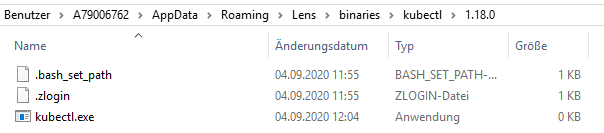
Having the same problem. It also "deletes" (0KB) the kubectl.exe after that happens.
 simwak
on 4 Sep 2020
simwak
on 4 Sep 2020
778 probably fixed this by releasing the lock when downloading of kubectl fails.
 nevalla
on 4 Sep 2020
nevalla
on 4 Sep 2020
I experienced the same issue:
Environment
Windows 7
Lens 3.5.3
I resolved it (work around) by manually downloading kubectl for the given version and placing it in the above mentioned folder before starting up Lens.
 rdouman
on 4 Sep 2020
rdouman
on 4 Sep 2020
Thanks @nevalla I will check with 3.6.0
papanito
on 4 Sep 2020
Hi, Lens update itself this morning to 3.6.0
Got this error now, on 1.18.8 kubectl.exe
Windows 10
Lens 3.6.0
Lens is not usable, trying to downgrade to 3.5.3
EDIT
Downgrade not working neither, the message dialog is less frequent but still broken :(
But workaround, manual download, works also in 3.6.0 with kubectl.exe 1.18.8
 UnleashSpirit
on 16 Sep 2020
UnleashSpirit
on 16 Sep 2020
With 3.6.3 it's even worse. Getting the error every few seconds (2-10 seconds). Totally bad experience as you need to click it away ervery time.
simwak
on 19 Sep 2020
With 3.6 you can define Download directory in preferences? Does that help? Also it's possible to disable downloading kubectl binaries and define path to your own kubectl binary.
nevalla
on 21 Sep 2020
Setting the path to my own kubectl binary works! Setting a different path, for example the desktop does not work.
simwak
on 21 Sep 2020
Setting the path to my own kubectl binary works! Setting a different path, for example the desktop does not work.
when you defined desktop, did you see any binaries downloaded? Trying to figure out what is the actual problem here. I thought that app will release the lock on all situations, but apparently I am wrong.
nevalla
on 21 Sep 2020
when you defined desktop, did you see any binaries downloaded? Trying to figure out what is the actual problem here. I thought that app will release the lock on all situations, but apparently I am wrong.
It created the directory Desktop\binaries\1.18.8 and the kubectl.exe is just 0kb in size.
simwak
on 21 Sep 2020
Hi, still happens in 3.6.7 on win10 :(
Are there any workarounds?
 dealboy
on 13 Nov 2020
dealboy
on 13 Nov 2020
The problem is with the 0KB kubectl.exe file. Download kubectl manually from Kubernetes stores e.g. in my case https://storage.googleapis.com/kubernetes-release/release/v1.16.14/bin/windows/amd64/kubectl.exe and replace 0KB file.
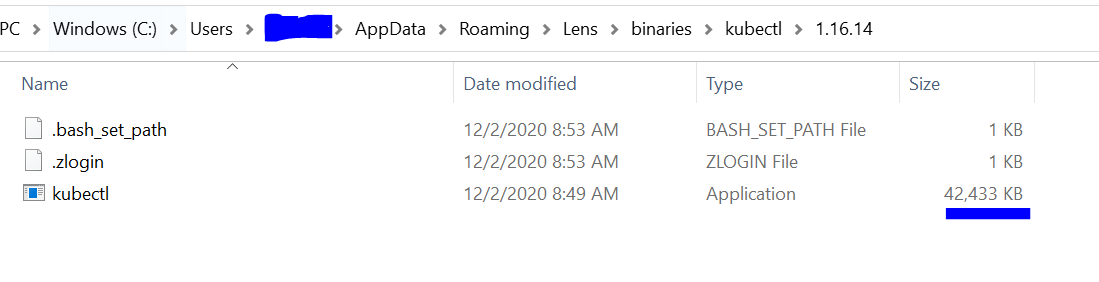
This works for me!
 Ghebrehiywet
on 2 Dec 2020
Ghebrehiywet
on 2 Dec 2020
The problem is with the 0KB
kubectl.exefile. Download kubectl manually from Kubernetes stores e.g. in my casehttps://storage.googleapis.com/kubernetes-release/release/v1.16.14/bin/windows/amd64/kubectl.exeand replace 0KB file.This works for me!
That worked also for me sometime. But not always and you need to override it way too often.
simwak
on 2 Dec 2020
Thanks @Ghebrehiywet : it works for me, seems to be a good workaround.
 fkocik
on 3 Dec 2020
fkocik
on 3 Dec 2020
Related issues
 fjudith
·
4Comments
fjudith
·
4Comments
 jtackaberry
·
6Comments
jtackaberry
·
6Comments
 snowmoonsoftware
·
4Comments
snowmoonsoftware
·
4Comments
 HristoA
·
6Comments
HristoA
·
6Comments
 geruetzel
·
6Comments
geruetzel
·
6Comments
Most helpful comment
The problem is with the 0KB
kubectl.exefile. Download kubectl manually from Kubernetes stores e.g. in my casehttps://storage.googleapis.com/kubernetes-release/release/v1.16.14/bin/windows/amd64/kubectl.exeand replace 0KB file.This works for me!