Ledger-live-desktop: Cannot add account for Nano X
Ledger Live Version and Operating System
1.8.0
Windows 10 (x64 17134.765)
Expected behavior
Clicking Add Account should add crypto account, e.g. Bitcoin.
Actual behavior
Clicking Add Account detects Nano X device but when going into app (e.g. Bitcoin) on device, it disconnects and shows as device not connected. Exiting app will show device as again connected.
Steps to reproduce the behavior
Reset Live using Settings -> Ledger Live Reset.
Connect Nano X and go through setup as an initialized device.
Use App Manager to add apps to Nano X device
Click Add Account and choose Bitcoin
Connect Nano X
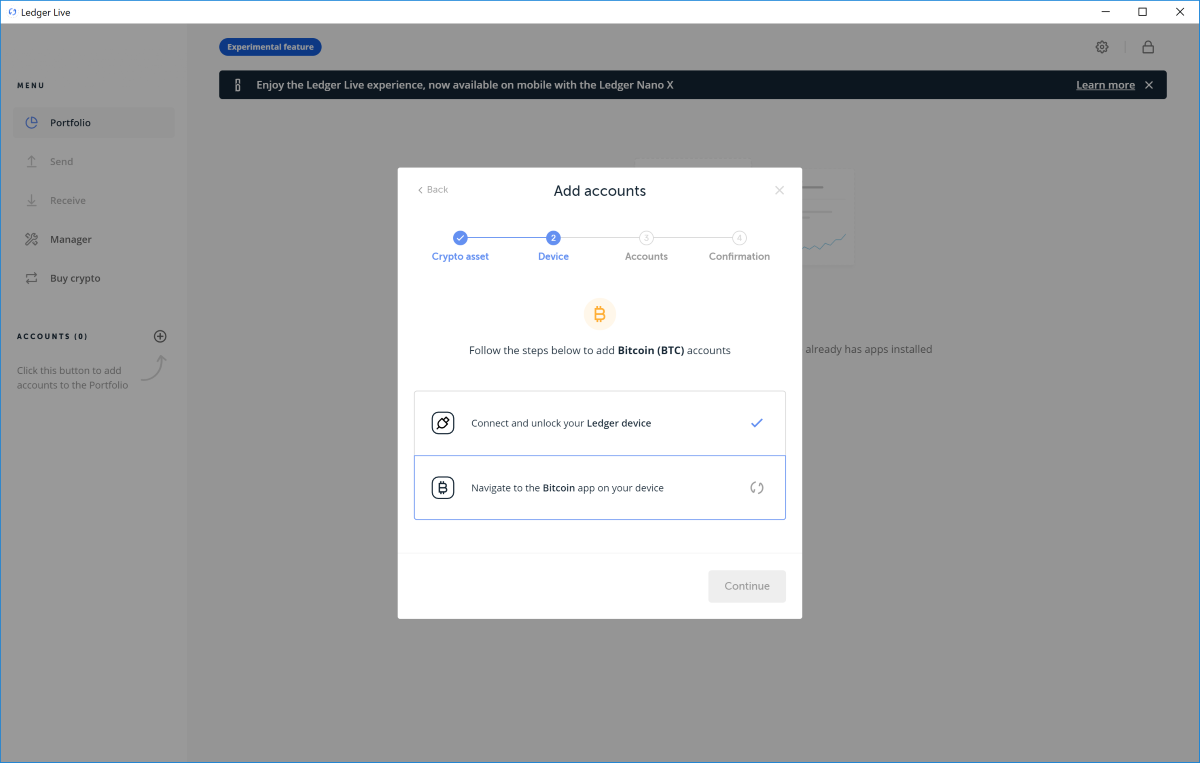
Go into Bitcoin app on Nano X

 cdmackie
All 36 comments
Hi, thanks for the issue.
For the purpose of investigation, can you try to turn off the Bluetooth of the NanoX, reboot it and then connect it again by USB?
 gre
on 19 May 2019
gre
on 19 May 2019
Yes, tried it with BT on and off. Was off for the above test.
cdmackie
on 20 May 2019
I also encountered this problem. How can I solve it?
 ceozero
on 22 May 2019
ceozero
on 22 May 2019
It's not easy to understand the problem without further detail. And we can't really gather all usb issues into one issue, it can come from many reasons.
- first we need to understand if it's a NanoX issue or a general usb one. Have you tried with a NanoS in the exact same conditions?
- it can falls into the general topic of https://support.ledger.com/hc/en-us/articles/115005165269-Fix-connection-issues
You can contact our tech support so we can gather all this information at a central place and start investigating (feel free to investigate on your end as well!)
We hope to fix this soon.
thanks
gre
on 22 May 2019
There is no problem using nano s at the same time. I think it's nano x compatibility.
ceozero
on 22 May 2019
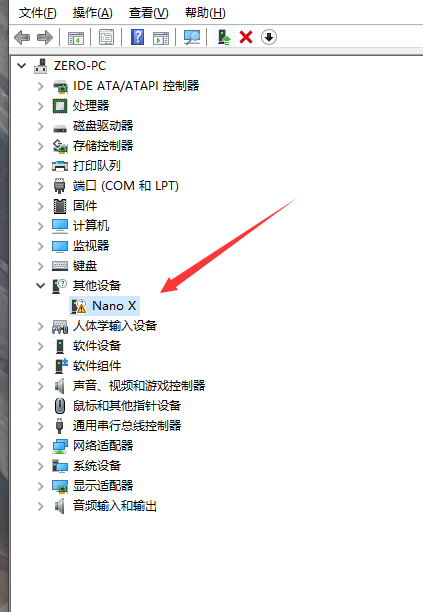
Unable to update the driver automatically. Where can I find the nano x driver?
Windows 10 LTSC
ceozero
on 22 May 2019
Same problem here,
However there is a workaround for it (kinda annoying):
- Close Ledger Live app
- Open crypto app on your device (to which you want to add the account)
- Start Ledger Live (without closing crypto app)
- Add the account (now it should work)
You have to repeat this step for each crypto. Even for receiving!
 Zaczero
on 22 May 2019
Zaczero
on 22 May 2019
Same problem here,
However there is a workaround for it (kinda annoying):
- Close Ledger Live app
- Open crypto app on your device (to which you want to add the account)
- Start Ledger Live (without closing crypto app)
- Add the account (now it should work)
You have to repeat this step for each crypto. Even for receiving!
My God, this is a bug. Thank you. It's a very troublesome operation.
ceozero
on 22 May 2019
Here is the error from logs while trying to getAddress
(same error for adding account and getting receive address):
{
    "data": {
        "message": "Ledger device: Security not satisfied (dongle locked or have invalid access rights) (0x6982)",
        "name": "TransportStatusError",
        "stack": "Error\n    at new TransportStatusError (C:\\Program Files\\Ledger Live\\resources\\app.asar\\node_modules\\@ledgerhq\\errors\\lib\\index.js:160:16)\n    at TransportNodeHid._callee$ (C:\\Program Files\\Ledger Live\\resources\\app.asar\\node_modules\\@ledgerhq\\hw-transport\\lib\\Transport.js:93:23)\n    at I (C:\\Program Files\\Ledger Live\\resources\\app.asar\\dist\\internals\\webpack:\\node_modules\\regenerator-runtime\\runtime.js:62:15)\n    at Generator._invoke (C:\\Program Files\\Ledger Live\\resources\\app.asar\\dist\\internals\\webpack:\\node_modules\\regenerator-runtime\\runtime.js:296:1)\n    at Generator.e.(anonymous function) [as next] (C:\\Program Files\\Ledger Live\\resources\\app.asar\\dist\\internals\\webpack:\\node_modules\\regenerator-runtime\\runtime.js:114:1)\n    at step (C:\\Program Files\\Ledger Live\\resources\\app.asar\\node_modules\\@ledgerhq\\hw-transport\\lib\\Transport.js:20:191)\n    at C:\\Program Files\\Ledger Live\\resources\\app.asar\\node_modules\\@ledgerhq\\hw-transport\\lib\\Transport.js:20:361\n    at <anonymous>",
        "statusCode": 27010,
        "statusText": "SECURITY_STATUS_NOT_SATISFIED"
    },
    "level": "warn",
    "message": "✖ CMD getAddress error",
    "pname": "renderer",
    "timestamp": "2019-05-22T13:51:46.186Z",
    "type": "cmd.ERROR"
}, {
    "data": {
        "message": "Ledger device: Security not satisfied (dongle locked or have invalid access rights) (0x6982)",
        "name": "TransportStatusError",
        "stack": "Error\n    at new TransportStatusError (C:\\Program Files\\Ledger Live\\resources\\app.asar\\node_modules\\@ledgerhq\\errors\\lib\\index.js:160:16)\n    at TransportNodeHid._callee$ (C:\\Program Files\\Ledger Live\\resources\\app.asar\\node_modules\\@ledgerhq\\hw-transport\\lib\\Transport.js:93:23)\n    at I (C:\\Program Files\\Ledger Live\\resources\\app.asar\\dist\\internals\\webpack:\\node_modules\\regenerator-runtime\\runtime.js:62:15)\n    at Generator._invoke (C:\\Program Files\\Ledger Live\\resources\\app.asar\\dist\\internals\\webpack:\\node_modules\\regenerator-runtime\\runtime.js:296:1)\n    at Generator.e.(anonymous function) [as next] (C:\\Program Files\\Ledger Live\\resources\\app.asar\\dist\\internals\\webpack:\\node_modules\\regenerator-runtime\\runtime.js:114:1)\n    at step (C:\\Program Files\\Ledger Live\\resources\\app.asar\\node_modules\\@ledgerhq\\hw-transport\\lib\\Transport.js:20:191)\n    at C:\\Program Files\\Ledger Live\\resources\\app.asar\\node_modules\\@ledgerhq\\hw-transport\\lib\\Transport.js:20:361\n    at <anonymous>",
        "statusCode": 27010,
        "statusText": "SECURITY_STATUS_NOT_SATISFIED"
    },
    "level": "warn",
    "message": "✖ CMD getAddress error",
    "pname": "internal",
    "timestamp": "2019-05-22T13:51:46.185Z",
    "type": "cmd.ERROR"
}, {
    "error": {
        "message": "Ledger device: Security not satisfied (dongle locked or have invalid access rights) (0x6982)",
        "name": "TransportStatusError",
        "stack": "Error\n    at new TransportStatusError (C:\\Program Files\\Ledger Live\\resources\\app.asar\\node_modules\\@ledgerhq\\errors\\lib\\index.js:160:16)\n    at TransportNodeHid._callee$ (C:\\Program Files\\Ledger Live\\resources\\app.asar\\node_modules\\@ledgerhq\\hw-transport\\lib\\Transport.js:93:23)\n    at I (C:\\Program Files\\Ledger Live\\resources\\app.asar\\dist\\internals\\webpack:\\node_modules\\regenerator-runtime\\runtime.js:62:15)\n    at Generator._invoke (C:\\Program Files\\Ledger Live\\resources\\app.asar\\dist\\internals\\webpack:\\node_modules\\regenerator-runtime\\runtime.js:296:1)\n    at Generator.e.(anonymous function) [as next] (C:\\Program Files\\Ledger Live\\resources\\app.asar\\dist\\internals\\webpack:\\node_modules\\regenerator-runtime\\runtime.js:114:1)\n    at step (C:\\Program Files\\Ledger Live\\resources\\app.asar\\node_modules\\@ledgerhq\\hw-transport\\lib\\Transport.js:20:191)\n    at C:\\Program Files\\Ledger Live\\resources\\app.asar\\node_modules\\@ledgerhq\\hw-transport\\lib\\Transport.js:20:361\n    at <anonymous>",
        "statusCode": 27010,
        "statusText": "SECURITY_STATUS_NOT_SATISFIED"
    },
    "level": "warn",
    "message": "Command error:",
    "pname": "internal",
    "timestamp": "2019-05-22T13:51:46.185Z"
}, {
    "level": "debug",
    "message": "<=6982",
    "pname": "internal",
    "timestamp": "2019-05-22T13:51:46.184Z",
    "type": "apdu"
}, {
    "level": "debug",
    "message": "=>e040000015058000002c80000000800000000000000000000000",
    "pname": "internal",
    "timestamp": "2019-05-22T13:51:46.178Z",
    "type": "apdu"
}, {
    "data": {
        "currencyId": "bitcoin",
        "derivationMode": "",
        "devicePath": "\\\\?\\hid#vid_2c97&pid_0004&mi_00#8&1d571292&0&0000#{4d1e55b2-f16f-11cf-88cb-001111000030}",
        "path": "44'/0'/0'/0/0",
        "segwit": false
    },
    "level": "info",
    "message": "CMD getAddress.send()",
    "pname": "internal",
    "timestamp": "2019-05-22T13:51:46.169Z",
    "type": "cmd.START"
}, {
    "data": {
        "currencyId": "bitcoin",
        "derivationMode": "",
        "devicePath": "\\\\?\\hid#vid_2c97&pid_0004&mi_00#8&1d571292&0&0000#{4d1e55b2-f16f-11cf-88cb-001111000030}",
        "path": "44'/0'/0'/0/0",
        "segwit": false
    },
    "level": "info",
    "message": "CMD getAddress.send()",
    "pname": "renderer",
    "timestamp": "2019-05-22T13:51:46.169Z",
    "type": "cmd.START"
}
Here's where I found that workaround (10 months old?): https://www.reddit.com/r/ledgerwallet/comments/8xfdac/add_account_doesnt_work_ledger_live/e24tu3i/
I tried resetting Ledger Live with no luck.
Run as admin didn't help as well.
USB 2.0 / 3.0 no difference.
Tested with Bluetooth enabled and disabled - no difference.
I am using Windows 10 64bit


Zaczero
on 22 May 2019
Also what's worth mentioning is that whenever I enter or exit crypto app I can hear device disconnect/connect sound on Windows. I think that the workaround works because device doesn't reconnect while entering the crypto app with ledger open. Imo Ledger Live can't handle that disconnect/connect properly and falls back to the 1st step.
I tried:
- Open Ledger Live
- Open crypto app first
- Then add account / receive funds
but Ledger Live is stuck on the first step. The workaround only works when crypto app is started before Ledger Live.
Video of disconnect/connect (listen carefully):
Action 5-22-2019 4-27-53 PM.zip
Also I've tried uninstalling device from Device Manager and installing it again.
Restarted my pc and disabled any VPN/antivirus running on my computer.
Zaczero
on 22 May 2019
I confirm the same issues with adding accounts.
It also affected Trinity in this case, couldn't recreate the account as it was asking me to plug my Ledger in after starting IOTA app. In my case, having IOTA already started before plugging in the Ledger worked like a charm.
Ledger X / Windows 10 OS Build 17763.529
EDIT: After some try and fail testing I've noticed it works for me best when I connect ledger to PC and start app on the Ledger, then start Ledger Live and add the account I want to.
 vueme
on 22 May 2019
vueme
on 22 May 2019
@ceozero @vueme @cdmackie
In such situation, can you attempt to use the "Experimental USB" under the settings experimental section?
This is an alternative implementation that no longer uses USB events to wait the device to be connected.
@Zaczero you are correct, it's very likely there is an issue with the USB events that are missed and it seems to be only on windows.
That experimental USB was a quick workaround (and have some UI glitches like it will say your device is a nanoS and it won't detect disconnection to automatically leave manager). It's worth giving a try to confirm it fixes the problem. If it does we'll get rid of USB library and will just do polling on hid.
Thanks
gre
on 24 May 2019
@gre
Hell yeah, it worked like a charm.
Tested both: adding account & receiving funds

Just wondering: won't it break the firmware updates in the future just because it detects it as nano s instead of x or is there additional verification and that nano s is just visual (ik that it's a temporary solution - I'm just curious).
Zaczero
on 24 May 2019
@Zaczero I don't think it will break firmware update because the information is mainly estetical. Now I can't guarantee that for sure so wouldn't recommend neither (it's still an experimental feature).
For firmware update, I recommend to get back to the non experimental implementation. I don't think there will be the same bug happening for firmware updates because the issue mentioned here is exclusively happening when you switch context on the device (dashboard -> app -> dashboard). Each time you switch apps, there is actually a usb reconnection that is happening because how the device works (isolation of the usb stack,.. it's not shared between apps). Firmware update remain on the dashboard so it should be good, plugging again your device would help re-detecting the device and you land on dashboard, so it would be fine.
The goal now is to rework the way we deal with USB (and potentially it will mean UX & UI rework in the future). My plan is first to get the same UI/UX working with a different approach on how we deal with USB. before we do later a UI/UX rework. Hope to make it happen soon, it will probably be under Experimental USB still, before we validate it works properly.
gre
on 24 May 2019
@gre
I can confirm that using the experimental USB worked but the UI is a bit bugged as you said.
Even solved my Trinity error but I don't know if that's related.
Cheers and good luck!
vueme
on 26 May 2019
I also had the problem on my MacBook air. When trying above workarround it then does work. Definitively a bug but we have a workaround so oké 👍🏻
 ThomasDevOps
on 25 Aug 2019
ThomasDevOps
on 25 Aug 2019
@ThomasDevOps which workaround are you referring to? Thanks
gre
on 27 Aug 2019
@gre let's take the Bitcoin app as an example.
First unlock your ledger nano S/X and open up the bitcoin app on your Ledger Nano S/X
Then poen up the Ledger Live app on your computer/mac.
Login into Ledger Live
Open Bitcoin app on Ledger Live (or Add btcoin app on Ledger Live)
now it will continue and not be stuck.
(Normally you open ledger live first and then go to your ledger nano, but then it gets stuck, so try the otherway around)
Lets me know if I was not clear enough :)
ThomasDevOps
on 27 Aug 2019
@ThomasDevOps ok i see, can you test if the "Experimental USB" solves the problem for you? thanks
gre
on 27 Aug 2019
@gre yes that also solved the problem for me.
ThomasDevOps
on 27 Aug 2019
This is how I fixed "Nano X" yellow warning triangle in Device Manager for Windows 7 x64.
Ledger nano X with yellow warning triangle will work with Ledger Live but not with web browsers.
To fix this you need to install a driver for two hardware. The first driver installation is the device itself and the second installation is the hardware that appears when opening the wallet on the device.
Both hardware have the name "Nano X" in Device Manager.
Install driver for both hardware:
Control panel > Device Manager > right click on Nano X > Update Driver Software >
Browse my computer for driver software > Let me pick from a list of device drivers on my computer >
Human Interface Devices(HID) > Microsoft --- Microsoft Input Controler Device > INSTALL
After that you can use Ledger with programs like Wasabi Wallet, Monero wallet, Chrome...
 probitco
on 2 Sep 2019
probitco
on 2 Sep 2019
So you just install some random driver that will not do anything apart from removing the warning triangle.
@gre, There is in fact something wrong with the drivers, as programs like Wasabi Wallet, Monero wallet, Chrome can't detect Nano X hardware. The only software that works with it is Ledger Live.
Any manual way to install the driver, so perhaps the other programs will start to see Ledger?
Nano S works.
Nano X doesn't.
 dzid26
on 8 Sep 2019
dzid26
on 8 Sep 2019
I forgot to mention that you need to install two hardware. The first installation is the device itself and the second installation is the hardware that appears when opening the wallet on the device.
probitco
on 10 Sep 2019
Isn't some random driver you installed? Ledger is not HID device.
What does it solve apart from temporarily removing the triangle warning?
dzid26
on 10 Sep 2019
Hi,
holy shit, today I have updated mi Ledger nano S firmware and the problem of this post is 100% true
How can Ledger make this bad firmware !?!?!
Thanks for this workarounds:
Same problem here,
However there is a workaround for it (kinda annoying):1. Close Ledger Live app 2. Open crypto app on your device (to which you want to add the account) 3. Start Ledger Live (without closing crypto app) 4. Add the account (now it should work)You have to repeat this step for each crypto. Even for receiving!
@ceozero @vueme @cdmackie
In such situation, can you attempt to use the "Experimental USB" under the settings experimental section?
This is an alternative implementation that no longer uses USB events to wait the device to be connected.
@Zaczero you are correct, it's very likely there is an issue with the USB events that are missed and it seems to be only on windows.That experimental USB was a quick workaround (and have some UI glitches like it will say your device is a nanoS and it won't detect disconnection to automatically leave manager). It's worth giving a try to confirm it fixes the problem. If it does we'll get rid of USB library and will just do polling on hid.
Thanks
Greetings
 clamatac
on 30 Nov 2019
clamatac
on 30 Nov 2019
Having this same issue, just bought a brand new Nano S. Updated to the latest firmware and the only way to add accounts is to use the workaround referenced several times here, originally by @Zaczero. Hopefully a fix is in the works?
 jgreisen
on 3 Dec 2019
jgreisen
on 3 Dec 2019
@jgreisen even when using Experimental USB?
gre
on 3 Dec 2019
having this issue as well, using the workaround. Very disappointed.
https://www.reddit.com/r/ledgerwallet/comments/e80c4b/updated_to_160_and_cant_acces_bitcoin_wallet/
 Buttaa
on 8 Dec 2019
Buttaa
on 8 Dec 2019
@ButtaTRiBot can you tell us if Experimental USB works for you? we're planning to shift to this implementation in the incoming weeks/months
thanks
gre
on 9 Dec 2019
@ButtaTRiBot can you tell us if Experimental USB works for you? we're planning to shift to this implementation in the incoming weeks/months
thanks
@gre yes, Experimental USB works, shows "application is ready" on the NanoS and allows me to access the wallet. Waiting for the implementation before i update other devices.
edit: @gre works fine on my macbook without Experimental USB, seems to be a Windows problem.
Buttaa
on 9 Dec 2019
@gre yes, the Experimental USB seems to resolve the issue once activated.
jgreisen
on 9 Dec 2019
@gre some of the recent Windows/Ledger(?) updates seem to have this issue fixed now.
I was able to connect without Experimental USB.
Would like to see other people to confirm this too
Buttaa
on 16 Dec 2019
Would you, anyone, point to the right place to ask this question?
Can I use one Ledger Nano X with IOTA app on both
- PC Windows+Trinity desktop
- Android phone+ Trinit App?
I performed the initial setup on PC, I received my IOTA and now I wonder whether I can use the same Ledger hardware wallet with Android app Trinity Wallet.
Sorry for asking here on development portal...
 janzilka
on 4 Feb 2020
janzilka
on 4 Feb 2020
We expect this to be fixed in context of a big rework that just got merged. we'll reopen in this does not fix in the next release #2596
gre
on 20 Feb 2020
I have the exact same issue with my ledger nano S probably only on XRP accounts.
So, after reinstalling system and thus Ledger Live I want to add XRP account to see tokens and receive/withdraw.
There is no Experimental USB option in settings.
Any help?
 Shaquer
on 2 Jun 2020
Shaquer
on 2 Jun 2020
Hi,
I have a ledger nano S with firmware 1.6.0. Ledger live is 2.3.2
Now, I do not have the experimental usb option, but the problem seems to have disappeared. I say that because I have delete one of my accounts, and I have added again correctly.
¿anyone else still having the problem?
¿anyone else with the problem fixed like it seems to me?
Greetings
clamatac
on 2 Jun 2020
Related issues
 noman-land
·
4Comments
noman-land
·
4Comments
 juan-cortes
·
4Comments
juan-cortes
·
4Comments
 Urgo
·
3Comments
Urgo
·
3Comments
 skyrbs
·
3Comments
skyrbs
·
3Comments
 jcalfee
·
3Comments
jcalfee
·
3Comments
Most helpful comment
@Zaczero I don't think it will break firmware update because the information is mainly estetical. Now I can't guarantee that for sure so wouldn't recommend neither (it's still an experimental feature).
For firmware update, I recommend to get back to the non experimental implementation. I don't think there will be the same bug happening for firmware updates because the issue mentioned here is exclusively happening when you switch context on the device (dashboard -> app -> dashboard). Each time you switch apps, there is actually a usb reconnection that is happening because how the device works (isolation of the usb stack,.. it's not shared between apps). Firmware update remain on the dashboard so it should be good, plugging again your device would help re-detecting the device and you land on dashboard, so it would be fine.
The goal now is to rework the way we deal with USB (and potentially it will mean UX & UI rework in the future). My plan is first to get the same UI/UX working with a different approach on how we deal with USB. before we do later a UI/UX rework. Hope to make it happen soon, it will probably be under Experimental USB still, before we validate it works properly.