Ledger-live-desktop: UI elements disappearing from Ledger Live in Ubuntu 16.04 64-bit
Ledger Live Version and Operating System
- tested on Ledger Live 1.1.11
- Platform and version: Ubuntu 16.04.5 64-bit
Expected behaviour
UI elements stay where they should be.
Actual behaviour
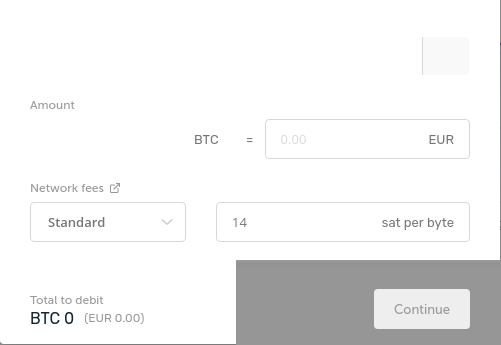
Mouseover on any interactive UI element causes said UI element to disappear. Sometimes non-interactive elements, such as the checklist for connecting the Ledger and opening the app, will also disappear as they are toggled between unchecked and checked. Makes the application impossible to use!
Steps to reproduce the behaviour
All I'm doing from my end is downloading the latest AppImage, making it executable, and running it, then trying to use it.
To achieve the below screenshot, I scrolled to my Ethereum account, clicked Receive (which disappeared on mouseover but still worked), connected the Ledger, opened the Ethereum app, and then moused over the various interactive elements of the window - causing them all to disappear.

Escaping out of the window and attempting to go back in causes the whole window to appear invisible, and various other graphical corruptions.
Happy to assist with troubleshooting in any way I can; at the moment I'm having to use the old Ledger apps!
 ghalfacree
All 55 comments
Hello, this looks similar to https://github.com/LedgerHQ/ledger-live-desktop/issues/1494
Does problem persists after a reboot? This bug can be caused just after updating video drivers. If it persists, is it possible for you to test with another desktop environment? Finally, can you give informations on your video configuration?
lspci -v | grep -A 10 VGA
 meriadec
on 27 Sep 2018
meriadec
on 27 Sep 2018
The problem does persist after a reboot, but I think you're onto something with the graphics drivers: I have a desktop and a laptop, both running Ubuntu 16.04.5 64-bit, but the desktop is an AMD A10-5800K APU and the laptop is an Intel Core i7-7560U. Both are running the default drivers supplied by Canonical's repositories. The desktop exhibits the issue; the laptop (having just installed Ledger Live on it to check) does not. Same desktop environment on both.
Output of lspci on the desktop:
00:01.0 VGA compatible controller: Advanced Micro Devices, Inc. [AMD/ATI] Trinity [Radeon HD 7660D] (prog-if 00 [VGA controller])
        Subsystem: Advanced Micro Devices, Inc. [AMD/ATI] Trinity [Radeon HD 7660D]
        Flags: bus master, fast devsel, latency 0, IRQ 38
        Memory at c0000000 (32-bit, prefetchable) [size=256M]
        I/O ports at f000 [size=256]
        Memory at feb00000 (32-bit, non-prefetchable) [size=256K]
        [virtual] Expansion ROM at 000c0000 [disabled] [size=128K]
        Capabilities: [50] Power Management version 3
        Capabilities: [58] Express Root Complex Integrated Endpoint, MSI 00
        Capabilities: [a0] MSI: Enable+ Count=1/1 Maskable- 64bit+
        Capabilities: [100] Vendor Specific Information: ID=0001 Rev=1 Len=010 <?>
--
        Flags: bus master, VGA palette snoop, 66MHz, medium devsel, latency 64
        Bus: primary=00, secondary=04, subordinate=05, sec-latency=64
        I/O behind bridge: 0000b000-0000cfff
        Memory behind bridge: fd300000-fe7fffff
        Prefetchable memory behind bridge: d0000000-d13fffff
Referring on https://github.com/electron/electron/issues/4380#issuecomment-416893821, can you try
./ledger-live-desktop-1.1.11-linux-x86_64.AppImage --disable-gpu
No change when running with --disable-gpu.
ghalfacree
on 27 Sep 2018
can confirm, same issue - Radeon gpu. Latest drivers, latest build - Arch linux.
 stonedbear
on 3 Oct 2018
stonedbear
on 3 Oct 2018
Hi,
Do you folks have same kind of issue with other Electron based app OR does it only seem to apply to Ledger Live?
 gre
on 4 Oct 2018
gre
on 4 Oct 2018
Hi Gre,
I tested it with Etcher and Brave browser no issues there.
stonedbear
on 4 Oct 2018
As we currently not reproducing the error on our side, we'll need your help on investigating :)
On this comment I see some users have solved issue by using --disable-d3d11 or --disable-gpu flag when launching the app, can you try?
Also I'm not sure those parameters are passed to electron when using them with the .AppImage, maybe it would need to build the app with yarn dist:dir then launch the un-packaged app located in dist/linux-unpacked.
Finally, if possible on your side to test on previous releases it would be super useful to help us identify what could have caused this annoying bug.
meriadec
on 4 Oct 2018
Only appears to be Ledger Live: Atom and Etcher , other Electron apps, work perfectly on the same system.
Test results, Ledger Live 1.2.0 (automatically updated this morning) from AppImage (not rebuilt with yarn):
--disable-gpu - No change.
--disable-d3d11 - No change
--disable-d3d11 --disable-gpu - No change.
Version history testing, going backwards:
1.2.0 - Broken
1.1.11 - Broken
1.1.10 - Broken
1.1.9 - Broken
1.1.8 - No AppImage available, untested
1.1.7 - Broken
1.1.6 - Broken
1.1.5 - Broken
1.1.4 - Broken
1.1.3 - No AppImage available, untested
1.1.2 - Broken
1.1.1 - Broken
1.1.0 - Broken
1.0.7 - Working

So, it looks like whatever performance improvements were introduced in 1.1.0 are to blame!
ghalfacree
on 4 Oct 2018
@ghalfacree thanks for your reactivity :D that's a good hint!
meriadec
on 4 Oct 2018
@ghalfacree wow, that was quick ;)
i tested it with 1.0.5-1 and it is also working fine.
stonedbear
on 4 Oct 2018
Digging the changes introduced in v1.1.0, I didn't find anything suspicious stuff yet.
@ghalfacree would you mind testing this release I just built? only difference is the addition of app.disableHardwareAcceleration() (relatable).
meriadec
on 4 Oct 2018
@meriadec That build just sits at the initial loading screen with the spinning progress circle, and gets no further. Uses very little CPU itself (~5%) but causes Xorg to eat up 70-90% continuously. Nothing printed at the terminal during this process.
ghalfacree
on 4 Oct 2018
Arf.. ok I guess it's because I compiled it on my machine and my glibc version is too high. (You can run with DEV_TOOLS=1 ./foobar.AppImage to confirm)
I will compile on other machine and come back to you.
meriadec
on 4 Oct 2018
You're absolutely right:
Uncaught Error: /lib/x86_64-linux-gnu/libc.so.6: version `GLIBC_2.28' not found (required by /tmp/.org.chromium.Chromium.kGL0sl)
I'm running Ubuntu GLIBC 2.23-0ubuntu10.
ghalfacree
on 4 Oct 2018
Done, would you mind trying again? :pray: :crossed_fingers:
meriadec
on 4 Oct 2018
@meriadec No change, sadly: UI elements still disappearing on mouseover.
ghalfacree
on 4 Oct 2018
Ok :ok_hand:
So, apparently no quick-win for this issue ^^ I think best approach on our side will be to 1- reproduce (with specific hardware / VM), 2- git bisect and iterate.
I can't give ETA on this unfortunately, so sorry for the inconvenience. Keep updated!
meriadec
on 4 Oct 2018
@meriadec No problem - I appreciate you looking into it! Let me know when there's something to test, and I'll get it done here.
ghalfacree
on 4 Oct 2018
Can confirm this bug on Debian Stretch / Gnome-Shell with AppImage.
I have compiled from source, and when "yarn start" finished, ledger live has started and was ok (no transparent or blank UI element).
When "yarn dist:dir" finished, AppImage generated didn't work as expected : some UI elements were transparent or blank.
I have to say I modified package.json to install webpack 4.19.1 and webpack-cli 3.1.1 because yarn was reporting errors in node_modules/webpack-cli/bin/config-yargs.js (89):
describe: optionsSchema.definitions.output.properties.path.description,
                                                ^
TypeError: Cannot read property 'properties' of undefined
 Thasugeas
on 3 Nov 2018
Thasugeas
on 3 Nov 2018
I have the same bug on Ubuntu 18.04.1 64bit with a Radeon GPU. This is pretty bad, makes the whole app basically unusable as elements like buttons and forms just disappear entirely when hovering over them.
 chescos
on 8 Nov 2018
chescos
on 8 Nov 2018
Same problem here. Ledger Live 1.2.6, Opensuse Tumbleweed with Vega 8 graphics (amdgpu driver)
 il-cyclone
on 3 Dec 2018
il-cyclone
on 3 Dec 2018
Same problem – Latest Arch Linux, AMDGPU.
 ririen
on 21 Dec 2018
ririen
on 21 Dec 2018
This bug is still an issue on Ubuntu 18.04.1, Ledger Live 1.2.7. This bug makes the app almost unusable.
 ZacheryGlass
on 22 Dec 2018
ZacheryGlass
on 22 Dec 2018
Confirmed Ledger Live is also erratic and unusable through several releases, most recently Ledger Live 1.3.0, on QubesOS. Same behavior as described above. Using a Debian Testing VM, happy to test or help in further debugging. Note that Ledger on QubesOS is an ultra-secure combination. If it would only work.
 clayt0nk
on 12 Jan 2019
clayt0nk
on 12 Jan 2019
we need to upgrade our Electron version that comes with a more recent Chromium to see if it helps fixing the bug. I'll soon try to replicate your issue (will probably make myself a QubesOS live usb)
gre
on 13 Jan 2019
@gre Don't worry, already switched to a hardware wallet that actually has usable software (Trezor, if anybody is wondering).
chescos
on 13 Jan 2019
I found a workaround for this issue:
- Go to the Manager Or Buy Crypto pages
- Click the Send/Recieve button
- Behold! No flicker or glitches
I think this problem is related to the Total Balance graph and how it updates. I saw everything glitch once or twice while the value changed in the balance, so maybe it's some repaint issue. It's very likely to be on your codebase though because I never saw this on other electron apps.
 diegogangl
on 14 Jan 2019
diegogangl
on 14 Jan 2019
I can confirm that @diegogangl's workaround... err, works: if I'm on the portfolio screen, everything's glitchy-disappeary; switching to the static Manager or Buy/Trade screens makes everything work perfectly - even to the point of bringing back any UI elements that had previously disappeared.
ghalfacree
on 15 Jan 2019
wow nice hint @diegogangl. As you said, probably due to our Chart component. It make use of d3.js + mouse interactions, and ye, redraw itself on countervalue change or transaction.
meriadec
on 15 Jan 2019
debian testing here, app is not in an usable state as everything disappears randomly from the screen
cat /etc/os-release
PRETTY_NAME="Debian GNU/Linux buster/sid"
NAME="Debian GNU/Linux"
ID=debian
HOME_URL="https://www.debian.org/"
SUPPORT_URL="https://www.debian.org/support"
BUG_REPORT_URL="https://bugs.debian.org/"
tried the various fixes proposed here, none works, nor @diegogangl workaround
do you have a docker image ?
➜  Downloads ./ledger-live-desktop-1.6.0-linux-x86_64.AppImage --disable-gpu
desktop-file-install is missing. Skipping /tmp/.mount_ledgerfnQ2KF/AppRun.
Deprecated: @ledgerhq/live-common/lib/errors => @ledgerhq/errors
Checking for update
Deprecated: @ledgerhq/live-common/lib/errors => @ledgerhq/errors
Update for version 1.6.0 is not available (latest version: 1.6.0, downgrade is disallowed).
-> Killing internal process 47069
➜  Downloads ./ledger-live-desktop-1.6.0-linux-x86_64.AppImage --disable-d3d11
desktop-file-install is missing. Skipping /tmp/.mount_ledgergsiNZD/AppRun.
Deprecated: @ledgerhq/live-common/lib/errors => @ledgerhq/errors
Checking for update
Deprecated: @ledgerhq/live-common/lib/errors => @ledgerhq/errors
Update for version 1.6.0 is not available (latest version: 1.6.0, downgrade is disallowed).
-> Killing internal process 48447
➜  Downloads ./ledger-live-desktop-1.6.0-linux-x86_64.AppImage --disable-d3d11 --disable-gpu
desktop-file-install is missing. Skipping /tmp/.mount_ledgerH2aFWf/AppRun.
Deprecated: @ledgerhq/live-common/lib/errors => @ledgerhq/errors
Checking for update
Deprecated: @ledgerhq/live-common/lib/errors => @ledgerhq/errors
Update for version 1.6.0 is not available (latest version: 1.6.0, downgrade is disallowed).
-> Killing internal process 49075
➜  Downloads ./ledger-live-desktop-1.6.0-linux-x86_64.AppImage
desktop-file-install is missing. Skipping /tmp/.mount_ledgerAWTvg4/AppRun.
Deprecated: @ledgerhq/live-common/lib/errors => @ledgerhq/errors
Checking for update
Deprecated: @ledgerhq/live-common/lib/errors => @ledgerhq/errors
Update for version 1.6.0 is not available (latest version: 1.6.0, downgrade is disallowed).
-> Killing internal process 2482
 lspci -v | grep -A 10 VGA
03:00.0 VGA compatible controller: NVIDIA Corporation GP104 [GeForce GTX 1080] (rev a1) (prog-if 00 [VGA controller])
        Subsystem: eVga.com. Corp. GP104 [GeForce GTX 1080]
        Flags: bus master, fast devsel, latency 0, IRQ 105, NUMA node 0
        Memory at de000000 (32-bit, non-prefetchable) [size=16M]
        Memory at c0000000 (64-bit, prefetchable) [size=256M]
        Memory at d0000000 (64-bit, prefetchable) [size=32M]
        I/O ports at 8000 [size=128]
        [virtual] Expansion ROM at 000c0000 [disabled] [size=128K]
        Capabilities: <access denied>
        Kernel driver in use: nvidia
        Kernel modules: nvidia
 euri10
on 3 Apr 2019
euri10
on 3 Apr 2019
like @ghalfacree it starts to appear between 1.0.7 and 1.1.0
any more information I could provide to help ?
euri10
on 3 Apr 2019
Can we please have a method to permanently disable the charts. This is totally unusable with disappearing elements.
This issue has been open a long time.
 bundabrg
on 16 Apr 2019
bundabrg
on 16 Apr 2019
Something I noticed:
The problem appears in the portfolio page or in pages of addresses with multiple transactions (portfolio also has multiple transactions).
 AdrianClv
on 18 Apr 2019
AdrianClv
on 18 Apr 2019
With the new version this is fixed to me
Update: No, it's back
AdrianClv
on 4 May 2019
Not for me :-(
Thasugeas
on 4 May 2019
It does not fix it for me. Clicking one of the accounts on the left and clicking 'send' will randomly put up a blank screen or a dialogue missing half its fields. Doing it repeatedly will sometimes bring it right for one try but its impossible to use.
Some detailed info on my system for comparison:
Summary: kubuntu bionic with an AMD GPU attached to 6 screens
$ lspci | grep VGA
01:00.0 VGA compatible controller: Advanced Micro Devices, Inc. [AMD/ATI] Ellesmere [Radeon RX 470/480/570/570X/580/580X] (rev cf)
$ lsmod | grep "kdm\|drm"
drm_kms_helper        172032  1 amdgpu
syscopyarea            16384  1 drm_kms_helper
sysfillrect            16384  1 drm_kms_helper
sysimgblt              16384  1 drm_kms_helper
fb_sys_fops            16384  1 drm_kms_helper
drm                   458752  21 gpu_sched,drm_kms_helper,amdgpu,ttm
$ find /dev -group video
/dev/fb0
/dev/dri/renderD128
$ cat /proc/cmdline
BOOT_IMAGE=/boot/vmlinuz-4.18.0-18-generic root=/dev/mapper/kubuntu--vg-root ro quiet splash amdgpu.dc=1 vt.handoff=1
$ find /etc/modprobe.d/
/etc/modprobe.d/
/etc/modprobe.d/mdadm.conf
/etc/modprobe.d/qemu-system-x86.conf
/etc/modprobe.d/blacklist-firewire.conf
/etc/modprobe.d/alsa-base.conf
/etc/modprobe.d/blacklist-rare-network.conf
/etc/modprobe.d/iwlwifi.conf
/etc/modprobe.d/amd64-microcode-blacklist.conf
/etc/modprobe.d/dkms.conf
/etc/modprobe.d/blacklist-oss.conf
/etc/modprobe.d/blacklist.conf
/etc/modprobe.d/blacklist-ath_pci.conf
/etc/modprobe.d/blacklist-framebuffer.conf
/etc/modprobe.d/intel-microcode-blacklist.conf
/etc/modprobe.d/virtualgl.conf
/etc/modprobe.d/blacklist-modem.conf
$ glxinfo | grep -i "vendor\|rendering"
direct rendering: Yes
server glx vendor string: SGI
client glx vendor string: Mesa Project and SGI
    Vendor: X.Org (0x1002)
OpenGL vendor string: X.Org
$ grep LoadModule /var/log/Xorg.0.log
[    10.953] (II) LoadModule: "glx"
[    11.123] (II) LoadModule: "amdgpu"
[    11.126] (II) LoadModule: "fb"
[    11.126] (II) LoadModule: "dri2"
[    12.962] (II) LoadModule: "glamoregl"
[    13.064] (II) LoadModule: "ramdac"
[    14.192] (II) LoadModule: "libinput"
in the time a fix is found for this one (and its hard to debug because we didnt reproduced yet), you can use the CLI tool, that allow all kinds of operations that Live Desktop provide: https://www.npmjs.com/package/ledger-live
meriadec
on 6 May 2019
I had some time so I decided to reproduce this.
- I created a VM and installed kubuntu 19.04. Made sure it's screen res was 1920x1080
- I initialised a fresh Nano S
- Ran 1.8.0 ledger live. Added an account for each of Bitcoin, Bitcoin Cash, Ethereum, Ethereum Classic.
- Fiddling with the app will demo the same issue but I found it easiest to reproduce by full screening it first then clicking 'Send' in the menu. This came up with missing elements as follows.

This is a scratch VM so I'm happy to provide remote access to it via a ScreenConnect Guest Pass.
bundabrg
on 10 May 2019
I have updated my comment. The problem persists.
AdrianClv
on 12 May 2019
Do you have any clue why this happen, could it be related to SVGs heavy usage? (charts, icons, ..)
We might also want to upgrade Electron ASAP / find better alternative (like carlo)
gre
on 12 May 2019
I'm not sure myself. I've never used Electron (I try to veer towards frameworks that compile to native though that's a moving goal at the moment). I'll fork this and see if I can do some digging on the issue and send back a PR if I can find something.
bundabrg
on 13 May 2019
I've been stuck for 5 hours but may have found a work around. When I try to use the send or receive buttons on the left hand side of the interface I get weird interface furballs. Behavior similar to the screen shot @bundabrg posted. When I click on one of the accounts listed on the left and then use the blue send and receive buttons in the upper right the interface appears to respond properly.
 cryptocritter
on 13 May 2019
cryptocritter
on 13 May 2019
This workaround doesn't work for me. Only @diegogangl did, but no more with 1.8 version.
Thasugeas
on 13 May 2019
Dang this is affecting me as well. Fedora 28 with xmonad.
$  lspci -v | grep -A 10 VGA
01:00.0 VGA compatible controller: Advanced Micro Devices, Inc. [AMD/ATI] Ellesmere [Radeon RX 470/480/570/570X/580/580X/590] (rev e7) (prog-if 00 [VGA controller])
    Subsystem: Sapphire Technology Limited Nitro+ Radeon RX 570/580
    Flags: bus master, fast devsel, latency 0, IRQ 29
    Memory at e0000000 (64-bit, prefetchable) [size=256M]
    Memory at f0000000 (64-bit, prefetchable) [size=2M]
    I/O ports at e000 [size=256]
    Memory at f0200000 (32-bit, non-prefetchable) [size=256K]
    Expansion ROM at 000c0000 [disabled] [size=128K]
    Capabilities: <access denied>
    Kernel driver in use: amdgpu
    Kernel modules: amdgpu
 muff1nman
on 18 May 2019
muff1nman
on 18 May 2019
1.9.1, although not mentioning it in the changelog, has fixed this bug for me :-)
No it hasn't
Thasugeas
on 24 May 2019
Can confirm on arch linux, the appimage from GH works "fine", text is no longer missing, but it has wired "refresh refluxes", components are blinking crazy fast for 0.x a second, then it stabilizes and UI is fine.
 agilob
on 27 May 2019
agilob
on 27 May 2019
I had the same issue (Ubuntu 18.04 with AMD GPU) and the update 1.9.1 fixed it :)
 olivierpelet
on 2 Jun 2019
olivierpelet
on 2 Jun 2019
debian buster with an GeForce GTX 1080 and it seems fixed too, thanks, what happened ?
euri10
on 2 Jun 2019
Its better but I still see invisible items in dropdown lists. For example if I open a 'send' and then drop the the 'account to debit' have a bunch of entries with blank names. Scrolling seems to help refresh it. Also the chart behind the 'send' window disappears sometimes for a while, then comes back later.
bundabrg
on 5 Jun 2019
Just updated my previous comment: bug not fixed when trying to send
Thasugeas
on 5 Jun 2019
I see this issue with Arch Linux - GPU: AMD Radeon VII running wayland. Did not have this issue on a 1080TI in X11, however.
For me, it mainly appears on the portfolio page and during the dialog popups.
Using version 1.15.0
 vidaru
on 3 Oct 2019
vidaru
on 3 Oct 2019
Same error here,
Works for receive only under menu section.
take a look at this:
https://my.pcloud.com/publink/show?code=XZ3TdHkZWkSVGz7FRDVYXn8IlplvEfCIvUrk
I'm going to try installing different versions and distro's and see what happens.
Ledger Live 1.15.0
$ inxi -SGMC
System: Host: solydx Kernel: 5.2.0-3-amd64 x86_64 bits: 64 Desktop: Xfce 4.14.1 Distro: solydxk-11 11
SMP Debian 5.2.17-1 (2019-09-26) x86_64
Machine: Type: Desktop Mobo: MSI model: 890GXM-G65 (MS-7642) v: 1.0 serial:
BIOS: American Megatrends v: 1.8 date: 12/24/2010
CPU: Topology: Dual Core model: AMD Phenom II X2 555 bits: 64 type: MCP L2 cache: 1024 KiB
Speed: 800 MHz min/max: 800/3200 MHz Core speeds (MHz): 1: 800 2: 800
Graphics: Device-1: AMD RS880 [Radeon HD 4290] driver: radeon v: kernel
Display: x11 server: X.Org 1.20.4 driver: ati,radeon unloaded: fbdev,modesetting,vesa
resolution: 1920x1080~60Hz
OpenGL: renderer: AMD RS880 (DRM 2.50.0 / 5.2.0-3-amd64 LLVM 8.0.1) v: 3.3 Mesa 19.1.6
EDIT:
Playing around with windows up and minimized it appears to be the PC's video card.
EDIT: Update:
v 1.11.0 and 1.15.0 worked on my other Laptop with the following video-
Graphics: Device-1: Intel 2nd Generation Core Processor Family Integrated Graphics driver: i915 v: kernel
Display: x11 server: X.Org 1.20.4 driver: modesetting unloaded: fbdev,vesa resolution: 1366x768~60Hz
OpenGL: renderer: Mesa DRI Intel Sandybridge Mobile v: 3.3 Mesa 18.3.6
So it appears that it's a video card / driver issue.
 troypulk
on 4 Oct 2019
troypulk
on 4 Oct 2019
Just an update from my experience.
I find that if I load ledger-live-desktop from a terminal using ledger-live-desktop, I no longer experience display issues on the machine I normally experience them with when opening via the gnome shell.
vidaru
on 6 Nov 2019
We expect this to be fixed in context of a big rework that just got merged. we'll reopen in this does not fix in the next release #2596
gre
on 20 Feb 2020
Related issues
 skyrbs
·
3Comments
skyrbs
·
3Comments
 pollastri-pierre
·
5Comments
pollastri-pierre
·
5Comments
 nicolasbigot
·
3Comments
nicolasbigot
·
3Comments
 noman-land
·
4Comments
noman-land
·
4Comments
 BurnyBoi
·
4Comments
BurnyBoi
·
4Comments
Most helpful comment
@gre Don't worry, already switched to a hardware wallet that actually has usable software (Trezor, if anybody is wondering).