Layer5: [Project] Service Mesh Interface: text alignment
Description
The text on the Service Mesh Interface project is center-aligned (see screenshot).
Expected Behavior
This text should be left-aligned.
Screenshots

Contributor Resources
The layer5 repo contains two websites. The current generation and the next-generation of the layer5.io site.
If the layer5-ng label is absent on this issue, then this issue pertains to the current generation of the layer5.io website, which uses Jekyll and GitHub Pages. Site content is found under the master branch.
If the layer5-ng label is present on this issue, then this issue pertains to the next-generation of the layer5.io website, which uses Gatsby, Strapi, and GitHub Pages. Site content is found under the layer5-ng branch.
 leecalcote
All 14 comments
@leecalcote i would like to take up this one....as my first contribution to layer5
 Pratyush-Saxena
on 15 Sep 2020
Pratyush-Saxena
on 15 Sep 2020
@Pratyush-Saxena please go ahead
 Tanuj22
on 15 Sep 2020
Tanuj22
on 15 Sep 2020
@Tanuj22 @leecalcote ...While setting up dev enviroment ...i m getting this error
ruby: error while loading shared libraries: libcrypt.so.2: cannot open shared object file: No such file or directory...
pls help me in getting through this..
Pratyush-Saxena
on 16 Sep 2020
@Tanuj22 @leecalcote ...While setting up dev enviroment ...i m getting this error
ruby: error while loading shared libraries: libcrypt.so.2: cannot open shared object file: No such file or directory...
pls help me in getting through this..
Are you on windows, @Pratyush-Saxena ?
 Nikhil-Ladha
on 16 Sep 2020
Nikhil-Ladha
on 16 Sep 2020
@Nikhil-Ladha ...I use manjaro linux
Pratyush-Saxena
on 16 Sep 2020
Okay, then if you are using ruby installed fron the linux package manager. I would suggest to remove it, and use rvm instead for ruby and then try it again.
Nikhil-Ladha
on 16 Sep 2020
Okay, then if you are using ruby installed fron the linux package manager. I would suggest to remove it, and use rvm instead for ruby and then try it again.
@Pratyush-Saxena also do take care that you install ruby 2.7.0
Tanuj22
on 16 Sep 2020
Okay, then if you are using ruby installed fron the linux package manager. I would suggest to remove it, and use rvm instead for ruby and then try it again.
@Nikhil-Ladha can u pls ...explain how should i do that
Pratyush-Saxena
on 16 Sep 2020
The procedure is listed in the contributing guide AFAIRC. @chandrashritii @PluckyPrecious can you guys please point out that?
Nikhil-Ladha
on 16 Sep 2020
You can remove ruby then, install rvm from this link https://rvm.io/
Then, install ruby-2.7.0 using rvm itself, and set it as the default version. Then, try building the site.
Nikhil-Ladha
on 16 Sep 2020
@Pratyush-Saxena
Completely remove the currently installed version(s) of ruby from your system and do a clean install. The archlinux wiki instructions for installing ruby with rvm should work for manjaro linux. Try following this tutorial.
Another good reference source. Once you have rvm installed, you can go ahead and install ruby-2.7.0 using rvm, as @Nikhil-Ladha and @Tanuj22 have suggested. Hope this helps :)
 chandrashritii
on 17 Sep 2020
chandrashritii
on 17 Sep 2020
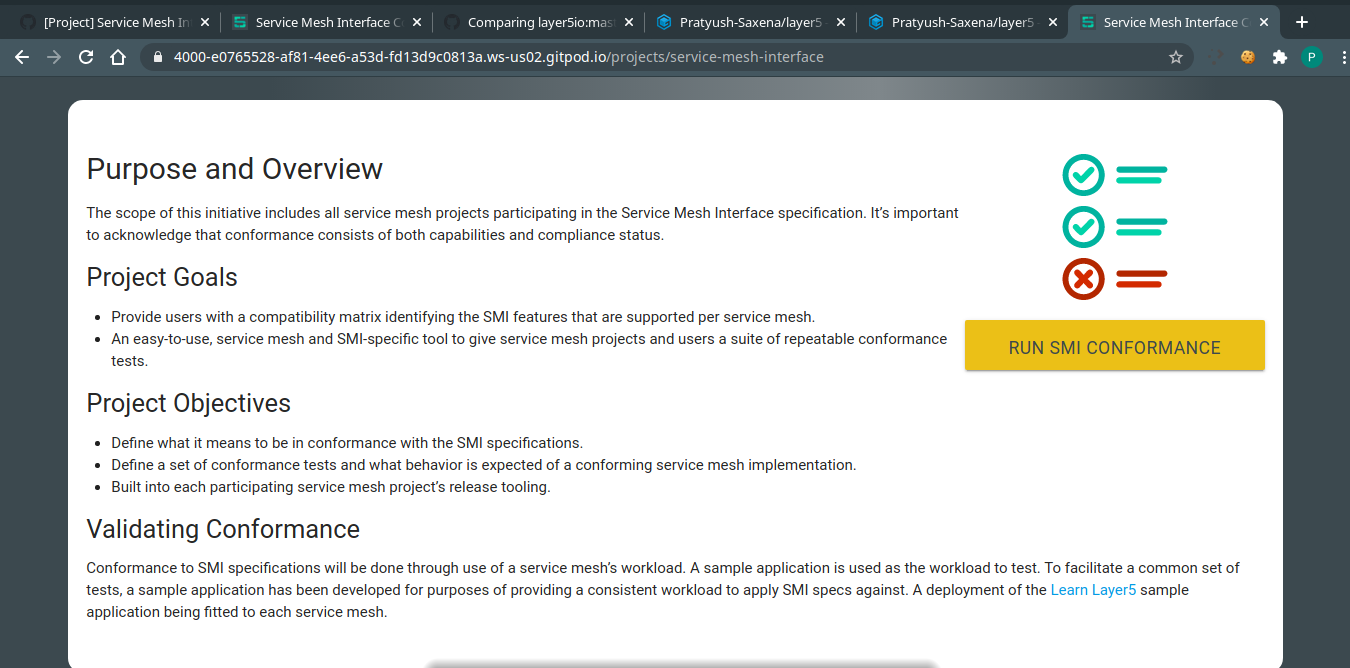
@leecalcote @Nikhil-Ladha @chandrashritii @Tanuj22 ...i just make this website run with ruby v2.7.1(coz as i said before i m unable to setup dev env on my local machine so I m working on gitpod which supports v2.7.1) and i found the issue resolved automatically ..... i guess you guys should now use rubyv2.7.1
Pratyush-Saxena
on 19 Sep 2020
Means, you are saying the issue is with ruby 2.7.0?
But, all of the members here are running it on the same version 🤔. Maybe, some other issue might have occurred which you are missing or so.
Nikhil-Ladha
on 19 Sep 2020
Means, you are saying the issue is with ruby 2.7.0?
But, all of the members here are running it on the same version . Maybe, some other issue might have occurred which you are missing or so.
I think we must look if the site is ready to get updated with ruby v2.7.1.....
Pratyush-Saxena
on 19 Sep 2020
Related issues
leecalcote
·
3Comments
 Neilblaze
·
3Comments
Neilblaze
·
3Comments
 Jashpatel1
·
3Comments
Jashpatel1
·
3Comments
 navendu-pottekkat
·
4Comments
leecalcote
·
3Comments
navendu-pottekkat
·
4Comments
leecalcote
·
3Comments