Latex-workshop: Cannot compile .tex files on MacOS
Description
Compiling of the .tex files will not work, so I am not able to use the workflow in my VSCode on MacOS. I suspect this might be related to the location of my files, which are on iCloud Drive, so the path might be a bit 'ugly'.
This is the error message I get:
Latexmk: applying rule 'pdflatex'...
This is pdfTeX, Version 3.14159265-2.6-1.40.18 (TeX Live 2017) (preloaded format=pdflatex)
 restricted \write18 enabled.
entering extended mode
! I can't find file `"/Users/ahmet/Library/Mobile Documents/com"'.
<to be read again>
                   \protect
<*> "/Users/ahmet/Library/Mobile Documents/com~
                                               apple~CloudDocs/Southampton/P...
(Press Enter to retry, or Control-D to exit)
Please type another input file name
! Emergency stop.
<to be read again>
                   \protect
<*> "/Users/ahmet/Library/Mobile Documents/com~
                                               apple~CloudDocs/Southampton/P...
!  ==> Fatal error occurred, no output PDF file produced!
Transcript written on texput.log.
=== TeX engine is 'pdfTeX'
Latexmk: Errors, so I did not complete making targets
I have tried quite a few things:
- removing all whitespace from the complete path to the file
- creating a symbolic link, so
~/Paper/is the directory where all .tex files are located - tried hardcoding the path in the workflow in settings
- tried creating an alias command and just putting that in the workflow settings without any arguments
Whatever I do, the error appears. I am able to run the command for latexmk manually from the terminal, so if I run latexmk -synctex=1 -interaction=nonstopmode -file-line-error -pdf -f ~/Paper/Thesis.tex the file gets built.
Expected behavior
I expect a PDF to be generated, that the compiling process is completed.
Actual behavior
There is an error message, with the log that I have showed above.
Log messages
LaTeX Workshop Output
file: 'file:///Users/ahmet/Library/Mobile%20Documents/com~apple~CloudDocs/Southampton/ProjectPrep/MScProject/Code/novelchain/Paper/Thesis.tex'
severity: 'Error'
message: 'I can't find file `"/Users/ahmet/Library/Mobile Documents/com"'
'
at: '1,1'
source: 'LaTeX'
Developer Tools Console
Additional Information
I am using MacOS X, latest version, 10.12.6.
 elahmo
All 29 comments
The problem is com~apple~CloudDocs. If you create a symlink, the error should change or just disappear. Have you tried hardcode ~/Paper/Thesis.tex ?
 James-Yu
on 12 Aug 2017
James-Yu
on 12 Aug 2017
Yes, I have tried that.
I tried this:
"latex-workshop.latex.toolchainnn": [
{
"command": "~/Paper/compileLatex"
}
]
(I have added an alias for the whole latexmk command)
as well as
"latex-workshop.latex.toolchain": [
{
"command": "latexmk",
"args": [
"-synctex=1",
"-interaction=nonstopmode",
"-file-line-error",
"-pdf",
"~/Paper/Thesis.tex" //as well as ./%DOCFILE%.text to avoid path being present
]
}
]
The first setting is just wrong. Please post the log for the second setting.
James-Yu
on 12 Aug 2017
Seems to be empty, "RawLatexLog", as well as .log file. But the status bar shows that 'Latex toolchain terminated with error'. Problems dock also doesnt show anything.
elahmo
on 12 Aug 2017
LaTeX Workshop Output?
James-Yu
on 12 Aug 2017
Yeah, LaTeX Workshop: Show LaTeX Log, the one that opens the new tab for 'Raw LaTeX Log', nothing is shown there now.
elahmo
on 12 Aug 2017
To access the log, click the 'problems' icons on the statusbar, select 'OUTPUT', then select 'LaTeX Workshop' from the dropdown menu on the right.
Without full information I cannot do any diagnostic.
James-Yu
on 12 Aug 2017
This is LaTeX Workshop Output. That one was LaTeX log right
James-Yu
on 12 Aug 2017
The project contains the code as well, so this was in subfolder 'Paper', I now tried opening just that subfolder in VSCode and still the same.
Here is the output from there:
[15:38:19] Initializing LaTeX Workshop.
[15:38:19] Creating LaTeX Workshop http and websocket server.
[15:38:19] LaTeX Workshop initialized.
[15:38:19] Found root file from active editor: /Users/ahmet/Library/Mobile Documents/com~apple~CloudDocs/Southampton/ProjectPrep/MScProject/Code/novelchain/Paper/Thesis.tex
[15:38:19] Root file changed from: undefined. Find all dependencies.
[15:38:19] Instatiating new file watcher for /Users/ahmet/Library/Mobile Documents/com~apple~CloudDocs/Southampton/ProjectPrep/MScProject/Code/novelchain/Paper/Thesis.tex
[15:38:19] Parsing /Users/ahmet/Library/Mobile Documents/com~apple~CloudDocs/Southampton/ProjectPrep/MScProject/Code/novelchain/Paper/Thesis.tex
[15:38:19] Adding /Users/ahmet/Library/Mobile Documents/com~apple~CloudDocs/Southampton/ProjectPrep/MScProject/Code/novelchain/Paper/Definitions.tex to file watcher.
[15:38:19] Parsing /Users/ahmet/Library/Mobile Documents/com~apple~CloudDocs/Southampton/ProjectPrep/MScProject/Code/novelchain/Paper/Definitions.tex
[15:38:19] Adding /Users/ahmet/Library/Mobile Documents/com~apple~CloudDocs/Southampton/ProjectPrep/MScProject/Code/novelchain/Paper/Introduction.tex to file watcher.
[15:38:19] Parsing /Users/ahmet/Library/Mobile Documents/com~apple~CloudDocs/Southampton/ProjectPrep/MScProject/Code/novelchain/Paper/Introduction.tex
[15:38:19] Adding /Users/ahmet/Library/Mobile Documents/com~apple~CloudDocs/Southampton/ProjectPrep/MScProject/Code/novelchain/Paper/LiteratureReview.tex to file watcher.
[15:38:19] Parsing /Users/ahmet/Library/Mobile Documents/com~apple~CloudDocs/Southampton/ProjectPrep/MScProject/Code/novelchain/Paper/LiteratureReview.tex
[15:38:19] Adding /Users/ahmet/Library/Mobile Documents/com~apple~CloudDocs/Southampton/ProjectPrep/MScProject/Code/novelchain/Paper/Approach.tex to file watcher.
[15:38:19] Parsing /Users/ahmet/Library/Mobile Documents/com~apple~CloudDocs/Southampton/ProjectPrep/MScProject/Code/novelchain/Paper/Approach.tex
[15:38:19] Adding /Users/ahmet/Library/Mobile Documents/com~apple~CloudDocs/Southampton/ProjectPrep/MScProject/Code/novelchain/Paper/ResultsDiscussion.tex to file watcher.
[15:38:19] Parsing /Users/ahmet/Library/Mobile Documents/com~apple~CloudDocs/Southampton/ProjectPrep/MScProject/Code/novelchain/Paper/ResultsDiscussion.tex
[15:38:19] Adding /Users/ahmet/Library/Mobile Documents/com~apple~CloudDocs/Southampton/ProjectPrep/MScProject/Code/novelchain/Paper/Conclusions.tex to file watcher.
[15:38:19] Parsing /Users/ahmet/Library/Mobile Documents/com~apple~CloudDocs/Southampton/ProjectPrep/MScProject/Code/novelchain/Paper/Conclusions.tex
[15:38:19] Adding /Users/ahmet/Library/Mobile Documents/com~apple~CloudDocs/Southampton/ProjectPrep/MScProject/Code/novelchain/Paper/AppendixA.tex to file watcher.
[15:38:19] Parsing /Users/ahmet/Library/Mobile Documents/com~apple~CloudDocs/Southampton/ProjectPrep/MScProject/Code/novelchain/Paper/AppendixA.tex
[15:38:19] Found .bib file /Users/ahmet/Library/Mobile Documents/com~apple~CloudDocs/Southampton/ProjectPrep/MScProject/Code/novelchain/Paper/ECS.bib
[15:38:19] Creating file watcher for .bib files.
[15:38:19] Parsing .bib entries from /Users/ahmet/Library/Mobile Documents/com~apple~CloudDocs/Southampton/ProjectPrep/MScProject/Code/novelchain/Paper/ECS.bib
[15:38:19] Parsed 1 .bib entries from /Users/ahmet/Library/Mobile Documents/com~apple~CloudDocs/Southampton/ProjectPrep/MScProject/Code/novelchain/Paper/ECS.bib.
[15:38:19] Server created on 127.0.0.1:58325
[15:38:19] LaTeX Workshop version: 3.3.0
[15:38:19] Default environments loaded
[15:38:19] Default commands loaded
[15:38:19] Default unimathsymbols loaded
[15:38:26] Root file remains unchanged from: /Users/ahmet/Library/Mobile Documents/com~apple~CloudDocs/Southampton/ProjectPrep/MScProject/Code/novelchain/Paper/Thesis.tex.
[15:38:34] Found root file from active editor: /Users/ahmet/Library/Mobile Documents/com~apple~CloudDocs/Southampton/ProjectPrep/MScProject/Code/novelchain/Paper/Thesis.tex
[15:38:34] Root file remains unchanged from: /Users/ahmet/Library/Mobile Documents/com~apple~CloudDocs/Southampton/ProjectPrep/MScProject/Code/novelchain/Paper/Thesis.tex.
[15:38:38] BUILD command invoked.
[15:38:38] Found root file from active editor: /Users/ahmet/Library/Mobile Documents/com~apple~CloudDocs/Southampton/ProjectPrep/MScProject/Code/novelchain/Paper/Thesis.tex
[15:38:38] Root file remains unchanged from: /Users/ahmet/Library/Mobile Documents/com~apple~CloudDocs/Southampton/ProjectPrep/MScProject/Code/novelchain/Paper/Thesis.tex.
[15:38:38] Building root file: /Users/ahmet/Library/Mobile Documents/com~apple~CloudDocs/Southampton/ProjectPrep/MScProject/Code/novelchain/Paper/Thesis.tex
[15:38:38] Build root file /Users/ahmet/Library/Mobile Documents/com~apple~CloudDocs/Southampton/ProjectPrep/MScProject/Code/novelchain/Paper/Thesis.tex
[15:38:38] Toolchain step 1: latexmk, -synctex=1,-interaction=nonstopmode,-file-line-error,-pdf,~/Paper/Thesis.tex
[15:38:38] File watcher: responding to change in /Users/ahmet/Library/Mobile Documents/com~apple~CloudDocs/Southampton/ProjectPrep/MScProject/Code/novelchain/Paper/Thesis.tex
[15:38:38] Parsing /Users/ahmet/Library/Mobile Documents/com~apple~CloudDocs/Southampton/ProjectPrep/MScProject/Code/novelchain/Paper/Thesis.tex
[15:38:38] Found .bib file /Users/ahmet/Library/Mobile Documents/com~apple~CloudDocs/Southampton/ProjectPrep/MScProject/Code/novelchain/Paper/ECS.bib
[15:38:38] Adding .bib file /Users/ahmet/Library/Mobile Documents/com~apple~CloudDocs/Southampton/ProjectPrep/MScProject/Code/novelchain/Paper/ECS.bib to bib file watcher.
[15:38:38] Parsing .bib entries from /Users/ahmet/Library/Mobile Documents/com~apple~CloudDocs/Southampton/ProjectPrep/MScProject/Code/novelchain/Paper/ECS.bib
[15:38:38] Parsed 1 .bib entries from /Users/ahmet/Library/Mobile Documents/com~apple~CloudDocs/Southampton/ProjectPrep/MScProject/Code/novelchain/Paper/ECS.bib.
[15:38:38] Refresh outline.
[15:38:38] Parsing /Users/ahmet/Library/Mobile Documents/com~apple~CloudDocs/Southampton/ProjectPrep/MScProject/Code/novelchain/Paper/Thesis.tex for outline
[15:38:38] Parsing /Users/ahmet/Library/Mobile Documents/com~apple~CloudDocs/Southampton/ProjectPrep/MScProject/Code/novelchain/Paper/Definitions.tex for outline
[15:38:38] Parsing /Users/ahmet/Library/Mobile Documents/com~apple~CloudDocs/Southampton/ProjectPrep/MScProject/Code/novelchain/Paper/Introduction.tex for outline
[15:38:38] Parsing /Users/ahmet/Library/Mobile Documents/com~apple~CloudDocs/Southampton/ProjectPrep/MScProject/Code/novelchain/Paper/LiteratureReview.tex for outline
[15:38:38] Parsing /Users/ahmet/Library/Mobile Documents/com~apple~CloudDocs/Southampton/ProjectPrep/MScProject/Code/novelchain/Paper/Approach.tex for outline
[15:38:38] Parsing /Users/ahmet/Library/Mobile Documents/com~apple~CloudDocs/Southampton/ProjectPrep/MScProject/Code/novelchain/Paper/ResultsDiscussion.tex for outline
[15:38:38] Parsing /Users/ahmet/Library/Mobile Documents/com~apple~CloudDocs/Southampton/ProjectPrep/MScProject/Code/novelchain/Paper/Conclusions.tex for outline
[15:38:38] Parsing /Users/ahmet/Library/Mobile Documents/com~apple~CloudDocs/Southampton/ProjectPrep/MScProject/Code/novelchain/Paper/AppendixA.tex for outline
[15:38:38] Toolchain returns with error: 11/null.
[15:38:39] Root file remains unchanged from: /Users/ahmet/Library/Mobile Documents/com~apple~CloudDocs/Southampton/ProjectPrep/MScProject/Code/novelchain/Paper/Thesis.tex.
[15:38:41] Found root file from active editor: /Users/ahmet/Library/Mobile Documents/com~apple~CloudDocs/Southampton/ProjectPrep/MScProject/Code/novelchain/Paper/Thesis.tex
[15:38:41] Root file remains unchanged from: /Users/ahmet/Library/Mobile Documents/com~apple~CloudDocs/Southampton/ProjectPrep/MScProject/Code/novelchain/Paper/Thesis.tex.
[15:38:42] Root file remains unchanged from: /Users/ahmet/Library/Mobile Documents/com~apple~CloudDocs/Southampton/ProjectPrep/MScProject/Code/novelchain/Paper/Thesis.tex.
11 = file specified on command line not found this is latexmk error code explanation.
~/Paper/Thesis.tex The folder Paper is symlinked at your user folder?
From the log it seems the extension works without problem. [15:38:38] Toolchain step 1: latexmk, -synctex=1,-interaction=nonstopmode,-file-line-error,-pdf,~/Paper/Thesis.tex means that the extension executes the combined command, which is exactly the same as you tried in command line. latex compilers cannot recognize paths with ~, but it's non-extension-related and we cannot correct it.
I'm also a bit of curious why the icloud folder name contains ~, which is very uncommon. Apple's pattern is to use dots as delimiters. weird
James-Yu
on 12 Aug 2017
Paper is linked yeah, lrwxr-xr-x 1 ahmet staff 76 12 Aug 15:01 Paper -> /Users/ahmet/iCloud/Southampton/ProjectPrep/MScProject/Code/novelchain/Paper
Anyway, I solved it it appears. Instead of ~/Paper/Thesis.tex I put the path without the ~ and now it is /users/ahmet/Paper/Thesis.tex, and it completed successfully. Weird that when the extension executes the script, the ~ thing makes the command fail, but from command line, both iTerm and VSCode terminal it works correctly.
Thanks for the prompt responses and help with this! I have to start with the dissertation now! 💃
elahmo
on 12 Aug 2017
Glad there is a workaround. Tbh I totally have no idea why $HOME won't work in child_process. Will check back later.
James-Yu
on 12 Aug 2017
I had to add a shell:true option to the child_process.spawn() options to get it to recognise environment variables in the arguments.
I dunno if there are other side effects of running these commands in a separate shell?
 ashthespy
on 15 Aug 2017
ashthespy
on 15 Aug 2017
@ashthespy Killing the sub-processes can be a problem, only my 2c. However if shell-true can overcome the tilde path issue, it is worth a try i think.
James-Yu
on 4 Sep 2017
@James-Yu child_process.kill() doesn't kill the children of latexmk or arara anyway (As we found out recently over at Atom-LaTeX).
The current proposal is a 'hacky' solution of calling taskkill and pskill for windows and unix systems. That would work with the shell:true flag as well.
I will be looking forward to see how you solve this issue here, so can implement it over at your Atom package ;-)
ashthespy
on 4 Sep 2017
@ashthespy Let me check how it works for this extension. I never noticed problems, but this can because my tex project is usually small enough.
James-Yu
on 4 Sep 2017
For me this works:
"latex-workshop.latex.toolchain": [
{"command": "cd",
"args" : ["%DIR%"]
},
{"command": "pdflatex",
"args": [
"-synctex=1",
"-interaction=nonstopmode",
"-file-line-error",
"%DOCFILE%"
]
}
Then the pdflatex command does not have tildes in its argument anymore.
ps sorry for duplicating before.
 Mollenboot
on 13 Oct 2017
Mollenboot
on 13 Oct 2017
Would it be possible for LaTeX-Workshop to automatically cd into the compilation directory before compiling, rather than specify the full path to the file? This would eliminate this problem (which I understand is caused by the latex command). @Mollenboot's fix works, but is a bit annoying, especially since it had to be reworked for the new toolchain format, and may need to be reworked again in the future.
 rben01
on 11 Aug 2018
rben01
on 11 Aug 2018
Is there an update to this hack? I've tried to update it to the latest toolchain format, but I'm still getting the error as a result of the tilde. My user settings now look like this:
{
"editor.autoClosingBrackets": false,
"scm.alwaysShowProviders": true,
"git.autofetch": true,
"git.confirmSync": false,
"latex-workshop.latex.tools": [
{
"name": "latexmk",
"command": "latexmk",
"args": [
"-synctex=1",
"-interaction=nonstopmode",
"-file-line-error",
"-pdf",
"%DOC%"
]
},
{
"name": "cd",
"command": "cd",
"args" : ["%DIR%"]
},
{
"name": "pdflatex",
"command": "pdflatex",
"args": [
"-synctex=1",
"-interaction=nonstopmode",
"-file-line-error",
"%DOC%"
]
},
{
"name": "bibtex",
"command": "bibtex",
"args": [
"%DOCFILE%"
]
}
],
"latex-workshop.latex.recipes": [
{
"name": "latexmk",
"tools": [
"latexmk"
]
},
{
"name": "pdflatex -> bibtex -> pdflatex*2",
"tools": [
"cd",
"pdflatex",
"bibtex",
"pdflatex",
"pdflatex"
]
}
],
}
 tjohnson250
on 16 Sep 2018
tjohnson250
on 16 Sep 2018
Here's mine:
"latex-workshop.latex.recipes": [
    {
        "name": "latexmk",
        "tools": ["cd_to_cwd", "latexmk"]
    },
    {
        "name": "pdflatex -> bibtex -> pdflatex*2",
        "tools": ["cd_to_cwd", "pdflatex", "bibtex", "pdflatex", "pdflatex"]
    }
],
"latex-workshop.latex.tools": [
    {
        "name": "cd_to_cwd",
        "command": "cd",
        "args": ["%DIR%"]
    },
    {
        "name": "latexmk",
        "command": "latexmk",
        "args": [
            "-synctex=1",
            "-interaction=nonstopmode",
            "-file-line-error",
            "-pdf",
            "%DOCFILE%"
        ]
    },
    {
        "name": "pdflatex",
        "command": "pdflatex",
        "args": [
            "-synctex=1",
            "-interaction=nonstopmode",
            "-file-line-error",
            "%DOCFILE%"
        ]
    },
    {
        "name": "bibtex",
        "command": "bibtex",
        "args": ["%DOCFILE%"]
    }
],
The key is that a) the first recipe listed is used by default; b) the recipe used has to contain the cd tool.
rben01
on 16 Sep 2018
That works with VSCode 1.27.2. Thanks.
tjohnson250
on 16 Sep 2018
I confirmed that the solution by @rben01 works in 1.28.2. I’d like to see this as the default recipe. Would that be possible, @James-Yu?
 leafac
on 23 Oct 2018
leafac
on 23 Oct 2018
Another Workaround
Create a symbolic link to the iCloud folder, for example:
$ ln -s "~/Library/Mobile Documents/com~apple~CloudDocs/" iCloudOpen Visual Studio Code on that folder without following the symbolic link (a feature new to 1.28), for example:
$ code iCloud/Research/papers
leafac
on 23 Oct 2018
Paperis linked yeah,lrwxr-xr-x 1 ahmet staff 76 12 Aug 15:01 Paper -> /Users/ahmet/iCloud/Southampton/ProjectPrep/MScProject/Code/novelchain/PaperAnyway, I solved it it appears. Instead of
~/Paper/Thesis.texI put the path without the~and now it is/users/ahmet/Paper/Thesis.tex, and it completed successfully. Weird that when the extension executes the script, the~thing makes the command fail, but from command line, both iTerm and VSCode terminal it works correctly.Thanks for the prompt responses and help with this! I have to start with the dissertation now! 💃
I used symbolic links as a workaround as well some time ago. I had an issue described above, but even in mid-2017, before 1.28, the symbolic link trick worked.
elahmo
on 23 Oct 2018
@elahmo From what I understood, your solution required tweaking the configuration in Visual Studio Code. This is no longer necessary.
leafac
on 23 Oct 2018
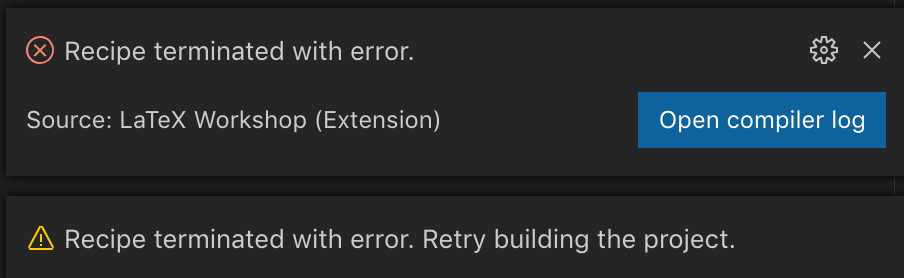
Good to know about the symlink trick, however, even though everything ultimately works with symlink, I still get those same 2 errors every time I build the project. Is this what happens with other people?
 brandonloong
on 6 Oct 2019
brandonloong
on 6 Oct 2019
I don’t get errors like these. Also, I moved my LaTeX projects to ~/Documents so that they’re synced to iCloud and don’t require the symlink.
leafac
on 7 Oct 2019
I figured out that the errors were not related to the compilation issues of this thread. However, what do you mean when you say that your files in ~/Documents are synced with iCloud without having symlinks there? That location is outside of iCloud syncing capability.
brandonloong
on 7 Oct 2019
However, what do you mean when you say that your files in
~/Documentsare synced with iCloud without having symlinks there? That location is outside of iCloud syncing capability.
In my computer, ~/Documents and ~/Desktop are synced to iCloud.
leafac
on 7 Oct 2019
Related issues
 tenhobi
·
4Comments
tenhobi
·
4Comments
 jabooth
·
3Comments
jabooth
·
3Comments
 mdrozdo
·
4Comments
mdrozdo
·
4Comments
 sidmishraw
·
3Comments
sidmishraw
·
3Comments
 kookma
·
4Comments
kookma
·
4Comments
Most helpful comment
Here's mine:
The key is that a) the first recipe listed is used by default; b) the recipe used has to contain the
cdtool.