Latex-workshop: Wrong message during and after build process
No update after modifying the code in editor
For brevity in this message I use LW for _Latex Workshop_
When LW builds a sample TEX file and finds some errors it shows them by red underlines.
After you modify the file, it still shows those error underlines, even in wrong location.
Look at the following picture which LW build was successful, and produces PDF output, but keep the error underline.
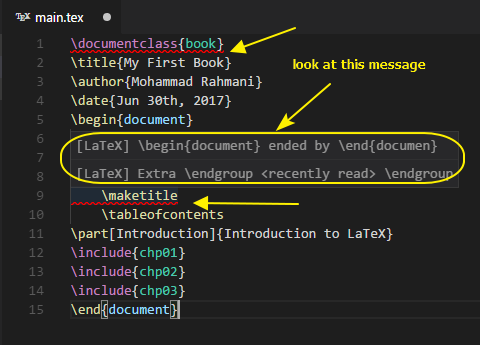
Wrong message in status bar
When you request LW to build a .tex file, in the status bar it is seen a message indicating the current status of LaTeX compilation and build process. While in many cases the build process is successful, LW always shows the following message during build process
x LaTeX toolchain terminated with error
See this picture, in which the build process was successful.
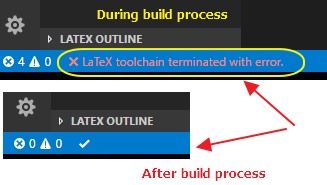
Suggestion
- It seems LW does not monitor the code change in the editor
- The message in status bar should indicate the real status
 kookma
All 4 comments
Unfortunately, neither problem has a good solution.
For the first issue, the error message is generated by the compiler instead of linter (chktex). So after you edit the file, it is not possible for the extension to know if the problem is resolved or not until a new build. At the same time, it is inadequate to simply remove these messages upon edit. Suppose the building process returns three errors and you see the problem.
For the second issue. The message is colored by the returning code of the compiler. The only problem I came across was when a new build command is invoked during the previous building process. However, in such cases, the message is correct after the second one. You can always check latex log and/or LW output to check if the compilation is actually successful or not.
Hope the explanation is good for you.
 James-Yu
on 30 Jul 2017
James-Yu
on 30 Jul 2017
I may try to figure out if there are some dirty solutions to the second issue. Though there is no promise yet.
James-Yu
on 30 Jul 2017
In my opinion, there is no need for dirty solutions. The extension does the job now! But these issues can be considered for your future improvement!
kookma
on 30 Jul 2017
Actually a quite elegant solution to the second issue!
James-Yu
on 31 Jul 2017
Related issues
 jlelong
·
4Comments
jlelong
·
4Comments
 wstcegg
·
5Comments
wstcegg
·
5Comments
 sabicalija
·
6Comments
sabicalija
·
6Comments
 BjoernDaase
·
3Comments
BjoernDaase
·
3Comments
 iainmstott
·
5Comments
iainmstott
·
5Comments
Most helpful comment
Actually a quite elegant solution to the second issue!