Latex-workshop: Toolchain doesn't support CJK path.
A workaround is proposed in the comment (Jun. 16th). This problem is caused by LaTeX compilers who refuse to understand some of the excellent human languages.
When I configure the tool chain setting as:
// 将设置放入此文件中以覆盖默认设置
{
    "latex-workshop.latex.toolchain": [
    {
      "command": "xelatex",
      "args": [
        "-synctex=1",
        "-interaction=nonstopmode",
        "-file-line-error",
        "-pdf",
        "%DOC%"
      ]
    }
  ]
}
I faild to build the tex project. As a consequence I found the tex file is located in path containing chinese characters.
When I move it into pure english path, I got it works.
 shrinktofit
All 10 comments
By the way, When I use \documentclass {carticle} , I got compiler errors.
shrinktofit
on 1 Jun 2017
Can you please try xelatex in command line and see the results?
I have no idea on document carticle. Is it article without c?
 James-Yu
on 1 Jun 2017
James-Yu
on 1 Jun 2017
If xelatex works in command but not in the extension, I would suggest you may try the full path in config items.
James-Yu
on 1 Jun 2017
Running the commands in cmd.exe gives right result 。
I found the path is actually messy code when I inspect output panel of Latex Workshop.
老铁你是中国人吗?用中文交流算了
shrinktofit
on 1 Jun 2017
Can you please attach the corresponding logs in the output panel?
Yeah I'm Chinese, from HK. Though I need to (sorta) keep the conversation English for others' reference.
不過我看中文沒有問題🤣
James-Yu
on 1 Jun 2017
Hello, I got the same problem (cannot compile .tex file in CJK path with the LaTeX Workshop Toolchain).
This is XeTeX, Version 3.14159265-2.6-0.99998 (TeX Live 2017/W32TeX) (preloaded format=xelatex 2017.6.16) 16 JUN 2017 15:59
entering extended mode
restricted \write18 enabled.
file:line:error style messages enabled.
%&-line parsing enabled.
**d:/¶³ºބ???Dropbox/JunYiExs/LaTeX/test/mjsyx9.tex
! Emergency stop.
<to be read again>
<*> d:/¶³ºބ
Dropbox/JunYiExs/LaTeX/test/mjsyx9.tex
*** (job aborted, file error in nonstop mode)
Here is how much of TeX's memory you used:
3 strings out of 493005
17 string characters out of 6137956
61634 words of memory out of 5000000
4077 multiletter control sequences out of 15000+600000
3640 words of font info for 14 fonts, out of 8000000 for 9000
1348 hyphenation exceptions out of 8191
1i,0n,0p,1b,6s stack positions out of 5000i,500n,10000p,200000b,80000s
No pages of output.
As the figure shows below.
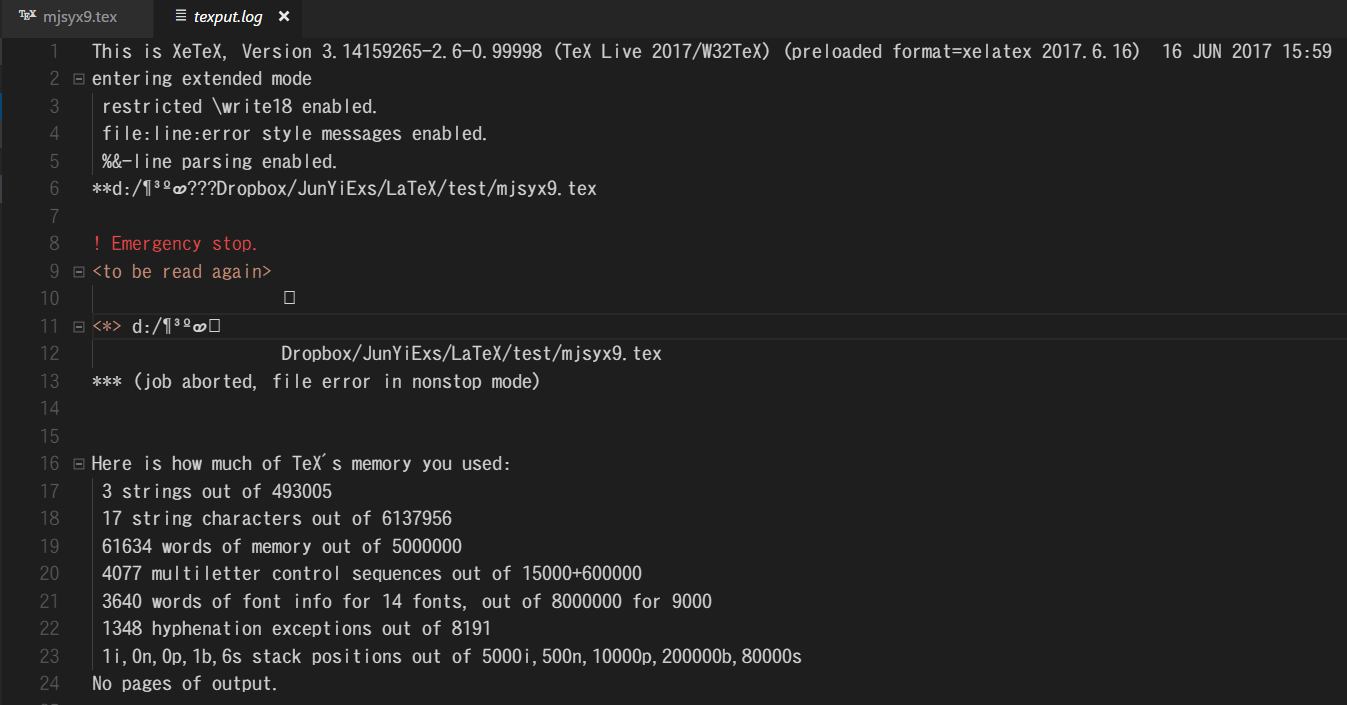
It seem that the wrong encoding with CJK Path.
 Hsins
on 16 Jun 2017
Hsins
on 16 Jun 2017
Can confirm. Investigating this issue.
James-Yu
on 16 Jun 2017
我先用中文表示下好了,這個問題應該主要來自於 xelatex 並不支援路徑和檔名中存在有 CJK 字符。而在 Sublime Text 2/3 的 LaTexTools Package 中或是常見的 compile 過程中,我們是習慣先 cd 到該文件路徑下再進行編譯,這樣可以避免路徑存在 CJK 字符的問題(但依舊不支持檔名有 CJK 字符)
The problem may be caused by the fact that xelatex can't support CJK symbol. How about cd into the folder without running xelatex with path?
Hsins
on 16 Jun 2017
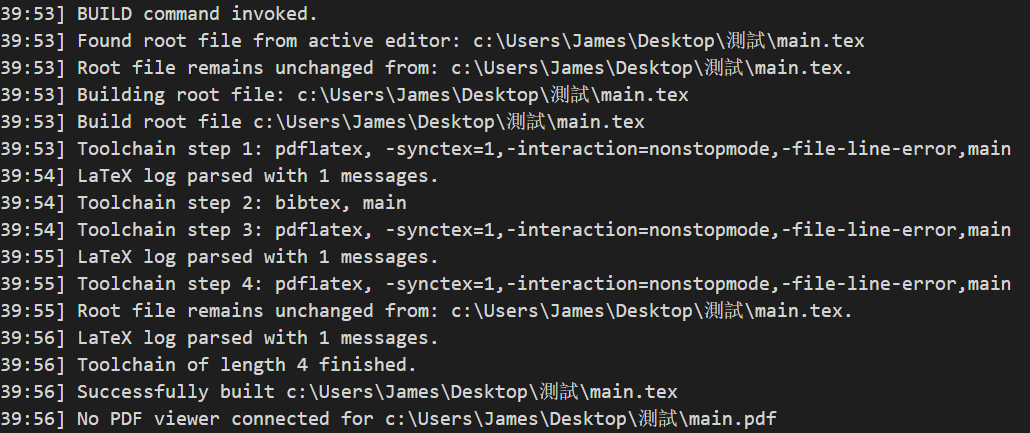
Confirmed @Hsins . pdflatex neither supports cjk path. Meanwhile, I'd recommend you replace all %DOC% in toolchain with %DOCFILE%, which only appends the relative path to the command. This point is noted in the readme, and I have tested it without problems.
Test screenshot:
James-Yu
on 16 Jun 2017
@shrinktofit 老铁,你秀逗了,哈哈
 finalion
on 19 Jul 2017
finalion
on 19 Jul 2017
Related issues
 dslemusp
·
4Comments
dslemusp
·
4Comments
 LordScree
·
5Comments
LordScree
·
5Comments
 kookma
·
4Comments
kookma
·
4Comments
 jose-a-sa
·
4Comments
jose-a-sa
·
4Comments
 s-ilic
·
3Comments
s-ilic
·
3Comments
Most helpful comment
Confirmed @Hsins .
pdflatexneither supports cjk path. Meanwhile, I'd recommend you replace all%DOC%in toolchain with%DOCFILE%, which only appends the relative path to the command. This point is noted in thereadme, and I have tested it without problems.Test screenshot:
