Laravel-excel: is not recognised as an OLE file
Versions
- PHP version: 7.1.12
- Lumen version: 5.5.*
- Package version: 3.1
Description
I get an error on some xls files when importing.
The filename /tmp/laravel-excel-p0Ik8z8RMONZ7664r1feNjsyQPS6vKap is not recognised as an OLE file
how can i solve it?
 kemalatila
All 14 comments
Thanks for submitting the ticket. Unfortunately the information you provided is incomplete. We need to know which version you use and how to reproduce it. Please include code examples. Before we can pick it up, please check (https://github.com/Maatwebsite/Laravel-Excel/blob/3.1/.github/ISSUE_TEMPLATE.md) and add the missing information. To make processing of this ticket a lot easier, please make sure to check (https://laravel-excel.maatwebsite.nl/3.1/getting-started/contributing.html) and double-check if you have filled in the issue template correctly. This will allow us to pick up your ticket more efficiently. Issues that follow the guidelines correctly will get priority over other issues.
![issue-check[bot] picture](https://avatars.githubusercontent.com/u/8315038?v=4&s=40) issue-check[bot]
on 27 Feb 2019
issue-check[bot]
on 27 Feb 2019
Could you please add more information about the version you're using, and your code? Please refer to the issue template if you need any guidance on this. Thanks!
 GlennM
on 28 Feb 2019
GlennM
on 28 Feb 2019
My Controller Code :
        $new_file_name = md5(uniqid()) . '.' . $request->file('document')->getClientOriginalExtension();
        $path = $request->file('document')->move(storage_path() . '/epdk_import/', $new_file_name);
        Excel::import(new VendorsImport, $path);
and sent the excel as attachment
kemalatila
on 28 Feb 2019
Can you share the full stack trace please.
 patrickbrouwers
on 28 Feb 2019
patrickbrouwers
on 28 Feb 2019
Full Stack Trace
full_stack_trace.txt
kemalatila
on 28 Feb 2019
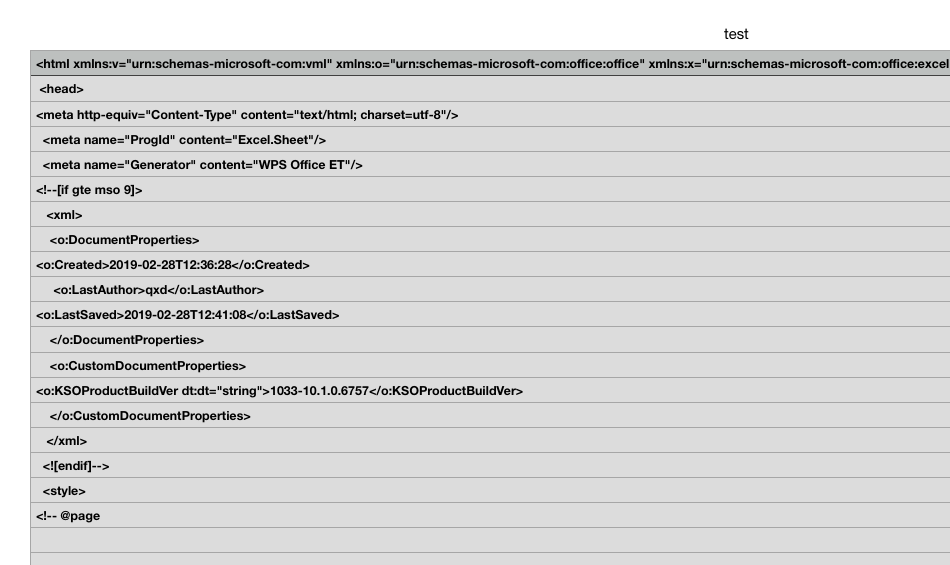
@kemalatila I checked your file, but your file seems invalid.
patrickbrouwers
on 1 Mar 2019
thanks @patrickbrouwers , I figure out.
kemalatila
on 1 Mar 2019
i have the same problem
 davs20
on 17 Mar 2019
davs20
on 17 Mar 2019
@kemalatila how did you solve it?
davs20
on 17 Mar 2019
It was tricky. I said save as "microsoft office 2013" format to users before upload it. Otherwise have to parse xml file .. (open to advice)
kemalatila
on 17 Mar 2019
Hello @kemalatila , I am also facing this same problem while uploading .xls format but when I upload .xlsx format then it's working well, how can I solve this problem.
 tanvira1993
on 7 Mar 2020
tanvira1993
on 7 Mar 2020
Hello @kemalatila , I am also facing this same problem while uploading .xls format but when I upload .xlsx format then it's working well, how can I solve this problem.
Hi @tanvira1993, Did you try save as file to "Microsoft Office 2013" format again?
kemalatila
on 7 Mar 2020
Hello @kemalatila, I am facing this problem too when upgrade from version 2.0 to 3.1.
In 2.0, it is OK to upload this file, but when I use 3.1, an error as is not recognised as an OLE file was showed.
I save my file as Excel97-2004 format and can upload well. But how I can fix that without convert the file format? because I have a lot of files like this.
 hoangnkvti
on 27 Mar 2020
hoangnkvti
on 27 Mar 2020
Hi @hoangnkvti, I have no idea about this problem, contributors may support you. @GlennM, @patrickbrouwers .
kemalatila
on 27 Mar 2020
Related issues
 ellej16
·
3Comments
ellej16
·
3Comments
 dr3ads
·
3Comments
dr3ads
·
3Comments
 alejandri
·
3Comments
alejandri
·
3Comments
 muhghazaliakbar
·
3Comments
muhghazaliakbar
·
3Comments
 pamekar
·
3Comments
pamekar
·
3Comments