Label-studio: Empty html for projects/ page at startup
When startup up label-studio I am directed to the projects page on the local host. Unfortunately this just brings me to an empty HTML page.
This is the output to the terminal:
$ label-studio
Data base and media directory:  C:\Users\bbarbieri\AppData\Local\label-studio\label-studio
Start browser at URL: http://localhost:8080
Performing system checks...

System check identified no issues (0 silenced).
March 17, 2021 - 09:51:52
Django version 3.1.4, using settings 'label_studio.core.settings.label_studio'
Starting development server at http://0.0.0.0:8080/
Quit the server with CTRL-BREAK.
[17/Mar/2021 09:51:55] "GET / HTTP/1.1" 302 0
[17/Mar/2021 09:51:55] "GET /projects/ HTTP/1.1" 200 2270
[17/Mar/2021 09:51:55] "GET /static/fonts/roboto/roboto.6ffe390dd5ff.css HTTP/1.1" 200 4451
[17/Mar/2021 09:51:55] "GET /static/css/uikit.e49a7a43adbd.css HTTP/1.1" 200 3892
[17/Mar/2021 09:51:55] "GET /static/css/main.3b36b24fbb6f.css HTTP/1.1" 200 15457
[17/Mar/2021 09:51:55] "GET /react-app/main.css?v=1eac65 HTTP/1.1" 200 121279
[17/Mar/2021 09:51:55] "GET /static/js/jquery.min.220afd743d9e.js HTTP/1.1" 200 88145
[17/Mar/2021 09:51:55] "GET /static/js/helpers.9a01b074ff58.js HTTP/1.1" 200 13336
[17/Mar/2021 09:51:55] "GET /react-app/index.js?v=1eac65 HTTP/1.1" 200 5200104
[17/Mar/2021 09:51:58] "GET /static/fonts/roboto/roboto-v20-latin_cyrillic-regular.9af3b948743a.woff2 HTTP/1.1" 200 22428
[17/Mar/2021 09:51:59] "GET /react-app/main.css.map HTTP/1.1" 200 133214
 brianbarbieri
All 60 comments
@brianbarbieri Could you please show a screenshot with the browser console?
 makseq
on 17 Mar 2021
makseq
on 17 Mar 2021
Are you trying to run it on localhost domain? What address for LS instance is in the browser?
makseq
on 17 Mar 2021
@brianbarbieri Could you please show a screenshot with the browser console?
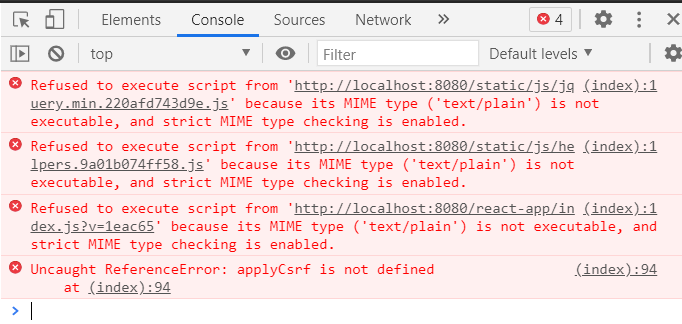
brianbarbieri
on 17 Mar 2021
Are you trying to run it on localhost domain? What address for LS instance is in the browser?
It's running on the http://localhost:8080/, what do you mean by LS instance?
brianbarbieri
on 17 Mar 2021
@brianbarbieri Yes, I mean the thing you mentioned.
makseq
on 17 Mar 2021
Are you using LS from repository or from pip packages?
makseq
on 17 Mar 2021
From
Are you using LS from repository or from pip packages?
From the pip packages in an fresh conda environment.
$ pip list
appdirs                  1.4.3
asgiref                  3.3.1
attr                     0.3.1
attrs                    20.3.0
azure-core               1.12.0
azure-storage-blob       12.8.0
boto                     2.49.0
boto3                    1.16.28
botocore                 1.19.28
boxing                   0.1.4
cachetools               4.2.1
certifi                  2020.12.5
cffi                     1.14.5
chardet                  4.0.0
click                    7.1.2
colorama                 0.4.4
coreapi                  2.3.3
coreschema               0.0.4
cryptography             3.4.6
Django                   3.1.4
django-annoying          0.10.6
django-cors-headers      3.6.0
django-debug-toolbar     3.2
django-extensions        3.1.0
django-filter            2.4.0
django-model-utils       4.1.1
django-redis-cache       3.0.0
django-rest-swagger      2.2.0
django-rq                2.3.2
django-user-agents       0.4.0
djangorestframework      3.12.2
drf-dynamic-fields       0.3.0
drf-generators           0.3.0
drf-yasg                 1.20.0
google-api-core          1.26.1
google-auth              1.28.0
google-cloud-core        1.6.0
google-cloud-storage     1.28.1
google-resumable-media   0.5.1
googleapis-common-protos 1.53.0
htmlmin                  0.1.12
idna                     2.10
inflection               0.5.1
isodate                  0.6.0
itypes                   1.2.0
Jinja2                   2.11.3
jmespath                 0.10.0
joblib                   1.0.1
jsonschema               3.2.0
label-studio             1.0.0
label-studio-converter   0.0.25
lockfile                 0.12.2
lxml                     4.6.2
MarkupSafe               1.1.1
mock                     4.0.3
more-itertools           8.7.0
moto                     1.3.16.dev122
msrest                   0.6.21
nltk                     3.5
numpy                    1.20.1
oauthlib                 3.1.0
openapi-codec            1.3.2
ordered-set              4.0.2
packaging                20.9
pandas                   1.2.3
Pillow                   7.2.0
pip                      21.0.1
protobuf                 3.15.6
psycopg2-binary          2.8.4
pyasn1                   0.4.8
pyasn1-modules           0.2.8
pycparser                2.20
pydantic                 1.7.3
pyparsing                2.4.7
pyrsistent               0.17.3
python-dateutil          2.8.1
pytz                     2019.3
PyYAML                   5.4.1
redis                    3.5.3
regex                    2020.11.13
requests                 2.25.1
requests-oauthlib        1.3.0
responses                0.13.0
rq                       1.7.0
rsa                      4.7.2
ruamel.yaml              0.16.13
ruamel.yaml.clib         0.2.2
rules                    2.2
s3transfer               0.3.4
setuptools               52.0.0.post20210125
simplejson               3.17.2
six                      1.15.0
sqlparse                 0.4.1
tqdm                     4.59.0
ua-parser                0.10.0
ujson                    4.0.2
uritemplate              3.0.1
urllib3                  1.26.4
user-agents              2.2.0
Werkzeug                 1.0.1
wheel                    0.36.2
wincertstore             0.2
xmljson                  0.2.0
xmltodict                0.12.0
zipp                     3.4.1
@brianbarbieri Could you please:
- right click the broken link in the browser console
- open in new tab
- send a screenshot of this page
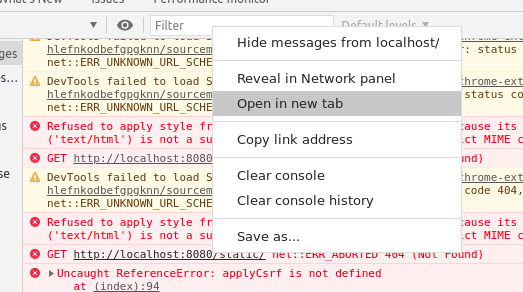
Thank you in advance!
makseq
on 17 Mar 2021
@brianbarbieri Could you please:
- right click the broken link in the browser console
- open in new tab
- send a screenshot of this page
Thank you in advance!

lots of min js, and
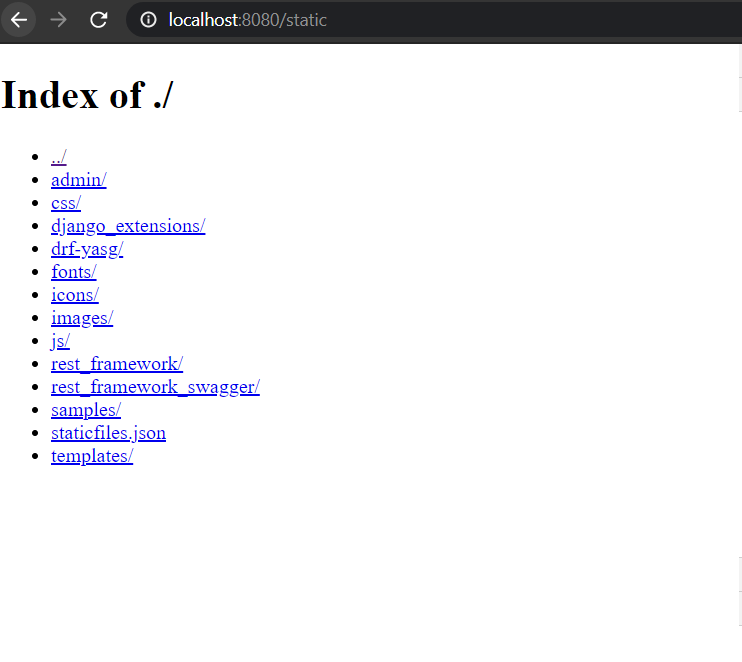
404 here though:
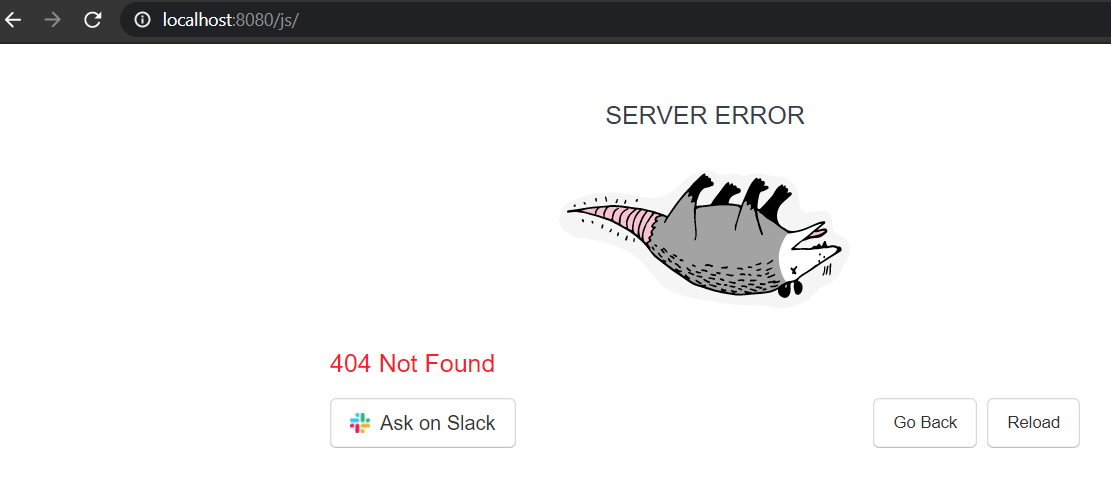
The 404 seems to be for every child in the static directory
No thank you for helping me out.
brianbarbieri
on 17 Mar 2021
It looks like you are using DEBUG=False with git cloned repo..
Please, try this:
DEBUG=True label-studio
DEBUG=True label-studio
Doing this yields same blank html with this in the console:
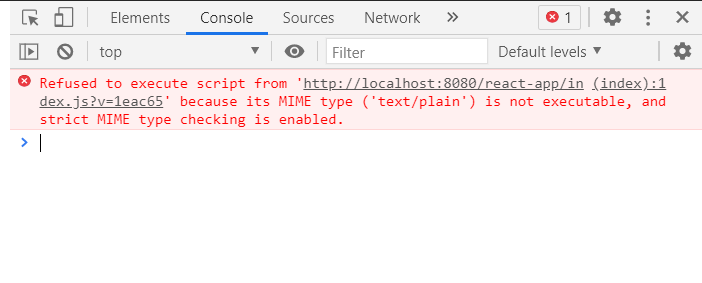
brianbarbieri
on 17 Mar 2021
@brianbarbieri And what if you open /react-app/index.js?.... in a new tab?
makseq
on 17 Mar 2021
@brianbarbieri And what if you open /react-app/index.js?.... in a new tab?
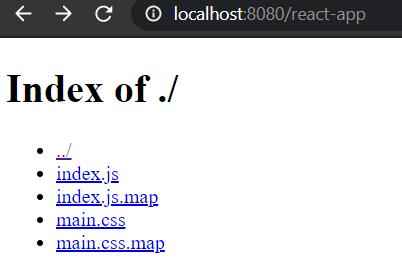
Finding the dir and the file:
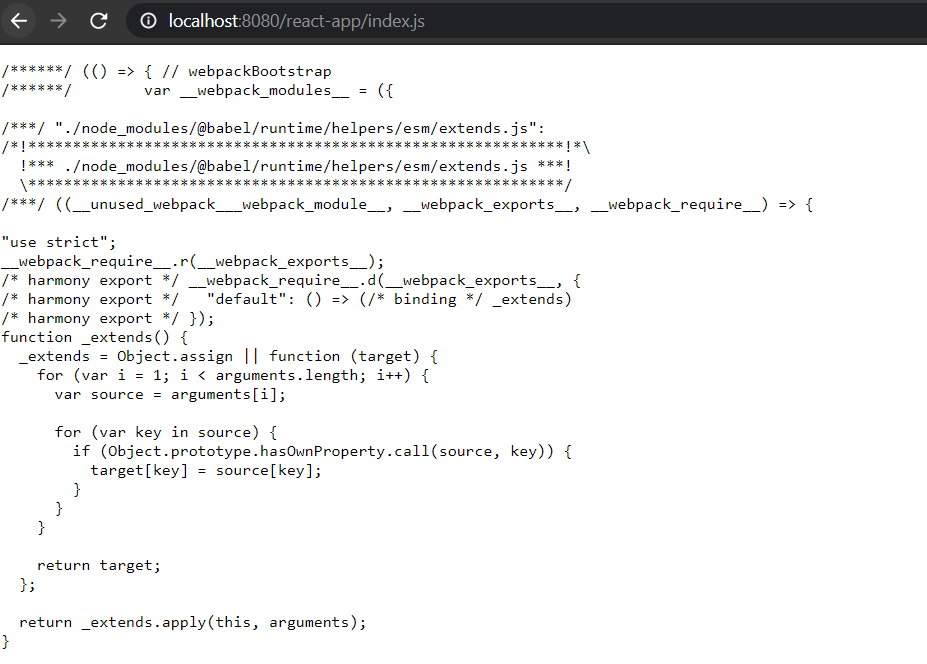
brianbarbieri
on 17 Mar 2021
@brianbarbieri
What browser do you use and what version is it?
Could you try to use another browser?
makseq
on 17 Mar 2021
@brianbarbieri
What browser do you use and what version is it?
Could you try to use another browser?
I'm using chrome, but I get the same behavior on MS edge
brianbarbieri
on 17 Mar 2021
Yep! Got it on Edge. In chrome browser it works fine for me.
makseq
on 17 Mar 2021
It's chrome 89.0.4389.82 . I think everything will be ok if you update it.
makseq
on 17 Mar 2021
Could you show your chrome browser version?
makseq
on 17 Mar 2021
It's chrome 89.0.4389.82 . I think everything will be ok if you update it.
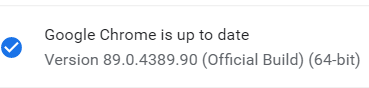
Fully up to date, still does not work :/
brianbarbieri
on 17 Mar 2021
@brianbarbieri Don't you use nginx over label studio? Or something like this.. Because I can reproduce it on Edge and there is another error (I have very old Edge version).
makseq
on 17 Mar 2021
Not that I know off, maybe the problem is with it being a work computer/ some type of firewall issue?
I did the exact same things on my personal laptop and I'm facing no issues at all/
brianbarbieri
on 17 Mar 2021
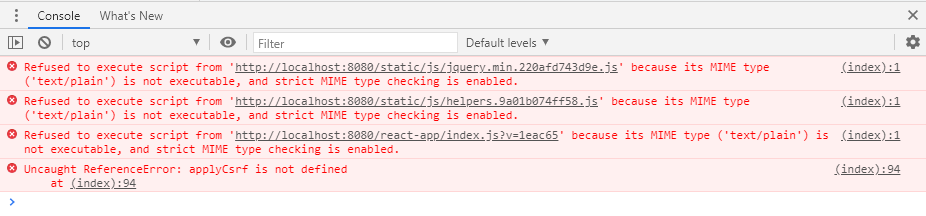
I'm getting the same error along with the following console messages, I have the chrome 89.0.4389.90 version as well.
 sam-fisco
on 17 Mar 2021
sam-fisco
on 17 Mar 2021
@sam-fisco are you on windows?
makseq
on 17 Mar 2021
@brianbarbieri is it your personal laptop on windows?
makseq
on 17 Mar 2021
@sam-fisco are you on windows?
Yes I am
sam-fisco
on 17 Mar 2021
@brianbarbieri is it your personal laptop on windows?
Yes both systems are on windows, I will asl a colleague tomorrow to install the tool aswell to see if the work laptop is the problem.
brianbarbieri
on 18 Mar 2021
I had same problem with arg host is set to "0.0.0.0" and solved by remove it. If you also define host, you may try.
Remove --host "0.0.0.0" like this one:
label-studio start weblabel -b --host "0.0.0.0" --port 8080
Into this:
label-studio start weblabel -b --port 8080
 trhgnhat
on 18 Mar 2021
trhgnhat
on 18 Mar 2021
@trhgnhat Thank you for your solution!
Could you explain more please: where did you get this command label-studio start weblabel -b --host "0.0.0.0" --port 8080 with host "0.0.0.0" ?..
makseq
on 18 Mar 2021
@makseq got randomly on the internet for long time and don't know why. Just removed it yesterday since i got this error.
trhgnhat
on 18 Mar 2021
brianbarbieri
on 18 Mar 2021
@brianbarbieri Thank you very much for the provided solution!
@sam-fisco Could you check @brianbarbieri solution?
makseq
on 18 Mar 2021
Hi
I ran into a similar issue, turns out in my case it was being caused by the pip release label-studio-1.0.0.post0 which after startup and logging in the projects page was empty but in my browser console i found:
GET http://X.X.X.X:8080/projects/x86_64-conda_cos6-linux-gnu/react-app/index.js?v=60ba41 net::ERR_ABORTED 404 (Not Found)
IP removed for privacy. Clearly the path looks a bit odd and i was checking for existing issues and found this one. I noticed the package list above showed 1.0.0 so i rolled back to that and it works ok, so seems this one is related to the latest post0 release.
Thanks
Tony
 antonyscerri
on 18 Mar 2021
antonyscerri
on 18 Mar 2021
@antonyscerri Thank you very much for your report.
Could you please show your HOST env variables?
echo $HOST
echo $LABEL_STUDIO_HOST
@antonyscerri I think it's releated to https://github.com/conda/conda/issues/7031
If you set HOST="" then the issue will be fixed.
HOST="" label-studio start
Hi
Yes that appears to be the case, so i can run the latest version now. Its only impacting the 1.0.0.post0 release though, it has no impact on 1.0.0. The values were:
echo $HOST
x86_64-conda_cos6-linux-gnu
echo $LABEL_STUDIO_HOST
antonyscerri
on 18 Mar 2021
We fixed it in 1.0.0.post2 (without changing Windows registry).
makseq
on 19 Mar 2021
@makseq I am getting this same behavior on an aws ec2 w/ an ubuntu 18.04 deep learning base ami using v 1.0.0.post2. My chrome version is Version 89.0.4389.90 (Official Build) (x86_64). The console output from the login page is pasted below:
Refused to apply style from 'http://X.X.X.X:8080/static/' because its MIME type ('text/html') is not a supported stylesheet MIME type, and strict MIME checking is enabled.X.X.X.X/:25
GET http://X.X.X.X:8080/static/ net::ERR_ABORTED 404 (Not Found)
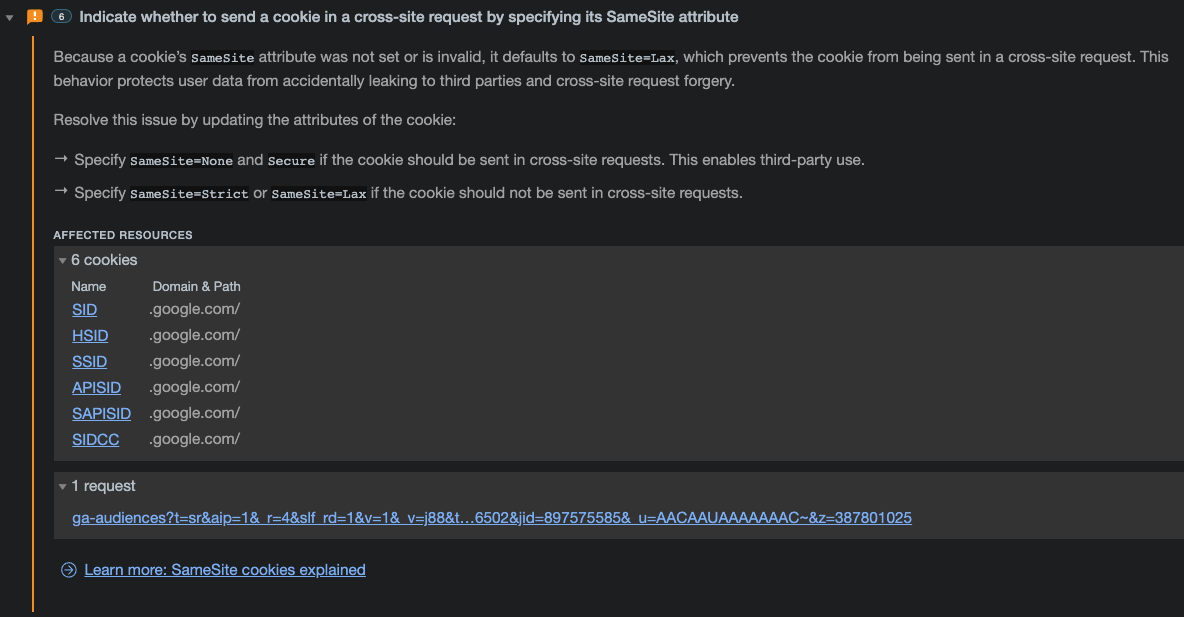
Additionally, chrome generated some issue messages which I am pasting below.
 EconML
on 20 Mar 2021
EconML
on 20 Mar 2021
@EconML Could you send a screenshot with the browser console where I can see an exact error with MIME?
makseq
on 21 Mar 2021
@makseq thx for the reply, here it is. I blocked out the private ip for privacy

EconML
on 21 Mar 2021
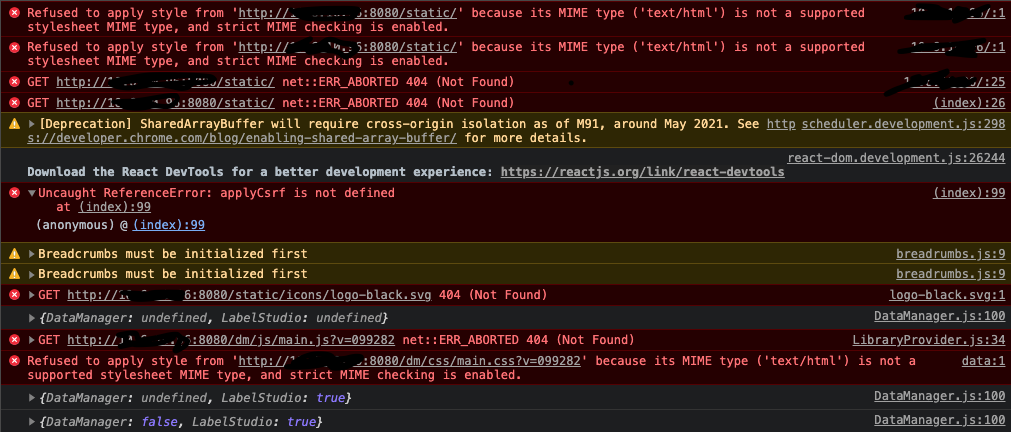
Additionallly, if this is helpful after logging on and navigating to a test project i get the following in the console
EconML
on 21 Mar 2021
@EconML
- Do you use LS as pip package?
- What is your start LS command?
- Have you set up
HOST=...somehow?
makseq
on 21 Mar 2021
BTW I tried 1.0.0.post2 to check on some fixes but the UI didnt render properly. The animating logo player on the top left and then menu items were displayed down the left side of the page. It looked like a CSS problem but there didn't seem to be an obvious CSS resource missing/broken. I had to downgrade to continue testing something, i was using the same HOST="" to launch.
antonyscerri
on 21 Mar 2021
@antonyscerri @EconML could you check 1.0.0.post3?
makseq
on 22 Mar 2021
@makseq apologies for lack of response. I was off yesterday and my MacBook took a shit on me this morning. When I have a chance I will check 1.0.0.post3.
EconML
on 22 Mar 2021
I just happened to see post3 was available and then your note. I was able to install and launch it (using HOST="") and i can pull up the homepage, and project page. It did appear to get stuck in some kind of loop loading a page the logs had something like the following:
[22/Mar/2021 20:12:36] "GET /label-studio-frontend/css/main.css?v=099282 HTTP/1.1" 200 1311494
[22/Mar/2021 20:12:36] "GET /dm/css/main.css.map HTTP/1.1" 200 75990
[22/Mar/2021 20:12:36] "GET /react-app/main.css.map HTTP/1.1" 200 82624
[22/Mar/2021 20:12:38] "GET /label-studio-frontend/css/main.css.map HTTP/1.1" 200 1237020
[22/Mar/2021 20:12:39] "GET /react-app/index.js.map HTTP/1.1" 200 3897006
[22/Mar/2021 20:12:39] "GET /dm/js/main.js.map HTTP/1.1" 200 6417195
[22/Mar/2021 20:12:40] "GET /label-studio-frontend/js/main.js.map HTTP/1.1" 200 7496886
[22/Mar/2021 20:12:54] "GET /dm/css/main.css.map HTTP/1.1" 200 75990
[22/Mar/2021 20:12:54] "GET /react-app/main.css.map HTTP/1.1" 200 82624
[22/Mar/2021 20:12:55] "GET /label-studio-frontend/css/main.css.map HTTP/1.1" 200 1237020
[22/Mar/2021 20:13:00] "GET /react-app/main.css.map HTTP/1.1" 200 82624
[22/Mar/2021 20:13:00] "GET /dm/css/main.css.map HTTP/1.1" 200 75990
[22/Mar/2021 20:13:01] "GET /label-studio-frontend/css/main.css.map HTTP/1.1" 200 1237020
[22/Mar/2021 20:13:08] "GET /react-app/index.js.map HTTP/1.1" 200 3897006
[22/Mar/2021 20:13:11] "GET /label-studio-frontend/js/main.js.map HTTP/1.1" 200 7496886
[22/Mar/2021 20:13:12] "GET /dm/js/main.js.map HTTP/1.1" 200 6417195
I was able to go back to the homepage and then into the project and it now seems to be ok. However I reloaded the homepage again to try a fresh view. When i clicked on the title of the project and got to this url - http://x.x.x.x:8080/projects/1/data (ip redacted) then it appeared to get stuck again, the top nav bar shows but the rest of the page is blank. Browser debug console doesnt show anything useful, the last line seems to be an object being output from DataManager.js:100. The terminal log shows the following, with the initial page request being around 20:16.
[22/Mar/2021 20:16:22] "GET /static/images/favicon.ico HTTP/1.1" 200 21822
[22/Mar/2021 20:16:24] "GET /api/projects/1 HTTP/1.1" 200 2100
[22/Mar/2021 20:16:25] "GET /dm/css/main.css?v=099282 HTTP/1.1" 200 49803
[22/Mar/2021 20:16:25] "GET /label-studio-frontend/css/main.css?v=099282 HTTP/1.1" 200 1311494
[22/Mar/2021 20:16:25] "GET /dm/js/main.js?v=099282 HTTP/1.1" 200 1264906
[22/Mar/2021 20:16:30] "GET /label-studio-frontend/js/main.js?v=099282 HTTP/1.1" 200 2073078
[22/Mar/2021 20:19:07] "GET /static/fonts/roboto/roboto.6ffe390dd5ff.css HTTP/1.1" 200 4451
[22/Mar/2021 20:19:07] "GET /static/css/uikit.e49a7a43adbd.css HTTP/1.1" 200 3892
[22/Mar/2021 20:19:07] "GET /static/css/main.3b36b24fbb6f.css HTTP/1.1" 200 15457
[22/Mar/2021 20:19:07] "GET /react-app/main.css?v=33ec81 HTTP/1.1" 200 71464
[22/Mar/2021 20:19:07] "GET /dm/css/main.css?v=099282 HTTP/1.1" 200 49803
[22/Mar/2021 20:19:08] "GET /label-studio-frontend/css/main.css?v=099282 HTTP/1.1" 200 1311494
[22/Mar/2021 20:19:09] "GET /react-app/main.css.map HTTP/1.1" 200 82624
[22/Mar/2021 20:19:09] "GET /dm/css/main.css.map HTTP/1.1" 200 75990
[22/Mar/2021 20:19:09] "GET /label-studio-frontend/css/main.css.map HTTP/1.1" 200 1237020
[22/Mar/2021 20:19:10] "GET /dm/js/main.js.map HTTP/1.1" 200 6417195
[22/Mar/2021 20:19:13] "GET /react-app/index.js.map HTTP/1.1" 200 3897006
[22/Mar/2021 20:19:20] "GET /label-studio-frontend/js/main.js.map HTTP/1.1" 200 7496886
antonyscerri
on 22 Mar 2021
@nicholasrq Do you understand: what's going on here?
makseq
on 22 Mar 2021
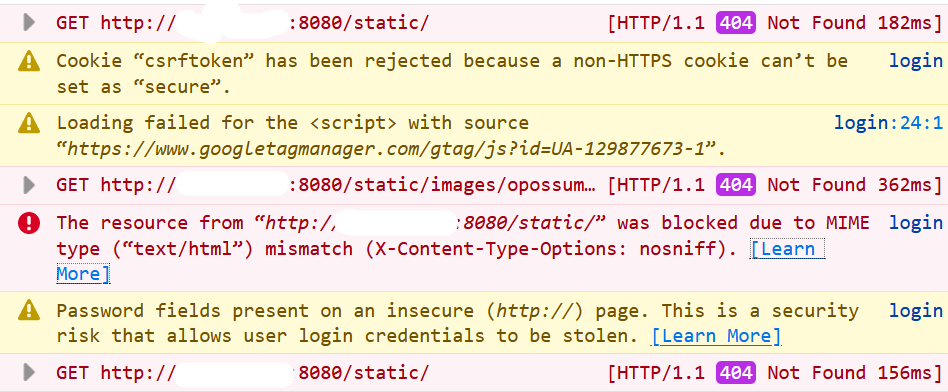
@makseq I pulled down post3 and I am still getting the 404 and MIME type errors. Console output is below. Additionally, since I'm not on my mac, I'm using firefox and getting the exact same behavior.
EconML
on 22 Mar 2021
@makseq It looks to be more consistently failing if i reload the page when on the data tab view, where as going to projects and clicking on the project seems to display the page. The only thing in debug console is a mention "Breadcrumbs must be initialized first" coming from breadrumbs.js:9, which is what happens on both pages when refreshed, on the project data view though it occurs after the first call to DataManager.js:100, which doesnt happen when you start on the project page as its already been intialised. I can see the call to the api to retrieve the project details but there is no further calls to get the columns etc which seem to originate from the data manager.
antonyscerri
on 22 Mar 2021
@EconML are you running Label Studio locally or on a remote machine compared to where the browser is located? And are you running it behind any web server (nginx etc) or other proxy or ELB (you mentioned AWS). And what launch command are you now using?
antonyscerri
on 22 Mar 2021
@EconML it looks like you are still using 1.0.0.post2 instead of 1.0.0.post3..
makseq
on 22 Mar 2021
@antonyscerri I am running label studio on a remote ec2. I have setup traffic rules so that port 8080 is opened to me when I am on my company vpn. I am not running and ELB on this instance. Full disclosure, I had previously been using ls v0.8.0 for my annotation jobs without any issue. I actually just rolled back to 0.8.0 because my actual goal is to plugin the ml backend and these issues were blocking.
EconML
on 22 Mar 2021
@makseq I could have sworn I verified with pip list after installing with setup.py. Maybe I copied the wrong .png. Let me doublecheck..
EconML
on 22 Mar 2021
Check label-studio version, it must be the same:
Label Studio version: 1.0.0.post3

{
    "package": {
        "version": "1.0.0.post3",
        "short_version": "1.0",
        "latest_version_from_pypi": "1.0.0.post3",
        "latest_version_upload_time": "2021-03-22T13:00:56",
        "current_version_is_outdated": false
    },
    "backend": {
        "message": "Fix manifest for dm",
        "commit": "5e2883013290dc6c93f40c2d473bb845e8744c4a",
        "date": "2021-03-22 15:41:55 +0300",
        "branch": "master",
        "version": "1.0.0+55.g5e288301"
    },
    "label-studio-frontend": {
        "message": "Fix brushes to always get the current stage",
        "commit": "099282da1bab181f02c92107af1a260481f16d32",
        "branch": "master",
        "date": "2021-03-19T16:20:46Z"
    },
    "dm2": {
        "message": "Build for UMD",
        "commit": "4966e206259ce8c5d43ff82c2d0ed6bfa5f712e6",
        "branch": "master",
        "date": "2021-03-19T13:25:47Z"
    }
}
@makseq it seems you were right! After pulling down post3, verifying, and starting ls I am no longer having the 404 and MIME type. However, my tasks won't sync, getting 500 (this is a different issue obviously).
EconML
on 22 Mar 2021
@makseq Is there anything you need that would help debug @antonyscerri continued issues? Also, do you have an idea of root cause, I'm assuming you made the changes to post3?
EconML
on 22 Mar 2021
For now i may stick with post0 as it let's me try most of what I wanted to explore with the basic UI pieces. I was trying some of the ML pieces but things seem to be in flux right now and the examples, ML backend and various documents don't appear to match exactly so i may wait till thing stabilise.
antonyscerri
on 22 Mar 2021
@antonyscerri Do you mean that post0 is working?
@nicholasrq Could you make a diff between post0 and post3?
makseq
on 22 Mar 2021
@makseq I know this is unrelated but since we're already on the thread can you point in the direction of some resources/tutorials for custom/dummy model ml backend on v0.8.0? Otherwise i can post new issue/slack.
EconML
on 22 Mar 2021
@makseq post0 is fine as long as i launch with HOST="" i can reload pages and have been working through testing out various workflow ideas and not run into an issue. post2 looked like the css just wasnt working and post3 has the issue reloading the project data page.
antonyscerri
on 22 Mar 2021
@EconML It's better to have such a question on slack.
Check this: https://labelstud.io/tutorials/dummy_model.html
makseq
on 22 Mar 2021
Related issues
 atakanokan
·
3Comments
atakanokan
·
3Comments
 potipot
·
4Comments
potipot
·
4Comments
 andreaferretti
·
5Comments
andreaferretti
·
5Comments
 laynr
·
4Comments
laynr
·
4Comments
 azarezade
·
3Comments
azarezade
·
3Comments
Most helpful comment
@makseq it seems you were right! After pulling down post3, verifying, and starting ls I am no longer having the 404 and MIME type. However, my tasks won't sync, getting 500 (this is a different issue obviously).