Kudu: ExceptionMessage":"ChangeSetId does not match
Hi All, I am trying to do zip deploy on Azure App Service Environment with below command.
curl -X POST -u $AZDUSERNAME:$AZDPASSWORD https://AppServiceEnvirnmentSCMURL/api/wardeploy?name=catalyst-notification1-service --data-binary @warfilepath
but I am seeing below error.
"Message":"An error has occurred.","ExceptionMessage":"ChangeSetId(release-1.0) does not match d9b1c74611e947759da28b84f1c21a07, 'master' or 'HEAD'","ExceptionType":"System.InvalidOperationException","StackTrace":" at Kudu.Core.SourceControl.NullRepository.GetChangeSet(String id) in C:\Kudu Files\Private\src\master\Kudu.Core\SourceControl\NullRepository.cs:line 73\r\n at Kudu.Core.Deployment.FetchDeploymentManager.
My repo is GITLAB and project version is release-2.0 . I build the war file as part of CI process in GITLAB on branch release-2.0. I cloned this release-2.0 branch from release-1.0.
I did verified my yml and POM file to check if there any references to release-1.0 branch but could not see any references.
Any help on this would be greatly appreciated.
Thanks,
Shekar
 lshekarrao
All 10 comments
Disclaimer: I am not a projectkudu team member
I am also using a private gitlab to deploy to Azure app services.
I recommend using "External Git" as your deployment method.
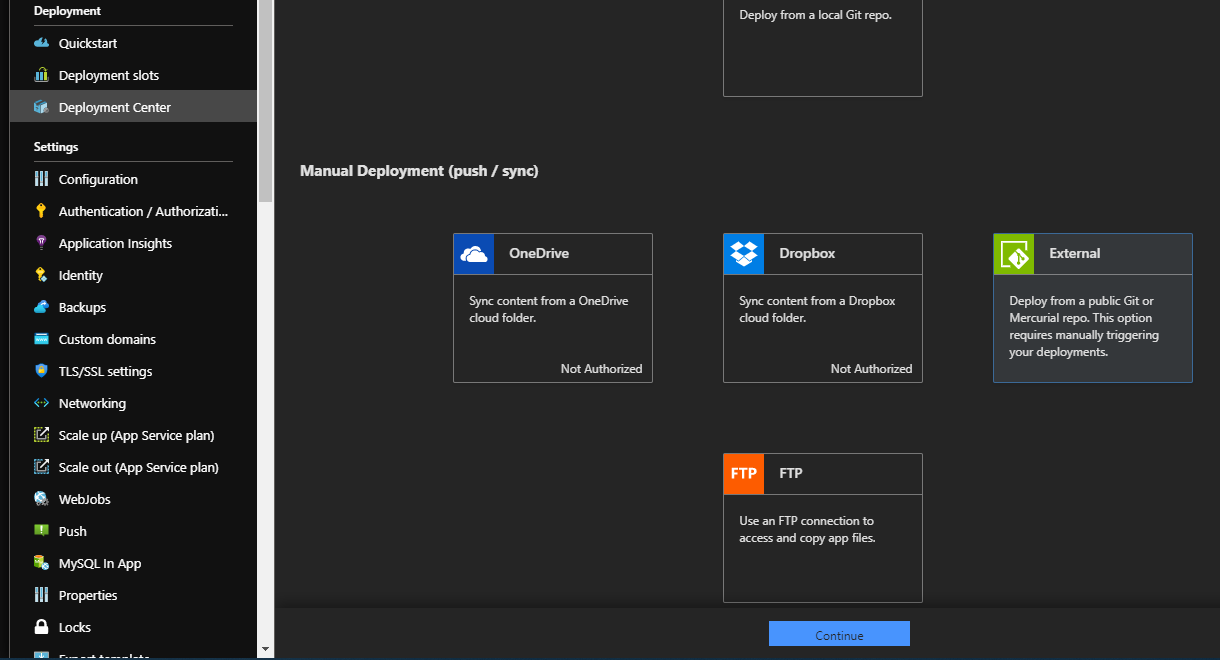
Set up a special "Deployment" branch within your repo, with the desired deployment payload
in the app service, go to deployment center, select "External Git"
- Select Kudu build service
- Provide the "Clone with SSH" url as the source
- Provide the name of your deployment branch
- Assuming your repo is private, provide either your credentials, or the credentials of a neutral "deployment user" (our solution)
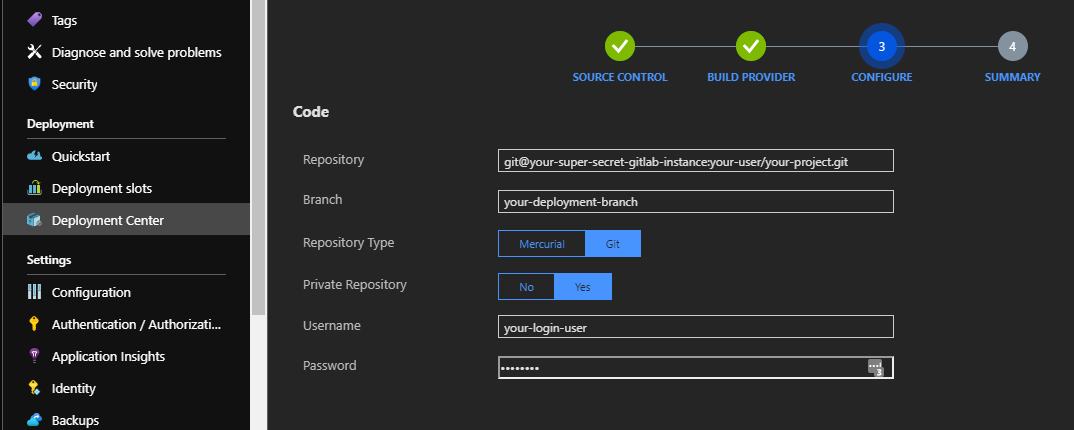
Ok now time to tell Gitlab what the deal is:
Every app service will happily provide it's RSA key if you go to the following url
- Log in if prompted
https://your-app.scm.azurewebsites.net/api/sshkey?ensurePublicKey=1
NOTE: Replace your-app with the name of your app service
THIS (without the double quotes) is the deployment key (ssh key) you need to give to your project in gitlab, so that gitlab will allow kudu to pull.
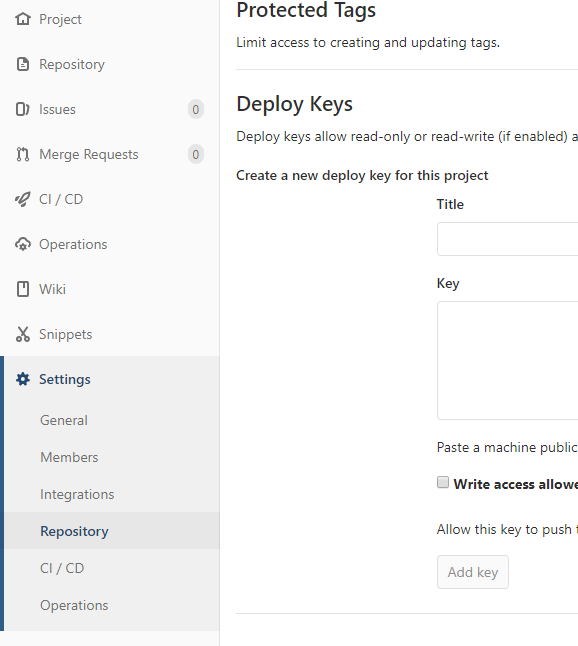
That's it!
You can manually tell azure to deploy your branch by clicking the "Sync" button that is now present in the deployment center.
But we're lazy developers right? Why do I have to go click a thing when I JUST updated my deployment branch? Fortunately Both Azure App Services and Gitlab made this part pretty painless

On the app overview page in the Azure Portal, download publish profile
- Look for the password in the file
- Recommended if using vscode:
- set vscode to treat the file as an html file
- apply document formatting from the command palette (F1)
In gitlab, in the project, go to Settings > Integrations
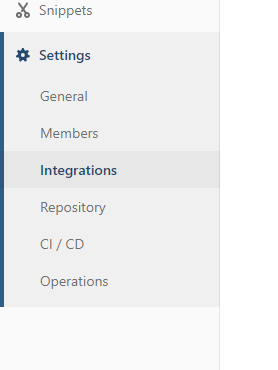
Add URL
https://$your-app:[email protected]/deployTest:
- Make a small change and push it into the deploy branch
- In the deployment center make sure the deploy commit # is the same
 carson-nr
on 19 Oct 2019
carson-nr
on 19 Oct 2019
I am getting the same error as above. Has anyone solved the real issue here?
 tonykaralis
on 13 Mar 2020
tonykaralis
on 13 Mar 2020
@tonykaralis Have you tried the solution suggested by @carson-nr above? also if this is still occurring, can you please post the exception message here?
 nertim
on 18 Mar 2020
nertim
on 18 Mar 2020
@tonykaralis @lshekarrao One of the reasons why you would run in to this issue is if you already have CICD configured with the app and if you try to deploy something out of band and/or change your deployment source without disconnecting. If you are still running in to this issue, we would need to collect some more information.
But my first recommendation would be for you to disconnect and re-connect to your source control.
nertim
on 19 Mar 2020
@nertim Thanks for getting back to me. I did realise at the time I had configured for deployment via an external git source. Once I disconnected the zipdeploy worked. It would be great if the error messages were slightly more verbose.
Thanks though, I did get it working in the end.
tonykaralis
on 19 Mar 2020
Hello. I am experiencing the same behavior. Previously I used "local git" deployment. Now I try to perform a zip-deployment. I have disconnected the "local git" deployment source. But the same error as above:
_ChangeSetId(azure_dev) does not match 876813da8c5c46ed8ee160b35fc4eea7, 'master' or 'HEAD'_
happens. It seems, that Kudu tries to use "local git" deployment furthermore. How could the "local git" deployment be completely turned off?
 yarick123
on 16 Apr 2020
yarick123
on 16 Apr 2020
Remove "d:\home\site\repository" directory and retry.
 suwatch
on 16 Apr 2020
suwatch
on 16 Apr 2020
@suwatch thank you, unfortunately it did not help. But I solved the problem.
I had a configuration setting
_deployment_branch=azure_dev_
After deleting it, zip-deployment started to work.
yarick123
on 17 Apr 2020
@suwatch thank you, unfortunately it did not help. But I solved the problem.
I had a configuration setting
_deployment_branch=azure_dev_
After deleting it, zip-deployment started to work.
I couldn't find deployment branch settings . But removing settings.xml from D:\home\site\deployments> worked for me
 sannayak1
on 17 Dec 2020
sannayak1
on 17 Dec 2020
The common cause for this is when a site or slot have 2 conflicting types of deployments (eg. zipdeploy as well as git such as localgit or CI/CD for GitHub, etc.). Wonder if your issue fall into this category?
suwatch
on 17 Dec 2020
Related issues
 npiasecki
·
8Comments
npiasecki
·
8Comments
 PatrickQuintal
·
7Comments
PatrickQuintal
·
7Comments
 estei
·
3Comments
estei
·
3Comments
 jcorioland
·
8Comments
jcorioland
·
8Comments
 renanlq
·
4Comments
renanlq
·
4Comments
Most helpful comment
@tonykaralis @lshekarrao One of the reasons why you would run in to this issue is if you already have CICD configured with the app and if you try to deploy something out of band and/or change your deployment source without disconnecting. If you are still running in to this issue, we would need to collect some more information.
But my first recommendation would be for you to disconnect and re-connect to your source control.