Kudu: App Services Infrastructure Restart Discussion
I have several apps in a single S2 App Service instance that are experiencing problems with cold restarts / no warmup whenever the platform boots me to a new host, such as during infrastructure upgrade events. However, deployment swaps are running fine with warmup performing as expected there. It's only when I get booted to a new host that things go wrong.
(I had initially started discussing this in App services swap behavior discussion, but I'm not seeing any problems with doing deployment swaps: warmup works just fine when doing a staging/production slot swap. As a result, I thought it best to open a new issue. If this is not a good channel, please kindly redirect me.)
Last night at around 11:30 p.m. Eastern I got booted to a new host, and once again all my apps (Local Cache or not) went haywire for a few minutes. Example apps are app-sv-sync-prod and app-sv-bills-prod.
Within the span of just 15 minutes, the production slots (again, running on a single S2 instance) bounced between four hosts: from RD00155D47E122 to RD00155D47DE81, then to RD00155D47D527, and settling on RD00155D47D524.
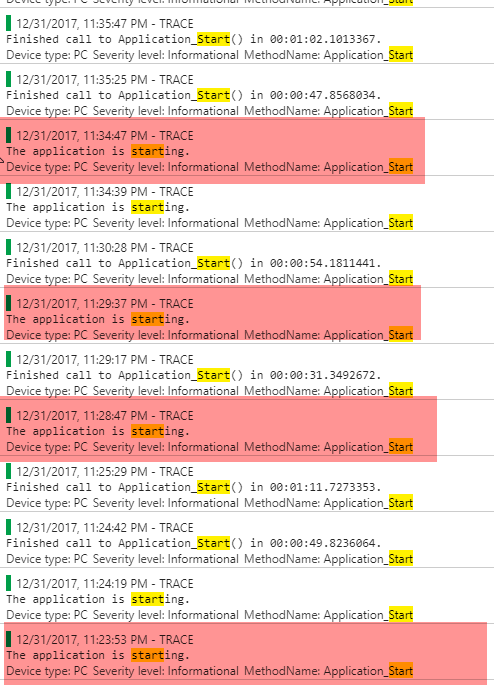
That seems kind of odd, but I'd be OK with it if things were actually warmed up each time, but they didn't seem to be (red is a response > 30 seconds from Pingdom):
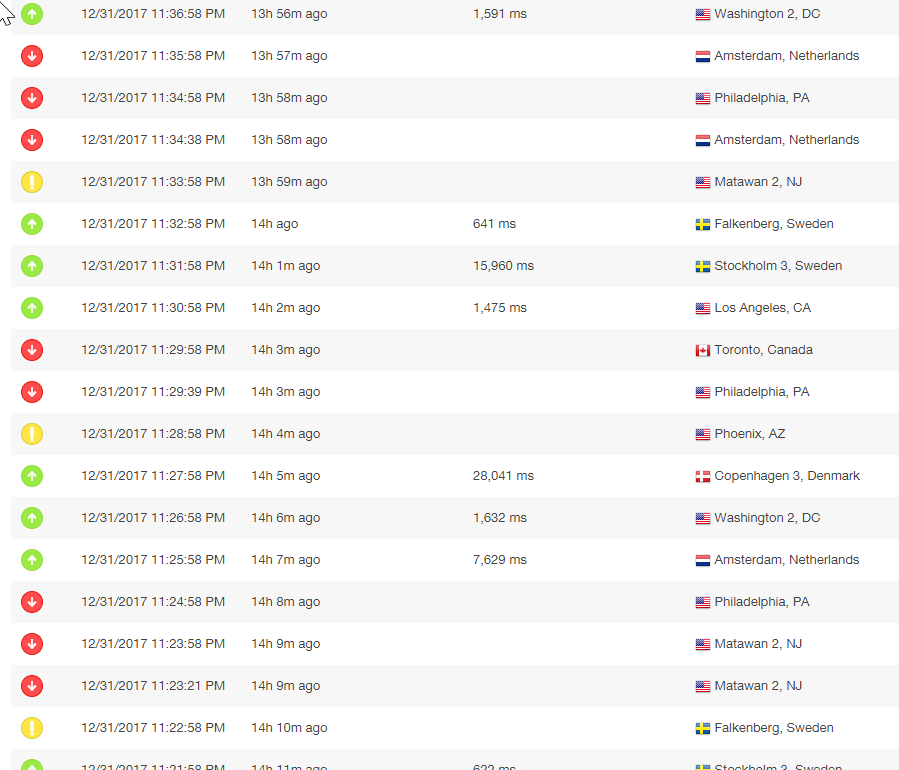
There are no rewrite rules here, as I nuked those in favor of the new HTTPS Only option on the domains tab. I had also tried disabling WEBSITE_LOCAL_CACHE_OPTION on one of the apps in advance of the host switch thinking it might have something to do with it, but it was effected by the same downtime.
If anyone is experiencing these kinds of issues with restarts caused by infrastructure upgrades, I'd love some pointers.
 npiasecki
All 8 comments
@npiasecki this does not sound Kudu related. Can you start thread on forum or StackOverflow instead? Or if this is more urgent, it may be best to open a support request. Thanks!
 davidebbo
on 1 Jan 2018
davidebbo
on 1 Jan 2018
For anyone following along via Google, the follow-up is that I opened a support ticket where we created a simple ASP.NET app with a 20-second startup delay in App_Start and attempted to use application initialization to ensure that only a warm instance is exposed. During this course of events we discovered a few things.
- When scaling up or down an app service plan, application initialization doesn't seem to work. The platform sends you to the instance before it's ready.
- When scaling out, it sometimes works, but sometimes your production instance gets immediately restarted, making the application initialization a moot point. Sometimes the additional instance is added to the LB too soon. It seems other people are seeing this problem. I suspect this is the same problem I'm seeing on infrastructure updates. Support suggested using remapmanagedrequeststo, but that doesn't actually fix the problem, it just makes the downtime look a little prettier.
- If you are using Local Cache, you can theoretically improve things a little bit by having your app init page throw a non-200 status code if the Local Cache isn't ready as described in https://tech.jet.com/blog/2017/02-01-azure-web-apps/
- If you do that right, you will still end up with cold starts when IIS randomly decides to restart everything on your production instance due to "IIS configuration change, HostingEnvironment initiated shutdown, HostingEnvironment caused shutdown" despite not having touched anything. Ironically happened an hour after I deployed an update to implement item 3 above. This appears to be a non-overlapped recycle because Application Insights logs the shutdown event a full minute before the next request comes in, at which point the warmup page is called but the instance is already attempting to serve traffic. "Phil0007" reports something similar in the comments at the UserVoice entry. Because S1/S2/S3 VMs are so very slow at startup and all of your apps are starting at the same time, you're looking at a startup time measured in minutes, even though the startup of each app individually takes seconds.
One wonders if he should go back to building out this infrastructure via IaaS VMs!
Should folks wish to continue this discussion, I point them to this existing StackOverflow post or this one. It seems to me a lot of developers are struggling with this issue on App Service: I don't care how often it restarts, as long as it an overlapped, warmed-up restart.
npiasecki
on 5 Jan 2018
Thanks for posting the follow up with your findings @npiasecki
 frankfuu
on 26 Feb 2018
frankfuu
on 26 Feb 2018
@frankfuu Also check https://stackoverflow.com/questions/45021644/is-there-way-to-determine-why-azure-app-service-restarted/ ... it took me many months to figure out, but some of my problems were caused by having Always On turned on my staging slots. This wreaked havoc after infrastructure upgrades because App Service underlying hardware is weak. Once I fixed that and did the other things I mention in that post, I (knock on wood) haven’t had a problem in two months of restarts.
npiasecki
on 26 Feb 2018
Thanks again! I Looks like I'll have to get around to testing the Local Cache feature. Also good pointers on the AlwaysOn feature. What makes you think the Always On is not a sticky feature? How can I test this? I'm using the slots feature it seems like I can just toggle the staging slot to have AlwaysOn disabled and keep the production slot enabled. Does this not stick?
Edit: Upon further reading, it seems like Microsoft haven't implemented this yet
frankfuu
on 26 Feb 2018
Would turning the app off in staging slot always work for always on config? I have my build turn staging slots on, then deploy, warm site up, then swap, then turn staging slot off in build.
Running into all these issues. I have swapping working perfectly, but my app takes 3 minutes to warm up, the the app restarts on production and I'm down for 3 minutes, cpu spikes to 150% and scales because we've reached cpu threshold taking site down again since scale actions restart everything.
Seriously considering moving to VM/IIS, anyone have good recommendations on how to do blue/green deployments on VM's? I love azure app swapping, butt his is killing me. Looking at octopus deploy.
 twilly86
on 6 Apr 2018
twilly86
on 6 Apr 2018
https://anthonychu.ca/post/vsts-deploy-app-service-azure-functions-run-from-zip/
Does this deploy by zip help in any way related to cold warm ups? It sounds like this speeds up app start up. Still in preview so I'm hesitant to use this, but looks promising.
twilly86
on 6 Apr 2018
@twilly86 it can help in scenarios where cold start involves a lot of file accesses. Please do give it a try.
davidebbo
on 6 Apr 2018
Related issues
 akrowczyk
·
5Comments
akrowczyk
·
5Comments
 estei
·
3Comments
estei
·
3Comments
 suwatch
·
6Comments
suwatch
·
6Comments
 chrarnoldus
·
8Comments
chrarnoldus
·
8Comments
 PatrickQuintal
·
7Comments
PatrickQuintal
·
7Comments
Most helpful comment
For anyone following along via Google, the follow-up is that I opened a support ticket where we created a simple ASP.NET app with a 20-second startup delay in App_Start and attempted to use application initialization to ensure that only a warm instance is exposed. During this course of events we discovered a few things.
One wonders if he should go back to building out this infrastructure via IaaS VMs!
Should folks wish to continue this discussion, I point them to this existing StackOverflow post or this one. It seems to me a lot of developers are struggling with this issue on App Service: I don't care how often it restarts, as long as it an overlapped, warmed-up restart.