Kratos: Area calculation in linear Quadrilaterals seems odd
Description
When flipping the orientation of a quad in the input (i.e. changing nodes 1 and 3 according to the node ordering convention) the Area becomes negative, even though it should still be positive IMO
Scope
- KratosCore
Expected behavior
Area should not be affected by flipping the orientation
Environment
- Branch: master
Additional info
This is especially annoying since the base element checks this for for 2D Elements :/
Is this really a bug or am I missing sth?
@KratosMultiphysics/technical-committee @loumalouomega
 philbucher
All 36 comments
I don't understand, if you switch the node 1 and 3 you are literally inverting the element. Don't think in an isolated quad, think in a whole mesh, if the nodes 1-3 of a quad are switched, the mesh will be crashed
 loumalouomega
on 16 Aug 2020
loumalouomega
on 16 Aug 2020
+1 for vicente s comment
On Sun, Aug 16, 2020, 7:28 PM Vicente Mataix Ferrándiz <
[email protected]> wrote:
I don't understand, if you switch the node 1 and 3 you are literally
inverting the element. Don't think in an isolated quad, think in a whole
mesh, if the nodes 1-3 of a quad are switched, the mesh will be crashed—
You are receiving this because you are on a team that was mentioned.
Reply to this email directly, view it on GitHub
https://github.com/KratosMultiphysics/Kratos/issues/7358#issuecomment-674554126,
or unsubscribe
https://github.com/notifications/unsubscribe-auth/AB5PWEMR5N7D6PWU725HDPDSBAJNLANCNFSM4QA3ZAYQ
.
 RiccardoRossi
on 16 Aug 2020
RiccardoRossi
on 16 Aug 2020
I think I have to explain a bit more.
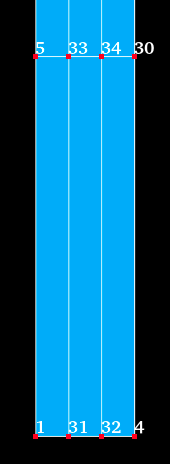
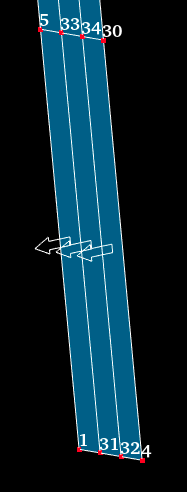
I have the following mesh (as simple as it can get). The Node numbers are shown. Lets take a look at the element in the left bottom corner. According to the Kratos convention the connectivity numbering should be _1 - 31 - 33 - 5_.
By default the orientation is as shown in picture 2, however this results in a numbering _1 - 5 - 33 - 31_
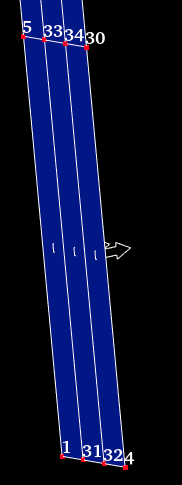
Switching the orientation aka flipping the normals will result in the correct ordering (see pic 3)
My point (and the issue) is that both meshes are valid input, i.e. the mesh is exactly the same in both cases
 |
|  |
|  |
|
philbucher
on 16 Aug 2020
I think I have to explain a bit more.
I have the following mesh (as simple as it can get). The Node numbers are shown. Lets take a look at the element in the left bottom corner. According to the Kratos convention the connectivity numbering should be _1 - 31 - 33 - 5_.
By default the orientation is as shown in picture 2, however this results in a numbering _1 - 5 - 33 - 31_
Switching the orientation aka flipping the normals will result in the correct ordering (see pic 3)My point (and the issue) is that both meshes are valid input, i.e. the mesh is exactly the same in both cases
Can you convert this minimal example in a python test we can debug?
loumalouomega
on 17 Aug 2020
mmm
i have the feeling this is a difference in the local ordering employed by
different programs.
some programs order it as
2 3
0 1
others as
3 2
0 1
what is the convention?
how would u do the flipping in this context?
On Sun, Aug 16, 2020, 10:01 PM Philipp Bucher notifications@github.com
wrote:
I think I have to explain a bit more.
I have the following mesh (as simple as it can get). The Node numbers are
shown. Lets take a look at the element in the left bottom corner. According
to the Kratos convention the connectivity numbering should be 1 - 31 -
33 - 5.
By default the orientation is as shown in picture 2, however this results
in a numbering 1 - 5 - 33 - 31
Switching the orientation aka flipping the normals will result in the
correct ordering (see pic 3)My point (and the issue) is that both meshes are valid input, i.e. the
mesh is exactly the same in both cases[image: image]
https://user-images.githubusercontent.com/25484702/90342773-146a6300-e00b-11ea-9bf2-bb77cb088462.png
[image: image]
https://user-images.githubusercontent.com/25484702/90342775-192f1700-e00b-11ea-9079-859af21f0d15.png
[image: image]
https://user-images.githubusercontent.com/25484702/90342777-1d5b3480-e00b-11ea-9157-b3b10c2e3534.png—
You are receiving this because you are on a team that was mentioned.
Reply to this email directly, view it on GitHub
https://github.com/KratosMultiphysics/Kratos/issues/7358#issuecomment-674570941,
or unsubscribe
https://github.com/notifications/unsubscribe-auth/AB5PWEL7DWZ3JCNOD2RVS63SBA3I7ANCNFSM4QA3ZAYQ
.
RiccardoRossi
on 17 Aug 2020
mmm i have the feeling this is a difference in the local ordering employed by different programs. some programs order it as 2 3 0 1 others as 3 2 0 1 what is the convention? how would u do the flipping in this context?
https://github.com/KratosMultiphysics/Kratos/wiki/Mesh-node-ordering#quadrilateral
loumalouomega
on 17 Aug 2020
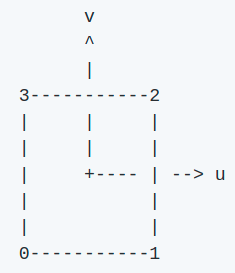
The ordering of the nodes is the same:
Kratos | Salome
---|---
 |
| 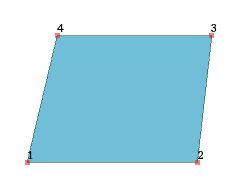
The issue comes when flipping the normal, i.e. from which side one looks at it (front vs back so to say, as depicted in the pics above with the arrows)
If one looks from the from the front then the ordering is correct, looking from the back it is different (still same mesh, just the normal pointing in the opposite direction)
Does this clarify what I mean?
philbucher
on 17 Aug 2020
The ordering of the nodes is the same:
Kratos Salome
The issue comes when flipping the normal, i.e. from which side one looks at it (front vs back so to say, as depicted in the pics above with the arrows)
If one looks from the from the front then the ordering is correct, looking from the back it is different (still same mesh, just the normal pointing in the opposite direction)Does this clarify what I mean?
Can you please provide a mesh example giving issues?
loumalouomega
on 17 Aug 2020
Can you please provide a mesh example giving issues?
~~~py
import KratosMultiphysics as KM
current_model = KM.Model()
model_part= current_model.CreateModelPart("Main")
node1 = model_part.CreateNewNode(1, 0, 0, 0)
node2 = model_part.CreateNewNode(2, 1, 0, 0)
node3 = model_part.CreateNewNode(3, 1, 1, 0)
node4 = model_part.CreateNewNode(4, 0, 1, 0)
surface_1 = KM.Quadrilateral2D4(node1, node2, node3, node4)
print(surface_1.Area())
surface_2 = KM.Quadrilateral2D4(node1, node4, node3, node2)
print(surface_2.Area())
~~~
the area of the second quad is negative, which is the issue
philbucher
on 21 Aug 2020
But it is normal, nodes must be ordered counter clockwise, it is standard
loumalouomega
on 21 Aug 2020
But it is normal, nodes must be ordered counter clockwise, it is standard
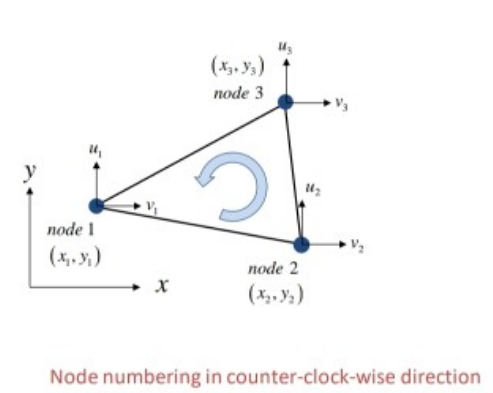
loumalouomega
on 21 Aug 2020
In local space sure, but what about the global space? What is the "norm" direction?
philbucher
on 21 Aug 2020
I mean this is my point, changing the global orientation (aka flipping the normal) shouldn't affect the local space
philbucher
on 21 Aug 2020
It does, local space is the projection of the global space into the "ideal geometry", if the nodes are inverted, the projection will be inverted. What we can do is to add utilities that check the proper ordering of the nodes for all types of geometries, not just tetras and tris
loumalouomega
on 21 Aug 2020
hm ok I will discuss this with @KratosMultiphysics/technical-committee first before we do anything. This would anyway be a sensitive change.
My main problem with this is that I have to do A LOT of computations beforehand to make sure the ordering is correct. Basically I need to compute the Area of each element using the Kratos way and then selecting which ordering to use :/
philbucher
on 21 Aug 2020
Technically the mesher should respect this
loumalouomega
on 21 Aug 2020
practically it does not :D
Edit:
It happens randomly, even for simple models as shown above. I couldn't yet figure out how they do it.
philbucher
on 21 Aug 2020
In my experience GiD and GMSH respects the node ordering
loumalouomega
on 21 Aug 2020
Salome apparently does not
philbucher
on 21 Aug 2020
I support Vicente's arguments in here. I'd also assume that in the ideal space the nodes are counterclockwise sorted. Considering that the xi and eta coordinate systems are (1,0) and (0,1) the normal must point upwards (towards the observer).
 rubenzorrilla
on 21 Aug 2020
rubenzorrilla
on 21 Aug 2020
I fully agree that in local coords we must stick to this convention
Let me ask the opposite question: Assume I have a part where I want the normals to point in the opposite direction for whatever reason. How would this be achieved?
E.g. for the fluids, I remember there is sth going on related to the inflow and outflow, those needs this directed in a certain way no? @rubenzorrilla
philbucher
on 21 Aug 2020
I fully agree that in local coords we must stick to this convention
Let me ask the opposite question: Assume I have a part where I want the normals to point in the opposite direction for whatever reason. How would this be achieved?
Now I think I got your point. So the idea is to have a robust and consistent mechanism to swap the normals?
E.g. for the fluids, I remember there is sth going on related to the inflow and outflow, those needs this directed in a certain way no? @rubenzorrilla
In the fluid we assume that the normals point outwards.
rubenzorrilla
on 22 Aug 2020
o think it should be. a geometry method...
On Sat, Aug 22, 2020, 11:56 AM Rubén Zorrilla notifications@github.com
wrote:
I fully agree that in local coords we must stick to this convention
Let me ask the opposite question: Assume I have a part where I want the
normals to point in the opposite direction for whatever reason. How would
this be achieved?Now I think I got your point. So the idea is to have a robust and
consistent mechanism to swap the normals?E.g. for the fluids, I remember there is sth going on related to the
inflow and outflow, those needs this directed in a certain way no?
@rubenzorrilla https://github.com/rubenzorrillaIn the fluid we assume that the normals point outwards.
—
You are receiving this because you are on a team that was mentioned.
Reply to this email directly, view it on GitHub
https://github.com/KratosMultiphysics/Kratos/issues/7358#issuecomment-678621064,
or unsubscribe
https://github.com/notifications/unsubscribe-auth/AB5PWEKECOJTJ4XBDWXUG53SB6I4JANCNFSM4QA3ZAYQ
.
RiccardoRossi
on 23 Aug 2020
independent of adding another methods I would say that we should be able to support those features of the Preprocessor: GiD; Salome
Otherwise the problem wouldn't be solved
philbucher
on 23 Aug 2020
I think that GiD already supports that. I have never experienced problems with neither the swap normal nor the make coherent options.
rubenzorrilla
on 23 Aug 2020
lets speak abt this, I feel like verbal explanations will be more fruitful :)
philbucher
on 24 Aug 2020
for the record, I figured together with @sunethwarna that in fluids the TetrahedralMeshOrientationCheck is used to make sure things are correct no matter what the preprocessor does :)
philbucher
on 28 Aug 2020
(but does it work with hexa and quad?)
loumalouomega
on 28 Aug 2020
My 2 cents:
Just changing the orientation of the quad (nodes 1,2,3,4 vs 1,4,3,2 as in @philbucher's example above) will of course affect in which direction the normal is pointing, but the area should definitely not be negative.
Preprocessors should respect the ordering of nodes in Kratos. The need of making normals coherent is a fix for a deficiency of the input/preprocessor. Also the convention of normals of solid surfaces pointing outwards is fine, but what is outside if we talk about a surface mesh only? In that case the decision of which direction of the surface is the positive normal direction is a user decision IMO and i am not sure how that could be fixed by an automatic process.
 armingeiser
on 22 Sep 2020
armingeiser
on 22 Sep 2020
My 2 cents:
Just changing the orientation of the quad (nodes1,2,3,4vs1,4,3,2as in @philbucher's example above) will of course affect in which direction the normal is pointing, but the area should definitely not be negative.Preprocessors should respect the ordering of nodes in Kratos. The need of making normals coherent is a fix for a deficiency of the input/preprocessor. Also the convention of normals of solid surfaces pointing outwards is fine, but what is outside if we talk about a surface mesh only? In that case the decision of which direction of the surface is the positive normal direction is a user decision IMO and i am not sure how that could be fixed by an automatic process.
What do you propose?, to change the way the area is computed?, this is the FEM standard. We may enforce the positivity of the area multiplying by a "normal factor" that would be 1 if the normal is the expected and -1 if the opposite, but this should not be like that. If you read the documentation of any FEM it is done ensuring the normal in a certain direction, read for example Code_Aster documentation:
https://www.code-aster.org/V2/doc/v13/en/man_u/u3/u3.01.00.pdf
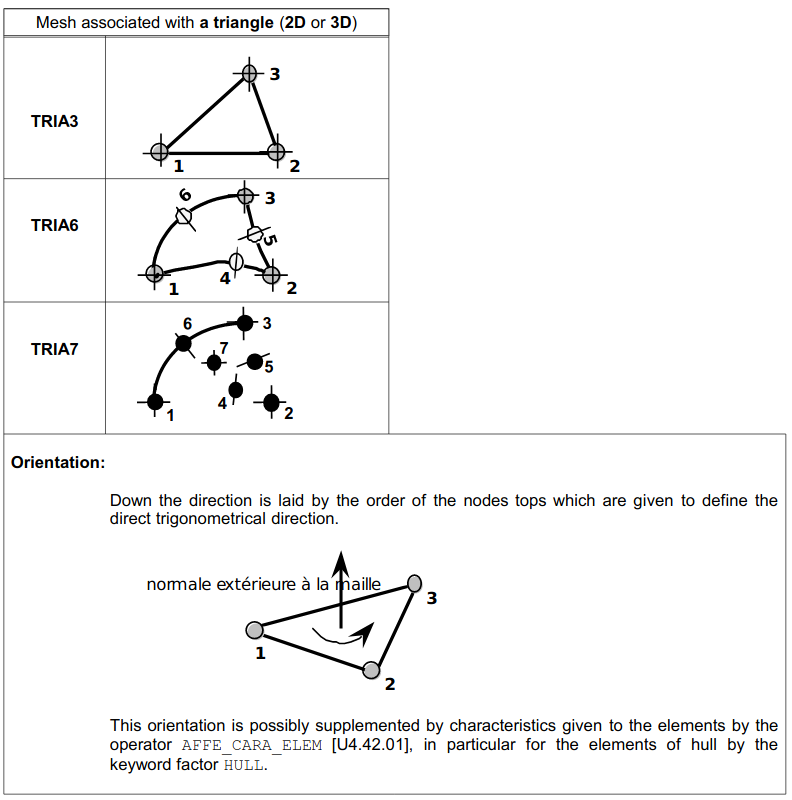
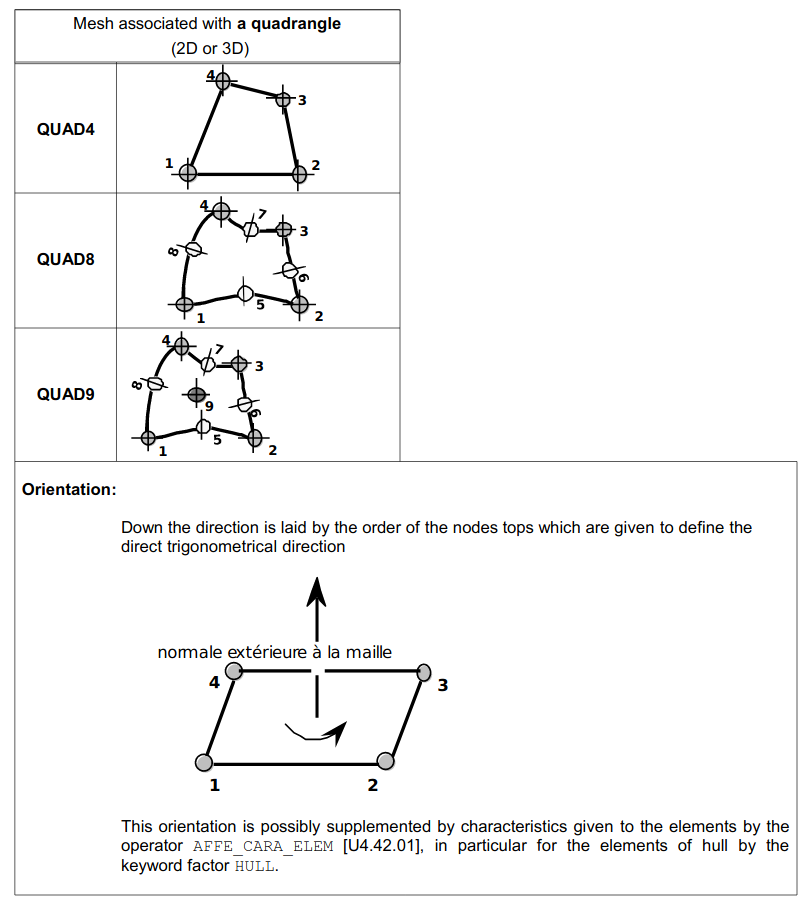
loumalouomega
on 22 Sep 2020
I still could not communicate what I actually mean and why I think that we are currently not doing it correctly IMO
I will come back to explaining more in detail when I have time
philbucher
on 22 Sep 2020
My understanding is the following:
If a quad (left) undergoes a rigid body rotation, it should not change its area. Of course the normal points in the opposite direction.
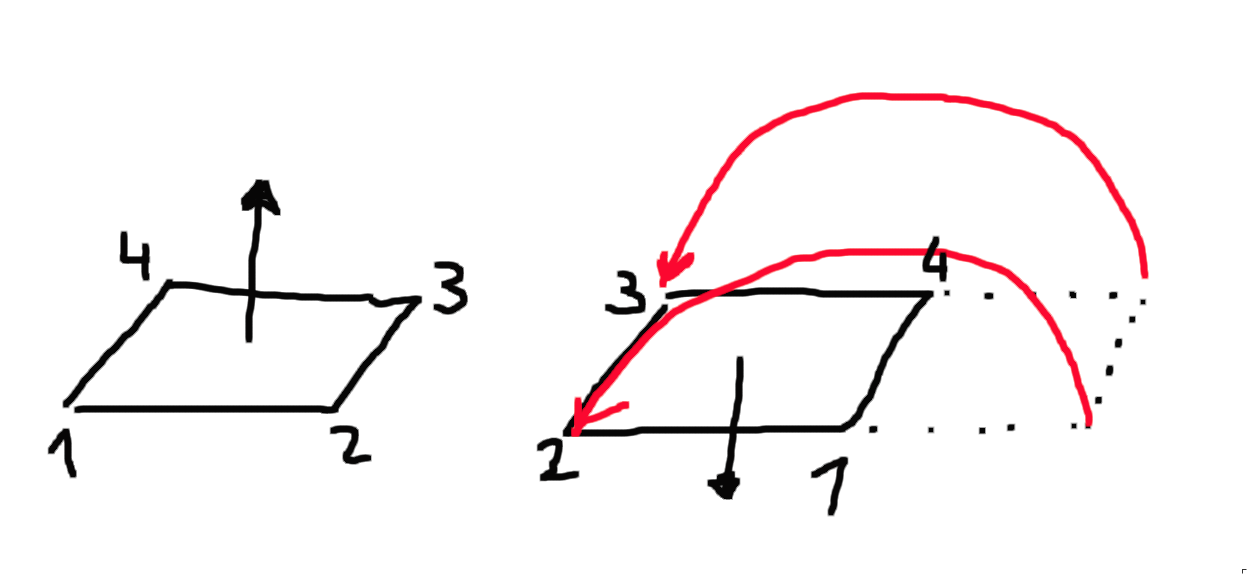
Looking at the node numbers we have left 1,2,3,4 and right 1,4,3,2 - which is exactly the example of @Philip above and apparently in Kratos a negative area is calculated for the right case.
But maybe i am missing something obvious here.
armingeiser
on 22 Sep 2020
thanks @armingeiser this is pretty much what I failed to explain :D
philbucher
on 22 Sep 2020
If you work in 2D what you posted @armingeiser is an inversion of element. If you want to change that for the 3D I will understand
loumalouomega
on 22 Sep 2020
Now i see where we are diverging: I was talking about 3D (having shell elements in mind).
@philbucher's in your example you are using Quad2D4N so i guess you guys where talking about 2D :upside_down_face:
Just noticed that, so sorry for the confusion.
armingeiser
on 22 Sep 2020
@KratosMultiphysics/technical-committee fully delegates this issue to the @KratosMultiphysics/implementation-committee
 pooyan-dadvand
on 3 Nov 2020
pooyan-dadvand
on 3 Nov 2020
Related issues
 Gaoliu19910601
·
6Comments
Gaoliu19910601
·
6Comments
 josep-m-carbonell
·
4Comments
josep-m-carbonell
·
4Comments
 riccardotosi
·
7Comments
riccardotosi
·
7Comments
 roigcarlo
·
6Comments
josep-m-carbonell
·
6Comments
roigcarlo
·
6Comments
josep-m-carbonell
·
6Comments