Kratos: Changes in compilation
Dear @KratosMultiphysics/all
We are about to commit a change which will make important changes to the compilation process:
Once done, you will see the following changes:
- Applications/CMakeLists.txt is gone.
- It will be possible to stablish compilation dependencies between applications from inside your applications
- It will be possible to compile applications outside kratos repo
- cmake_build folder is gone and template scripts were moved to scripts
This changes are not backward compatible so please take a moment to read the changes that we have made to the configure.sh files and CMakeList.txt files of your apps.
Below you have a short and longer explanation of the main changes. Please if you have any doubt don't hesitate to ask.
TL;DR:
- Copy
scripts/standard_configure.sh/battoscripts/configure.sh/batas before - Add/remove apps with the
add_appmacro - Compilation results will be installed in
kratos/bin/[build_type]by default - Change
LD_LIBRARY_PATHtokratos/bin/[build_type]/libs - Change
PYTHONPATHtokratos/bin/[build_type]
Details
You can find all the info in: Compilation options
As a summary:
Configure script
Adding removing applications
Apps are now enabled disabled by adding its path to KRATOS_APPLICATIONS. For example if you previously had:
cmake ..                                  \
-DFLUID_DYNAMICS_APPLICATION=ON           \
-DEXTERNAL_SOLVERS_APPLICATION=ON
It will become:
export KRATOS_APPLICATIONS=$KRATOS_APPLICATIONS:/path/to/FluidDynamicsApplication
export KRATOS_APPLICATIONS=$KRATOS_APPLICATIONS:/path/to/ExternalSolversApplication

cmake ..
Note that \/^ are gone so you can comment these lines to able/disable
As this can be a little bit to verbose, we have defined some macros add_app inside the script to help with this so you can do:
add_app ${KRATOS_APP_DIR}/FluidDynamicsApplication
add_app ${KRATOS_APP_DIR}/ExternalSolversApplication
Directories and dependencies
Most of libraries, dependencies, and default directories are now set automatically, so you don't have to change them. If you chose to do so, the most common ones can now be set changing the following variables:
export KRATOS_SOURCE="${KRATOS_SOURCE:-"$( cd "$(dirname "$0")" ; pwd -P )"/..}"
export KRATOS_BUILD="${KRATOS_SOURCE}/build"
export KRATOS_APP_DIR="${KRATOS_SOURCE}/applications"
export KRATOS_INSTALL_PYTHON_USING_LINKS=ON
export KRATOS_BUILD_TYPE=${KRATOS_BUILD_TYPE:-"Release"}
export PYTHON_EXECUTABLE=${PYTHON_EXECUTABLE:-"/usr/bin/python3"}
export BOOST_ROOT=${BOOST_ROOT:-"/home/cimne/boost"}
KRATOS_SOURCE: Is the location of Kratos source, by default will point to the Kratos soruce directory where the script is located (If the script is in
/home/cimne/Kratos/scripts, it will point to/home/cimne/Kratos. you can change it so it points to whatever other Kratos source you want. Our recommendation is to not touch this one.- KRATOS_BUILD: The build directory (what used to be
cmake_build). Our recommendation is to not touch this one.
- KRATOS_BUILD: The build directory (what used to be
KRATOS_APP_DIR: This variable is just to help reduce the length of the path to the apps, as there will be typically located in the same place. Our recommendation is to not touch this one.
KRATOS_INSTALL_PYTHON_USING_LINKS: Allows you to make links for the python scripts instead of copies. This is useful if you are developing and you don't want to reinstall things every time you touch a *.py file.
KRATOS_BUILD_TYPE: Build type, as before
Release,RelWithDebInfo,Debug,FullDebugandCustomPYTHON_EXECUTABLE: Path to your python interpreter
BOOST_ROOT: Path to boost libraries
Advanced options and other switches:
You are still able to touch other compilation options directly with cmake just as before:
So where you use to had:
cmake ..             \
 -DMETIS_APPLICATION=ON \
 -DUSE_METIS_5=ON \
 -DUSE_MPI=OFF    \
 -DEIGEN_ROOT="/home/cimne/eigen" \
... etc ...
you will now have:
cmake -H"${KRATOS_SOURCE}" -B"${KRATOS_BUILD}/${KRATOS_BUILD_TYPE}"  \
 -DUSE_METIS_5=ON \
 -DUSE_MPI=OFF    \
 -DEIGEN_ROOT="/home/cimne/eigen" \
Application dependencies
There is now a new macro kratos_add_dependency which allow to define dependencies at CMake level. If you had something like:
if(NOT (${DEM_APPLICATION} STREQUAL "ON"))
    message(SEND_ERROR "The DEM Application must be compiled before this one. Set DEM_APPLICATION=ON in the configure file.")
endif(NOT (${DEM_APPLICATION} STREQUAL "ON"))

if(NOT (${FLUID_DYNAMICS_APPLICATION} STREQUAL "ON"))
    message(SEND_ERROR "The Fluid Dynamics Application must be compiled before this one. Set FLUID_DYNAMICS_APPLICATION=ON in the configure file.")
endif(NOT (${FLUID_DYNAMICS_APPLICATION} STREQUAL "ON"))
Now it will become:
kratos_add_dependency(${KRATOS_SOURCE_DIR}/applications/FluidDynamicsApplication)
kratos_add_dependency(${KRATOS_SOURCE_DIR}/applications/DEMApplication)
 roigcarlo
All 71 comments
When this is going to be merged?, after or before release?
 loumalouomega
on 28 Nov 2019
loumalouomega
on 28 Nov 2019
Ideally, before
roigcarlo
on 28 Nov 2019
In the summary above, shouldn't the advanced options look like this?
cmake -H"${KRATOS_SOURCE}" -B"${KRATOS_BUILD}/${KRATOS_BUILD_TYPE}"
 -DUSE_METIS_5=ON \
 -DUSE_MPI=OFF    \
 -DEIGEN_ROOT="/home/cimne/eigen" \
 ipouplana
on 30 Nov 2019
ipouplana
on 30 Nov 2019
No, you need the trailing \ in the first line
roigcarlo
on 30 Nov 2019
Then I don't know why, but my script couldn't run like you say... (only after I took out that first backslash)
Edit: Maybe it was because it was the first time I run the script, but I got an error saying something like: "the folder Kratos/build/Release... does not exists"
ipouplana
on 30 Nov 2019
Can you send me the script? I'll take a look
roigcarlo
on 30 Nov 2019
Right now I am not at home, but this evening I can send you the scripts I have (both for Linux and for macOS). Thanks!
ipouplana
on 30 Nov 2019
After the first run, the configure.sh (defined with the backslash as you said) worked perfectly in Ubuntu.
I have now problems with the compilation in macOS. I will send you the configuration file and the error I get.
ipouplana
on 30 Nov 2019
I am not able to compile the new release in my macOS. I added the required apps and added the boost path in the configure.sh file and run the "sh configure.sh" command from the scripts location.
The error it shows is:
configure.sh: line 52: cmake: command not found
configure.sh: line 55: cmake: command not found

 sauravVerma92
on 1 Dec 2019
sauravVerma92
on 1 Dec 2019
Hi @sauravVerma92, we are about to upload a script prepared for mac. Please try that once #6023 is merged.
Also, please remember to set the BOOST_ROOT variable so it points to the same directory as your old configure.sh
roigcarlo
on 1 Dec 2019
Hi @sauravVerma92, we are about to upload a script prepared for mac. Please try that once #6023 is merged.
Also, please remember to set the BOOST_ROOT variable so it points to the same directory as your old configure.sh
@sauravVerma92 with that script you should not have problems (I tested it yesterday), but remember to update the paths to your own case (python, boost, cmake, etc.)
ipouplana
on 1 Dec 2019
Thank u @ipouplana and @roigcarlo .
But I am still getting error in compiling.
CMake Error at applications/ExternalSolversApplication/CMakeLists.txt:142 (install):
install FILES given directory
"/Library/Developer/CommandLineTools/SDKs/MacOSX10.15.sdk/System/Library/Frameworks/Accelerate.framework"
to install.
The edited script is attached here:
Function to add apps
add_app () {
export KRATOS_APPLICATIONS="${KRATOS_APPLICATIONS}$1;"
}
Set compiler
export CC=gcc
export CXX=g++
Set variables
export KRATOS_SOURCE="${KRATOS_SOURCE:-"$( cd "$(dirname "$0")" ; pwd -P )"/..}"
export KRATOS_BUILD="${KRATOS_SOURCE}/build"
export KRATOS_APP_DIR="${KRATOS_SOURCE}/applications"
export KRATOS_INSTALL_PYTHON_USING_LINKS=ON
Set basic configuration
export KRATOS_BUILD_TYPE=${KRATOS_BUILD_TYPE:-"Release"}
export PYTHON_EXECUTABLE=${PYTHON_EXECUTABLE:-"/Library/Frameworks/Python.framework/Versions/3.6/bin/python3"}
export BOOST_ROOT=${BOOST_ROOT:-"/Users/sauravverma/Downloads/softwares/boost_1_71_0"}
Set applications to compile
export KRATOS_APPLICATIONS=
add_app ${KRATOS_APP_DIR}/ExternalSolversApplication
add_app ${KRATOS_APP_DIR}/StructuralMechanicsApplication
add_app ${KRATOS_APP_DIR}/FluidDynamicsApplication
add_app ${KRATOS_APP_DIR}/DEMApplication
add_app ${KRATOS_APP_DIR}/DemStructuresCouplingApplication
add_app ${KRATOS_APP_DIR}/FemToDemApplication
add_app ${KRATOS_APP_DIR}/SwimmingDEMApplication
add_app ${KRATOS_APP_DIR}/MeshingApplication
add_app ${KRATOS_APP_DIR}/MeshMovingApplication
Clean
clear
rm -rf "${KRATOS_BUILD}/${KRATOS_BUILD_TYPE}/cmake_install.cmake"
rm -rf "${KRATOS_BUILD}/${KRATOS_BUILD_TYPE}/CMakeCache.txt"
rm -rf "${KRATOS_BUILD}/${KRATOS_BUILD_TYPE}/CMakeFiles"
Configure
/Applications/CMake.app/Contents/bin/cmake -H"${KRATOS_SOURCE}" -B"${KRATOS_BUILD}/${KRATOS_BUILD_TYPE}" -DUSE_MPI=OFF
Buid
/Applications/CMake.app/Contents/bin/cmake --build "${KRATOS_BUILD}/${KRATOS_BUILD_TYPE}" --target install -- -j4
sauravVerma92
on 1 Dec 2019
Thank u @ipouplana and @roigcarlo .
But I am still getting error in compiling.
CMake Error at applications/ExternalSolversApplication/CMakeLists.txt:142 (install):
install FILES given directory
"/Library/Developer/CommandLineTools/SDKs/MacOSX10.15.sdk/System/Library/Frameworks/Accelerate.framework"
to install.The edited script is attached here:
Function to add apps
add_app () {
export KRATOS_APPLICATIONS="${KRATOS_APPLICATIONS}$1;"
}Set compiler
export CC=gcc
export CXX=g++Set variables
export KRATOS_SOURCE="${KRATOS_SOURCE:-"$( cd "$(dirname "$0")" ; pwd -P )"/..}"
export KRATOS_BUILD="${KRATOS_SOURCE}/build"
export KRATOS_APP_DIR="${KRATOS_SOURCE}/applications"
export KRATOS_INSTALL_PYTHON_USING_LINKS=ONSet basic configuration
export KRATOS_BUILD_TYPE=${KRATOS_BUILD_TYPE:-"Release"}
export PYTHON_EXECUTABLE=${PYTHON_EXECUTABLE:-"/Library/Frameworks/Python.framework/Versions/3.6/bin/python3"}
export BOOST_ROOT=${BOOST_ROOT:-"/Users/sauravverma/Downloads/softwares/boost_1_71_0"}Set applications to compile
export KRATOS_APPLICATIONS=
add_app ${KRATOS_APP_DIR}/ExternalSolversApplication
add_app ${KRATOS_APP_DIR}/StructuralMechanicsApplication
add_app ${KRATOS_APP_DIR}/FluidDynamicsApplication
add_app ${KRATOS_APP_DIR}/DEMApplication
add_app ${KRATOS_APP_DIR}/DemStructuresCouplingApplication
add_app ${KRATOS_APP_DIR}/FemToDemApplication
add_app ${KRATOS_APP_DIR}/SwimmingDEMApplication
add_app ${KRATOS_APP_DIR}/MeshingApplication
add_app ${KRATOS_APP_DIR}/MeshMovingApplicationClean
clear
rm -rf "${KRATOS_BUILD}/${KRATOS_BUILD_TYPE}/cmake_install.cmake"
rm -rf "${KRATOS_BUILD}/${KRATOS_BUILD_TYPE}/CMakeCache.txt"
rm -rf "${KRATOS_BUILD}/${KRATOS_BUILD_TYPE}/CMakeFiles"Configure
/Applications/CMake.app/Contents/bin/cmake -H"${KRATOS_SOURCE}" -B"${KRATOS_BUILD}/${KRATOS_BUILD_TYPE}" -DUSE_MPI=OFF
Buid
/Applications/CMake.app/Contents/bin/cmake --build "${KRATOS_BUILD}/${KRATOS_BUILD_TYPE}" --target install -- -j4
You have not changed the path of the compiler (gcc, g++ for clang), and you still need to add some paths in the configuration section. Look at the example of script in #6023
ipouplana
on 1 Dec 2019
Thank u @ipouplana, It's compiling now.
sauravVerma92
on 1 Dec 2019
Hi @ipouplana , The compilation stopped at 97% with an error:
[ 97%] Built target KratosStructuralMechanicsCore
make: * [all] Error 2
sauravVerma92
on 1 Dec 2019
I don’t know about the error you mention... don’t you have a more explicit message?
ipouplana
on 1 Dec 2019
Hi @ipouplana , the error message is pasted below. However, I removed the FemToDemApplication from the export Kratos_Application and compiled again suucessfully.
[ 89%] Linking CXX shared module KratosFemToDemApplication.so
ld: library not found for -lKratosSolidMechanicsCore
clang-9: error: linker command failed with exit code 1 (use -v to see invocation)
make[2]: * [applications/FemToDemApplication/KratosFemToDemApplication.so] Error 1
make[1]: * [applications/FemToDemApplication/CMakeFiles/KratosFemToDemApplication.dir/all] Error 2
sauravVerma92
on 2 Dec 2019
What happened to the variables for
BLAS_LIBRARIES
LAPACK_LIBRARIES ?
Running the config script tells me that they are not used in the project. I need to compile with a special version of lapack and blas and thus I have to specify those paths.
 AndreasWinterstein
on 2 Dec 2019
AndreasWinterstein
on 2 Dec 2019
@AndreasWinterstein They are still valid ( all variables are in fact), you can copy paste them from the old config file:
cmake -H"${KRATOS_SOURCE}" -B"${KRATOS_BUILD}/${KRATOS_BUILD_TYPE}" -DUSE_MPI=OFF   \
-DLAPACK_LIBRARIES="path"                                                           \
-DBLAS_LIBRARIES="path"
@sauravVerma92 Seems that FemToDem has a linkage dependency with the SolidMechanics App. I will ask the maintainer and if its intended add it as a dependency.
roigcarlo
on 2 Dec 2019
I also thought this is the case and it also works for all the other variables except for those two (see below). I copied them exactly to the position as described in your post.
_CMake Warning:
Manually-specified variables were not used by the project:
BLAS_LIBRARIES
LAPACK_LIBRARIES_
Here is the bock in my config script (paths are not added explicitly):
cmake -H"${KRATOS_SOURCE}" -B"${KRATOS_BUILD}/${KRATOS_BUILD_TYPE}"                                                     \
-DUSE_MPI=ON                                                                                                            \
-DUSE_METIS_5=ON                                                                                                        \
-DKRATOS_EXCLUDE_OPENMP=ON                                                                                              \
-DKRATOS_BUILD_TESTING=OFF                                                                                              \
-DCMAKE_CXX_FLAGS="-std=c++11 -Wall -diag-disable 10193 -diag-disable 1478 -diag-disable 1786"                          \
-DTRILINOS_ROOT="..."                                           \
-DBLAS_LIBRARIES="..."                               \
-DLAPACK_LIBRARIES="..."                              \
-DCMAKE_INSTALL_PREFIX="...."                                \
And as expected I am getting a compilation error from trilinos library since it exactly needs this special type of the blas/lapack.
AndreasWinterstein
on 2 Dec 2019
@AndreasWinterstein Which application need the libraries? We have moved the blad and lapack dependencies from the core to the external solvers app, as right now are only needed by the SuperLU solver. If you do not compile that app it won't be detected.
If you have another app that requeires them just add:
find_package(BLAS REQUIRED)
include_directories(${BLAS_INCLUDE_DIRS})
link_directories(${BLAS_LIBRARIES})
find_package(LAPACK REQUIRED)
include_directories(${LAPACK_INCLUDE_DIRS})
link_directories(${LAPACK_LIBRARIES})
To the cmake file of the app.
roigcarlo
on 2 Dec 2019
As far as I understand the TrilinosApplication. In detail the solvers from trilions i.e. Atzteck, Amesos and ML. Some time ago @philbucher added flags to deactivate those solvers. If I deactivate the build in trilinos solvers the compilation works. I only use the amgcl solver from the core since it is anyway faster and thus I do not need them. But if someone wants to use the solvers from trilions he needs to compile blas and lapack version 3.7.0 himself and add the path. Normally you do not compile the ExternalSolversApplication on cluster systems since it is not needed and makes problems at least in our case.
Here is the error message:
~
_CMakeFiles/KratosTrilinosCore.dir/custom_factories/trilinos_linear_solver_factory.cpp.o: in function Teuchos::StringIndexedOrderedValueObjectContainer<Teuchos::ParameterEntry>::getNonconstKeyAndObject(long)':
trilinos_linear_solver_factory.cpp:(.text._ZN7Teuchos40StringIndexedOrderedValueObjectContainerINS_14ParameterEntryEE23getNonconstKeyAndObjectEl[_ZN7Teuchos40StringIndexedOrderedValueObjectContainerINS_14ParameterEntryEE23getNonconstKeyAndObjectEl]+0x670): undefined reference toTeuchos::TestForException_break(std::__cxx11::basic_string
ld: trilinos_linear_solver_factory.cpp:(.text._ZN7Teuchos40StringIndexedOrderedValueObjectContainerINS_14ParameterEntryEE23getNonconstKeyAndObjectEl[_ZN7Teuchos40StringIndexedOrderedValueObjectContainerINS_14ParameterEntryEE23getNonconstKeyAndObjectEl]+0xcac): undefined reference to Teuchos::TestForException_break(std::__cxx11::basic_string<char, std::char_traits<char>, std::allocator<char> > const&)'
ld: CMakeFiles/KratosTrilinosCore.dir/custom_factories/trilinos_linear_solver_factory.cpp.o: in functionKratos::TrilinosLinearSolverFactory
trilinos_linear_solver_factory.cpp:(.text._ZNK6Kratos27TrilinosLinearSolverFactoryINS_13TrilinosSpaceI18Epetra_FECrsMatrix15Epetra_FEVectorEENS_10UblasSpaceIdN5boost7numeric5ublas6matrixIdNS8_15basic_row_majorImlEENS8_15unbounded_arrayIdSaIdEEEEENS8_6vectorIdSE_EEEENS_12AmesosSolverIS4_SI_NS_9ReordererIS4_SI_EEEEE12CreateSolverENS_10ParametersE[_ZNK6Kratos27TrilinosLinearSolverFactoryINS_13TrilinosSpaceI18Epetra_FECrsMatrix15Epetra_FEVectorEENS_10UblasSpaceIdN5boost7numeric5ublas6matrixIdNS8_15basic_row_majorImlEENS8_15unbounded_arrayIdSaIdEEEEENS8_6vectorIdSE_EEEENS_12AmesosSolverIS4_SI_NS_9ReordererIS4_SI_EEEEE12CreateSolverENS_10ParametersE]+0x2628): undefined reference to Amesos::Query(std::__cxx11::basic_string<char, std::char_traits<char>, std::allocator<char> >)'
ld: CMakeFiles/KratosTrilinosCore.dir/custom_factories/trilinos_linear_solver_factory.cpp.o: in functionKratos::TrilinosLinearSolverFactory
trilinos_linear_solver_factory.cpp:(.text._ZNK6Kratos27TrilinosLinearSolverFactoryINS_13TrilinosSpaceI18Epetra_FECrsMatrix15Epetra_FEVectorEENS_10UblasSpaceIdN5boost7numeric5ublas6matrixIdNS8_15basic_row_majorImlEENS8_15unbounded_arrayIdSaIdEEEEENS8_6vectorIdSE_EEEENS_16MultiLevelSolverIS4_SI_NS_9ReordererIS4_SI_EEEEE12CreateSolverENS_10ParametersE[_ZNK6Kratos27TrilinosLinearSolverFactoryINS_13TrilinosSpaceI18Epetra_FECrsMatrix15Epetra_FEVectorEENS_10UblasSpaceIdN5boost7numeric5ublas6matrixIdNS8_15basic_row_majorImlEENS8_15unbounded_arrayIdSaIdEEEEENS8_6vectorIdSE_EEEENS_16MultiLevelSolverIS4_SI_NS_9ReordererIS4_SI_EEEEE12CreateSolverENS_10ParametersE]+0xa53): undefined reference to ML_Epetra::SetDefaults(std::__cxx11::basic_string<char, std::char_traits<char>, std::allocator<char> >, Teuchos::ParameterList&, int*, double*, bool)'
ld: trilinos_linear_solver_factory.cpp:(.text._ZNK6Kratos27TrilinosLinearSolverFactoryINS_13TrilinosSpaceI18Epetra_FECrsMatrix15Epetra_FEVectorEENS_10UblasSpaceIdN5boost7numeric5ublas6matrixIdNS8_15basic_row_majorImlEENS8_15unbounded_arrayIdSaIdEEEEENS8_6vectorIdSE_EEEENS_16MultiLevelSolverIS4_SI_NS_9ReordererIS4_SI_EEEEE12CreateSolverENS_10ParametersE[_ZNK6Kratos27TrilinosLinearSolverFactoryINS_13TrilinosSpaceI18Epetra_FECrsMatrix15Epetra_FEVectorEENS_10UblasSpaceIdN5boost7numeric5ublas6matrixIdNS8_15basic_row_majorImlEENS8_15unbounded_arrayIdSaIdEEEEENS8_6vectorIdSE_EEEENS_16MultiLevelSolverIS4_SI_NS_9ReordererIS4_SI_EEEEE12CreateSolverENS_10ParametersE]+0xcdb): undefined reference toML_Epetra::SetDefaults(std::__cxx11::basic_string
ld: CMakeFiles/KratosTrilinosCore.dir/custom_factories/trilinos_linear_solver_factory.cpp.o: in function Kratos::AztecSolver<Kratos::TrilinosSpace<Epetra_FECrsMatrix, Epetra_FEVector>, Kratos::UblasSpace<double, boost::numeric::ublas::matrix<double, boost::numeric::ublas::basic_row_major<unsigned long, long>, boost::numeric::ublas::unbounded_array<double, std::allocator<double> > >, boost::numeric::ublas::vector<double, boost::numeric::ublas::unbounded_array<double, std::allocator<double> > > >, Kratos::Reorderer<Kratos::TrilinosSpace<Epetra_FECrsMatrix, Epetra_FEVector>, Kratos::UblasSpace<double, boost::numeric::ublas::matrix<double, boost::numeric::ublas::basic_row_major<unsigned long, long>, boost::numeric::ublas::unbounded_array<double, std::allocator<double> > >, boost::numeric::ublas::vector<double, boost::numeric::ublas::unbounded_array<double, std::allocator<double> > > > > >::Solve(Epetra_FECrsMatrix&, Epetra_FEVector&, Epetra_FEVector&)':
trilinos_linear_solver_factory.cpp:(.text._ZN6Kratos11AztecSolverINS_13TrilinosSpaceI18Epetra_FECrsMatrix15Epetra_FEVectorEENS_10UblasSpaceIdN5boost7numeric5ublas6matrixIdNS8_15basic_row_majorImlEENS8_15unbounded_arrayIdSaIdEEEEENS8_6vectorIdSE_EEEENS_9ReordererIS4_SI_EEE5SolveERS2_RS3_SN_[_ZN6Kratos11AztecSolverINS_13TrilinosSpaceI18Epetra_FECrsMatrix15Epetra_FEVectorEENS_10UblasSpaceIdN5boost7numeric5ublas6matrixIdNS8_15basic_row_majorImlEENS8_15unbounded_arrayIdSaIdEEEEENS8_6vectorIdSE_EEEENS_9ReordererIS4_SI_EEE5SolveERS2_RS3_SN_]+0x47c): undefined reference toIfpack::Create(std::__cxx11::basic_string
ld: CMakeFiles/KratosTrilinosCore.dir/custom_factories/trilinos_linear_solver_factory.cpp.o: in function Kratos::AmesosSolver<Kratos::TrilinosSpace<Epetra_FECrsMatrix, Epetra_FEVector>, Kratos::UblasSpace<double, boost::numeric::ublas::matrix<double, boost::numeric::ublas::basic_row_major<unsigned long, long>, boost::numeric::ublas::unbounded_array<double, std::allocator<double> > >, boost::numeric::ublas::vector<double, boost::numeric::ublas::unbounded_array<double, std::allocator<double> > > >, Kratos::Reorderer<Kratos::TrilinosSpace<Epetra_FECrsMatrix, Epetra_FEVector>, Kratos::UblasSpace<double, boost::numeric::ublas::matrix<double, boost::numeric::ublas::basic_row_major<unsigned long, long>, boost::numeric::ublas::unbounded_array<double, std::allocator<double> > >, boost::numeric::ublas::vector<double, boost::numeric::ublas::unbounded_array<double, std::allocator<double> > > > > >::Solve(Epetra_FECrsMatrix&, Epetra_FEVector&, Epetra_FEVector&)':
trilinos_linear_solver_factory.cpp:(.text._ZN6Kratos12AmesosSolverINS_13TrilinosSpaceI18Epetra_FECrsMatrix15Epetra_FEVectorEENS_10UblasSpaceIdN5boost7numeric5ublas6matrixIdNS8_15basic_row_majorImlEENS8_15unbounded_arrayIdSaIdEEEEENS8_6vectorIdSE_EEEENS_9ReordererIS4_SI_EEE5SolveERS2_RS3_SN_[_ZN6Kratos12AmesosSolverINS_13TrilinosSpaceI18Epetra_FECrsMatrix15Epetra_FEVectorEENS_10UblasSpaceIdN5boost7numeric5ublas6matrixIdNS8_15basic_row_majorImlEENS8_15unbounded_arrayIdSaIdEEEEENS8_6vectorIdSE_EEEENS_9ReordererIS4_SI_EEE5SolveERS2_RS3_SN_]+0x11d): undefined reference toAmesos::Create(std::__cxx11::basic_string
applications/TrilinosApplication/CMakeFiles/KratosTrilinosCore.dir/build.make:169: recipe for target 'applications/TrilinosApplication/libKratosTrilinosCore.so' failed
gmake[2]: *
~
AndreasWinterstein
on 2 Dec 2019
This is my trilinos config script:
~~~sh
TRILINOS_ROOT="~/software/trilinos-12.10.1-install"
EXTRA_LINK_FLAGS=""
EXTRA_ARGS=$@
METIS and PARMETIS have to be linked for the MLsolver. Otherwise KRATOS will cause linking errors!
PARMETIS_ROOT="/dss/dsshome1/09/.../compiled_libraries/ParMetis-3.2.0"
METIS_ROOT="/dss/dsshome1/09/.../compiled_libraries/ParMetis-3.2.0"
if LAPACK is compiled by oneself
LAPACK_ROOT="/dss/dsshome1/09/.../compiled_libraries/lapack-3.7.0" #BLAS_LIBRARY_NAMES:STRING = "librefblas.a" LAPACK_LIBRARY_NAMES:STRING = "liblapack.a"
clear
rm CMakeCache.txt
rm -rf CMakeFiles
rm *.cmake
cmake \
-D CMAKE_INSTALL_PREFIX:FILEPATH="${TRILINOS_ROOT}" \
-D CMAKE_BUILD_TYPE:STRING=RELEASE \
-D TPL_ENABLE_MPI:BOOL=ON \
-D MPI_CXX_COMPILER:FILEPATH=mpic++ \
-D MPI_C_COMPILER:FILEPATH=mpicc \
-D MPI_Fortran_COMPILER:FILEPATH=mpif90 \
-D Trilinos_ENABLE_CXX11=ON \
-D TPL_ENABLE_LAPACK:BOOL=ON \
-D BUILD_SHARED_LIBS:BOOL=ON \
-D BLAS_LIBRARY_DIRS:FILEPATH="${LAPACK_ROOT}" \
-D BLAS_LIBRARY_NAMES:STRING="librefblas.a" \
-D LAPACK_LIBRARY_DIRS:FILEPATH="${LAPACK_ROOT}" \
-D LAPACK_LIBRARY_NAMES:STRING="liblapack.a" \
-D TPL_ENABLE_METIS:BOOL=ON \
-D METIS_INCLUDE_DIRS:PATH="${METIS_ROOT}/METISLib" \
-D METIS_LIBRARY_NAMES:STRING="metis" \
-D METIS_LIBRARY_DIRS:PATH="${METIS_ROOT}" \
-D TPL_ENABLE_ParMETIS:BOOL=ON \
-D ParMETIS_INCLUDE_DIRS:PATH="${PARMETIS_ROOT}" \
-D ParMETIS_LIBRARY_NAMES:STRING="parmetis" \
-D ParMETIS_LIBRARY_DIRS:PATH="${PARMETIS_ROOT}" \
-D Trilinos_EXTRA_LINK_FLAGS:STRING="$EXTRA_LINK_FLAGS" \
-D Trilinos_ENABLE_Amesos:BOOL=ON \
-D Trilinos_ENABLE_Anasazi:BOOL=ON \
-D Trilinos_ENABLE_AztecOO:BOOL=ON \
-D AztecOO_ENABLE_Teuchos:BOOL=ON \
-D Trilinos_ENABLE_Epetra:BOOL=ON \
-D Trilinos_ENABLE_EpetraExt:BOOL=ON \
-D Trilinos_ENABLE_Galeri:BOOL=ON \
-D Trilinos_ENABLE_Ifpack:BOOL=ON \
-D Trilinos_ENABLE_ML:BOOL=ON \
-D Trilinos_ENABLE_PyTrilinos:BOOL=OFF \
-D Trilinos_ENABLE_Teuchos:BOOL=ON \
-D Trilinos_ENABLE_Triutils:BOOL=ON \
-D DART_TESTING_TIMEOUT:STRING=600 \
-D CMAKE_Fortran_FLAGS:STRING="-O5 -funroll-all-loops -fPIC" \
-D CMAKE_C_FLAGS:STRING="-O3 -fPIC -funroll-loops -march=native" \
-D CMAKE_CXX_FLAGS:STRING="-O3 -fPIC -funroll-loops -ffast-math -march=native -DMPICH_IGNORE_CXX_SEEK" \
$EXTRA_ARGS \
~/compiled_libraries/trilinos-12.10.1-Source
~~~
AndreasWinterstein
on 2 Dec 2019
When running a standard fluid simulation I am getting the following error:
~
Traceback (most recent call last):
File "MainKratos.py", line 31, in
simulation = FluidDynamicsAnalysisWithFlush(model,parameters)
File "MainKratos.py", line 12, in __init__
super(FluidDynamicsAnalysisWithFlush,self).__init__(model,project_parameters)
File "/dss/dsshome1/09/user/software_compilation_test/Kratos/bin/Release/KratosMultiphysics/FluidDynamicsApplication/fluid_dynamics_analysis.py", line 38, in __init__
super(FluidDynamicsAnalysis,self).__init__(model,parameters)
File "/dss/dsshome1/09/user/software_compilation_test/Kratos/bin/Release/KratosMultiphysics/analysis_stage.py", line 43, in __init__
self._GetSolver().AddVariables() # this creates the solver and adds the variables
File "/dss/dsshome1/09/user/software_compilation_test/Kratos/bin/Release/KratosMultiphysics/analysis_stage.py", line 201, in _GetSolver
self._solver = self._CreateSolver()
File "/dss/dsshome1/09/user/software_compilation_test/Kratos/bin/Release/KratosMultiphysics/FluidDynamicsApplication/fluid_dynamics_analysis.py", line 41, in _CreateSolver
return python_solvers_wrapper_fluid.CreateSolver(self.model, self.project_parameters)
File "/dss/dsshome1/09/user/software_compilation_test/Kratos/bin/Release/KratosMultiphysics/FluidDynamicsApplication/python_solvers_wrapper_fluid.py", line 74, in CreateSolver
return CreateSolverByParameters(model, solver_settings, parallelism)
File "/dss/dsshome1/09/user/software_compilation_test/Kratos/bin/Release/KratosMultiphysics/FluidDynamicsApplication/python_solvers_wrapper_fluid.py", line 59, in CreateSolverByParameters
solver = import_module(module_full).CreateSolver(model, solver_settings)
File "/lrz/sys/tools/python/intelpython35_u4/intelpython3/lib/python3.5/importlib/__init__.py", line 126, in import_module
return _bootstrap._gcd_import(name[level:], package, level)
File "
File "
File "
File "
File "
File "
File "/dss/dsshome1/09/user/software_compilation_test/Kratos/bin/Release/KratosMultiphysics/FluidDynamicsApplication/trilinos_navier_stokes_solver_fractionalstep.py", line 8, in
import KratosMultiphysics.TrilinosApplication as KratosTrilinos # MPI solvers
File "/dss/dsshome1/09/user/software_compilation_test/Kratos/bin/Release/KratosMultiphysics/TrilinosApplication/__init__.py", line 4, in
from KratosTrilinosApplication import *
ImportError: libepetra.so.12: cannot open shared object file: No such file or directory
~
I am sourcing the following script before I run:
~~~sh
export OMP_NUM_THREADS=1
export PYTHONPATH=/dss/dsshome1/09/user/software_compilation_test/Kratos/bin/Release:$PYTHONPATH
export LD_LIBRARY_PATH=/dss/dsshome1/09/user/software_compilation_test/Kratos/bin/Release/libs:$LD_LIBRARY_PATH
export LD_LIBRARAY_PATH=/dss/dsshome1/09/user/software/trilinos-12.10.1-install/lib:$LD_LIBRARY_PATH
~~~
The library is in the folder I am sourcing.
AndreasWinterstein
on 2 Dec 2019
Dear @AndreasWinterstein can you try to execute this line and copy here the error (no need for the ls output, only the error):
LD_PRELOAD=/dss/dsshome1/09/user/software/trilinos-12.10.1-install/lib/libepetra.so.12 ls
I do not get any error when executing it.
AndreasWinterstein
on 2 Dec 2019
The trilinos compilation error can be fixed by explicitly adding the c++11 flag to the compiler options. The -D Trilinos_ENABLE_CXX11=ON option is not enough.
The error finding the libepetra.so.12 remains.
AndreasWinterstein
on 2 Dec 2019
Looking into it
roigcarlo
on 2 Dec 2019
Hi,
I have an issue, in FluidDynamicsApplication and RANSApplication, we have trilinos_extension, which looks for MPI_NEEDED=ON and TRILINOS_APPLICATION=ON flags to compile the trilinos parts of the application. Currently there are two ways to compile trilinos application.
One is to use this add_app to add TrilinosApplication which compile the trilinos application without the flags, therefore FluidDynamicsApplication will skip trilnos_extension. The other way is to use the flags to compile TrilinosApplication, if it works. Or use both. But this is gonna create some problems in the future since it is not consistent and clean in my opinion.
Other option is to use MPI_NEEDED=ON flag only, in this case, we need to explicitly add the kratos_add_dependency (TrilinosApplication) when MPI_NEEDEd is specified in FluidDynamics and RANS applications cmake files. But the problem with this method is, sometimes we use MPI_NEEDED=ON without the TrilinosApplication for specific reasons. (Like using parallel HDF5 with MPI_NEEDED=ON without compiling the trilinos application). I am ok with this actually, since for me this seem to be the simplese solution
Is there a better cleaner way to achieve this?
@jcotela @roigcarlo
 sunethwarna
on 2 Dec 2019
sunethwarna
on 2 Dec 2019
@sunethwarna Would be ok for you to temporaly consider that USE_MPI=ON implies that trilinos will be compiled?
So we could change to:
if((${USE_MPI} MATCHES ON) )
  message("Enabling trilinos extension for KratosRANSApplication")
  add_subdirectory(trilinos_extension)
endif((${USE_MPI} MATCHES ON) )
As its done in the fluid dynamics app.
We will think about the case you described with the @KratosMultiphysics/technical-committee but we would like to leave it this way unless after christmas, as a well tailored solution may imply to move trilinos from an app to a module in the core (much like the KratosMpiCore extension) and that's not something we can do in a rush
@AndreasWinterstein After speaking with @RiccardoRossi We are pretty sure that the problem is that Trilinos asumes that blas and lapack libraries are already loaded in the system. Could you try to launch Kratos with LD_PRELOAD=/dss/dsshome1/09/.../compiled_libraries/lapack-3.7.0/librefblas.a;/dss/dsshome1/09/.../compiled_libraries/lapack-3.7.0/liblapack.a.
If this still doesn't work, try to preload libepetra itself: /dss/dsshome1/09/user/software/trilinos-12.10.1-install/lib/libepetra.so.12 like in the command I gave you before, but with python instead of ls.
roigcarlo
on 2 Dec 2019
@roigcarlo Following the new compilation I get the following weird error:
When I run python3 ~/software/kratos/kratos/python_scripts/run_tests.py inside the top-level kratos folder (i.e. ~/software/kratos) than I get an error that it doesnt find the Kratos module:
Traceback (most recent call last):
  File "kratos/python_scripts/run_tests.py", line 11, in <module>
    import KratosMultiphysics as KtsMp
  File "/home/daniel/software/kratos/KratosMultiphysics/__init__.py", line 16, in <module>
    from Kratos import *
ImportError: No module named 'Kratos'
Now, if I run this command from any other folder on my machine. It finds Kratos and everything is fine. I guess it is a problem with the environmental variables, which are now somehow conflicting with something.
Do you happen to have an idea what could be the problem? Or can anybody reproduce this error?
 dbaumgaertner
on 2 Dec 2019
dbaumgaertner
on 2 Dec 2019
@dbaumgaertner If you have the old libs and KratosMultiphysics folders in the top level dir it can be a problem, but should work fine if you clean it.
Expanding a bit, it happnes because the current workdir takes preference over the env variables, so it tries to load Kratos from there.
roigcarlo
on 2 Dec 2019
@roigcarlo thanks a lot! that solved the problem.
dbaumgaertner
on 2 Dec 2019
so now I checked, I am also having the same problem with epetra.
@roigcarlo did you meanwhile understand why (or better, how :D) it was working before?
 philbucher
on 2 Dec 2019
philbucher
on 2 Dec 2019
Because the *.a was being linked with Trilinos so the load order was KratosTrilinos.so (with the symbols of blas.a) and then libepetra.so (without).
Now seems that the load order is Trilinos without the blas and epetra asumming is loaded when it is not.
roigcarlo
on 2 Dec 2019
ok thx
stange, I thought I had it dynamically linked but anyway...
philbucher
on 2 Dec 2019
Update: When preloading the trilinos libraries needed the TrilinosApplication can be initialized. Unfortunately the same error as before occurs as soon as the FluidDynamicsApplication is initialized. All libraries are located in the libs folder for trilinos and kratos after compilation, but they cannot be found. I also added the folders to the LD_LIBRARY_PATH.
AndreasWinterstein
on 3 Dec 2019
@AndreasWinterstein which error?
ImportError: libepetra.so.12: cannot open shared object file: No such file or directory ?
While loading FluidDynamics?
roigcarlo
on 3 Dec 2019
yes.
AndreasWinterstein
on 3 Dec 2019
When deactivating all the trilinos solvers when compiling the error is gone, but it fails without throwing an error in the MetisApplication.
AndreasWinterstein
on 3 Dec 2019
I solved the problem. It was a problem with the lapack and blas libraries in trilinos. If it is of interest I will try to summarize the problems and post it here.
AndreasWinterstein
on 3 Dec 2019
glad to hear the problem if solve. if you can summarize the solution shortly and post before closing i think it would be useful for the future
 RiccardoRossi
on 3 Dec 2019
RiccardoRossi
on 3 Dec 2019
Prerequisites in my case (also works for gcc and OpenMPI tested by @sunethwarna):
- Intel compiler 2019
- Intel mpi 2019
- Lapack 3.0.9 (make.inc.lapack.3.9.0.txt; cmake does not work with ifort; IMPORTANT: Set the -fPIC flag for the fortran compiler)
- Trilinons 12.14.1 (do-configure.sh.trilinos.12.14.1.txt)
- Metis 5.1.0
- Parmetis 4.0.3
Changes necessary to my compilation of the old type:
- Lapack has to be compiled as shared libraries not as static ones as it is done by default.
- It does not work with the lapack from intel mkl.
- It is not enough to set Trilinos_ENABLE_CXX11=ON to compile trilinos with c++11 standard. The compiler flag -std=c++11 has be be added explicitly.
- The path to the trilinos installation has to be added to the LD_LIBRARAY_PATH.
AndreasWinterstein
on 4 Dec 2019
I am facing an error when trying to enable the incrompessible_fluid_appllicaton:
add_app ${KRATOS_APP_DIR}/incompressible_fluid_application
The error:
CMake Error at applications/incompressible_fluid_application/CMakeLists.txt:60 (add_library):
No SOURCES given to target: KratosIncompressibleFluidApplication
sauravVerma92
on 8 Dec 2019
The app does not follow the convection, may be reason. We may rename the
app...
El dom., 8 dic. 2019 16:29, Saurav Verma notifications@github.com
escribió:
I am facing an error when trying to enable the
incrompessible_fluid_appllicaton:
add_app ${KRATOS_APP_DIR}/incompressible_fluid_applicationThe error:
CMake Error at
applications/incompressible_fluid_application/CMakeLists.txt:60
(add_library):
No SOURCES given to target: KratosIncompressibleFluidApplication—
You are receiving this because you are on a team that was mentioned.
Reply to this email directly, view it on GitHub
https://github.com/KratosMultiphysics/Kratos/issues/6002?email_source=notifications&email_token=AEYQZAEAKW2DNR7LPMF4LF3QXUHFZA5CNFSM4JSTNZBKYY3PNVWWK3TUL52HS4DFVREXG43VMVBW63LNMVXHJKTDN5WW2ZLOORPWSZGOEGHBNJA#issuecomment-562960036,
or unsubscribe
https://github.com/notifications/unsubscribe-auth/AEYQZAGG3BSKPPBZW5QOJ63QXUHFZANCNFSM4JSTNZBA
.
loumalouomega
on 8 Dec 2019
I think Incompressible fluid app is needed to be enabled to run the swimmingDem application. I faced that error while running the test_examples in swimmingDem application
File "KratosSwimmingDEMPFEM.py", line 15, in
import KratosMultiphysics.IncompressibleFluidApplication
ModuleNotFoundError: No module named 'KratosMultiphysics.IncompressibleFluidApplication'
sauravVerma92
on 8 Dec 2019
FluidDynamicsApplication should be the one.
IncompressibleFluidApp is not required anymore, I think. If it is saying so there must be an error somewhere.
El 8 dic 2019, a las 18:03, Saurav Verma notifications@github.com escribió:
I think Incompressible fluid app is needed to be enabled to run the swimmingDem application. I faced that error while running the test_examples in swimmingDem application
File "KratosSwimmingDEMPFEM.py", line 15, in
import KratosMultiphysics.IncompressibleFluidApplication
ModuleNotFoundError: No module named 'KratosMultiphysics.IncompressibleFluidApplication'—
You are receiving this because you are on a team that was mentioned.
Reply to this email directly, view it on GitHub, or unsubscribe.
 maceligueta
on 8 Dec 2019
maceligueta
on 8 Dec 2019
Hi @AFranci @ipouplana @jgonzalezusua , apparently the "KratosSwimmingDEMPFEM.py" is requiring the IncompressibleFluidApplication. Is this really necessary? That application is pretty abandoned, and we should get rid of this dependence. Are we sure we are using something from that application?
maceligueta
on 9 Dec 2019
Hi @maceligueta , I just looked at it and that script belongs to a test_example that is deprecated... We should delete it.
The updated test_example of the coupling pfem-dem is here
ipouplana
on 9 Dec 2019
Hi there,
The compilation seems to work, but I was trying out some more customized settings and this is what I encounter:
I set in the sh I specify a different build folder:
export KRATOS_SOURCE="${KRATOS_SOURCE:-"$( cd "$(dirname "$0")" ; pwd -P )"/..}"
export KRATOS_BUILD="/home/pmt18/Software/KratosBuild/"
export KRATOS_APP_DIR="${KRATOS_SOURCE}/applications"
and while compiling I get the following message:
-- No KRATOS_SOURCE_DIR is defined, using: /home/pmt18/Repositories/Kratos
-- No KRATOS_BINARY_DIR is defined, using: /home/pmt18/Software/KratosBuild/Release
and I do not understand what the difference between KRATOS_SOURCE and KRATOS_SOURCE_DIR is supposed to be. Also, I set the path as seen above for the build to be in a different directory KratosBuild
I get in KratosBuild the following contents:
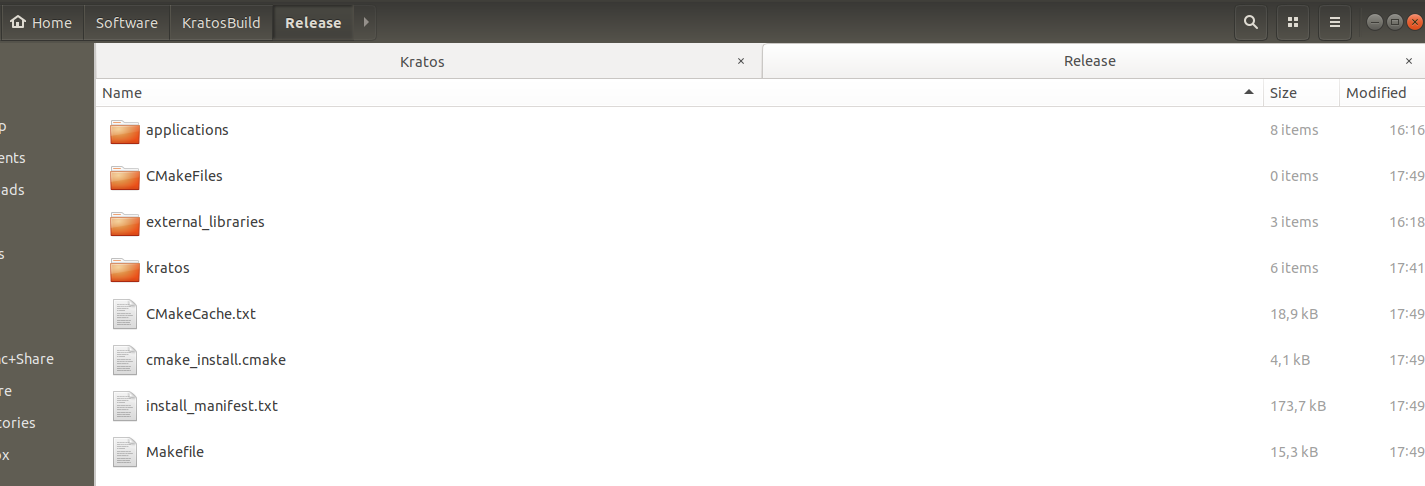
Whereas the bin folder appears where my Kratos repository is locally stored:
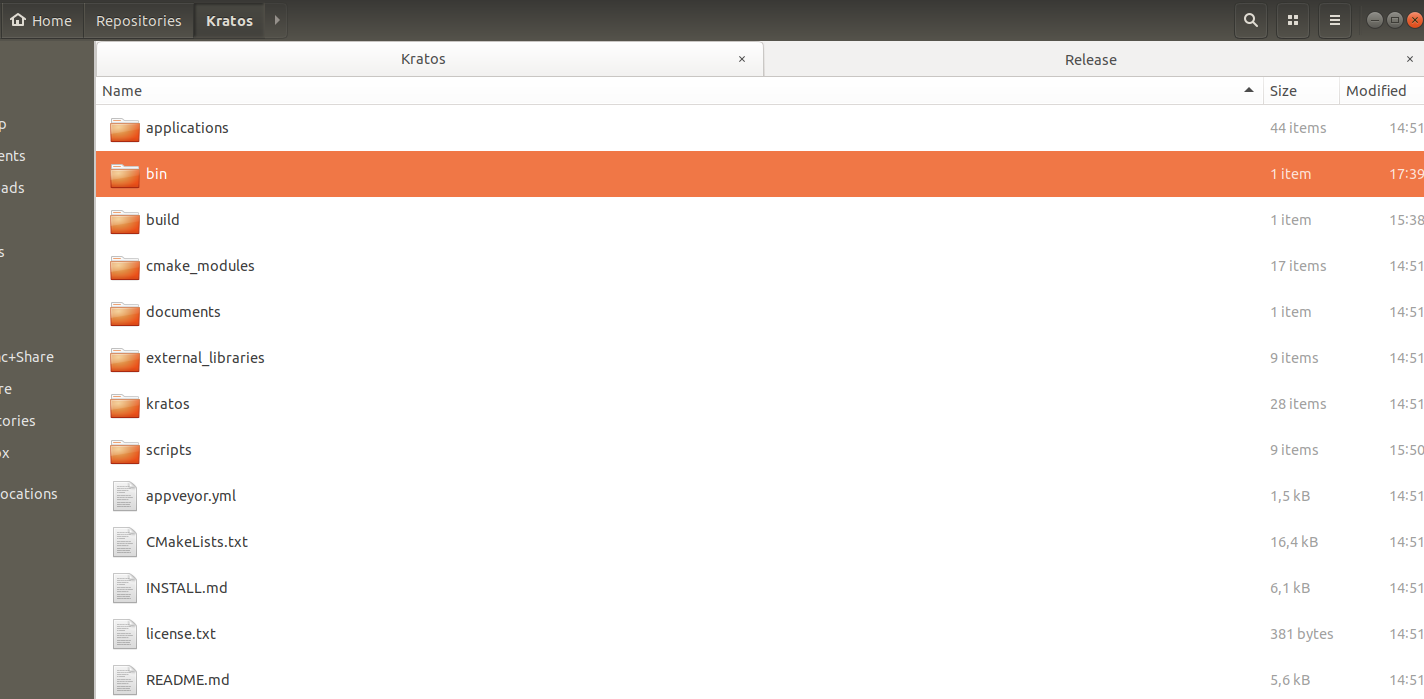
Should this be the case? Shouldn't the bin folder be in KratosBuild?
 mpentek
on 9 Dec 2019
mpentek
on 9 Dec 2019
Hi @mpentek
The KRATOS_SOURCE_DIR and KRATOS_BINARY_DIR notes are normal, but maybe a little bit misleading. I will look into that.
KRATOS_SOURCE_DIR is the internal variable we use to track the source of kratos, same thing with KRATOS_BINARY_DIR.
The source directory is passed to cmake by commandline here:
cmake -H"${KRATOS_SOURCE}" -B"${KRATOS_BUILD}/${KRATOS_BUILD_TYPE}" -DUSE_MPI=OFF
The -H marks the "home" directory for cmake, you may also have seen this as -S, its the same.
The -B controls de build directory (build folder).
Edit: Setting the -H sets the value of CMAKE_SOURCE_DIR which is the default one if KRATOS_SOURCE_DIR is not used.
The bin folder is the folder in which the result of the compilation is copied, and its default location is indeed in the kratos source folder (should be already added in the -gitignore list).
We u used to change that using the -DKRATOS_INSTALL_PREFIX option, but we have adopted the standad for cmake and is now called -DCMAKE_INSTALL_PREFIX. If you want the bin folder to be inside the build one, it can be done by setting the paths properly (-DCMAKE_INSTALL_PREFIX=${KRATOS_BUILD}/bin/${KRATOS_BUILD_TYPE} for example) , but I would advise against it
roigcarlo
on 9 Dec 2019
I like the new script, however i have a few points here.
- Why was such an important change that affects everybody's daily work merged so quickly while other much less important things are discussed for months?
- Is there a related MR? Can it please be linked to this thread?
- The WIKI page on how to build Kratos is not up to date anymore.
- In the Install.MD a section on how to actually use these scripts: (where to copy, how to run, what other setup for paths etc.) is missing. Edit: I just see that at the top of this thread it is explained how to set up the paths, nevertheless it would be good if this information was also in the Install.md file.
 armingeiser
on 10 Dec 2019
armingeiser
on 10 Dec 2019
Hi @armingeiser
It has been discussed for quite some time now, mainly in (#5825 MR, #5145, #5170, #5101, #2904). The ultimate goal with this is to be able to able to install kratos by:
python -m pip install kratos
Which requires among other thinks the changes in the python modules, to make applications truly independent from the core, and following some compilation standards that we were not enforcing. I can point you to the corresponding discussions for this as well if you are interested.
About the doc, we are working on having it updated as soon as possible, and it will be ready before the 7.1 release. I take note of the Install.MD suggestions
roigcarlo
on 10 Dec 2019
@roigcarlo Thanks for the explanation and the related MRs. #5825 is the one with the major changes of the installation process and it was discussed by 3 people only, thats what i meant.
I am really looking forward to the pip installation of Kratos! So thanks for the effort.
See the criticism as a first feedback on how the installation doc can be improved (and made foolproof). These where the main points me and my students struggled with.
armingeiser
on 10 Dec 2019
Dear @armingeiser we have been discussing this at lenght this PR in the @KratosMultiphysics/technical-committee (during several months, and multiple meetings).
we found no way to proceed towards being more pythonic other than the one we adopter here.
please believe if i tell that we did a considerable effort to minimize the disruption we caused with this. We also tried to communicate this in due time ...sorry if not enough
RiccardoRossi
on 10 Dec 2019
Hi @KratosMultiphysics/technical-committee . Is there any plan to update the installation pages soon or is it getting done already by someone?
https://github.com/KratosMultiphysics/Kratos/wiki/Linux-Build
https://github.com/KratosMultiphysics/Kratos/wiki/Windows-Install
There are some people having trouble installing Kratos due to outdated pages.
maceligueta
on 17 Dec 2019
Yep, is planned, anyway those pages should be no longer listed :S
roigcarlo
on 17 Dec 2019
For the MinGW is updated (I did it myself)
loumalouomega
on 17 Dec 2019
I think it would be a good opportunity to finally move the descriptions inside the repo (INSTALL.md) such that we have them in the history
see #2115 and #2764
philbucher
on 17 Dec 2019
I think it would be a good opportunity to finally move the descriptions inside the repo (
INSTALL.md) such that we have them in the history
see #2115 and #2764
The wiki is also a git repository, technically it also has a history
loumalouomega
on 17 Dec 2019
Related to this, I am preparing a PR for documentation. It basically is a configuration file for Sphinx, plus a proposal of a Table o Contents. We need a place where to have the information organized, which is not possible in the Wiki without building a TOC. Having that, will also allow us to export the documentation to readthedocs.org.
 marandra
on 17 Dec 2019
marandra
on 17 Dec 2019
yes, but esp when trying to compile an older version it is very tricky to find the matching version
also then you have it local so it won't be a problem when working without Inet
I think it is quite standard to have the install instructions with the code (thinking e.g. abt metis)
philbucher
on 17 Dec 2019
Agree with @philbucher , since we have to essentially rewrote all the install instructions, maybe it is worth to move from the wiki and put them into the install.md file (notice that basic info is already there so I plan on adding examples mostly)
roigcarlo
on 17 Dec 2019
Just tried the new compilation procedure (see the attached configure script).
Unless I made a mistake, it seems that CMAKE_INSTALL_PREFIX is still not supported, is it ?
 thelfer
on 17 Dec 2019
thelfer
on 17 Dec 2019
@thelfer I think you are missing a \ after the -DMGIS_LIBRARY="${MGISHOME}/lib/libMFrontGenericInterface.so" line
Also the KRATOS_INSTALL_PREFIX is not set, I suppose you wanted to use KRATOS_PREFIX or directly /home/th202608/codes/kratos/master/install
roigcarlo
on 17 Dec 2019
Dear All, @maceligueta and me have discovered the way of installñing python with links (no need to build in order to detect/copy the changes), only ghave to add:
set KRATOS_INSTALL_PYTHON_USING_LINKS=ON
in the configure.bat :)
Regards
 AlejandroCornejo
on 17 Dec 2019
AlejandroCornejo
on 17 Dec 2019
With a note, use the VS native x64 with admin credentials!!!!
AlejandroCornejo
on 17 Dec 2019
That's dangerous
loumalouomega
on 17 Dec 2019
@thelfer I think you are missing a
\after the-DMGIS_LIBRARY="${MGISHOME}/lib/libMFrontGenericInterface.so"lineAlso the
KRATOS_INSTALL_PREFIXis not set, I suppose you wanted to useKRATOS_PREFIXor directly/home/th202608/codes/kratos/master/install
Argh !!!!!!!! Sorry for this dumb mistake !
thelfer
on 17 Dec 2019
CLosing this. If someone has any problem please make a separate issue.
roigcarlo
on 22 Jan 2020
Related issues
 KlausBSautter
·
6Comments
KlausBSautter
·
6Comments
 qaumann
·
6Comments
qaumann
·
6Comments
 marcnunezc
·
5Comments
marcnunezc
·
5Comments
 e-dub
·
3Comments
e-dub
·
3Comments
 Vahid-Galavi
·
4Comments
Vahid-Galavi
·
4Comments
Most helpful comment
I solved the problem. It was a problem with the lapack and blas libraries in trilinos. If it is of interest I will try to summarize the problems and post it here.