Komga: [Feature Request] Ability to browse libraries of other komga servers from your own WebUI
We found that it is a bit inconvenient to have to open the WebUIs of each specific Komga server from the HOST's IP every time. It would to be more convenient to allow (as on plex, emby and kodi) the possibility to choose which server to connect (and authenticate) in order to browse the libraries.
Example:
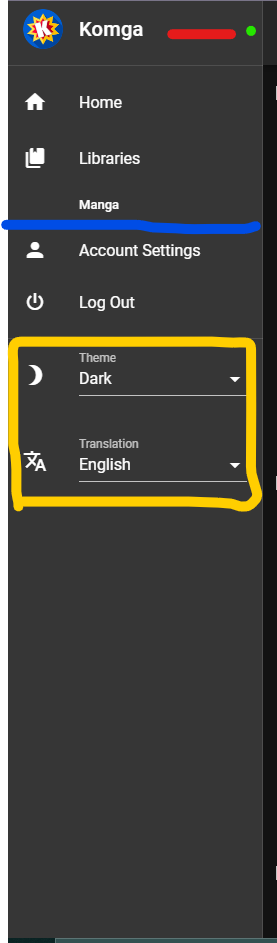
Where the red line is added the name that has been given to the server (if it has not been customized then the name of the pc will be used);
The green dot is the down arrow icon (usually it is used to make it clear that if you press on the entire box that takes Komga + name of the server currently connected);
At that point the home and libraries will display those of the selected server;
Where there is the blue line (Account Settings and Log Out) a separator is added (like the one between komga and home), since they are global settings;
The yellow box hides in a gear-shaped icon (thus making the layout more appreciable and less geeky);
The simplest solution for now is:
Function: add friend server; when clicked, it will ask for server IP and port used. Once added the interface will add the new one as a selectable server together with yours (during the addition it will be verified that there is actually a komga server on that ip and port, in addition at that moment the server name will also be exchanged).
After that, just use email and pw for that server. In addition, to avoid having to log in every time you change servers, you add a cookie / token or any system that allows you to be already authenticated after the first time you enter / add that server.
It may seem like a trivial request ... but if you have 4 people who host a komga server, it is not so convenient to change ip from the browser (even putting in the main favorites bar, the fact remains that you "reset" the page).
PLEX ex:

My server;
2 Server of my friends;
Official plex server;
 zFerry98
All 2 comments
I would say the use case for this would be rather small for the amount of work required to implement such a feature.
One of the main reasons it works so well with Plex is because it uses a centralised server (Run by Plex themselves) for handling authentication. To get something similiar is no small feat. There would be quite a few security and support hurdles to jump as well.
Your best bet is to use bookmarks in your browser, a start up page using something like Hiemdell or Organizr (the later I believe should let you wrap sites in an iframe giving easier access to other servers)
 Kussie
on 1 Mar 2021
Kussie
on 1 Mar 2021
There is also the concern of authorizing web requests from browser from other domains (aka CORS), which is PITA.
 gotson
on 1 Mar 2021
gotson
on 1 Mar 2021
Related issues
 vegedb
·
9Comments
vegedb
·
9Comments
 MEGAMENE
·
8Comments
MEGAMENE
·
8Comments
 muchtea
·
7Comments
muchtea
·
7Comments
 whalehub
·
3Comments
whalehub
·
3Comments
 Krylanc3lo
·
7Comments
Krylanc3lo
·
7Comments