Komga: [Bug] Scroll Bar always on via CSS in web interface, even when not needed
Komga environment
- OS: Windows 10
- Komga version:
- [x] I am running Komga from the
jar
- Java version:
- [x] I have a problem in the web interface
- Browser (with version): Chrome, firefox, edge, all newest stable versions
Describe the bug
The scroll bar never goes away on my windows tablet - even when it's unnecessary.
Steps to reproduce
- Go to web interface in a browser at a resolution large enough to see the entire page.
- Notice scrollbar greyed out on right.
I've found it kind of distracting trying to read on a Windows 10 tablet - obviously not world-ending, but it was enough of a nuisance always seeing the little bar instead of a full-screen comic that I took the time to get rid of it.
It's easily fixable, and I've even made a tampermonkey script to deal with it in the meantime. The problem (if this is in fact a bug and not a feature), is that the overflow-y: scroll is set, which means it will always appear, even if a page can't scroll. Change that to "auto" and the scrollbar goes away when it isn't needed and still pops up when it's needed.
 cityeyes
All 11 comments
It's a Windows problem, it doesn't happen on other OSes.
 gotson
on 19 Feb 2021
gotson
on 19 Feb 2021
Also, screenshots would help to make it clear what you are talking about :)
gotson
on 19 Feb 2021
It's easily fixable, and I've even made a tampermonkey script to deal with it in the meantime. The problem (if this is in fact a bug and not a feature), is that the overflow-y: scroll is set in the CSS, which means it will always appear, even if a page can't scroll. Change that to "auto" and the scrollbar goes away when it isn't needed and still pops up when it's needed.
If you can send a PR i will have a look, i do not have access to any Windows device to fix this.
gotson
on 19 Feb 2021
It's hard to illustrate remotely, and I'm away from my computer so I had to remote into it, but this is what I mean.
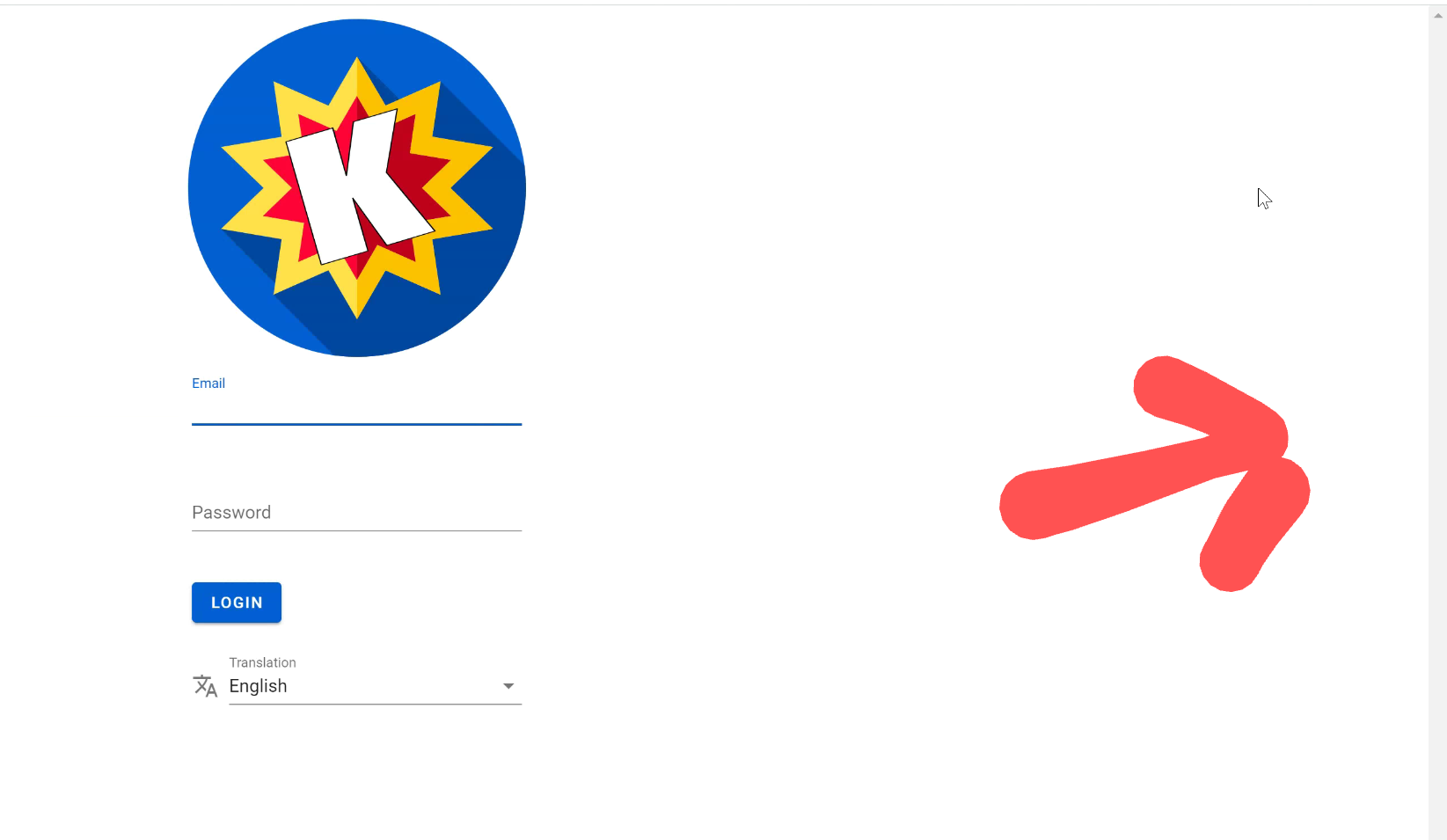
The basic issue is that the scrollbar on the Y axis, along the right side of the screen (denoted with the badly-drawn arrow), is always present, even when the screen can't be scrolled. The behavior is present on both desktops I tested, but not my phone.
It's not the worst thing in the world, just a bit distracting when a comic fills the whole screen and the scrollbar is over the right side of it.
I haven't messed with Github in ages and honestly just did a bunch of googling until I figured out enough about the overflow property to fix the issue, but I'll give it a shot.
The "fix" I found involved looking in the developer panel in Chrome to find:
overflow-y: scroll
And changing it to this:
overflow-y: auto
Since the "scroll" option results in an always-present scrollbar, and auto makes it go away when it isn't needed.
The tampermonkey script just overrides that line.
Would it be as easy as adding :
{
overflow-y: auto;
}
to the global CSS file?
I'm sorry, I don't have a great grasp on what I'm doing because I don't have a ton of experience with this stuff.
I'll take a look at it tomorrow and see if I can figure it out!
cityeyes
on 19 Feb 2021
Okay, I looked at the project and I have pretty much no idea what I'm doing. I THINK that editing the global CSS file would fix it, but there has to be something underlying that's changing the behavior in the first place and I don't know the first thing about tracking it down. I don't want any changes that I make to be bandages, or to make it worse for someone else, so let me know if you have any ideas.
I was also able to get a screenshot of the issue on my desktop in vertical. You can see what it looks like here:
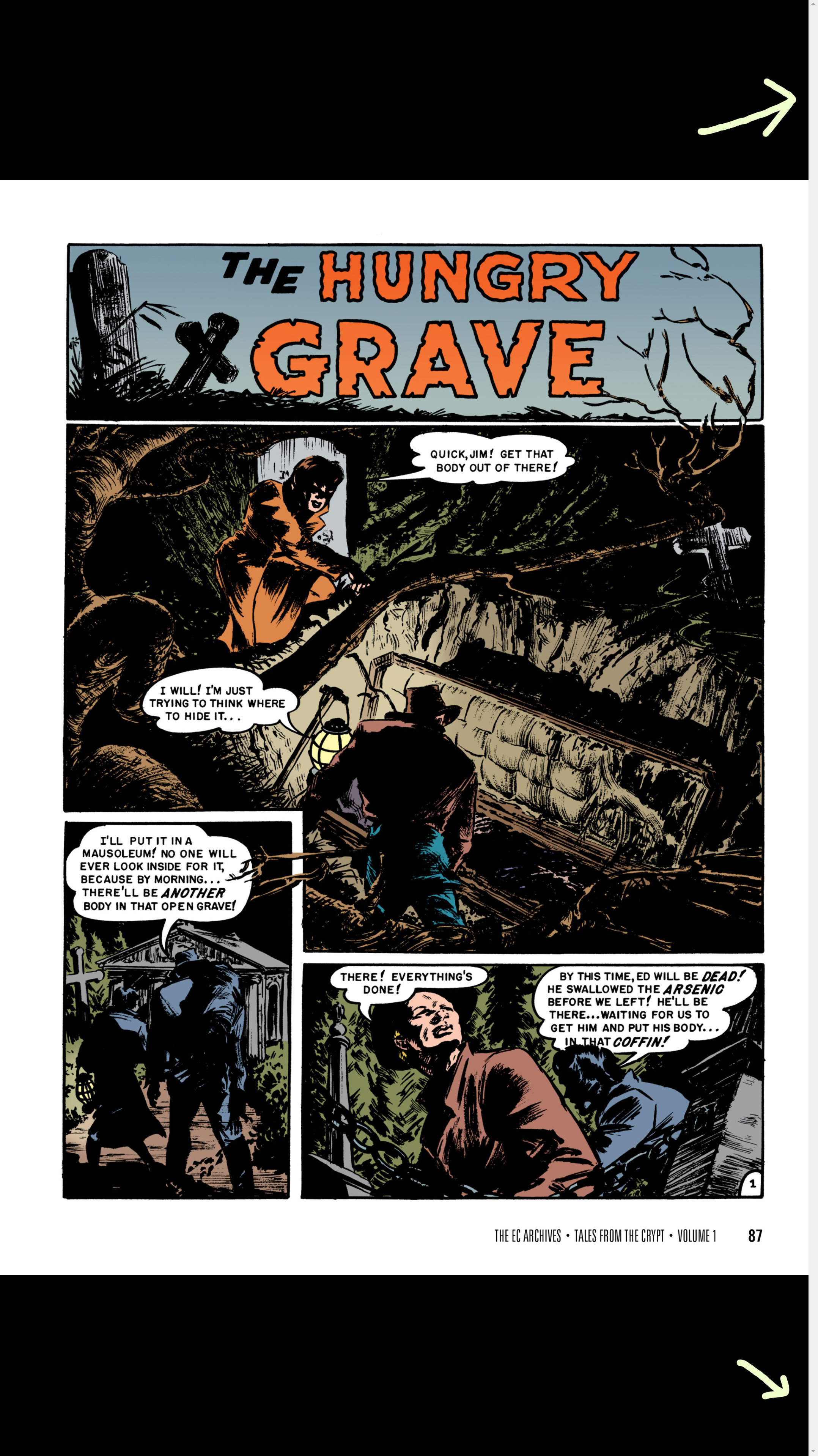
As you can see, the comic has "fit to page", but the scrollbar is still there even though it's useless in that situation. Not the end of the world, but distracting.
cityeyes
on 19 Feb 2021
Found it, I think. In tabbed-dialog.sass, there are two references to overflow-y: scroll, I THINK we can change those to either "auto" or "hidden" and it should get rid of that scrollbar. I'll try to make a PR, but I've only done a few things on Github in the past.
cityeyes
on 20 Feb 2021
That class should only be used when showing dialogs, so probably not the right culprit, but we never know!
gotson
on 20 Feb 2021
Ah, my mistake. I just made a guess since it was the only file in the repository that I could find that contained overflow-y:scroll.
Checking the developer console, it seems that the culprit resides in the file "chunk-vendors.20cf6f20.css". I'm not sure where that file inherits the scroll properties from, but it's the one present on pretty much every page to begin with, and the one the tampermonkey script has to override to "fix".
Sorry I can't be of more help, I'm not very familiar with CSS, or any of this, really.
cityeyes
on 20 Feb 2021
This is the expected behavior of the Vuetify package that normalizes the display. However this particular behaviour is hotly debated ( See here ) but i agree it would be nice to have it only show when needed as that is what users have come to expect these days.
I have created a PR ( https://github.com/gotson/komga/pull/421 ) that solves this issue, if @gotson agrees.
 Kussie
on 24 Feb 2021
Kussie
on 24 Feb 2021
I guess I was on the right track asking if adding overflow-y: auto; to the global CSS file would solve it, although I had no idea why. I really appreciate your work on it, thank you!
cityeyes
on 24 Feb 2021
:tada: This issue has been resolved in version 0.73.0 :tada:
The release is available on:
v0.73.0- GitHub release
Your semantic-release bot :package::rocket:
![github-actions[bot] picture](https://avatars.githubusercontent.com/in/15368?v=4&s=40) github-actions[bot]
on 24 Feb 2021
github-actions[bot]
on 24 Feb 2021
Related issues
 dankles
·
4Comments
dankles
·
4Comments
 MEGAMENE
·
8Comments
gotson
·
7Comments
MEGAMENE
·
8Comments
gotson
·
7Comments
 Arno500
·
6Comments
Arno500
·
6Comments
 whalehub
·
7Comments
whalehub
·
7Comments