Komga: Request: Don't separate subfolders into their own series
The typical library folder structure looks like this:
- Manga
-- Naruto
--- Volume 1
--- Volume 2
--- Volume 3
...
-- One Piece
--- Volume 1
--- Volume 2
--- Volume 3
...
Komga displays each folder in a library as its own series just like Ubooquity. So far so good.

The problem is that Komga does not honor the folder structure of folders that have one or multiple subfolders. For example, the manga Kaiji has several parts which are separated into different subfolders like this:
- Manga
-- Kaiji
--- 01. Part 1
---- Volume 1
---- Volume 2
---- Volume 3
...
--- 02. Part 2
---- Volume 1
---- Volume 2
---- Volume 3
...
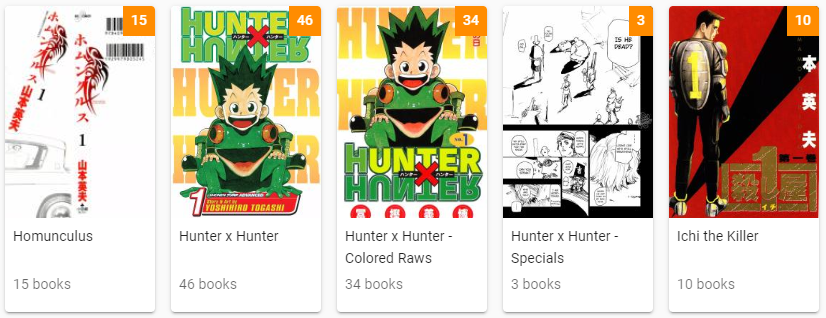
Instead of displaying Kaiji as one series with one folder icon and showing you the five subfolders when you click on the icon the way Ubooquity does it, each subfolder is displayed as if it were its own series in the library overview:

This leads to a messy overview, especially if you have multiple series with subfolders:

 whalehub
All 7 comments
You can prefix the intermediate folder with the name of the series, for example replace 01. Part 1 with Kaiji - Part 1.
This is a design choice, the hierarchical structure of a file system is not adapted to represent the multiple dimensions of the various metadata books can have. Every people will want to have their folders in a different way, so it will never work for everyone.
Regarding your particular manga, it could be considered as different series from what i gather from Wikipedia, as they don't even have the same title.
Then you may wonder how to visualize those 6 different series together, since they are part of the same "universe". That's where Collections could help (see #30).
 gotson
on 2 Jan 2020
gotson
on 2 Jan 2020
@gotson Thanks, that solution works for me.
whalehub
on 2 Jan 2020
Hi, I'm struggling with this, is there documentation on how this works? I can't even replicate the solution pointed to above:

Leads to:
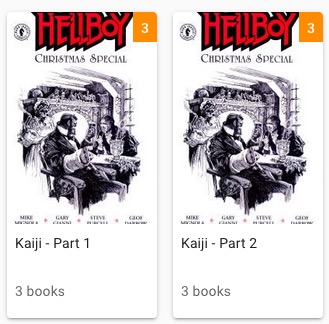
Shouldn't it just become one series called Kaiji?
 jfml
on 7 Jan 2020
jfml
on 7 Jan 2020
Shouldn't it just become one series called
Kaiji?
No. Each folder is a series. If you want to have books in the same series, but them in the same folder.
Documentation here: https://github.com/gotson/komga#what-does-it-do
gotson
on 8 Jan 2020
Ok.
So just to clarify in case someone else is as slow on the update as me:
Every folder with a cbr/cbz/zip inside it will be made a Series no matter where in your folder-structure it is buried (or if there are other subfolders with more files inside it (which in turn will again be made a Series)).
Folder with one ore more files inside it = Series.
Coolio.
jfml
on 8 Jan 2020
@whalehub I just added Sort Title for series, so now you can use that to see series grouped together, even if the title is very different, without changing your folder names. It's available in the series edit dialog.
gotson
on 31 Jan 2020
@gotson Thanks!
whalehub
on 5 Feb 2020
Related issues
gotson
·
10Comments
 muchtea
·
6Comments
muchtea
·
6Comments
 vegedb
·
9Comments
vegedb
·
9Comments
 tahngarth
·
8Comments
tahngarth
·
8Comments
 dankles
·
4Comments
dankles
·
4Comments
Most helpful comment
Ok.
So just to clarify in case someone else is as slow on the update as me:
Every folder with a cbr/cbz/zip inside it will be made a
Seriesno matter where in your folder-structure it is buried (or if there are other subfolders with more files inside it (which in turn will again be made aSeries)).Folder with one ore more files inside it =
Series.Coolio.