Kolibri: "In progress" (clock) icon should not be shown on the `ContentPage` when viewing content as guest
Observed behavior
E.g. on https://kolibri-training.learningequality.org/en/learn/#/topics/c/9599f581993e43838f19fe04fdf01af9
(Do not log in, but click the "Explore as guest" link on the Sign In page. Then go to the link again.)
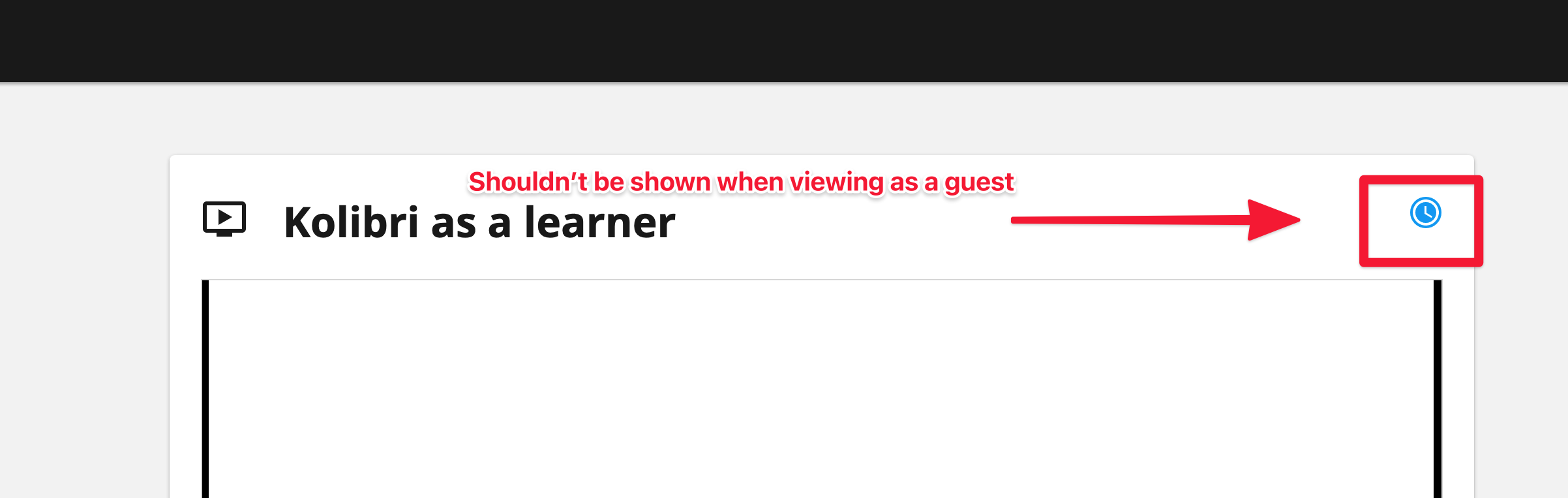
You will see the blue clock icon on the right corner, which is used to indicate that a resource is "in progress" (i.e. started but not finished by the user)
Expected behavior
This clock icon should not be shown to users who are not logged in and only viewing content as a guest
Steps to reproduce
- Use Kolibri as a guest
- Go to some resource
- See the clock icon
Context
Kolibri 0.14.5
 jonboiser
All 13 comments
Hello there!
I found that sessionProgress is returned when the user is not logged in. What are the differences between sessionProgress and summaryProgress here? If no progress will be displayed to the user as guest, do we need to return this sessionProgress?
https://github.com/learningequality/kolibri/blob/3abc1b22c7d58a7ed45be80fb493c407fb0ef745/kolibri/plugins/learn/assets/src/views/ContentPage.vue#L241-L249
 alvinhsu-gal220
on 5 Jan 2021
alvinhsu-gal220
on 5 Jan 2021
Hi @alvinhsu-gal220, sessionProgress indicates the progress within this specific session - so in the case of an anonymous user browsing content, we never save a summary of their progress (summaryProgess) so to show their progress through the content they are on right now, we use the sessionProgress instead. This will be non-zero if the user has accrued some progress through the content item while being on the content page and not navigating away.
 rtibbles
on 5 Jan 2021
rtibbles
on 5 Jan 2021
we use the sessionProgress instead. This will be non-zero if the user has accrued some progress through the content item while being on the content page and not navigating away.
Ah, that is why the ProgressIcon show up on this page. However, I think my problem is that the progress is not shown on the content card when navigating the topic:
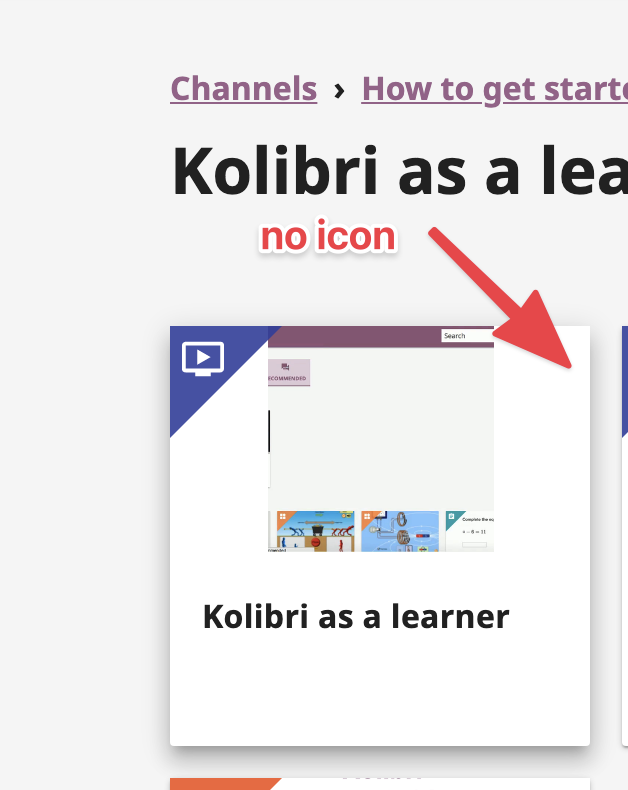
And so I think it is preferable not to show it in guest mode.
In this case, the solution might be to change how the progress computed property works and always return a falsy value if the user is not logged in.
jonboiser
on 5 Jan 2021
I see, thank you!
In this case, the solution might be to change how the progress computed property works and always return a falsy value if the user is not logged in.
So does that mean for this issue, progress will not be displayed regardless the guest user has accrued progress or not? Or would it be the scenario where
- If the guest user just browses the resource without accruing progress, do not display the "In progress" icon.
- If the guest user starts accruing progress, display the "In progress" icon just like the case for logged-in user.
alvinhsu-gal220
on 6 Jan 2021
In this case, the solution might be to change how the progress computed property works and always return a falsy value if the user is not logged in.
@jonboiser the only question would be whether we are using the progress computed prop for anything else in the page which we might still want to indicate to the user (say prompting them to go to the next content item when they have completed the content).
We use the progress computed prop in two places, one for displaying the header info, the other for registering the Mastery snackbar: https://github.com/learningequality/kolibri/blob/3abc1b22c7d58a7ed45be80fb493c407fb0ef745/kolibri/plugins/learn/assets/src/views/ContentPage.vue#L133
I think we should keep the progress prop as is, and just add a logged in check to the value we pass to the page header.
Would be:
:progress="userIsLoggedIn && progress"
Thoughts?
rtibbles
on 6 Jan 2021
@alvinhsu-gal220
So does that mean for this issue, progress will not be displayed regardless the guest user has accrued progress or not?
Yes, this is what I what. To me, the in-progress icon is something only logged-in users should see, especially since we do not show the progress icon or progress bars in other parts of the app if you are a guest.
I think Richard's solution above to replace Line 7 with
- :progress="progress"
+ :progress="userIsLoggedIn && progress"
Might achieve what I'm looking for, because it removes the in-progress icon while not affecting the mastery snackbar that appears after you finish a resource.
jonboiser
on 6 Jan 2021
I tried the discussed change above, and I found something interesting - I think it should be I'm not familiar with Kolibri and Vue.js both - but this is what happened:
I tried
:progress="isUserLoggedIn && progress"
And this does not prevent user to see the icon in guest mode.
However, when I tried
:progress="currentUserId && progress"
then it seems to work as we discussed before. It seems to me using isUserLoggedIn will always evaluate the result to true.
I'm not sure if using currentUserId here is a good solution - what do you think?
alvinhsu-gal220
on 11 Jan 2021
I'm not sure if using currentUserId here is a good solution - what do you think?
I think you might have found a bug in isUserLoggedIn. It must be returning a true or truthy value even when nobody is logged in.
Here is the implementation of isUserLoggedIn
It's possible that the state.kind array is missing the anonymous item somehow.
jonboiser
on 11 Jan 2021
Here's what I have found after digging in a little more - sorry for the confusion I caused for bringing up partial solution previously.
Regarding
:progress=isUserLoggedIn && progress, even if I letisUserLoggedInevaluate to false the in-progress icon still shows up in guest mode. So I turned my attention tosessionProgressin
https://github.com/learningequality/kolibri/blob/3abc1b22c7d58a7ed45be80fb493c407fb0ef745/kolibri/plugins/learn/assets/src/views/ContentPage.vue#L241-L249I found that in
https://github.com/learningequality/kolibri/blob/210aa3e0cb5e292552260d8b5d5756008090ac4e/kolibri/core/assets/src/views/ProgressIcon.vue#L60-L62
when I changed this.progress >= 0 to this.progress > 0, that seems to do the trick.
The in-progress icon for the card seems to have similar logic:
https://github.com/learningequality/kolibri/blob/210aa3e0cb5e292552260d8b5d5756008090ac4e/kolibri/plugins/learn/assets/src/views/ContentCard/CardThumbnail.vue#L112-L114
However, this also change the behavior for signed-in user when a resource is first clicked on. Before this change when a signed-in user views a resource for the first time, the in-progress icon will be display already. Now the in-progress icon will be displayed after second visit.
I hope this time this is the right place to look for a fix - what are your thoughts?
alvinhsu-gal220
on 13 Jan 2021
Yeah, that change from >= 0 to > 0 in ProgressIcon seems like the right change, especially to be consistent with the logic in CardThumbnail.
Before this change when a signed-in user views a resource for the first time, the in-progress icon will be display already. Now the in-progress icon will be displayed after second visit.
Even after your change, will the clock appear when you are signed-in and you watch a video for a little bit? Or do you need to leave the video and come back before you see it? (The clock _should_ appear after the progress is updated while watching the video)
jonboiser
on 14 Jan 2021
@jonboiser
Even after your change, will the clock appear when you are signed-in and you watch a video for a little bit? Or do you need to leave the video and come back before you see it? (The clock should appear after the progress is updated while watching the video)
Yes, it does appear after a few seconds when watching a video resource.
For guest user, this is also true. However, navigating away from the resource page and coming back the icon will disappear again. I suppose this is an acceptable behavior since I recall earlier in the discussion
we use the sessionProgress instead. This will be non-zero if the user has accrued some progress through the content item while being on the content page and not navigating away.
Is this assumption correct?
alvinhsu-gal220
on 14 Jan 2021
For guest user, this is also true. However, navigating away from the resource page and coming back the icon will disappear again. I suppose this is an acceptable behavior since I recall earlier in the discussion
No, I basically don't want the clock icon to show on the resource page _at all_ when logged in as a guest.
It's possible you might need something a little more complicated on the PageHeader progress prop, like
:progress=isUserLoggedIn ? null : progress
This is to make sure that progress === null at this line.
jonboiser
on 14 Jan 2021
I confirm the issue is no longer experienced with Kolibri version 0.14.6rc1. Tested with Windows 7 vm, on Chrome, Firefox and IE.
The In-progress clock is not visible in guest user mode.
 metodimilevqa
on 20 Jan 2021
metodimilevqa
on 20 Jan 2021
Related issues
jonboiser
·
5Comments
 mrpau-julius
·
4Comments
mrpau-julius
·
4Comments
 jtamiace
·
5Comments
jtamiace
·
5Comments
 ivanistheone
·
3Comments
ivanistheone
·
3Comments
 indirectlylit
·
4Comments
indirectlylit
·
4Comments